


惯性聚合 高效追踪和阅读你感兴趣的博客、新闻、科技资讯
阅读原文 在惯性聚合中打开

推荐订阅源

WordPress大学
WordPress大学
Stack Overflow Blog
Stack Overflow Blog
Latest news
Latest news
T
The Blog of Author Tim Ferriss
D
DataBreaches.Net
C
Check Point Blog
钛媒体:引领未来商业与生活新知
钛媒体:引领未来商业与生活新知
Security Latest
Security Latest
宝玉的分享
宝玉的分享
S
Schneier on Security
Blog — PlanetScale
Blog — PlanetScale
OSCHINA 社区最新新闻
OSCHINA 社区最新新闻
Cisco Talos Blog
Cisco Talos Blog
MyScale Blog
MyScale Blog
B
Blog RSS Feed
N
Netflix TechBlog - Medium
P
Privacy & Cybersecurity Law Blog
L
LINUX DO - 热门话题
Apple Machine Learning Research
T
Tenable Blog
Threat Intelligence Blog | Flashpoint
NISL@THU
NISL@THU
Google DeepMind News
Hacker News: Ask HN
Hacker News: Ask HN
Schneier on Security
博客园 - Franky
cs.CV updates on arXiv.org
S
Secure Thoughts
T
Threat Research - Cisco Blogs
D
Docker
Exploit-DB.com RSS Feed
人人都是产品经理
人人都是产品经理
G
GRAHAM CLULEY
Application and Cybersecurity Blog
博客园 - 【当耐特】
PCI Perspectives
PCI Perspectives
GbyAI
GbyAI
酷 壳 – CoolShell
酷 壳 – CoolShell
Cyberwarzone
Cyberwarzone
V
Vulnerabilities – Threatpost
F
Fortinet All Blogs
罗磊的独立博客
Engineering at Meta
Engineering at Meta
Y
Y Combinator Blog
SecWiki News
SecWiki News
A
Arctic Wolf
小众软件
小众软件
T
Troy Hunt's Blog
博客园 - 三生石上(FineUI控件)
Know Your Adversary
Know Your Adversary

Deno

Deno 2.8 | Deno Claw Patrol: an open-source security firewall for agents | Deno Fresh 2.3: Zero JS by default, View Transitions, and Temporal support | Deno Deno 2.7: Temporal API, Windows ARM, and npm overrides | Deno Build a dinosaur runner game with Deno, pt. 6 | Deno Build a dinosaur runner game with Deno, pt. 5 | Deno Deno Deploy is Generally Available | Deno Introducing Deno Sandbox | Deno Build a dinosaur runner game with Deno, pt. 4 | Deno Build a dinosaur runner game with Deno, pt. 3 | Deno Build a dinosaur runner game with Deno, pt. 2 | Deno React / Next.js Denial-of-Service Vulnerability: Deno Deploy users protected | Deno Deno 2.6: dx is the new npx | Deno Build a dinosaur runner game with Deno, pt. 1 | Deno React Server Functions / Next.js Vulnerability: Deno Deploy users protected | Deno My highlights from the new Deno Deploy | Deno Deno's Other Open Source Projects | Deno How Deno protects against npm exploits | Deno Help Us Raise $200k to Free JavaScript from Oracle | Deno Deno 2.5: Permissions in the config file | Deno Fresh 2.0 Graduates to Beta, Adds Vite Support | Deno Deno 2.4: deno bundle is back | Deno JavaScript™ Trademark Update | Deno What's coming to JavaScript | Deno A brief history of JavaScript | Deno Reports of Deno's Demise Have Been Greatly Exaggerated | Deno An Update on Fresh | Deno How Plaid migrated 100 services to a new database platform 5x faster with Deno | Deno Deno 2.3: Improved deno compile, local npm packages, and more | Deno Add JSR packages with pnpm and Yarn | Deno Zero-config Debugging with Deno and OpenTelemetry | Deno Exploring Art with TypeScript, Jupyter, Polars, and Observable Plot | Deno Deno v Oracle Update 3: Fighting the JavaScript Trademark | Deno Build a custom RAG AI agent in TypeScript and Jupyter | Deno How to get deep traces in your Node.js backend with OTel and Deno | Deno toranoana.deno #20 登録受付中(2025年3月14日) | Deno Node just added TypeScript support. What does that mean for Deno? | Deno The Dino 🦕, the Llama 🦙, and the Whale 🐋 | Deno Publish a lint rule, get a prize | Deno Deno 2.2: OpenTelemetry, Lint Plugins, node:sqlite | Deno If you're not using npm specifiers, you're doing it wrong | Deno How Deno's documentation is evolving | Deno Oracle justified its JavaScript trademark with Node.js—now it wants that ignored | Deno Introducing the JSR open governance board | Deno Intro to Wasm in Deno | Deno Announcing OpenAI on JSR | Deno Deno in 2024 | Deno Goodbye WinterCG, welcome WinterTC | Deno Build a SolidJS app with Deno | Deno Run your Next.js SSR app on Deno Deploy | Deno Solve Advent of Code 2024 with Deno and Win Prizes! | Deno Deno v. Oracle: Canceling the JavaScript Trademark | Deno Deno 2.1: Wasm Imports and other enhancements | Deno Build a Typesafe API with tRPC and Deno | Deno Self-contained Executable Programs with Deno Compile | Deno Build a Database App with Drizzle ORM and Deno | Deno Introducing your new JavaScript package manager: Deno | Deno Announcing Growthbook on JSR | Deno Build an Astro site with Deno | Deno How to convert CommonJS to ESM | Deno Announcing Deno 2 | Deno The Final Touches: What’s New In v2.0.0-rc.10 | Deno Announcing Stable V8 Bindings for Rust | Deno Deno 2.0 Release Candidate | Deno Secure, efficient private npm registries with Cloudsmith and Deno | Deno Painting the Plane as We Fly It: Designing JSR | Deno Introducing Web Cache API support on Deno Deploy | Deno Deno 1.46: The Last 1.x Release | Deno Protect your cloud spend with new Deno Deploy spend limits | Deno What we got wrong about HTTP imports | Deno Benchmarking AWS Lambda Cold Starts Across JavaScript Runtimes | Deno Announcing Supabase on JSR | Deno Deno 1.45: Workspace and Monorepo Support | Deno Introducing KV Backup for Deno Subhosting | Deno Announcing Hono on JSR | Deno How We Made the Deno Language Server Ten Times Faster | Deno How the Guardian uses Deno to audit accessibility and performance across their 2.7 million articles | Deno Introducing More Flexible Domain Association for Deno Subhosting | Deno The stabilization process of the Standard Library has begun | Deno Deno 1.44: Private npm registries, improved Node.js compat, and performance boosts | Deno How we built a secure, performant, multi-tenant cloud platform to run untrusted code | Deno The Deno Standard Library is now available on JSR | Deno How to document your JavaScript package | Deno Your Low Code Solution Needs an Escape Hatch | Deno Deno 1.43: Improved Language Server performance | Deno How Slack used Deno to save months of engineering effort in launching their new platform | Deno JSR Is Not Another Package Manager | Deno Announcing the Hookdeck SDK on JSR | Deno Announcing the Neon Serverless Driver on JSR | Deno An intro to TSConfig for JavaScript Developers | Deno How we built JSR | Deno How Netlify used Deno Subhosting to build a successful edge functions product | Deno Introducing Simpler Project Creation in Deno Deploy | Deno Deno 1.42: Better dependency management with JSR | Deno Introducing deployctl, the command line interface for Deno Deploy | Deno Introducing JSR - the JavaScript Registry | Deno How to add Monaco to a Next.js app and securely run untrusted user code | Deno Survey Results and Roadmap | Deno Deno 1.41: smaller deno compile binaries | Deno Webhooks suck, but here are alternatives | Deno
A Gentle Intro to TypeScript | Deno
Jo Franchett · 2024-06-27 · via Deno

For many who came to programming via JavaScript it is easy to fall in love with its low barrier to entry and versatile nature. JavaScript runs in a browser, can be written in notepad, is interpreted line by line and requires no complicated compilation or tooling. JavaScript has democratized software development by allowing developers from all backgrounds to pick it up and start coding. But with Javascript’s forgiving nature, comes increased chances to make mistakes and create bugs.

Consider this JavaScript program:

function add(a, b) {
  return a + b;
}

console.log(add(1, 2)); 

This is a simple addition program that is designed to take two numbers and add them together, returning the result. Unexpected, often unpredictable things can start happening when we call this function with values that aren’t numbers.

We only really want to call this function with numbers - it doesn’t make sense otherwise - and in fact, if you pass values to it that are not numbers, you’ll end up with often bizarre and unpredictable results:

console.log(add(1, "2")); 
console.log(add(1, true)); 
console.log(add(1, "hello")); 

JavaScript is a dynamically typed language. This means that the types of data that we store in our variables can change at runtime. This can make it complicated to capture our intention in our JavaScript code - that our add function should only be called with numbers.

What we are seeing happen here is called type coercion - JavaScript automatically converts values from one data type to another. This can happen explicitly, through the use of functions and operators, or implicitly, when JavaScript expects a certain type of value in a particular context. Implicit type coercion can sometimes lead to unexpected results, especially in complex expressions. Here are a few cases:

console.log(1 + "2"); 
console.log("2" + 1); 

console.log("5" - 1); 
console.log("5" * "2"); 

console.log(0 == false); 
console.log(0 === false); 

Confusing right?!

In a JavaScript codebase, the best we can do is add some guard checks to our program that will throw errors if invalid values are provided. The problem with having only these runtime checks to protect us from errors is that we’ll often find out when a bug has been introduced into our code at the same time that our users do. So how do we protect ourselves from this often confusing JavaScript behavior?

TypeScript to the Rescue

TypeScript can help us to describe the intention of our code by being explicit about what types we expect where. TypeScript is a superset of JavaScript that adds additional type information to the language. When you compile TypeScript, JavaScript is produced that can run anywhere, so it’s really easy to incrementally use it to make your development experience better without having to rebuild all of your software.

Types allow you to catch errors in your code before it runs. If you accidentally assign a value of the wrong type to a variable, you’ll get a compile error. Types also make your code easier to read because you can explicitly state what kind of value you expect. We can also use tools to make types even more powerful. Code editors and IDEs have inbuilt tools to help autocomplete your code as you write when you’re using types correctly.

How do we add type annotations?

You add a type annotation in TypeScript by appending a colon (:) followed by the desired type after the function parameter’s name. If we were to extend our previous add example to convert it to TypeScript it would look like this:

function add(x: number, y: number) {
  return x + y;
}

console.log(add(1, 2)); 

This is the simplest change we can make to our code to make it more robust. Now the compiler knows that any code that attempts to call add() with anything but two numbers will fail at runtime, so it will throw an error upon compilation to tell you your program isn’t valid.

If we try and call add with a number and a string, for example, we’ll get a compiler error:
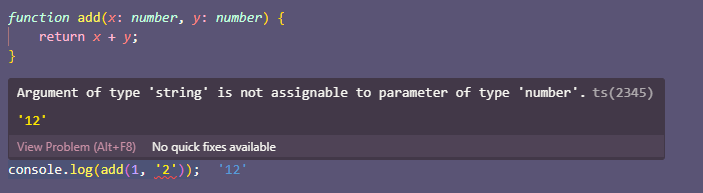
compiler error in VSCode

TypeScript is smart enough to work out some of the types in your program for you based on the information you’ve given it, we call this “type inference”. If we take the above example and expand it out, adding all the type annotations that we can, it’d look like this:

function add(x: number, y: number): number {
  return x + y;
}

const result: number = add(1, 1);
console.log(result);

Here we’ve explicitly added annotations for the function parameters, a return type of the add function, and the variable result. As a general rule, developers add “just enough” type annotations to tell the TypeScript compiler what’s going on, and let it infer the rest. In our original example, by adding type annotations to the x and y parameters, the TypeScript compiler could inspect the code and realize we only ever add two numbers, so would infer both the function return type, and the type of the variable result to be of type number.

Even if you only ever use TypeScript to annotate function parameters you’ll immediately remove an entire category of errors from your code.

Turning your TypeScript back into JavaScript

If your project is built using Node, you will need to add the typescript package and run the tsc compiler tool. We’ve written an introduction to configuring your TypeScript compiler.

Deno comes with the TypeScript compiler built right in, so if you’re using Deno, you do not need any other configuration or tools. Deno supports TypeScript out of the box, automatically turning TypeScript into JavaScript as we execute your source code.

On the client side, you can use Vite, a tool after our own heart, which does a similar transparent compilation for you, so if you’re a front end developer, you can still get TypeScript joy in your code.

Next up

In our next Deno Bite we’ll talk about common types that you’ll need in your TS code and how to use them to build more complex types to make your code clear and bug-free!

Are there any topics on TypeScript you would like us to cover? Let us know on Twitter or Discord!