





Deno continues to simplify programming with the first 2.x minor release, most
notably allowing for direct Wasm imports. 2.1
includes support for
asset files in deno compile,
stack traces in permission prompts,
improved deno task, and more. This release also
kicks off our first Long Term Support branch, and
much more.
To upgrade to Deno 2.1, run the following in your terminal:
If Deno is not yet installed, run one of the following commands to install or learn how to install it here.
curl -fsSL https://deno.land/install.sh | sh


iwr https://deno.land/install.ps1 -useb | iex
What’s New in Deno 2.1
- First-class Wasm support
- Long Term Support release
deno init --npm vite- Dependency management
- Embed asset files in
deno compile - Stack traces in permission prompts
- Turbocharged
deno task - Node.js and npm compatibility improvements
--allow-envwildcards- Formatting and linting improvements
- Display images in Jupyter notebooks
- Override version in
deno publish - LSP improvements
- Performance improvements
- Quality of life improvements
- V8 13.0
- Acknowledgments
The Deno team will also be hosting a livestream to demo and discuss 2.1 on December 3rd, 8am PT / 11am ET / 4pm UTC, as well as to answer any of your questions.
First-class Wasm support
Wasm, or WebAssembly, is a binary compilation target that allows you to write code in other languages and compile it for the browser.
While Deno has always had Wasm support, Deno v2.1 makes it significantly simpler, more ergonomic, and more performant to import Wasm modules.
Previously, you would have to load a Wasm module manually, which required
specifying --allow-read or --allow-net permissions:
const wasmInstance = WebAssembly.instantiateStreaming(fetch("./add.wasm"));
const { add } = wasmInstance;

console.log(add(1, 2));
import { add } from "./add.wasm";

console.log(add(1, 2));
Wasm modules are now part of the “module graph”, which Deno can analyze and cache for faster use.
Deno also understands exporting Wasm modules and will type check their use.
Let’s say we tried to call the add function from the previous example
incorrectly:
import { add } from "./add.wasm";

console.log(add(1, ""));
$ deno check main.ts
Check file:///main.ts
error: TS2345 [ERROR]: Argument of type 'string' is not assignable to parameter of type 'number'.
console.log(add(1, ""));
                   ~~
    at file:///main.ts:3:20
Wasm modules can also import other modules. Let’s create a Wasm module (using WebAssembly text format):
(module
  (import "./time.ts" "getTimeInSeconds" (func $get_time (result i32)))
  (func (export "getValue") (result i32)
    call $get_time
  )
)
export function getTimeInSeconds() { return Date.now() / 1000; }
import { getValue } from "./toolkit.wasm";

console.log(getValue());
Now let’s run it:
> wat2wasm toolkit.wat
> deno main.ts
1732147633

> deno main.ts
1732147637
Read more at Deno Docs to learn how you can leverage Wasm modules.
Long Term Support release
Deno gets a new minor release every six weeks and a new patch release almost every week. However, development teams in larger organizations need to carefully audit new releases before using them in production. Having such a fast paced release cadence makes it challenging for these teams to keep up with the latest Deno release.
To make it easier for these teams to use Deno, Deno v2.1 is the first LTS
release of Deno. The v2.1 branch will receive important bug fixes and
performance improvements for the next six months.
More information on LTS support can be found in the docs
deno init --npm vite
Using npm init (or npm create) is a popular way to scaffold a new project
for many frameworks based on existing templates.
Before Deno v2.1, this was a bit involved and required intricate knowledge about
how that program works. In this release, we’ve simplified this command:
deno init gets a new --npm flag to start a new project like you would using
npm, pnpm and other popular package managers:
$ deno run -A npm:create-viteWhen you run this subcommand, Deno will prompt you if you want to run the project initialization script with all permissions.
Dependency management
There are a ton of improvements to Deno’s dependency management in this release,
but the most important bit is that you can now manage JSR and npm dependency
updates with the new deno outdated subcommand:
$ deno outdated
┌────────────────┬─────────┬────────┬────────┐
│ Package        │ Current │ Update │ Latest │
├────────────────┼─────────┼────────┼────────┤
│ jsr:@std/fmt   │ 1.0.0   │ 1.0.3  │ 1.0.3  │
├────────────────┼─────────┼────────┼────────┤
│ jsr:@std/async │ 1.0.1   │ 1.0.1  │ 1.0.8  │
├────────────────┼─────────┼────────┼────────┤
│ npm:chalk      │ 4.1.2   │ 4.1.2  │ 5.3.0  │
└────────────────┴─────────┴────────┴────────┘
This command also supports flags like --update and --latest:
$ deno outdated --update --latest
Updated 3 dependencies:
 - jsr:@std/async 1.0.1 -> 1.0.8
 - jsr:@std/fmt   1.0.0 -> 1.0.3
 - npm:chalk      4.1.2 -> 5.3.0
The command deno outdated allows you to see which dependencies in your project
have newer versions available. Note this command understands both deno.json
and package.json, and modifies both these files at the same time.
By default, it respects semver ranges specified in the configuration file(s),
but you can force it to update to the latest available version (even if it might
not be semver compatible) with the --latest flag.
You can also filter packages you’d like to check:
$ deno outdated "@std/*"
┌────────────────┬─────────┬────────┬────────┐
│ Package        │ Current │ Update │ Latest │
├────────────────┼─────────┼────────┼────────┤
│ jsr:@std/fmt   │ 1.0.0   │ 1.0.3  │ 1.0.3  │
├────────────────┼─────────┼────────┼────────┤
│ jsr:@std/async │ 1.0.1   │ 1.0.1  │ 1.0.8  │
└────────────────┴─────────┴────────┴────────┘

$ deno outdated "!@std/fmt"
┌────────────────┬─────────┬────────┬────────┐
│ Package        │ Current │ Update │ Latest │
├────────────────┼─────────┼────────┼────────┤
│ jsr:@std/async │ 1.0.1   │ 1.0.1  │ 1.0.8  │
├────────────────┼─────────┼────────┼────────┤
│ npm:chalk      │ 4.1.2   │ 4.1.2  │ 5.3.0  │
└────────────────┴─────────┴────────┴────────┘
Or update to a specific version:
$ deno outdated --update chalk@5.2 @std/async@1.0.6
Updated 2 dependencies:
 - jsr:@std/async 1.0.1 -> 1.0.6
 - npm:chalk      4.1.2 -> 5.2.0
deno outdated works in workspaces too - use --recursive flag:
$ deno outdated --recursive --update --latest
Interactive updates are on the roadmap and planned for upcoming releases.
Read more about keeping your dependencies up to date or about Deno’s package management capabilities in general.
Embed assets files in deno compile
Since v1.6,
deno compile has
allowed you to compile your project into a single binary executable for any
major platform, making it easier to distribute and execute without needing to
install Deno or dependencies.
One of the most requested features for deno compile was ability to embed
arbitrary files that can be read by the compiled program. Thanks to a major
overhaul of the internal infrastructure of deno compile, this is now possible.
You can now use the --include flag to tell Deno to include additional files or
directories:
$ deno compile --include ./names.csv --include ./data/ main.ts
Then in your program you can read them the same way if you were developing locally:
import { parse } from "jsr:@std/csv/parse";
const names = Deno.readTextFile(import.meta.dirname + "/names.csv");
const csvData = parse(names);

const dataFiles = Deno.readDir(import.meta.dirname + "/data");
for (const file of dataFiles) {

}
Keep in mind that you can only include local files. Remote files are not supported.
Additionally, programs created with deno compile can now leverage
V8 code caching for faster startups.
The cache is created on first run and placed in a temporary directory, to be
used on subsequent runs.
Our benchmarks show over 2x improvement for subsequent runs, but your mileage may vary:
$ hyperfine --warmup 2 scratch.exe scratch_new.exe
Benchmark 1: scratch.exe
  Time (mean ± σ):     282.9 ms ±   6.5 ms    [User: 78.1 ms, System: 15.6 ms]
  Range (min … max):   276.5 ms … 295.2 ms    10 runs

Benchmark 2: scratch_new.exe
  Time (mean ± σ):     129.7 ms ±   6.8 ms    [User: 17.1 ms, System: 9.7 ms]
  Range (min … max):   120.9 ms … 138.4 ms    21 runs

Summary
  scratch_new.exe ran
    2.18 ± 0.13 times faster than scratch.exe
Learn more about all
the various use cases of deno compile,
including creating desktop games from JavaScript, HTML, and CSS.
Stack traces in permission prompts
Deno’s permission system is one of its most loved features. Using interactive permission prompts is a useful way to understand which permissions are needed for a program to function properly. One shortcoming of these prompts was that they only showed what permission is needed by which API, but you couldn’t see where exactly is that permission requested.
Deno v2.1 solves this shortcoming:
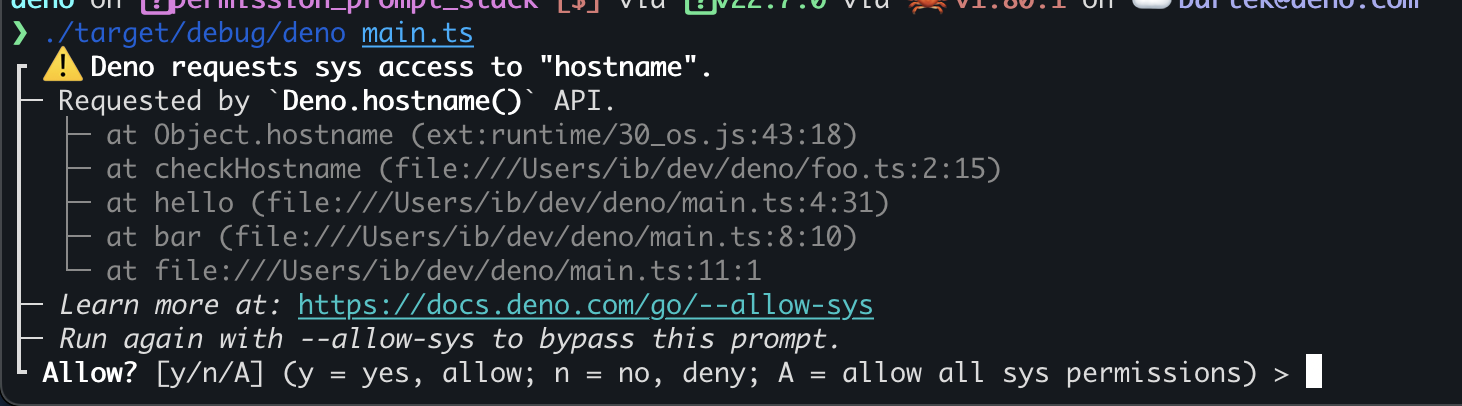
Running any program with DENO_TRACE_PERMISSIONS environmetal variable will
enable collection of stack trace when a permission is requested, allowing you to
easily pinpoint which part of the program needs a certain permission.
Keep in mind that this functionality is expensive and results in a significant performance hit — collecting a stack trace every time permissions might be requested is slow and shouldn’t be used in production.
Turbocharged deno task
This release brings major improvements to deno task.
Firstly, you can now write your tasks as objects and give them informative descriptions:
{
  "tasks": {
    "build": "deno run -RW build.ts",
    "serve": {
      "description": "Start the dev server",
      "command": "deno run -RN server.ts"
    }
  }
}
$ deno task
Available tasks:
- build
    deno run -RW build.ts
- serve
    // Start the dev server
    deno run -RN server.ts
The "description" option was added in favor of (now removed) handling of
comments in deno.jsonc files.
Task dependencies
Deno tasks can now have dependencies:
{
  "tasks": {
    "build": "deno run -RW build.ts",
    "generate": "deno run -RW generate.ts",
    "serve": {
      "command": "deno run -RN server.ts",
      "dependencies": ["build", "generate"]
    }
  }
}
In the above example, running deno task serve will first execute build and
generate tasks in parallel, and once both of them finish successfully the
serve task will be executed:
$ deno task serve
Task build deno run -RW build.ts
Task generate deno run -RW generate.ts
Generating data...
Starting the build...
Build finished
Data generated
Task serve deno run -RN server.ts
Listening on http://localhost:8000/
deno task handles cycles in dependencies and will ensure that you won’t end up
in an infinite loop:
{
  "tasks": {
    "a": {
      "command": "deno run a.js",
      "dependencies": ["b"]
    },
    "b": {
      "command": "deno run b.js",
      "dependencies": ["a"]
    }
  }
}
$ deno task a Task cycle detected: a -> b -> a
“Diamond dependencies” (where two dependencies share a common dependency) are
understood correctly and deno task will ensure that tasks that are dependent
upon by multiple other tasks are only executed once:
{
  //   a
  //  / \
  // b   c
  //  \ /
  //   d
  "tasks": {
    "a": {
      "command": "deno run a.js",
      "dependencies": ["b", "c"]
    },
    "b": {
      "command": "deno run b.js",
      "dependencies": ["d"]
    },
    "c": {
      "command": "deno run c.js",
      "dependencies": ["d"]
    },
    "d": "deno run d.js"
  }
}
$ deno task a Task d deno run d.js Running d Task c deno run c.js Running c Task b deno run b.js Running b Task a deno run a.js Running a
Cross-package dependencies in tasks are currently not supported, but planned for the future.
Workspace support
With addition of --filter and --recursive flags you can now use deno task
to run tasks from all, or some members of
your workspace:
// deno.json
{
  "workspace": [
    "client",
    "server"
  ]
}

// client/deno.json
{
  "tasks": {
    "dev": "deno run -RN build.ts"
  }
}

// server/deno.json
{
  "tasks": {
    "dev": "deno run -RN server.ts"
  }
}
$ deno task --recursive dev Task dev deno run -RN build.ts Task dev deno run -RN server.ts Bundling project... Listening on http://localhost:8000/ Project bundled
$ deno task --filter "client/" dev
Task dev deno run -RN build.ts
Bundling project...
Project bundled
Please note that the workspace support is in early stages and there might be
situations where deno task behavior is not what you expect. We’d appreciate
opening a bug report in such
cases.
deno task --eval
deno task is powered by a bespoke cross-platform shell implementation, giving
you access to common commands like cat, echo, sleep and more that work on
all platforms.
You can now leverage this shell directly, by evaluating tasks explicitly,
without specifying them in deno.json file:
$ deno task --eval "echo $(pwd)"
Task echo $(pwd)
/dev/
Running deno task --eval "<task>" is equivalent to npm exec -c or
pnpm exec
Feature such as workspace topology sorting, caching based on input/output files and wildcard support are on the roadmap.
Read more at
Deno Docs to learn
about all the new features of deno task.
Node.js and npm compatibility improvements
Better CommonJS support
Deno v2.0 brought major improvements to CommonJs support, making it much easier to consume existing projects with Deno. While the situation got much better, our users provided a lot of feedback stating that it’s still not that easy to run these projects. Deno v2.1 addresses these needs by bringing better CJS support to enable older projects to run under Deno.
Node.js treats .js as CommonJS by default, unless the closest package.json
specifies "type": "esm". Deno has always treated all files as ESM and will
continue to do so, but to make it easier to run or for migrating existing
codebases, Deno will now look for the closest package.json file and treat
files as CommonJS if they specify their type:
{
+ "type": "commonjs",
  "dependencies": {
    "express": "^4"
  }
}
const express = require("express"); const app = express(); const port = 3000; app.get("/", (req, res) => { res.send("Hello World!"); }); app.listen(port, () => { console.log(`Example app listening on port ${port}`); });
$ deno run -REN main.js
error: Uncaught (in promise) ReferenceError: require is not defined
const express = require("express");
                ^
    at file:///main.js:1:17

    info: Deno supports CommonJS modules in .cjs files, or when there's a package.json
          with "type": "commonjs" option and --unstable-detect-cjs flag is used.
    hint: Rewrite this module to ESM,
          or change the file extension to .cjs.
$ deno run -REN main.js
Example app listening on port 3000
If you are trying to run a project that uses CommonJS, but doesn’t have the
"type": "commonjs" option specified in package.json, Deno will provide a
useful hint how to solve the problem:
$ deno run -REN main.js
error: Uncaught (in promise) ReferenceError: require is not defined
const express = require("express");
                ^
    at file:///main.js:1:17

    info: Deno supports CommonJS modules in .cjs files, or when the closest
          package.json has a "type": "commonjs" option.
    hint: Rewrite this module to ESM,
          or change the file extension to .cjs,
          or add package.json next to the file with "type": "commonjs" option.
    docs: https://docs.deno.com/go/commonjs
Finally, we improved the static analysis of CommonJS modules, which means you no
longer need --allow-read permissions to execute CJS modules in many cases.
Improved support for Node.js globals
Deno provides all Node.js globals like Buffer, global, setImmediate and
more, to all npm packages. Similarly to the CommonJS support, not having these
globals available by default might pose challenges and hurdles when trying to
run or migrate and existing project to Deno.
console.log(global.btoa("Hello!"));
$ deno main.js
error: Uncaught (in promise) ReferenceError: global is not defined
console.log(global.btoa("Hello!"));
            ^
    at file:///Users/ib/dev/scratch_express/main.js:1:13

    info: global is not available in the global scope in Deno.
    hint: Use globalThis instead, or assign globalThis.global = globalThis.
In Deno v2.1, a new --unstable-node-globals flag was added that adds following
global variables:
BufferglobalsetImmediateclearImmediate
$ deno main.js
error: Uncaught (in promise) ReferenceError: global is not defined
console.log(global.btoa("Hello!"));
            ^
    at file:///main.js:1:13

    info: global is not available in the global scope in Deno.
    hint: Use globalThis instead, or assign globalThis.global = globalThis,
          or run again with --unstable-node-globals flag to add this global.

$ deno --unstable-node-globals main.js
SGVsbG8h
Other compatibility fixes
- Deno now
sets
npm_config_user_agentenv var when running npm packages or tasks which makes it possible for more packages to recognize Deno as an available package manager .npmrcis respected indeno addanddeno installperf_hooks.monitorEventLoopDelay()now works correctly- Node-API addons:
findSourceMapis available innode:modulenet.createConnectionnow supportsautoSelectFamilyoptionprocess.stdout.columnsis more reliablenode:inspectorandnode:inspector/promisesoverhaul, which improvesvitestsupportnode:netSocket.setNoDelay()now works correctlynode:cryptocomputes PEM length correctlychild_processIPC pipes cancel writes when closednode:timers/promisessetIntervalis fixednode:http2handles stream close from the server for better gRPC compatibilitynode:fsfsandfsStatnow return correct error on Windows, which improves compatibility with Nuxt 3 and Viteprocess.getBuiltinModule()is now availablenode:fsreadLinkis more reliable to improve Next.js compatibilitynode:httpServerResponseis now an ES5 class to supportlight-my-requestnode:httpServer.ref()/unref()is fixed to better support@opentelemetry/exporter/prometheusnode:httpnow normalizes headers inServerResponsewhich makes Svelte 5 work in Denonode:cryptotimingSafeEqualsworks correctly forArrayBuffers which makesscrypt-kdfwork correctlynode:tlsTLSSocket.alpnProtocolreturns correct valuenode:zlibcrc32()has been addedprocess.nextTick()now correctly reports exceptionsfetchnow accepts async iterables as a body that fixes compatibility with Next.jsnode:zlibgzipandgzipSynccorrectly acceptArrayBuffer- Next.js is more reliable
thanks to correctly resolving
node:moduleparent khromaandhono/streamingpackages are now more reliable thanks to stripping multiple slashes when resolving modules@vercel/otelis more reliable thanks to correctly resolving&&in version contraints
--allow-env wildcards
You can now specify suffix wildcards in --allow-env (or -E) flag to allow
“scoped” access to environmental variables. You often need to provide multiple
env vars to your program grouped by a common prefix, eg. AWS_ACCESS_KEY_ID,
AWS_SECRET_ACCESS_KEY, AWS_DEFAULT_REGION. Specifying all these variables in
your terminal could be cumbersome, so Deno v2.1 makes it easier:
$ deno run --allow-env=AWS_ACCESS_KEY_ID,AWS_SECRET_ACCESS_KEY,AWS_DEFAULT_REGION main.ts$ deno run --allow-env="AWS_*" main.ts
Now your program can read and write all environmental variables starting with
AWS_ prefix.
Formatting and linting improvements
deno fmt is an incredibly useful tool in Deno’s toolchain, and this release it
got even more useful with support for .sql files:
-- query.sql
SELECT   *
from users WHERE   email = "hello@example.com"
$ deno fmt --unstable-sql query.sql Formatted 1 file $ cat query.sql SELECT * FROM users WHERE email = "hello@example.com"
This support is still unstable, so you need to use --unstable-sql flag, or add
"fmt-sql" to the unstable option in your deno.json file.
You can opt into ignoring formatting an SQL file by adding an ignore comment at the top of the file:
-- deno-fmt-ignore-file
SELECT   *
from users WHERE   email = "hello@example.com"
$ deno fmt --unstable-sql Checked 1 file $ cat query.sql -- deno-fmt-ignore-file SELECT * from users WHERE email = "hello@example.com"
You can now also ignore formatting YAML files by adding # deno-fmt-ignore-file
directive at the top of your file:
Numerous issues related to formatting HTML, CSS, YAML and component files have been fixed in this release, but if you run into any problem we’d appreciate opening a bug report.
Finally, deno fmt and deno lint got smarter and will no longer try to
format/lint files that are listed in .gitignore files.
In previous releases you might have run into a situation where Deno formatted or flagged problems in build artifacts produced by popular frameworks. Starting with Deno v2.1 this problem should go away.
Display images in Jupyter notebooks
A new Deno.jupyter.image() API allows you to easily display an image in your
notebook:
Deno.jupyter.image("./logo.png");
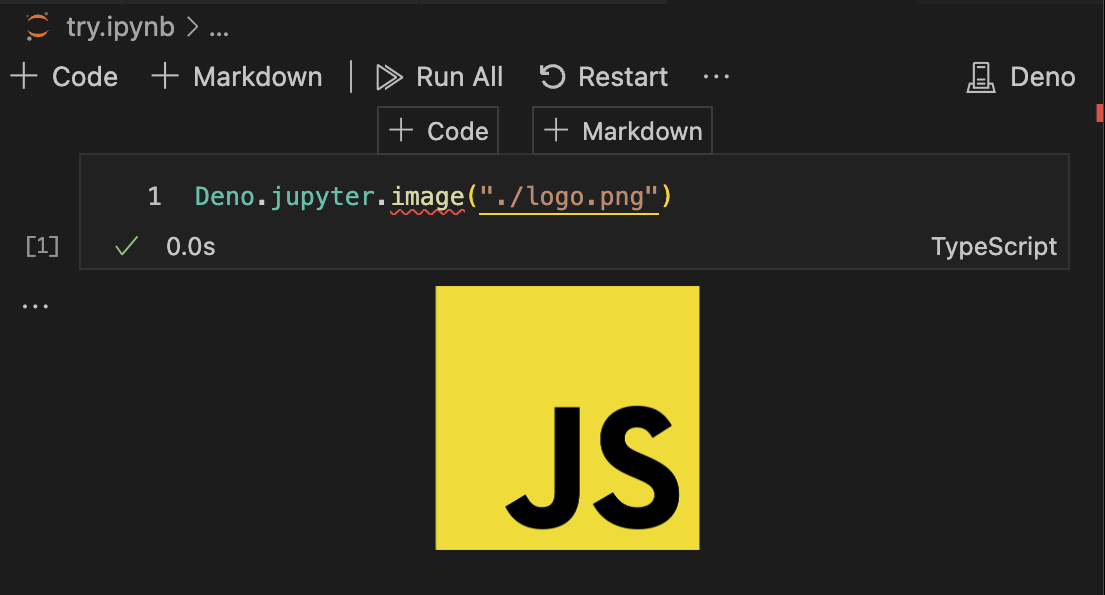
You can also display an image that you generated or read before:
const data = Deno.readFileSync("./cat.jpg");
Deno.jupyter.image(data);
The API supports JPEG and PNG images.
Override version in deno publish
You can now use --set-version flag in deno publish to override a package
version specified in deno.json file:
{
  "name": "@deno/otel",
  "version": "0.1.0",
  "exports": "./main.ts"
}
$ deno publish --set-version 0.2.0 Publishing @deno/otel@0.2.0 ... Successfully published @deno/otel@0.2.0
This flag can only be used when publishing a single package and will not work in a workspace setting.
LSP improvements
The built-in language server that ships with Deno received multiple improvements:
- Local
deno.jsonformatting settings now precendence over editor settings - Auto-import quick fix now supports type imports
unstablesettings are now respected by the LSP- No noisy warnings for unsupported actions
- Relative completions for
dependencies in
deno.jsonandpackage.json - Built-in types are now correctly loaded
- Coverage data directories are no longer analyzed to make LSP faster
- More reliable notifications when editor workspace settings change
- Support for
typescript.preferences.preferTypeOnlyAutoImports - Auto import completions for npm dependencies
- Auto import completions for
@deno-typesdirectives - Interactive inlay hint support
Performance improvements
Several notable performance improvements that made Deno faster again:
- Running microtasks got optimized, twice
- Transpiled modules are now a bit faster
- Default V8 heap limit is now based on available system memory
- Faster start up on Windows
Deno.serve()got slightly faster by not allocating URL path if not needed, avoiding requests’smethodandurlclones and caching WebIDL lookups
Quality of life improvements
--env-fileflag can be specified multiple times- File watcher now logs changed file
- Autocompletion for
lint rules in
deno.json - Comments are now excluded from coverage report
console.tableapplies colors- CSS parsing in
consoleis now case-insensitive Deno.serve()now correctly firesabortedevent onRequestwhen the request is cancelled- Workspaces support wildcard packages
- Hints on how to use
documentand DOM API in Deno
V8 13.0
Deno 2.1 ships with the latest V8 13.0.
Acknowledgments
We couldn’t build Deno without the help of our community! Whether by answering questions in our community Discord server or reporting bugs, we are incredibly grateful for your support. In particular, we’d like to thank the following people for their contributions to Deno 2.1: Benjamin Swerdlow, Bhuwan Pandit, Chris Veness, Cornelius Krassow, Eli Uriegas, HasanAlrimawi, Jeremy Tuloup, João Baptista, Kaveh, Keith Maxwell, Keith Tan, Kenta Moriuchi, Kyle Kelley, LongYinan, Lucas Nogueira, Mayank Kumar, McSneaky, Meir Blachman, Miguel Rodrigues, Mohammad Sulaiman, Nicola Bovolato, Patrick Uftring, Pig Fang, Richard Carson, Ronny Chan, Sahand Akbarzadeh, Scott Twiname, Soc Virnyl S. Estela, Taku Amano, Toby Ealden, Volker Schlecht, Yazan AbdAl-Rahman, familyboat, haturau, jiang1997, reczkok, tsukasa-ino, Łukasz Czerniawski, and 林炳权.
Would you like to join the ranks of Deno contributors? Check out our contribution docs here, and we’ll see you on the list next time.
Believe it or not, the changes listed above still don’t tell you everything that got better in 2.1. You can view the full list of pull requests merged in Deno 2.1 on GitHub here.
Thank you for catching up with our 2.1 release, and we hope you love building with Deno!
Get technical support, share your project, or simply say hi on Twitter, Discord, BlueSky, and Mastodon.