


Deno 1.25 has been tagged and released with the following new features and changes:
deno init subcommandIf you already have Deno installed, you can upgrade to 1.25 by running:
If you are installing Deno for the first time:
curl -fsSL https://deno.land/x/install/install.sh | sh


iwr https://deno.land/x/install/install.ps1 -useb | iex
Click here for more installation options.
deno init subcommandStarting a new project with Deno has always been incredibly simple: you just need a single file to get going. No need for any configuration files, dependency manifests, or build scripts.
Users coming from other ecosystems are often not used to this simplicity - they
often look for a tool to scaffold out a basic project structure to get them
started on the right path. In this release we have added a deno init
subcommand that scaffolds a basic Deno project.
$ deno init
✅ Project initialized
Run these commands to get started
  deno run main.ts
  deno test

$ deno run main.ts
Add 2 + 3 = 5

$ deno test
Check file:///dev/main_test.ts
running 1 test from main_test.ts
addTest ... ok (6ms)

ok | 1 passed | 0 failed (29ms)
This subcommand will create two files (main.ts and main_test.ts). These
files provide a basic example of how to write a Deno program and how to write
tests for it. The main.ts file exports a add function that adds two numbers
together and the main_test.ts file contains a test for this function.
You can also specify an argument to deno init to initialize a project in a
specific directory:
$ deno init my_deno_project
✅ Project initialized
Run these commands to get started
  cd my_deno_project
  deno run main.ts
  deno test
We’d love to hear your feedback on this feature in this GitHub issue.
This release adds experimental support for npm specifiers. It is important to emphasize that this feature is still under development. npm specifiers are extremely new and you’re likely find scenarios where something doesn’t work. Please report these problems to the issue tracker. We’ll be working hard to improve the compatibility layer and user experience over the next few releases.
The way these work is best described with an example:
import express from "npm:express";
const app = express();

app.get("/", function (req, res) {
  res.send("Hello World");
});

app.listen(3000);
console.log("listening on http://localhost:3000/");
These npm specifiers have the following format:
npm:<package-name>[@<version-requirement>][/<sub-path>]Then doing the following will start a simple express server:
$ deno run --unstable --A main.ts
listening on http://localhost:3000/
When doing this, no npm install is necessary and no node_modules folder is
created. These packages are also subject to the same permissions as Deno
applications. At the moment though, there are some unnecessary permissions that
get asked for, but in the future the above program will only require network
permissions.
These specifiers currently work with deno run, deno test, and deno bench.
Type checking is not yet supported. Integration for the language server,
deno vendor, deno info, and deno install is not yet ready either.
npm package binaries can be executed from the command line without an npm install using a specifier in the following format:
npm:<package-name>[@<version-requirement>][/<binary-name>]For example:
$ deno run --unstable --allow-env --allow-read npm:cowsay@1.5.0 Hello there!
 ______________
< Hello there! >
 --------------
        \   ^__^
         \  (oo)\_______
            (__)\       )\/\
                ||----w |
                ||     ||
$ deno run --unstable --allow-env --allow-read npm:cowsay@1.5.0/cowthink What to eat?
 ______________
( What to eat? )
 --------------
        o   ^__^
         o  (oo)\_______
            (__)\       )\/\
                ||----w |
                ||     ||
Similar to the previous example, this npm package requires env and read permissions, but in the future it shouldn’t require any permissions.
We’ll add deno install and lockfile support for npm package binaries in a
future release.
Because the feature is still experimental, specifying --unstable is required
when importing an npm specifier.
Deno 1.25 introduces a new experimental HTTP server, built to deliver best in class HTTP performance. Our benchmarks show a 4x improvement in hello-world request per second performance compared to Node.js and a 3x improvement compared to our existing web server. The new server is even 20% faster than a single threaded configuration of the canonical Rust HTTP server Hyper.
The new Deno.serve() API will feel very familiar to users of our existing
std/http server, as it works a drop in replacement for std/http’s serve()
function.
A basic hello world server is now as simple as:
Deno.serve(() => new Response("Hello, world!"));
You can find the full documentation for this API on doc.deno.land.
In this example each request is responded to with a dynamically rendered React component:
import * as React from "npm:react";
import { renderToReadableStream } from "npm:react-dom/server";

const App = () => (
  <html>
    <body>
      <h1>Hello World</h1>
    </body>
  </html>
);

const options = {
  headers: {
    "Content-Type": "text/html",
  },
};

Deno.serve(
  { port: 4500 },
  async () => new Response(await renderToReadableStream(<App />), options),
);
The new server only supports HTTP/1.1 at the moment. Seamless HTTP/2 support is planned and will be added in a future release. Other features available in our existing server - such as automatic response body compression - are also planned.
This new server should not yet be used to serve production traffic, but we
encourage you to play around and benchmark it. Because the API is still
experimental, the --unstable flag is required to use it. Please report any
bugs you discover on Deno’s issue tracker.
You can look forward to a more detailed blog post on the performance of the new HTTP server with more exhaustive benchmarks and runtime comparisons in the coming weeks.
When Deno starts up, it analyzes dependencies ahead of time to ensure remote modules are cached. This dependency analysis could be quite expensive on large files and so in Deno 1.25 it is cached behind the scenes per file. With this improvement, you should notice a considerable startup time improvement if any of your dependencies had large files after the initial run.
For example, ts_morph has a dependency on the TypeScript compiler, which ships as a 10MB JavaScript file.
import { Project } from "https://deno.land/x/ts_morph@15.1.0/mod.ts";
console.log(Project);
In the previous version of Deno, the above code would take ~1080ms on every run on one of our machines. Now, it’s ~225ms after the first run.
Additionally, a regression in baseline memory usage has been fixed and additional improvements to memory usage were made. You should see a significant reduction over recent versions.
This release adds new features and performance improvements to the unstable Foreign Function Interface
Uint8Array & 64-bit numbers in Fast FFI callsIn Deno v1.24, Fast FFI calls were added which improved performance significantly. The optimization was only enabled for number types.
This release enables this fast path for the u64, i64, pointer and buffer
types. Now many FFI modules can achieve native-like performance from the comfort
of JavaScript.
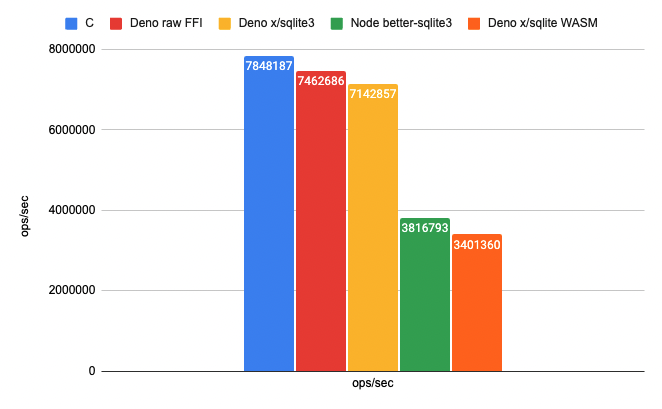
Benchmark using SQLite’s C API via Deno FFI. Higher is better.
buffer typeEarlier, the pointer type included passing JS TypedArray as parameters.
This release adds a new type, buffer, to leverage performance optimizations
for TypedArrays.
const { symbols: { hash } } = Deno.dlopen("libtest.so", {
  hash: {
    parameters: ["buffer", "u32"],
    result: "u32",
  },
});

const u8 = new Uint8Array([1, 2, 3]);
hash(u8, u8.byteLength);
Returning a buffer type is the same as returning a pointer type. The
pointer type no longer accepts TypedArrays in the slow call path to
encourage use of this new type.
Before:
cpu: Apple M1
runtime: deno 1.24.0 (aarch64-apple-darwin)

file:///deno/test_ffi/tests/bench.js
hash()    180.77 ns/iter (176.22 ns … 195.53 ns)  181.3 ns 193.97 ns 195.35 ns
After:
cpu: Apple M1
runtime: deno 1.25.0 (aarch64-apple-darwin)

file:///deno/test_ffi/tests/bench.js
hash() 56.01 ns/iter (55.43 ns … 62.43 ns) 56.03 ns 60.02 ns 61.33 nsDeno.UnsafePointerView APIThree new static methods were added to Deno.UnsafePointerView interface:
Deno.UnsafePointerView#getCStringDeno.UnsafePointerView#getArrayBufferDeno.UnsafePointerView#copyIntoconst ptr = symbols.get_hello(); const string = Deno.UnsafePointerView.getCString(ptr); const arrayBuffer = Deno.UnsafePointerView.getArrayBuffer(ptr); const copy = new Uint8Array(32); Deno.UnsafePointerView.copyInto(ptr, copy);
此内容由惯性聚合(RSS阅读器)自动聚合整理,仅供阅读参考。 原文来自 — 版权归原作者所有。