






To upgrade to Deno 2.2, run the following in your terminal:
If Deno is not yet installed, run one of the following commands to install or learn how to install it here.
curl -fsSL https://deno.land/install.sh | sh


iwr https://deno.land/install.ps1 -useb | iex
What’s New in Deno 2.2
There’s a lot included in this release. Here’s a quick overview to help you dive in to what you care most about:
- Built-in OpenTelemetry
- Linter updates
- Support for
node:sqlite - Improvements to
deno check - Improvements to
deno lsp - Useful updates to
deno task - Dependency management
- Relaxed permission checks for
Deno.cwd() - Smaller, faster
deno compile - More precise
deno bench WebTransportand QUIC APIs- Node.js and npm compatibility improvements
- Performance improvements
- Improvements to WebGPU
- Smaller Linux binaries
- TypeScript 5.7 and V8 13.4
- Long Term Support
- Acknowledgments
You can also see demos of all of these features in the v2.2 demos video.
Built-in OpenTelemetry integration
Deno 2.2 includes built-in OpenTelemetry for monitoring logs, metrics, and traces.
Deno automatically instruments APIs like console.log, Deno.serve, and
fetch. You can also instrument your own code using npm:@opentelemetry/api.
Let’s look at some logs and traces from Deno.serve API:
server.ts
Deno.serve((req) => {
  console.log("Received request for", req.url);
  return new Response("Hello world");
});
To capture observability data, you’ll need to provide an OTLP endpoint. If you
already have an observability system set up, you can use it. If not, the easiest
way to get something running is to spin up
a local LGTM stack in Docker:
$ docker run --name lgtm -p 3000:3000 -p 4317:4317 -p 4318:4318 --rm -ti \
    -v "$PWD"/lgtm/grafana:/data/grafana \
    -v "$PWD"/lgtm/prometheus:/data/prometheus \
    -v "$PWD"/lgtm/loki:/data/loki \
    -e GF_PATHS_DATA=/data/grafana \
    docker.io/grafana/otel-lgtm:0.8.1
We are now ready to run our server and capture some data:
The OpenTelemetry integration’s API is still subject to change. As such it is designated as an “unstable API” which requires the use of the
--unstable-otelflag in order to use it.
$ OTEL_DENO=true deno run --unstable-otel --allow-net server.ts
Listening on http://localhost:8000/
Now, connect to our server using a browser or curl:
$ curl http://localhost:8000
Hello world
You can now look at the logs and traces in your observability system. If you are using the LGTM stack, you can access the Grafana dashboard at http://localhost:3000.
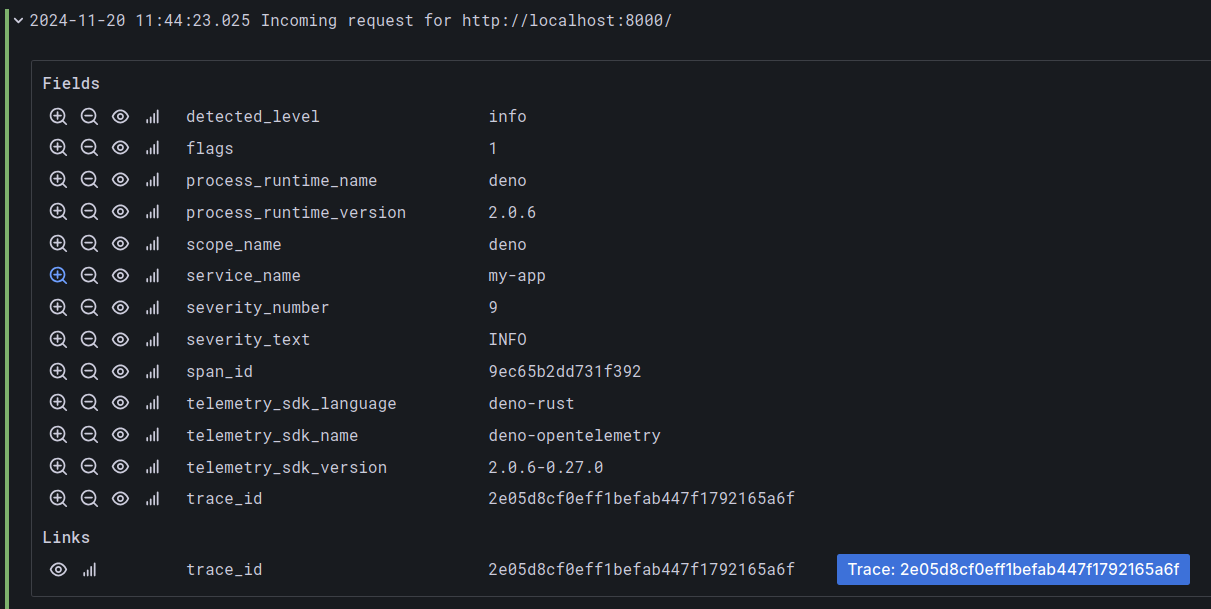
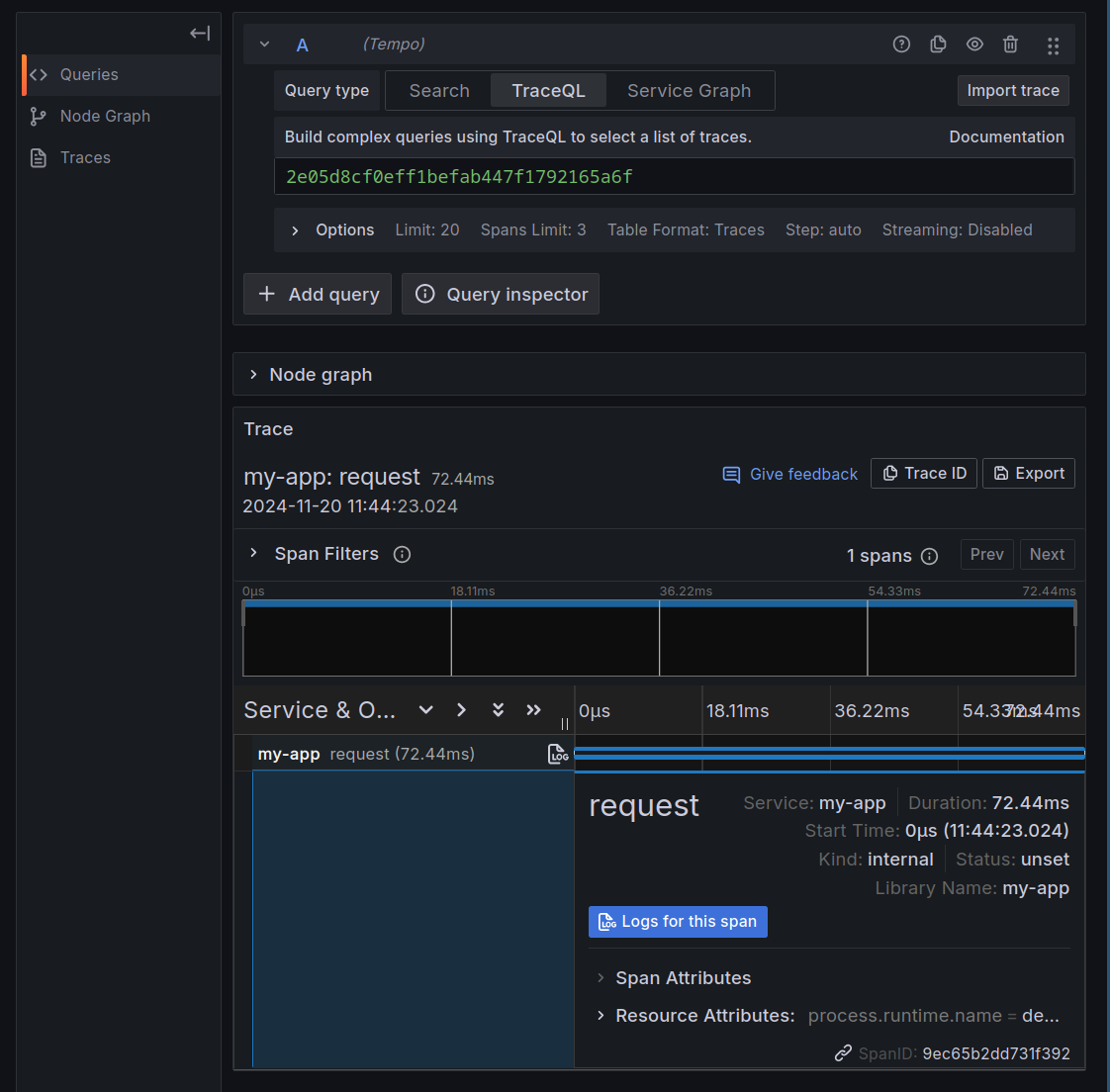
We’ve barely scratched the surface here. Deno also exports auto-instrumented
metrics, and you can create your own metrics and trace spans using the
npm:@opentelemetry/api package. To learn more about it, visit
Deno docs.
You can watch a demo of the OpenTelemetry integration in this video for v2.2 demos
Linter updates
Deno 2.2 introduces a major upgrade to
deno lint, including a
new plugin system and 15 new rules, particularly for React and Preact users.
New built-in lint rules
This release adds new lint rules, mainly targeting JSX and React best practices.
- jsx-boolean-value
- jsx-button-has-type
- jsx-curly-braces
- jsx-key
- jsx-no-children-prop
- jsx-no-comment-text-nodes
- jsx-no-duplicate-props
- jsx-no-unescaped-entities
- jsx-no-useless-fragment
- jsx-props-no-spread-multi
- jsx-void-dom-elements-no-children
- no-useless-rename
- react-no-danger-with-children
- react-no-danger
- react-rules-of-hooks
To complement these rules, two new tags have been added: jsx and react.
See the complete list of available lint rules and tags in the Deno docs.
JavaScript plugin API
The biggest update to deno lint is the ability to extend its functionality with a new plugin system.
NOTE: The plugin API is still in the phase where its API has potential to change, and so is currently marked as an unstable feature.
While there are many built-in rules, in some situations you might need a rule tailored to your specific project.
The plugin API is modelled after
the ESLint plugin API, but
is not 100% compatible. In practice, we expect that some of the existing
ESLint plugins to work with deno lint without problems.
Here’s an example of a simple lint plugin. We’ll create a plugin that reports an
error if you name a variable foo:
deno.json
{
  "lint": {
    "plugins": ["./my-plugin.ts"]
  }
}
my-plugin.ts
export default {
  name: "my-lint-plugin",
  rules: {
    "my-lint-rule": {
      create(context) {
        return {
          VariableDeclarator(node) {
            if (node.id.type === "Identifier" && node.id.name === "foo") {
              context.report({
                node,
                message: "Use more descriptive name than `foo`",
              });
            }
          },
        };
      },
    },
  },
} satisfies Deno.lint.Plugin;
main.js
const foo = "foo";
console.log(foo);
$ deno lint main.js
error[my-lint-plugin/my-lint-rule]: Use more descriptive name than `foo`
 --> /dev/main.js:1:7
  |
1 | const foo = "foo";
  |       ^^^^^^^^^^^


Found 1 problem
Checked 1 file
In addition to a visitor based API, you can also use CSS-like selectors for targeting specific nodes. Let’s rewrite above rule, using the selector syntax.
my-plugin.ts
export default {
  name: "my-lint-plugin",
  rules: {
    "my-lint-rule": {
      create(context) {
        return {
          'VariableDeclarator[id.name="foo"]'(node) {
            context.report({
              node,
              message: "Use more descriptive name than `foo`",
            });
          },
        };
      },
    },
  },
} satisfies Deno.lint.Plugin;
Lint plugins can be authored in TypeScript, and Deno provides full type
declarations out-of-the-box under the Deno.lint namespace.
You can consume local lint plugins, as well as plugins from npm and JSR:
deno.json
{
  "lint": {
    "plugins": [
      "./my-plugin.ts",
      "jsr:@my-scope/lint-plugin",
      "npm:@my-scope/other-plugin"
    ]
  }
}
Read more about deno lint plugin API
at the Deno docs.
Updated behavior of --rules flag for deno lint
deno lint --rules was changed in this release to always print all available
lint rules, marking which ones are enabled with the current configuration.
Additionally, deno lint --rules --json no longer prints raw Markdown
documentation, but instead links to the relevant rule page
in the Deno docs.
You can watch a more detailed demo of the lint plugin API in this video for v2.2 demos
Improvements to deno check
deno check, Deno’s tools
for type checking, received two major improvements in this release:
- JSDoc tags are now respected
- Settings for
compilerOptionscan now be configured per workspace member
Let’s look at each in a little detail:
JSDoc @import tags are now respected
@import JSDoc tags are now respected
when type checking. This lets you define imports inline, improving type checking
in JavaScript files.
add.ts
export function add(a: number, b: number): number {
  return a + b;
}
main.js
export function addHere(value) {
  return value(1, 2);
}

addHere("");
$ deno check main.js
Check file:///main.js
error: TS2345 [ERROR]: Argument of type 'string' is not assignable to parameter of type '(a: number, b: number) => number'.
addHere("");
        ~~
    at file:///main.js:10:9
Workspace-scoped compilerOptions settings
Previously, deno.json applied the same compilerOptions to all workspace
members, making it hard to configure a frontend and backend separately. Now,
workspace members can define their own settings.
It’s now possible to specify a different compilerOptions.lib setting in a
directory for your frontend code, thanks to the new
support for compilerOptions per workspace member.
deno.json
{
  "workspace": [
    "./server",
    "./client"
  ],
  "compilerOptions": {
    "checkJs": true
  }
}
client/deno.json
{
  "compilerOptions": {
    "lib": ["dom", "esnext"]
  }
}
client/main.js
document.body.onload = () => {
  const div = document.createElement("div");
  document.body.appendChild(div);
  document.body.appendChild("not a DOM element");
};
$ deno check client/main.js
Check file:///client/main.js
TS2345 [ERROR]: Argument of type 'string' is not assignable to parameter of type 'Node'.
  document.body.appendChild("not a DOM node");
                            ~~~~~~~~~~~~~~~~
    at file:///client/main.js:4:29

error: Type checking failed.
You can watch
a demo of the the updates to deno check in this video for v2.2 demos
Improvements to deno lsp
Deno 2.2 makes
deno lsp much
faster and more responsive, with major improvements for web framework users.
There’s too much to go into in detail here, but let’s look at some of the highlights:
- Speed up auto-completion suggestions by 5-20x
- Handle cancellation requests in blocking code
- Support for
compilerOptions.rootDirsandcompilerOptions.typesfor better DX for Svelte, Qwik and Vite users - Properly recognize ambient module imports
- Wildcard module augmentation is now supported
(eg.
.*cssand Vite virtual modules) - Import completions for
.wasmfiles - Formatting for
.scss,.sass,.less,.sql,.svelte,.vueand other component files - Include
node:prefix for built-in Node.js modules auto-imports - Better handling of
<reference types>directives and augmentation ofImportMetainterface by npm packages - Better auto-imports for npm packages
Useful updates to deno task
This release brings several updates to
deno task. The first will
help deno task be more robust and predicatable:
- On Unix, OS signals are now properly forwarded to sub-tasks.
- Properly terminate sub-process when task process is terminated on Windows
- Arguments are only passed to the root task
And two more that make deno task even more useful and convenient to use. We’ll
look at these in a little more detail:
- Wildcards in task names
- Running tasks without commands
Wildcards in task names
You can now use
deno task with wildcards in task names,
like so:
deno.json
{
  "tasks": {
    "start-client": "echo 'client started'",
    "start-server": "echo 'server started'"
  }
}
$ deno task "start-*"
Task start-client echo 'client started'
client started
Task start-server echo 'server started'
server started
Make sure to quote the task name with a wildcard, otherwise your shell will try to expand this character and you will run into errors.
The wildcard character (*) can be placed anywhere to match against task names.
All tasks matching the wildcard will be run in parallel.
Running tasks without commands
Task dependencies became popular in v2.1. Now, you can group tasks more easily by defining a task without a command.
deno.json
{
  "tasks": {
    "dev-client": "deno run --watch client/mod.ts",
    "dev-server": "deno run --watch sever/mod.ts",
    "dev": {
      "dependencies": ["dev-client", "dev-server"]
    }
  }
}
In the above example dev task is used to group dev-client and dev-server
tasks, but has no command of its own. It’s a handy way to group tasks together
to run from a single task name.
You can watch a
demo of the updates to deno task in this video for v2.2 demos
Dependency management
Deno 2.2 ships with a change to
deno outdated tool,
that adds a new, interactive way
to update dependencies:
Besides this improvement, a number of bug fixes have landed that make
deno install and
deno outdated more robust and faster. Including, but not limited to:
- Don’t re-set up
node_modulesdirectory if running lifecycle script - Use locked version of jsr package when fetching exports
- Do not error if a path is an npm package and a relative file
- Remove importMap field from specified config file
- Warn about not including auto-discovered config file in
deno install --global - Allow
--latestflag indeno outdated, without the--updateflag deno outdatedensures “Latest” version is greater than “Update” versiondeno outdatederrors when there are no config filesdeno outdatedretains strict semver specifier when updatingdeno outdatedshows a suggestion for updatingdeno outdatednow supports updating dependencies in external import mapsdeno oudateduses thelatesttag even when it’s the same as the current version
Support for node:sqlite
This release brings a highly requested node:sqlite module to Deno, making it
easy to work with in-memory or local databases:
db.ts
import { DatabaseSync } from "node:sqlite";

const db = new DatabaseSync("test.db");

db.exec(`
CREATE TABLE IF NOT EXISTS people (
  id INTEGER PRIMARY KEY AUTOINCREMENT,
  name TEXT,
  age INTEGER
);`);

const query = db.prepare(`INSERT INTO people (name, age) VALUES (?, ?);`);
query.run("Bob", 40);

const rows = db.prepare("SELECT id, name, age FROM people").all();
console.log("People:");
for (const row of rows) {
  console.log(row);
}

db.close();
$ deno run --allow-read --allow-write db.ts
People:
[Object: null prototype] { id: 1, name: "Bob", age: 40 }
See an example in our docs as well as the complete API reference.
Relaxed permission checks for Deno.cwd()
Deno 2.2 removes a requirement for the full --allow-read permission when using
the Deno.cwd() API.
main.js
console.log(Deno.cwd());
Deno v2.1
$ deno main.js
┏ ⚠️  Deno requests read access to <CWD>.
┠─ Requested by `Deno.cwd()` API.
┠─ To see a stack trace for this prompt, set the DENO_TRACE_PERMISSIONS environmental variable.
┠─ Learn more at: https://docs.deno.com/go/--allow-read
┠─ Run again with --allow-read to bypass this prompt.
┗ Allow? [y/n/A] (y = yes, allow; n = no, deny; A = allow all read permissions) > y
/dev
Deno v2.2
$ deno main.js
/dev
Before this change, it was already possible to acquire the CWD path without permissions, eg. by creating an error and inspecting its stack trace.
This change was originally intended to ship in Deno 2.0, but missed the party. We’re happy to welcome it here in v2.2.
Smaller, faster deno compile
A number of performance and quality of life improvements to deno compile:
- programs are now about 5Mb smaller on macOS
- reading files embedded in compiled programs is ~40% faster than in Deno 2.1
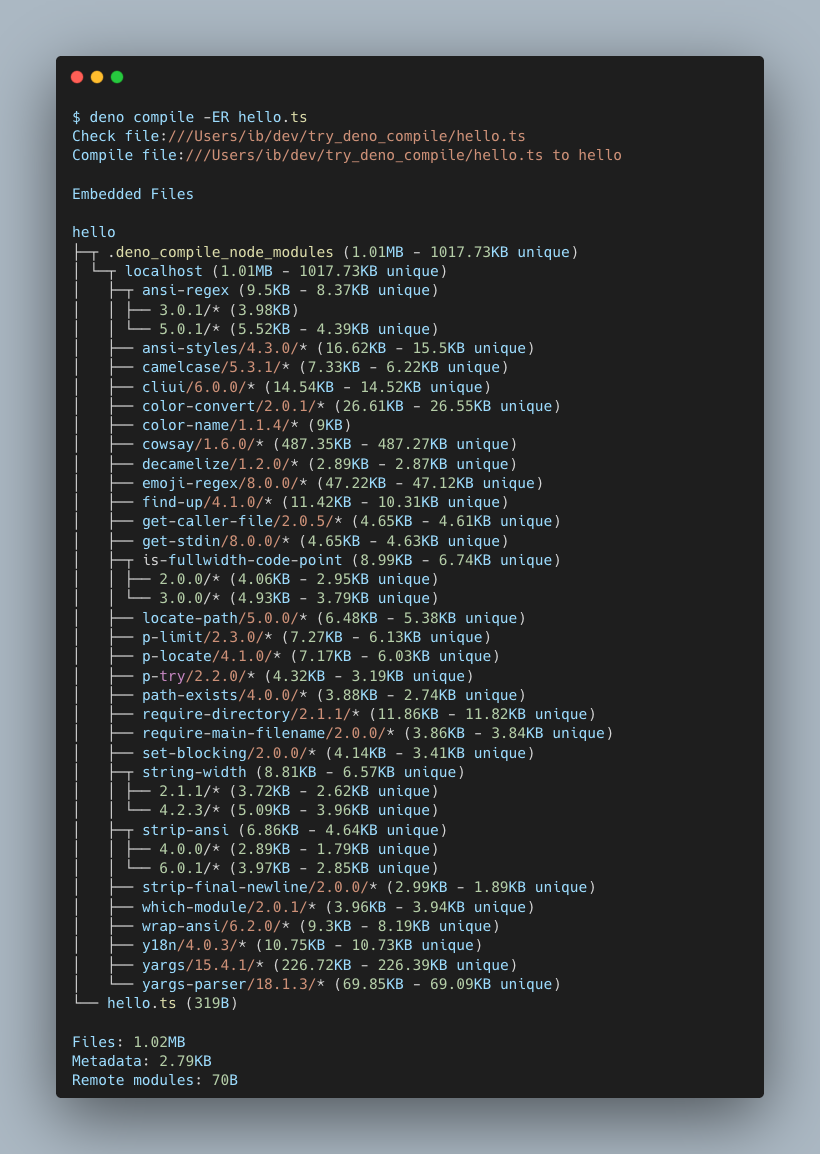
deno compilenow presents a summary of included files with their sizes (includingnode_modulesdirectory)
More precise deno bench
deno bench is the built-in tool that allows you to benchmark your code quickly
and easily. Deno v1.21
changed behavior of deno bench
to automatically perform warm up of the benchmark, as well as automatically
deciding how many iterations to perform, stopping when the time difference
between subsequent runs is statistically insignificant.
In most cases this works great, but sometimes, you want to have a granular
control over how many warmup runs and measured runs are performed. To this end,
Deno v2.2 brings back Deno.BenchDefinition.n and Deno.BenchDefinition.warmup
options. Specifying them will make deno bench perform the requested amount of
runs:
url_bench.ts
Deno.bench({ warmup: 1_000, n: 100_000 }, () => {
  new URL("./foo.js", import.meta.url);
});
The above benchmark will perform exactly 1000 “warmup runs” - these are not measured and are only used to “warm up” V8 engine’s JIT compiler. Then the bench will do 100 000 measured runs and show metrics based on these iterations.
WebTransport and QUIC APIs
Deno 2.2 ships with
an experimental support for
WebTransport API
and new,
unstable Deno.connectQuic and Deno.QuicEndpoint APIs.
If you aren’t familiar, QUIC (Quick UDP
Internet Connections) is a modern transport protocol designed to replace
TCP+TLS, and is the foundation for HTTP/3.
As these are experimental, their APIs may change in the future, and so they require the use of the
--unstable-netflag to be used.
Let’s see these APIs in action. Here’s an example of a QUIC echo server and a
WebTransport client.
Please note that WebTransport requires HTTPS to be used. These example use a
certificate/key pair; You can generate a self-signed cert using OpenSSL:
openssl req -x509 -newkey rsa:4096 -keyout my_key.pem -out my_cert.pem -days 365
server.js
const cert = Deno.readTextFileSync("my_cert.crt");
const key = Deno.readTextFileSync("my_cert.key");

const server = new Deno.QuicEndpoint({
  hostname: "localhost",
  port: 8000,
});
const listener = server.listen({
  cert,
  key,
  alpnProtocols: ["h3"],
});


for await (const conn of listener) {
  const wt = await Deno.upgradeWebTransport(conn);

  handleWebTransport(wt);
}

async function handleWebTransport(wt) {
  await wt.ready;

  (async () => {
    for await (const bidi of wt.incomingBidirectionalStreams) {
      bidi.readable.pipeTo(bidi.writable).catch(() => {});
    }
  })();

  (async () => {
    for await (const stream of wt.incomingUnidirectionalStreams) {
      const out = await wt.createUnidirectionalStream();
      stream.pipeTo(out).catch(() => {});
    }
  })();

  wt.datagrams.readable.pipeTo(wt.datagrams.writable);
}
client.js
import { decodeBase64 } from "jsr:@std/encoding/base64";
import { assertEquals } from "jsr:@std/assert";

const cert = Deno.readTextFileSync("my_cert.crt");
const certHash = await crypto.subtle.digest(
  "SHA-256",
  decodeBase64(cert.split("\n").slice(1, -2).join("")),
);

const client = new WebTransport(
  `https://localhost:8000/path`,
  {
    serverCertificateHashes: [{
      algorithm: "sha-256",
      value: certHash,
    }],
  },
);

await client.ready;

const bi = await client.createBidirectionalStream();

{
  const writer = bi.writable.getWriter();
  await writer.write(new Uint8Array([1, 0, 1, 0]));
  writer.releaseLock();
  const reader = bi.readable.getReader();
  assertEquals(await reader.read(), {
    value: new Uint8Array([1, 0, 1, 0]),
    done: false,
  });
  reader.releaseLock();
}

{
  const uni = await client.createUnidirectionalStream();
  const writer = uni.getWriter();
  await writer.write(new Uint8Array([0, 2, 0, 2]));
  writer.releaseLock();
}

{
  const uni =
    (await client.incomingUnidirectionalStreams.getReader().read()).value;
  const reader = uni!.getReader();
  assertEquals(await reader.read(), {
    value: new Uint8Array([0, 2, 0, 2]),
    done: false,
  });
  reader.releaseLock();
}

await client.datagrams.writable.getWriter().write(
  new Uint8Array([3, 0, 3, 0]),
);
assertEquals(await client.datagrams.readable.getReader().read(), {
  value: new Uint8Array([3, 0, 3, 0]),
  done: false,
});
$ deno run -R --unstable-net server.js
...

$ deno run -R --unstable-net client.js
...
Node.js and npm compatibility improvements
As always, Deno 2.2 brings a plethora of improvements to Node.js and npm compatibility. Here’s a list of highlights:
.npmrcfiles are now discovered in home directory and project directory- The
--unstable-detect-cjsflag has been repurposed and is now your ultimate escape hatch when having trouble working with CommonJS modules in Deno - AWS SDKs are now more reliable due to better handling of
HTTP 100 Continueresponses tls.connectsocket upgrades are more reliable
process changes:
process.cpuUsageis now available- Set
process.envas own property - Set other
processfields on own instance
fs changes:
fs.readFile(Sync) accepts file descriptorsFileHandle.chmodis now availableFileHandle.statis now availableFileHandle.truncateis now availableFileHandle.writevis now availableFileHandle.chownis now availableFileHandle.syncis now availableFileHandle.utimesis now available- Fix
fs.access/fs.promises.accesswithX_OKmode parameter on Windows - Add missing
pathargument validation infs.stat - Add missing error context for
fs.readFile - Support
recursiveoption infs.readdir
http module changes:
- Fix
npm:playwrightHTTP client - Improve
npm:mqttcompatibility - Propagate socket error to client request object
- Support
createConnectionoption inrequest() - Support proxy http request
node:httpproperly compares case inServerResponse.hasHeader()method
zlib module changes:
- Brotli APIs use correct byte offset for chunks
- Async
brotliDecompressAPI now works correctly - Fix
ReferenceErrorincrc32
worker_threads module changes:
worker_threadsmodule changes:- Event loop is kept alive if there is pending async work
data:URLs are now encoded properly withevaloption
crypto module changes:
- Add support for IV of any length in aes-(128|256)-gcm ciphers
- Fix panic when using invalid AES GCM key size
- Implement
aes-128-ctr,aes-192-ctr, andaes-256-ctr - Implement
crypto.hash - Implement
X509Certificate#checkHost getCiphersreturns supported cipherstimingSafeEquals[now throws] (https://github.com/denoland/deno/pull/27470) with differentbyteLength- Check GCM auth tag on
DechiperIv#final - Fix panic in
scrypt
v8 module changes:
v8module now handlesFloat16Arrayserialization- Add missing
node:inspector/promisesmodule - Prevent
node:child_processfrom always inheriting the parent environment
Other changes:
- Deno now watches for changes of
TZenv evariable and updates the timezone in JS APIs accordingly - Correct resolution of dynamic import of an ES module from a CommonJS module
- Handle CommonJS
exports with escaped characters - Add support for
workspace:^andworkspace:~version constraints for workspace members imports - Resolve module as maybe CommonJS module when the module is missing a file extension
- Show directory import and missing extension suggestions on “module not found” errors
- Lazy caching of npm dependencies, only as they’re needed
- Better handling of TypeScript in npm packages, only for type checking
Performance improvements
Performance improvements are a part of every Deno release, and this one is no exception. Here’s a list of some of the improvements:
- Deno now clears information about module analysis after a timeout, leading to lower memory consumption
Deno.statandnode:fs.statare now up to 2.5x faster on Windows- Looking up closest
package.jsonis slightly faster than in Deno 2.1 - Use assembly for sha256 and sha512 implementation,
making
@aws-sdk/client-s3up to 2x faster - Make Node.js module resolution faster, by limiting conversions between URLs and paths
node:fs.cpSyncis now up to 2x faster than Deno 2.1 and 3x faster than Node.js 20
Improvements to WebGPU
Our WebGPU implementation got a major revamp, which fixes many issues that were being encountered, and should also improve overall performance of the available APIs.
In addition to these fixes, our Jupyter integration is now able to display
GPUTextures as images, and GPUBuffers as text:
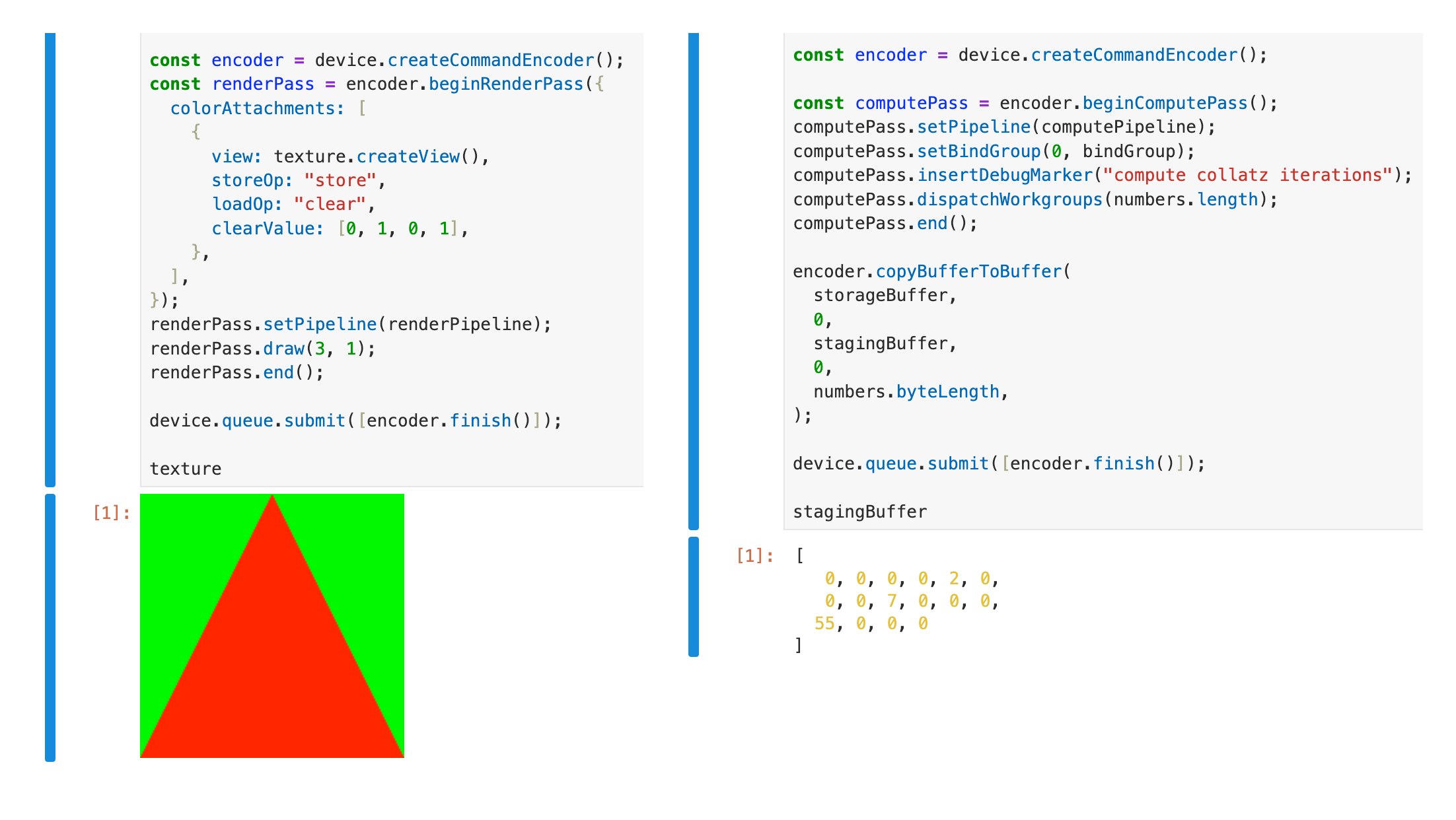
Check out some examples of using WebGPU with Deno.
Smaller Linux binaries
Thanks to using full
Link Time Optimization
we
managed to save almost 15Mb of the binary size.
That makes deno shrink from 137Mb to 122Mb.
TypeScript 5.7 and V8 13.4
Deno 2.2 upgrades to TypeScript 5.7 and V8 13.4, bringing new language features and performance improvements.
TypedArrays are now generic
One major TypeScript 5.7 change is that Uint8Array and other TypedArrays are
now generic over ArrayBufferLike. This allows better type safety when
working with SharedArrayBuffer and ArrayBuffer, but it may require updates
to some codebases.
const buffer: Uint8Array = new Uint8Array(new ArrayBuffer(8));


const buffer: Uint8Array<SharedArrayBuffer> = new Uint8Array(
  new SharedArrayBuffer(8),
);
This change might introduce type errors. If you see errors like:
error TS2322: Type 'Buffer' is not assignable to type 'Uint8Array<ArrayBufferLike>'.
error TS2345: Argument of type 'Buffer' is not assignable to parameter of type 'Uint8Array<ArrayBufferLike>'.
You may need to update @types/node to the latest version.
Read more about this change in Microsoft’s announcement and the TypeScript PR.
Long Term Support
Deno v2.1 remains the Long Term Support release and will receive bug fixes, security updates and critical performance improvements regularly for the next 6 months.
Acknowledgments
We couldn’t build Deno without the help of our community! Whether by answering questions in our community Discord server or reporting bugs, we are incredibly grateful for your support. In particular, we’d like to thank the following people for their contributions to Deno 2.2: Aaron Ang, Alvaro Parker, Benjamin Swerdlow, Bhuwan Pandit, Caleb Cox, Charlie Bellini, Cornelius Krassow, Cre3per, Cyan, Dimitris Apostolou, Espen Hovlandsdal, Filip Stevanovic, Gowtham K, Hajime-san, HasanAlrimawi, Ian Bull, Je Xia, João Baptista, Kenta Moriuchi, Kitson Kelly, Masato Yoshioka, Mathias Lykkegaard Lorenzen, Mohammad Sulaiman, Muthuraj Ramalingakumar, Nikolay Karadzhov, Rajhans Jadhao, Rano, Sean McArthur, TateKennington, Tatsuya Kawano, Timothy, Trevor Manz, ZYSzys, hongmengning, ingalless, jia wei, printfn, ryu, siaeyy, ud2.
Would you like to join the ranks of Deno contributors? Check out our contribution docs here, and we’ll see you on the list next time.
Believe it or not, the changes listed above still don’t tell you everything that got better in 2.2. You can view the full list of pull requests merged in Deno 2.2 on GitHub.
Thank you for catching up with our 2.2 release, and we hope you love building with Deno!
Get technical support, share your project, or simply say hi on Twitter, Discord, BlueSky, and Mastodon.