







Deno 1.18 has been tagged and released with the following features and changes:
Error.cause now displayed in all stack tracesIf you already have Deno installed, you can upgrade to 1.18 by running:
If you are installing Deno for the first time, you can use one of the methods listed below:
curl -fsSL https://deno.land/x/install/install.sh | sh


iwr https://deno.land/x/install/install.ps1 -useb | iex


brew install deno


scoop install deno


choco install deno
This releases finalizes our 6 month long effort to fully implement the Web Cryptography API. We’re done - the entirety of the Web Cryptography API is now implemented in Deno*.
Deno now passes 98.1% of the web platform test suite for the Web Cryptography API. For some comparison data: Chrome/Edge pass 94.5% of tests, Firefox passes 93.4%, and Safari passes in 99.8% of tests. You can see the current data for yourself on wpt.fyi.
To get here, these APIs were introduced in this release:
crypto.subtle.encrypt:crypto.subtle.decrypt:crypto.subtle.wrapKey:crypto.subtle.unwrapKey:crypto.subtle.importKey:crypto.subtle.exportKey:* With the exception of some very niche features, like P-521 elliptic curve keys.
A huge thanks to Sean Michael Wykes for helping get this over the finish line.
We are continuing to iterate on the configuration file that we first
introduced in Deno v1.14.
Previously, using a configuration file required you to specify the --config
flag, followed by the path to the config file.
Starting with this release, Deno will automatically discover configuration files
with the deno.json or deno.jsonc filenames. You can still explicitly pass a
config file path with --config to force a specific file to be used.
Before v1.18:
$ deno run --config ./deno.json ./src/file1.js
$ deno fmt --config ./deno.json
$ deno lint --config ./deno.json
v1.18:
$ deno run ./src/file1.js
$ deno fmt
$ deno lint
For subcommands that don’t specify file arguments (eg. deno fmt) Deno will
look for configuration files in the current working directory, walking the
directory tree upwards until a config file is found. For subcommands that
specify file arguments (e.g. deno run ./src/file1.js), Deno will look for a
sibling configuration file to the given entrypoint, walking the directory tree
upwards.
Consider following directory tree:
/dev
    /deno
         /my-project
                    /src
                        /file1.js
                        /file2.js
If the current working directory is /dev/deno/my-project/ and we run
deno run src/file.js, Deno will try to find configuration file by checking
these paths in order:
/dev/deno/my-project/src/deno.json
/dev/deno/my-project/src/deno.jsonc
/dev/deno/my-project/deno.json
/dev/deno/my-project/deno.jsonc
/dev/deno/deno.json
/dev/deno/deno.jsonc
/dev/deno.json
/dev/deno.jsonc
/deno.json
/deno.jsonc
If none of the paths exists, Deno will run without applying any configuration.
Additionally, Deno’s LSP will automatically discover the configuration file too; it will look for a configuration file in the same directory as workspace root, walking the directory tree upwards until a config file is found or the root directory is reached.
We plan to iterate on the features of the configuration file further in the coming months and we look forward to your feedback.
Error.cause now displayed in all stack tracesError.cause
is a relatively new property that allows programs to indicate a cause for
errors. Deno has supported this property since v1.13, however the cause was not
in all types of stack traces (namely uncaught exceptions). This is now fixed: a
chain of causes will be logged for uncaught errors.
Example:
function fizz() {
  throw new Error("boom!");
}

function bar() {
  try {
    fizz();
  } catch (e) {
    throw new Error("fizz() has thrown", { cause: e });
  }
}

function foo() {
  try {
    bar();
  } catch (e) {
    throw new Error("bar() has thrown", { cause: e });
  }
}

foo();
Before v1.18:
$ deno run error_cause.js
error: Uncaught Error: bar() has thrown
        throw new Error("bar() has thrown", { cause: e });
              ^
    at foo (file:///test.js:17:15)
    at file:///test.js:21:1
v1.18:
error: Uncaught Error: bar() has thrown
        throw new Error("bar() has thrown", { cause: e });
              ^
    at foo (file:///test.js:17:15)
    at file:///test.js:21:1
Caused by: Uncaught Error: fizz() has thrown
        throw new Error("fizz() has thrown", { cause: e });
              ^
    at bar (file:///test.js:9:15)
    at foo (file:///test.js:15:9)
    at file:///test.js:21:1
Caused by: Uncaught Error: boom!
    throw new Error("boom!");
          ^
    at fizz (file:///test.js:2:11)
    at bar (file:///test.js:7:9)
    at foo (file:///test.js:15:9)
at file:///test.js:21:1Deno 1.15 introduced a new API for nested test steps in --unstable. This
release stabilizes this API after positive feedback from the community.
This API addition allows users to specify sub-steps for tests defined by
Deno.test. These sub steps get their own sanitizer scopes
and are rendered in the test runner with indents. The new API is general enough
so it can be wrapped by polyfills to emulate existing test frameworks like mocha
or node-tap. The original explainer for this new API explains it in
more detail.
Here is an example of a test that uses the new API. It creates a database connection, runs some queries against it in sub tests and then closes the connection.
Deno.test("database test", async (t) => {
  const db = await Database.connect("postgres://localhost/test");

  await t.step("insert user", async () => {
    const users = await db.query(
      "INSERT INTO users (name) VALUES ('Deno') RETURNING *",
    );
    assertEquals(users.length, 1);
    assertEquals(users[0].name, "Deno");
  });

  await t.step("insert book", async () => {
    const books = await db.query(
      "INSERT INTO books (name) VALUES ('The Deno Manual') RETURNING *",
    );
    assertEquals(books.length, 1);
    assertEquals(books[0].name, "The Deno Manual");
  });

  db.close();
});
The same test written in Mocha style would look like this:
describe("database test", () => {
  let db: Database;

  beforeAll(async () => {
    db = await Database.connect("postgres://localhost/test");
  });

  it("insert user", async () => {
    const users = await db!.query(
      "INSERT INTO users (name) VALUES ('Deno') RETURNING *",
    );
    assertEquals(users.length, 1);
    assertEquals(users[0].name, "Deno");
  });

  it("insert book", async () => {
    const books = await db!.query(
      "INSERT INTO books (name) VALUES ('The Deno Manual') RETURNING *",
    );
    assertEquals(books.length, 1);
    assertEquals(books[0].name, "The Deno Manual");
  });

  afterAll(() => {
    db!.close();
  });
});
For those more familiar with this style, we have written a simple polyfill for Mocha that builds on top of this new API: https://gist.github.com/lucacasonato/54c03bb267074aaa9b32415dbfb25522.
This release brings another handful of updates to the unstable FFI API.
We’re seeing very interesting projects based on the FFI API, showcasing how powerful FFI API can be.
Based on the definition of symbols provided by a dynamic library, TypeScript will now infer types of available methods and raise errors if call sites don’t match the expected types.
const dylib = Deno.dlopen(
  "dummy_lib.so",
  {
    method1: { parameters: ["usize", "usize"], result: "void" },
    method2: { parameters: ["void"], result: "void" },
    method3: { parameters: ["usize"], result: "void" },
  } as const,
);


dylib.symbols.method1(0, 0);

dylib.symbols.method1(0);


dylib.symbols.method2(void 0);

dylib.symbols.method2(null);


dylib.symbols.method3(0);

dylib.symbols.method3(null);
Thank you to @sinclairzx81 for implementing this feature.
When defining symbols available in the dynamic library, you can now add aliases
to them. The use case for this feature is two-fold: a) you can rename symbols to
keep a consistent style in your code (alias snake_case to camelCase); b)
provide multiple overloads of the same function, eg. a synchronous version that
will block execution until function returns, and a “non-blocking” version that
will run the function on a thread pool returning a promise to the result.
use std::{
  thread::sleep,
  time::Duration
};

#[no_mangle]
pub extern "C" fn print_something() {
  println!("something");
}

#[no_mangle]
pub extern "C" fn sleep_blocking(ms: u64) {
  let duration = Duration::from_millis(ms);
  sleep(duration);
}
const dylib = Deno.dlopen(libPath, {
  "printSomething": {
    name: "print_something",
    parameters: [],
    result: "void",
  },
  "sleep_nonblocking": {
    name: "sleep_blocking",
    parameters: ["u64"],
    result: "void",
    nonblocking: true,
  },
  "sleep_blocking": {
    parameters: ["u64"],
    result: "void",
  },
});

dylib.symbols.printSomething();

let start = performance.now();
dylib.symbols.sleep_blocking(100);
console.assert(performance.now() - start >= 100);

start = performance.now();
dylib.symbols.sleep_nonblocking().then(() => {
  console.assert(performance.now() - start >= 100);
});
Thank you to @DjDeveloperr for implementing this feature.
Deno.UnsafeFnPointer APIA new Deno.UnsafeFnPointer function was added that allows to call a function
from the dynamic library that is available as a pointer.
#[no_mangle]
pub extern "C" fn add_u32(a: u32, b: u32) -> u32 {
  a + b
}

#[no_mangle]
pub extern "C" fn get_add_u32_ptr() -> *const c_void {
  add_u32 as *const c_void
}
const dylib = Deno.dlopen(
  "dummy_lib.so",
  {
    get_add_u32_ptr: { parameters: [], result: "pointer" },
  } as const,
);

const addU32Ptr = dylib.symbols.get_add_u32_ptr();
const addU32 = new Deno.UnsafeFnPointer(addU32Ptr, {
  parameters: ["u32", "u32"],
  result: "u32",
});
console.log(addU32.call(123, 456));
Thank you to @DjDeveloperr for implementing this feature.
Users now have the ability to set custom headers on outbound WebSockets. These headers are sent with the WebSocket handshake and can be used by the server to provide additional information about the WebSocket connection. This is a non standard extension and should thus be used with care.
To use this feature, you need to use the unstable WebSocketStream API:
const ws = new WebSocketStream("wss://example.com", {
  headers: { "X-Custom-Header": "foo" },
});
The headers property in the options bag has the same signature as the headers
property in the fetch function, and Request/Response constructors.
WebSocket connections accepted from clients using Deno.upgradeWebSocket now
automatically handle pong messages from clients. Ping messages are now sent
automatically when no other messages have been sent for a while to keep the
connection alive.
To configure the ping/pong interval, you can use the idleTimeout option in the
Deno.upgradeWebSocket options bag. The default value is 120 seconds. The
feature can be disabled by setting the value to 0.
import { serve } from "https://deno.land/std@0.140.0/http/server.ts";

serve((req: Request) => {
  const { socket, response } = Deno.upgradeWebSocket(req, { idleTimeout: 60 });
  handleSocket(socket);
  return response;
});

function handleSocket(socket: WebSocket) {
  socket.onopen = (e) => {
    console.log("WebSocket open");
  };
}
This release adds a couple of new features to Deno LSP that are available to all users of VS Code, JetBrains IDEs, and many other editors.
Debugging individual test cases has now been made much simpler through the
addition of “Debug” code lens quick action that will be shown above Deno.test
calls. When clicked, the test will be run with the interactive debugger attached
to your editor.
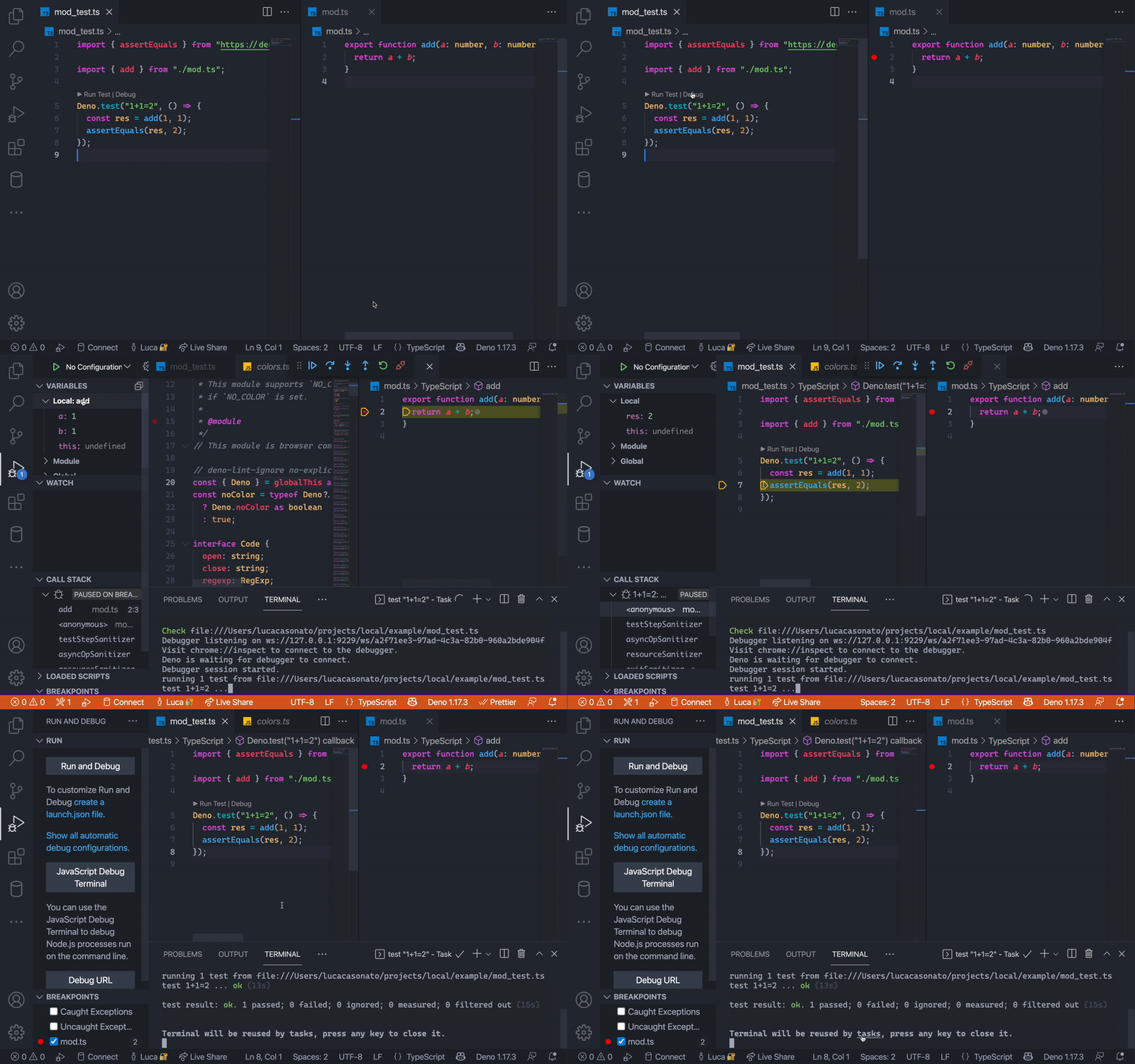
Thanks to @jespertheend for contributing this feature.
This release much improves the auto-completions for registies in the LSP. The registry completions now include helpful hovercards for each part of the URL. For deno.land/x packages, the hovercard includes package description, the star count, the last update date, and a link to the package’s documentation on doc.deno.land.
If you want to add support for registry completions for your own registry, make sure to read through the documentation.
This version brings an overhaul to deno coverage subcommand.
We received a feedback from community that generating coverage data is slow and
often the data is inaccurate. Generating coverage was slow due to indavertent
type checking of source files that were used to perform source mapping; by
simplifying the loading pipeline we managed to cut down processing time
significantly. Additionally, the deno coverage subcommand will now warn users
if the coverage data and available sources are in an inconsistent state. The
second problem of inaccurate data was alleviated by fixing some logic used to
merge coverage data collected from multiple files.
Deno uses V8 snapshots to
provide fast startup of the runtime and TypeScript compiler. These snapshots are
binary blobs. We produce them during build time and later embed them in the
deno executable. To make the executable smaller the snapshots were previously
compressed by V8 using zlib.
After an investigation it became apparent that using this zlib compression
incurs a reather significant startup overhead that could be avoided. Starting
with v1.18 Deno uses lz4 and zstd compression for the snapshots. This change
caused up to 33% faster startup of JavaScript runtime and up to 10% faster
startup of the TypeScript compiler.
For more details, see https://github.com/denoland/deno/pull/13320.
Thank you to @evanwashere for this improvement.
Deno 1.18 ships with version 9.8 of the V8 engine. This release doesn’t bring any new JavaScript features, but fixes several bugs that we discovered and reported in the recent months, including crashes in private methods (https://github.com/denoland/deno/issues/12940) and bug in ES module loading (https://github.com/denoland/deno/issues/11258).
此内容由惯性聚合(RSS阅读器)自动聚合整理,仅供阅读参考。 原文来自 — 版权归原作者所有。