









Today we are releasing Deno 1.9.0. This release contains many new features, performance improvements, and bug fixes:
fetch: new web compatibility
featuresIf you already have Deno installed you can upgrade to 1.9 by running
deno upgrade. If you are installing Deno for the first time, you can use one
of the methods listed below:
curl -fsSL https://deno.land/x/install/install.sh | sh


iwr https://deno.land/x/install/install.ps1 -useb | iex


brew install deno


scoop install deno


choco install deno
The current HTTP server in Deno, std/http, is implemented in pure TypeScript on top of TCP sockets. It has surpisingly good tail latency despite using a scripted HTTP server. But std/http’s major down side is that it is HTTP/1.1 only - with no easy path forward towards HTTP/2.
Ultimately we don’t want to be in the business of writing HTTP servers. HTTP is increasingly non-trivial and there are already well-implemented HTTP servers in native code.
Therefore we have employed Hyper to build a new native HTTP/2 server API in Deno.
The binding improves hello-world throughput by 48% when compared to the std/http pure TypeScript HTTP server.
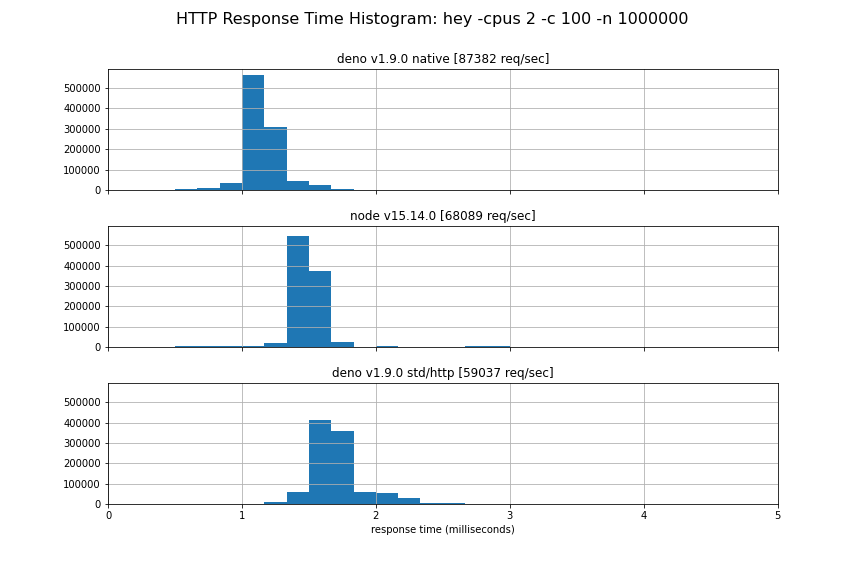
We hope to stabilize this new API soon, but for now you must use the
--unstable flag. Please test it out and give us feedback.
const body = new TextEncoder().encode("Hello World");
for await (const conn of Deno.listen({ port: 4500 })) {
  (async () => {
    for await (const { respondWith } of Deno.serveHttp(conn)) {
      respondWith(new Response(body));
    }
  })();
}
We have taken special care to use the same Request and Response objects as
the fetch() API uses. Both Request and Response objects have streamable
bodies, allowing full duplex communication to the client.
Also see the section below about ALPN, which is necessary to advertise HTTP/2 over TLS.
We’ve rebuilt our binding infrastructure to be significantly simpler & faster: we’ve removed over 1500 net lines-of-code from core, improved baseline binding (AKA ops or opcalls) overhead by up to ~65x or -98% and have established clean op foundations that should serve us well moving forward (for plugins, future optimizations, etc…).
In previous versions of Deno, opcalls followed a request/response pattern, encoding their data in custom “payloads” of ArrayBuffers. Historically these payloads used various encodings, ranging from JSON, flatbuffers to custom binary encodings… This was not only a performance bottleneck, it was a substantial source of complexity and fragmentation.
@AaronO suggested that instead of serializing back
and forth between these binary formats, JS & Rust,
it would be more efficient to
serialize directly between v8 and Rust values. Following that insight and a
quick prototype, serde_v8
was born. serde_v8 aims to provide a “maximally efficient” or “zero overhead”
bijection between v8 & Rust values whilst remaining expressive and familiar
(since it builds off David Tolnay’s fantastic
serde library).
Baseline op overhead is an important benchmark, it measures the minimum cost of a given class of opcalls (in nanoseconds per call):
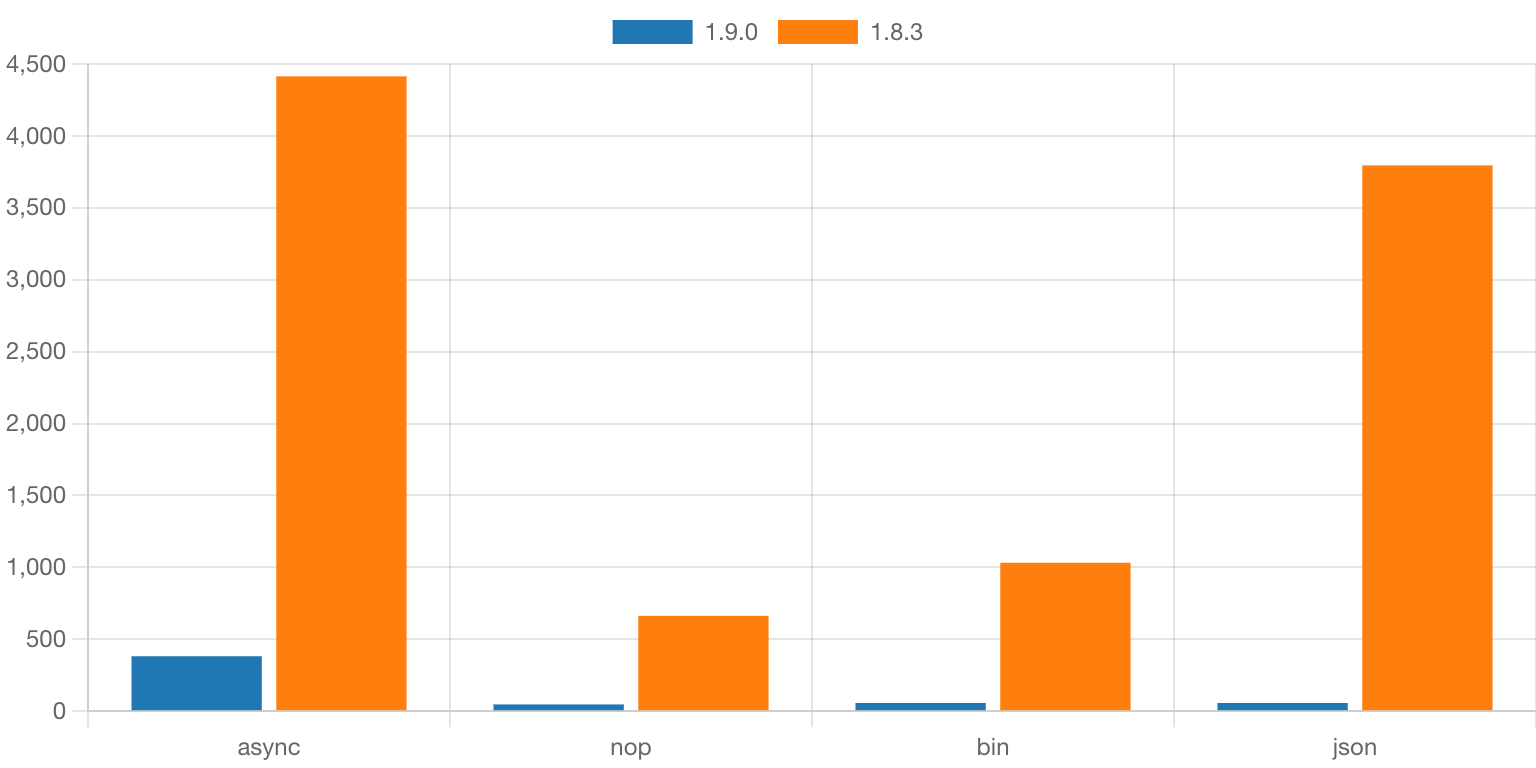
These op-layer improvements aren’t simply academic, they substantially improve Deno’s efficiency and have helped deliver throughput and latency gains on our HTTP benches. You should see improvements in your own Deno programs under heavy load or that were previously bottlenecked by opcall efficiency.
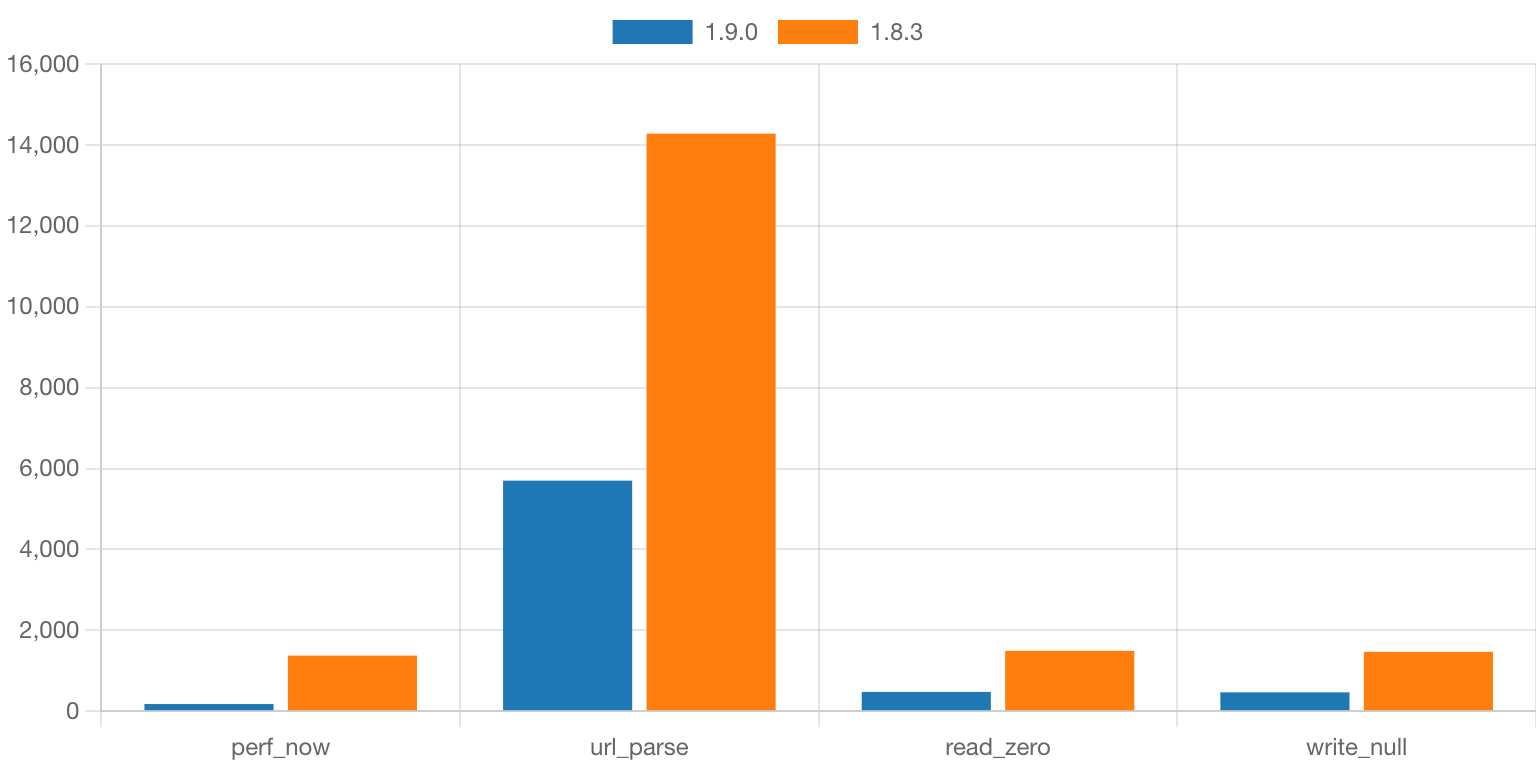
As you can see that many common functions in Deno are now up to ~3x faster.
fetchWe have introduced support for blob: (also known as object URLs) in this
release. The API for creating and revoking blob URLs is the same as in the
browser:
const blob = new Blob(["Hello World!"]);
const url = URL.createObjectURL(blob);
console.log(url);

const resp = await fetch(url);
console.log(await resp.text());

URL.revokeObjectURL(url);
Blob URLs can be used in fetch, to instantiate web workers using new Worker,
and in dynamic imports (using import()).
In addition to blob URLs, fetch now also supports data URLs:
const resp = await fetch("data:text/plain;base64,SGVsbG8gV29ybGQh");
console.log(await resp.text());
In this release Deno Language Server, the tool powering editor extensions for Deno, has gotten a few great new features and improvements.
Firstly we have improved and reintroduced the import completions feature from our old VS Code extension. It allows users to get completions in import statements. The LSP offers completions for local files, files already downloaded to your DENO_DIR cache, and also registry completions.
Here is an example of all three:
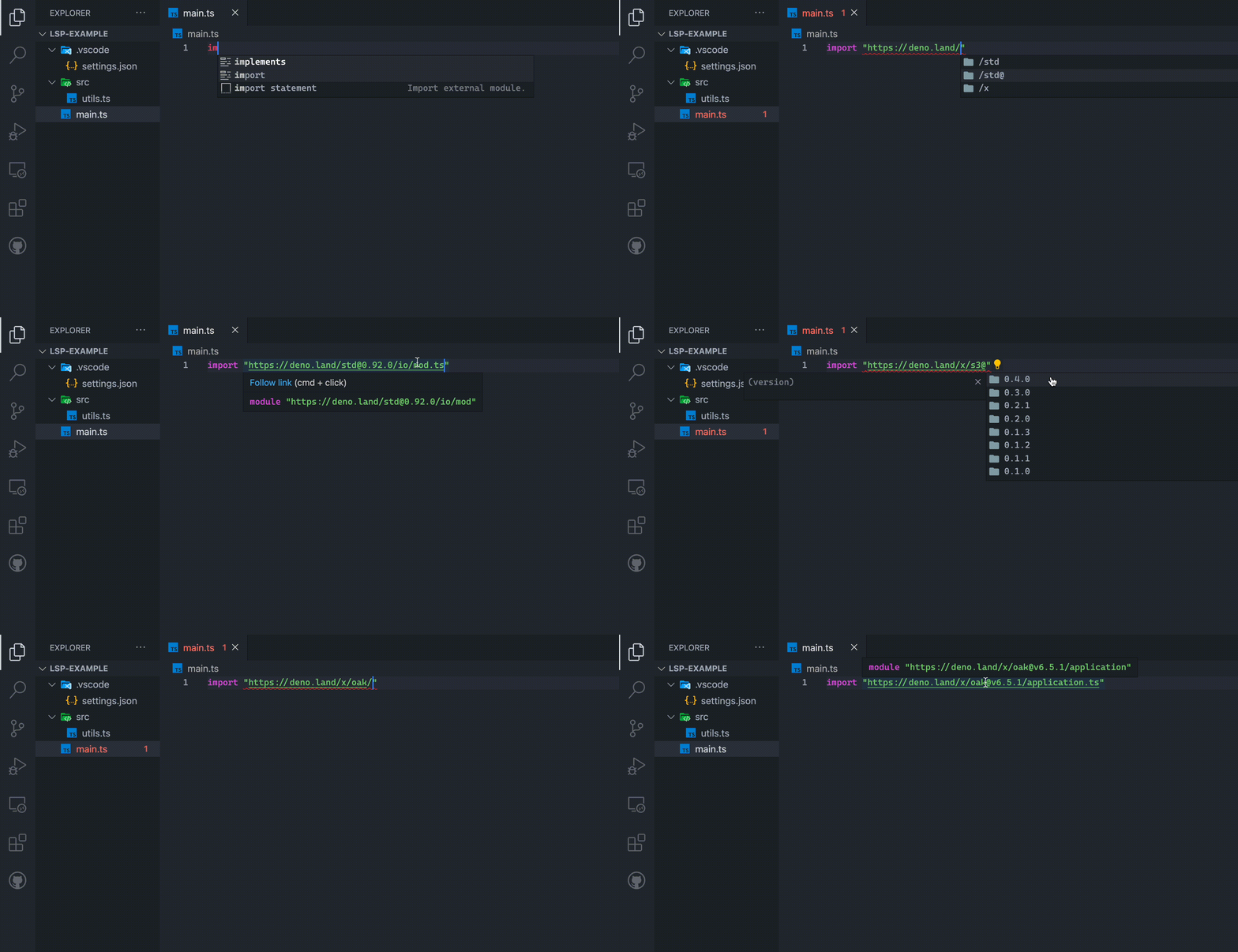
To enable completions for the https://deno.land/x registry add the following to your VS Code (or other editor) settings:
{
  "deno": {
    "suggest": {
      "imports": {
        "hosts": {
          "https://deno.land": true
        }
      }
    }
  }
}
Registry auto-completions are currently offered by https://deno.land/x. We are hoping more registries will implement the registry protocol to support this new feature. The Skypack registry has shown interest, and is likely to be supported soon. If you want to add support for your own registry, you can read the registry completions documentation.
In addition to the new import completions, we have also implemented the
textDocument/foldingRange and textDocument/selectionRange LSP functions that
enable your editor to provide better text snapping during selection, and better
support for folding up and expanding blocks of code.
This release also includes many bug fixes for the LSP, with a standout one being
a pesky bug on Windows systems that caused the LSP to panic when it encountered
specific file:// URLs.
--allow-env and --allow-runSeveral of Deno’s permission flags accept allow lists that make it possible to
scope program’s permissions granularly. For example --allow-read=/tmp grants
read permission only to the /tmp directory.
Prior to 1.9 both --allow-env and --allow-run were all in or nothing,
meaning that passing these flags granted full access to environmental variables,
and spawning subprocesses for any binary on the system respectively.
Now one can specify exactly which environment variables the program should have access to, or which subprocesses the program is allowed to spawn:
$ deno run --allow-env=DEBUG,LOG https://deno.com/blog/v1.9/env_permissions.ts
$ deno run --allow-run=deno https://deno.com/blog/v1.9/run_permissions.ts
Additionally, Deno.permissions.query() now allows querying for permissions to
execute specific binaries by using command field:
await Deno.permissions.query({ name: "run", command: "deno" });
Currently in Deno, if you run a program is missing the appropriate permission
flags it will throw an error and exit. In 1.9 we are adding the --prompt flag
which allows users to iteratively grant permissions as they are required during
runtime.
Using --prompt is especially useful when running one-off scripts from the
internet - you don’t need to know all required permissions upfront, instead you
can run the script without any permissions and grant or deny them one by one as
they are requested by the program.

Run the demo yourself:
deno run --prompt https://deno.com/blog/v1.9/prompt_permissions.ts
Please let us know if --prompt is useful for you. We are considering turning
it on by default in a future release.
Deno.listenTlsThe HTTP/2 protocol is connection agnostic. This means that it could be used on a Unix socket, a TCP socket, or on a connection using TLS. The major web browsers only allow HTTP/2 over TLS connections that announce support for HTTP/2 during the TLS handshake. This is done via the “Application-Layer Protocol Negotiation” TLS extension, also known as ALPN. This extension to the TLS handshake allows the TLS server and client to negotiate which application protocol they will use to communicate on the TLS connection. On the web to two dominant application protocols are HTTP/1.1 and HTTP/2. These have the ALPN protocol names “http/1.1” and “h2” respectively. Browsers will only send HTTP/2 requests to servers that announce HTTP/2 support, and if no ALPN protocols are listed, or only “http/1.1” is listed in the ALPN protocols, HTTP/1.1 will be used.
Up to this point the std/http server only supported HTTP/1.1, so there was no
need to support ALPN on TLS connections. With the introduction of
Deno.serveHttp in this release that changed. To make full HTTP/2 in Deno
possible, we have now added support for specifying the ALPN protocols to
announce when starting a TLS listener with Deno.listenTls.
Here is an example of creating a HTTPS server with full HTTP/2 support:
const listener = Deno.listenTls({
  port: 443,
  certFile: "./cert.pem",
  keyFile: "./key.pem",
  alpnProtocols: ["h2", "http/1.1"],
});

for await (const conn of listener) {
  handleConn(conn);
}

async function handleConn(conn: Deno.Conn) {
  const httpConn = Deno.serveHttp(conn);
  for await (const { request, respondWith } of httpConn) {
    respondWith(new Response(`Responding to ${request.url}`));
  }
}
1.9 brings stabilization of several APIs related to the file system:
Deno.fstatDeno.fstatSyncDeno.ftruncateDeno.ftruncateSyncAdditionally the following methods were added to the Deno.File class:
File.statFile.statSyncFile.truncateFile.truncateSyncIn an effort to make more code written using Deno directly portable to the browser and other non Deno runtimes, we have made the decision to deprecate and eventually remove all APIs from the Deno namespace that are not backed by system APIs. These APIs will be moved to the Deno standard library which can also be used in the browser.
In this release we are deprecating the following APIs:
Deno.BufferDeno.readAllDeno.readAllSyncDeno.writeAllDeno.writeAllSyncDeno.iterDeno.iterSyncThese APIs have been moved to the std/io module. We have introduced a new lint
rule in deno lint that finds and warns you about uses of these unstable APIs.
It will also suggest where in the standard library the API can now be found.
We are planning to remove these deprecated APIs for Deno 2.0. More aggressive deprecation messages might be introduced in a future pre-2.0 release. Please migrate code using these deprecated APIs as soon as possible.
useDefineForClassFieldsIn this release we have changed the default Deno tsconfig to include the
"useDefineForClassFields": true option. This option aligns TypeScript’s
handling of class field to the standard ECMA script semantics. This option can
not be overwritten in user code. We expect that most users will not need to
change their code.
此内容由惯性聚合(RSS阅读器)自动聚合整理,仅供阅读参考。 原文来自 — 版权归原作者所有。