

惯性聚合 高效追踪和阅读你感兴趣的博客、新闻、科技资讯
阅读原文 在惯性聚合中打开

推荐订阅源

cs.CL updates on arXiv.org
cs.AI updates on arXiv.org
Hacker News - Newest:
Hacker News - Newest: "LLM"
S
Security Affairs
PCI Perspectives
PCI Perspectives
Google Online Security Blog
W
WeLiveSecurity
www.infosecurity-magazine.com
Recent Commits to openclaw:main
P
Privacy & Cybersecurity Law Blog
Threat Intelligence Blog | Flashpoint
S
Security @ Cisco Blogs
Security Archives - TechRepublic
Cyberwarzone
Cyberwarzone
L
Lohrmann on Cybersecurity
TaoSecurity Blog
TaoSecurity Blog
V
Visual Studio Blog
博客园 - 聂微东
Scott Helme
Scott Helme
博客园 - 【当耐特】
K
Kaspersky official blog
Security Latest
Security Latest
K
KPMG report finds enterprise disconnect between AI and its ROI | CIO
MyScale Blog
MyScale Blog
Schneier on Security
WordPress大学
WordPress大学
博客园 - 叶小钗
C
Check Point Blog
V2EX - 技术
V2EX - 技术
钛媒体:引领未来商业与生活新知
钛媒体:引领未来商业与生活新知
博客园 - Franky
T
Tor Project blog
Apple Machine Learning Research
让小产品的独立变现更简单 - ezindie.com
腾讯CDC
雷峰网
雷峰网
博客园_首页
美团技术团队
Y
Y Combinator Blog
C
CERT Recently Published Vulnerability Notes
AWS News Blog
AWS News Blog
月光博客
月光博客
N
Netflix TechBlog - Medium
Last Week in AI
Last Week in AI
Recent Announcements
Google DeepMind News
Help Net Security
Help Net Security
P
Proofpoint News Feed
MongoDB | Blog
MongoDB | Blog
C
Cybersecurity and Infrastructure Security Agency CISA

Deno

Deno 2.8 | Deno Claw Patrol: an open-source security firewall for agents | Deno Fresh 2.3: Zero JS by default, View Transitions, and Temporal support | Deno Deno 2.7: Temporal API, Windows ARM, and npm overrides | Deno Build a dinosaur runner game with Deno, pt. 6 | Deno Build a dinosaur runner game with Deno, pt. 5 | Deno Deno Deploy is Generally Available | Deno Introducing Deno Sandbox | Deno Build a dinosaur runner game with Deno, pt. 4 | Deno Build a dinosaur runner game with Deno, pt. 3 | Deno Build a dinosaur runner game with Deno, pt. 2 | Deno React / Next.js Denial-of-Service Vulnerability: Deno Deploy users protected | Deno Deno 2.6: dx is the new npx | Deno Build a dinosaur runner game with Deno, pt. 1 | Deno React Server Functions / Next.js Vulnerability: Deno Deploy users protected | Deno My highlights from the new Deno Deploy | Deno Deno's Other Open Source Projects | Deno How Deno protects against npm exploits | Deno Help Us Raise $200k to Free JavaScript from Oracle | Deno Deno 2.5: Permissions in the config file | Deno Fresh 2.0 Graduates to Beta, Adds Vite Support | Deno Deno 2.4: deno bundle is back | Deno JavaScript™ Trademark Update | Deno What's coming to JavaScript | Deno A brief history of JavaScript | Deno Reports of Deno's Demise Have Been Greatly Exaggerated | Deno An Update on Fresh | Deno How Plaid migrated 100 services to a new database platform 5x faster with Deno | Deno Deno 2.3: Improved deno compile, local npm packages, and more | Deno Add JSR packages with pnpm and Yarn | Deno Zero-config Debugging with Deno and OpenTelemetry | Deno Exploring Art with TypeScript, Jupyter, Polars, and Observable Plot | Deno Deno v Oracle Update 3: Fighting the JavaScript Trademark | Deno Build a custom RAG AI agent in TypeScript and Jupyter | Deno How to get deep traces in your Node.js backend with OTel and Deno | Deno toranoana.deno #20 登録受付中(2025年3月14日) | Deno Node just added TypeScript support. What does that mean for Deno? | Deno The Dino 🦕, the Llama 🦙, and the Whale 🐋 | Deno Publish a lint rule, get a prize | Deno Deno 2.2: OpenTelemetry, Lint Plugins, node:sqlite | Deno If you're not using npm specifiers, you're doing it wrong | Deno How Deno's documentation is evolving | Deno Oracle justified its JavaScript trademark with Node.js—now it wants that ignored | Deno Introducing the JSR open governance board | Deno Intro to Wasm in Deno | Deno Announcing OpenAI on JSR | Deno Deno in 2024 | Deno Goodbye WinterCG, welcome WinterTC | Deno Build a SolidJS app with Deno | Deno Run your Next.js SSR app on Deno Deploy | Deno Solve Advent of Code 2024 with Deno and Win Prizes! | Deno Deno v. Oracle: Canceling the JavaScript Trademark | Deno Deno 2.1: Wasm Imports and other enhancements | Deno Build a Typesafe API with tRPC and Deno | Deno Self-contained Executable Programs with Deno Compile | Deno Build a Database App with Drizzle ORM and Deno | Deno Introducing your new JavaScript package manager: Deno | Deno Announcing Growthbook on JSR | Deno Build an Astro site with Deno | Deno How to convert CommonJS to ESM | Deno Announcing Deno 2 | Deno The Final Touches: What’s New In v2.0.0-rc.10 | Deno Announcing Stable V8 Bindings for Rust | Deno Deno 2.0 Release Candidate | Deno Secure, efficient private npm registries with Cloudsmith and Deno | Deno Painting the Plane as We Fly It: Designing JSR | Deno Introducing Web Cache API support on Deno Deploy | Deno Deno 1.46: The Last 1.x Release | Deno Protect your cloud spend with new Deno Deploy spend limits | Deno What we got wrong about HTTP imports | Deno Benchmarking AWS Lambda Cold Starts Across JavaScript Runtimes | Deno Announcing Supabase on JSR | Deno Deno 1.45: Workspace and Monorepo Support | Deno Introducing KV Backup for Deno Subhosting | Deno A Gentle Intro to TypeScript | Deno Announcing Hono on JSR | Deno How We Made the Deno Language Server Ten Times Faster | Deno How the Guardian uses Deno to audit accessibility and performance across their 2.7 million articles | Deno Introducing More Flexible Domain Association for Deno Subhosting | Deno The stabilization process of the Standard Library has begun | Deno Deno 1.44: Private npm registries, improved Node.js compat, and performance boosts | Deno How we built a secure, performant, multi-tenant cloud platform to run untrusted code | Deno The Deno Standard Library is now available on JSR | Deno How to document your JavaScript package | Deno Deno 1.43: Improved Language Server performance | Deno How Slack used Deno to save months of engineering effort in launching their new platform | Deno JSR Is Not Another Package Manager | Deno Announcing the Hookdeck SDK on JSR | Deno Announcing the Neon Serverless Driver on JSR | Deno An intro to TSConfig for JavaScript Developers | Deno How we built JSR | Deno How Netlify used Deno Subhosting to build a successful edge functions product | Deno Introducing Simpler Project Creation in Deno Deploy | Deno Deno 1.42: Better dependency management with JSR | Deno Introducing deployctl, the command line interface for Deno Deploy | Deno Introducing JSR - the JavaScript Registry | Deno How to add Monaco to a Next.js app and securely run untrusted user code | Deno Survey Results and Roadmap | Deno Deno 1.41: smaller deno compile binaries | Deno Webhooks suck, but here are alternatives | Deno
Your Low Code Solution Needs an Escape Hatch | Deno
Andy Jiang · 2024-05-04 · via Deno

Low-code solutions — visual workflow builders — can offer your users value by significantly reducing development effort and complexity. However, as your platforms’ capabilities grow with more integrations and functionalities, your users will inevitably require more customization to meet their needs. Instead of trying to anticipate and build for every use case, innovative platforms will simply offer an “escape hatch”, letting users write, host, and run custom code specifically designed to solve their problems.

Figuring out where and when to add a customizable code block to your low-code solution is an important product decision, which can require meaningful engineering effort. In this post, we’ll cover three common ways to add a code-level customization escape hatch to your low-code platform:

  • Internal custom block for data transformation
  • Custom external HTTP connectors
  • Custom dashboard and website components

Let’s get started.

Internal custom block for data transformation

Most low-code platforms enable workflow automation via a visual drag-and-drop interface. The connectors are generally cloud integrations, and the “blocks” either transform data payloads or trigger events. Common examples include cloud connector workflow builders like Zapier and IFTTT, but this also includes platforms like Descope, a drag and drop user authentication and management tool.
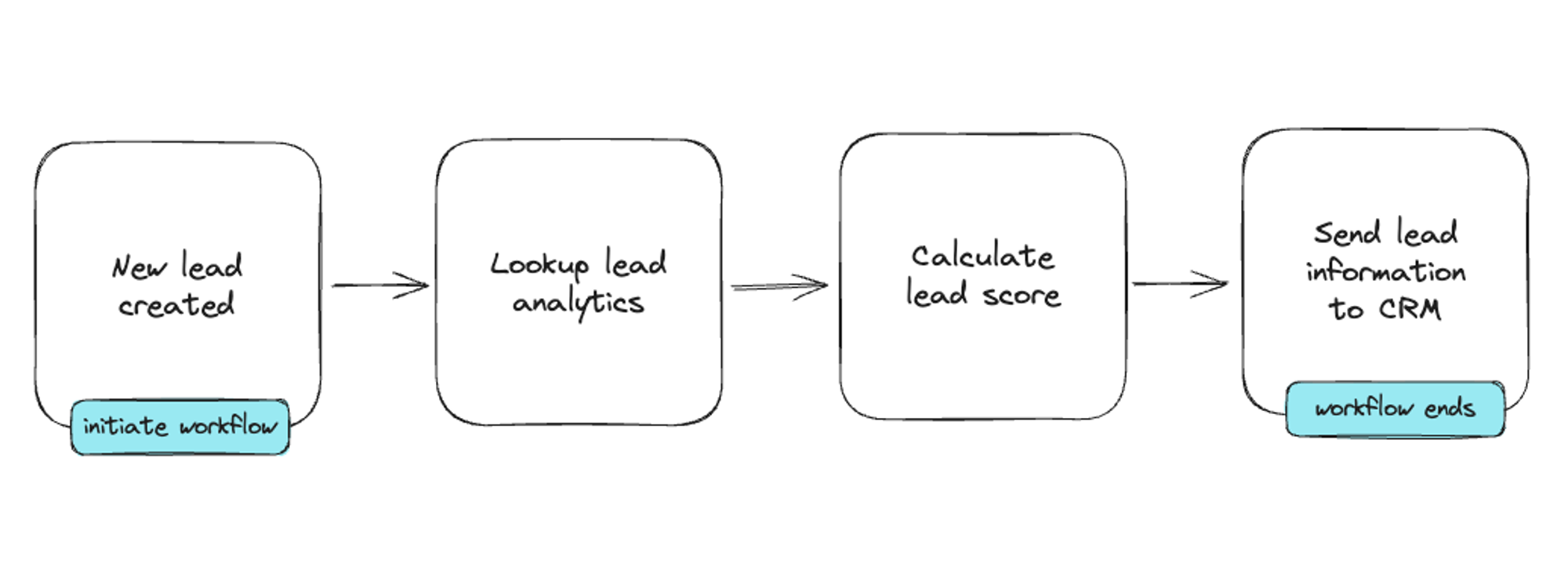
This low-code example allows you to build a lead scoring system through a drag and drop interface.

This low-code example allows you to build a lead scoring system through a drag and drop interface.

Users may want more flexibility on how they transform or use the data payload during the workflow. For instance, if the workflow is meant to calculate a lead score based on behavior, what if the user wants to pull in data from an external API and use their own algorithm? Or if the workflow is to assess purchase risk and the user has their own method for calculating that? Offering a “block” where the user can write code to have full control over the data is hugely valuable.
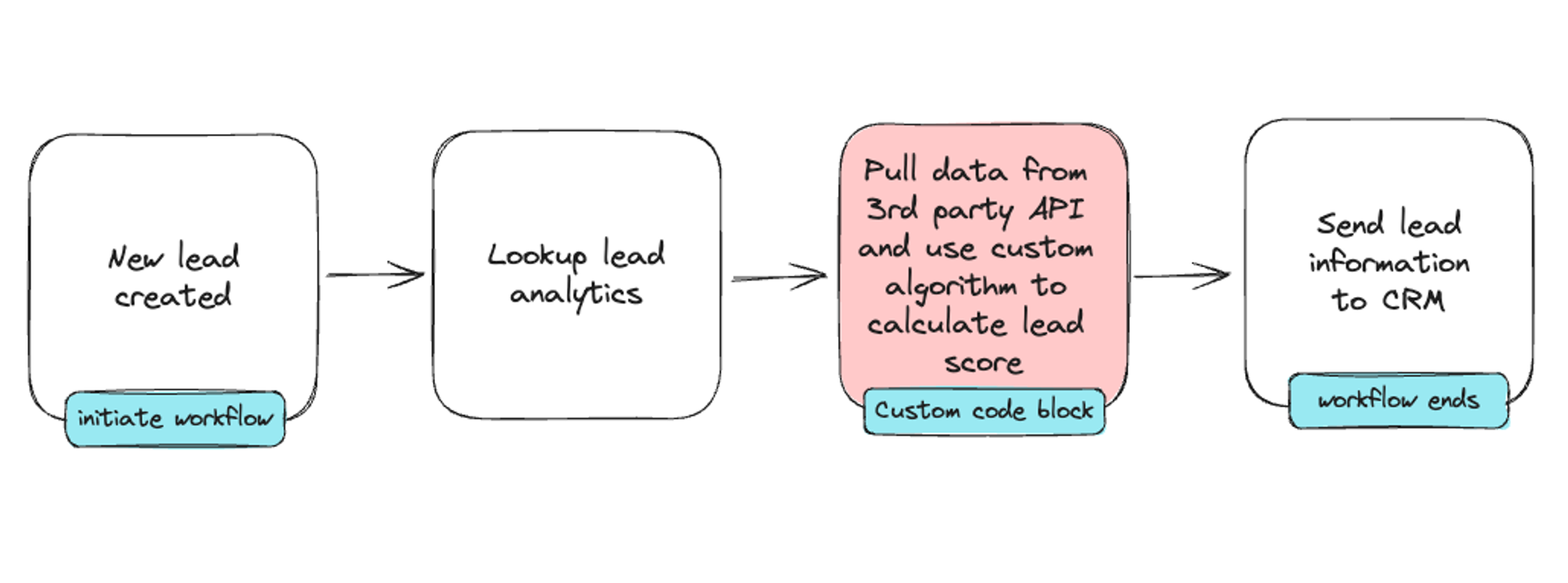
Adding a custom code block in between connectors in a low code workflow builder.

With a custom code block, users can pull necessary data and use their own algorithms tailored to their business to calculate a lead score.

Building this “block” that can take custom code and run it can be tricky, as there are two major considerations: security and performance.

Security means that anyone’s custom code cannot access another users’ environment, any shared global objects, or even your underlying infrastructure. Doing so could result in not only leaking personal data, but also loss of user confidence and trust in your product. When designing your custom code escape hatch, it’s imperative that there are multiple layers of defense in between deployments to maximize security.

Performance is also hugely important. When your user’s custom code block is initiated, there should be minimal cold starts to ensure that the entire workflow happens immediately. For low-code platforms assessing chargeback risk or user authentication, for example, their API responses may initiate business-critical downstream workflows, where every millisecond matters. When evaluating potential technology solutions, determining which has the least cold start time will keep your users happy.

Run untrusted JavaScript from multiple customers in a secure, hosted sandbox with Deno Subhosting. Get started for free today.

Custom external HTTP connectors

Most workflow automation builders offer external HTTP connectors, which allow users to either initiate a workflow via receiving an incoming webhook or to send an HTTP request as part of a workflow. While offering webhooks gives developers a way to integrate third party external services to your platform, it’s not the best developer experience. The onus is on the developer to standup and maintain a server (or queues) to ensure webhooks are received and processed properly.
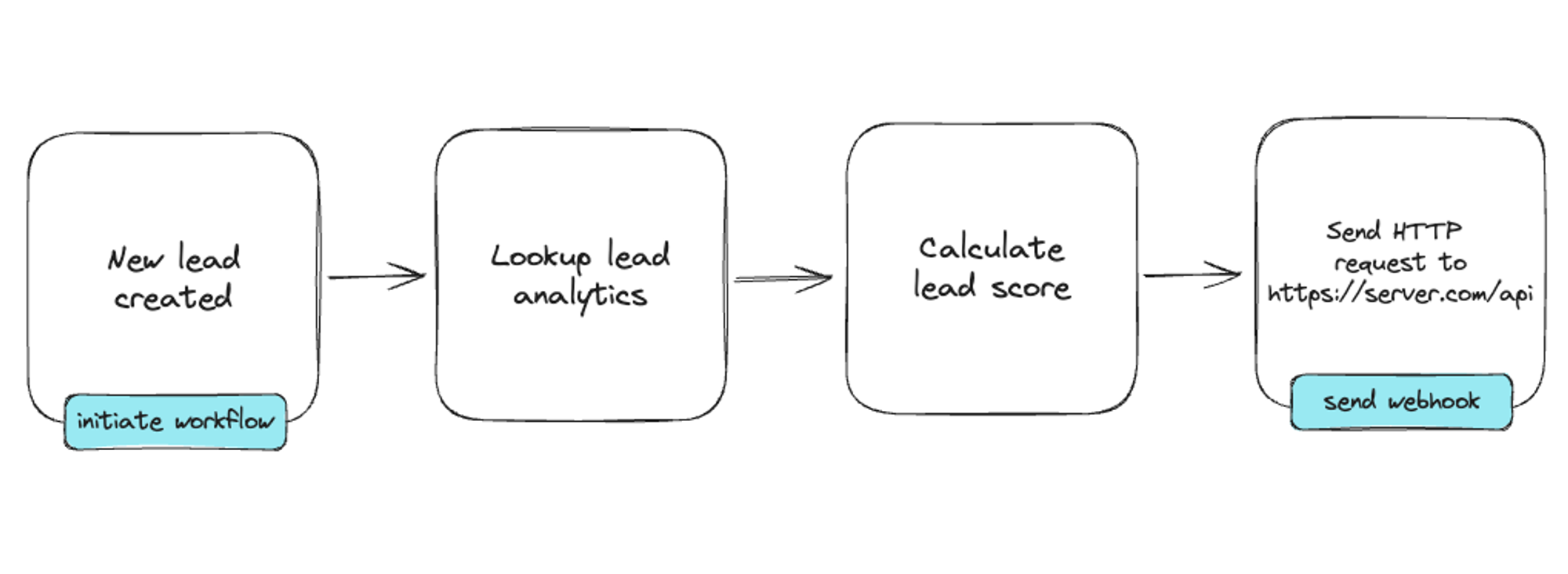
A low-code workflow using an external HTTP webhook connector.

What if your user wants to transform the data before routing it to a third party API? Perhaps that use case is small enough that setting up and maintaining a highly available server is overkill. This user just wants to be able to write a tiny bit of serverless code that runs immediately when called.

In the above scenario, webhooks is just the start of the solution. Savvy platforms go beyond a webhook and offer their users a custom code block that takes the webhook payload and allows code to custom manipulate it with actions like sending another HTTP request to another web service. These little web-based text editors can come loaded with access to specific npm modules so that users can be productive immediately.
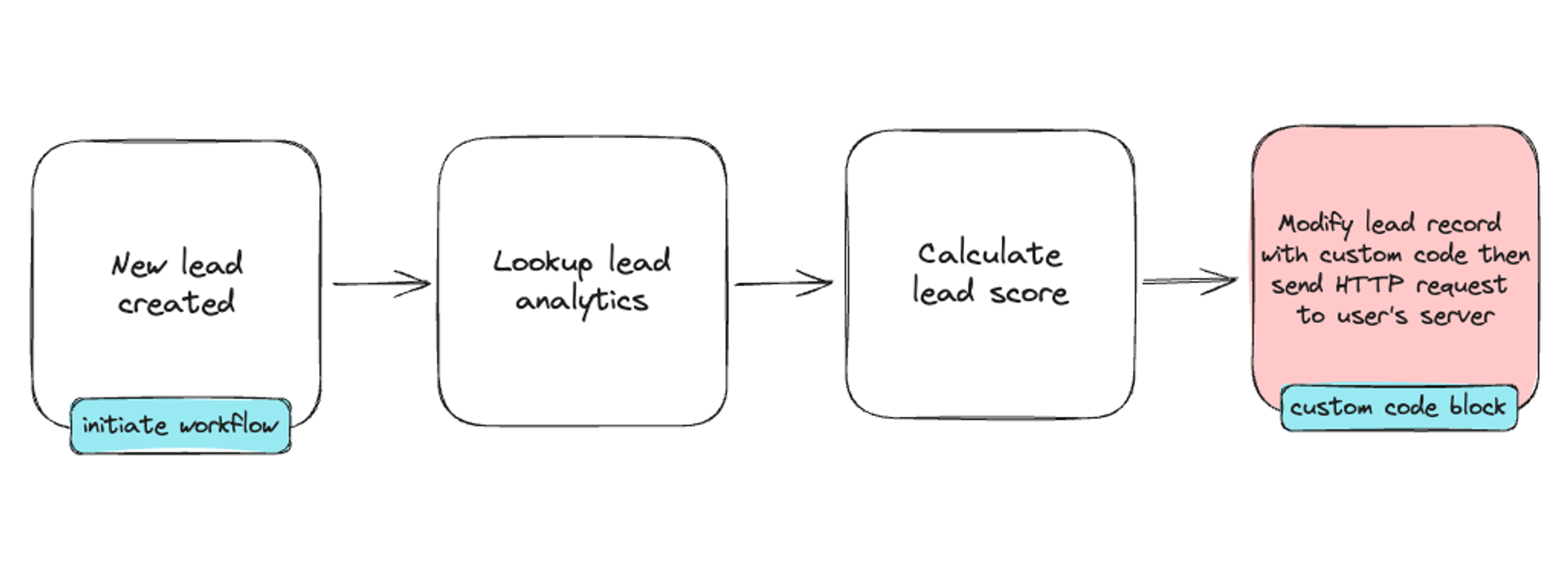
Adding a custom HTTP handler as a block in a low-code workflow builder.

For this use case, performance and security again are top concerns. This code needs to be executed immediately, and not have access to any other users’ code blocks, or your underlying infrastructure.

Custom dashboard and website components

For low-code dashboard, reporting, and even site-building solutions, oftentimes there are pre-made charts, graphs, or UI components that can ingest and visualize data. Though it’s possible to build every possible chart and component type, it’s hard to predict exactly what your end users need for their use case.
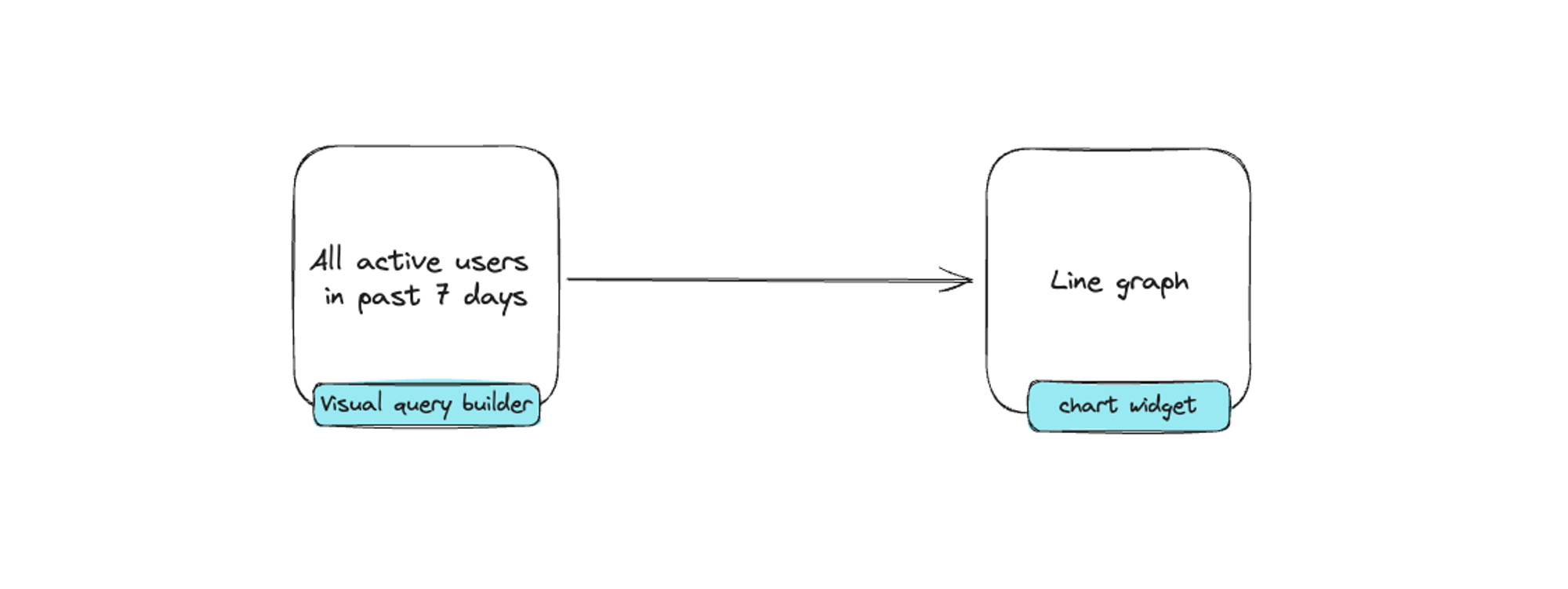
Typical workflow for using a pre-made chart component in a low-code environment.

One approach is to offer a custom code component where users can build their own chart, graph, or UI widget. This code can either manipulate the data directly and output it in a way that can be parsed by a chart or graph, or it can even give the user control over how to render a chart or graph.
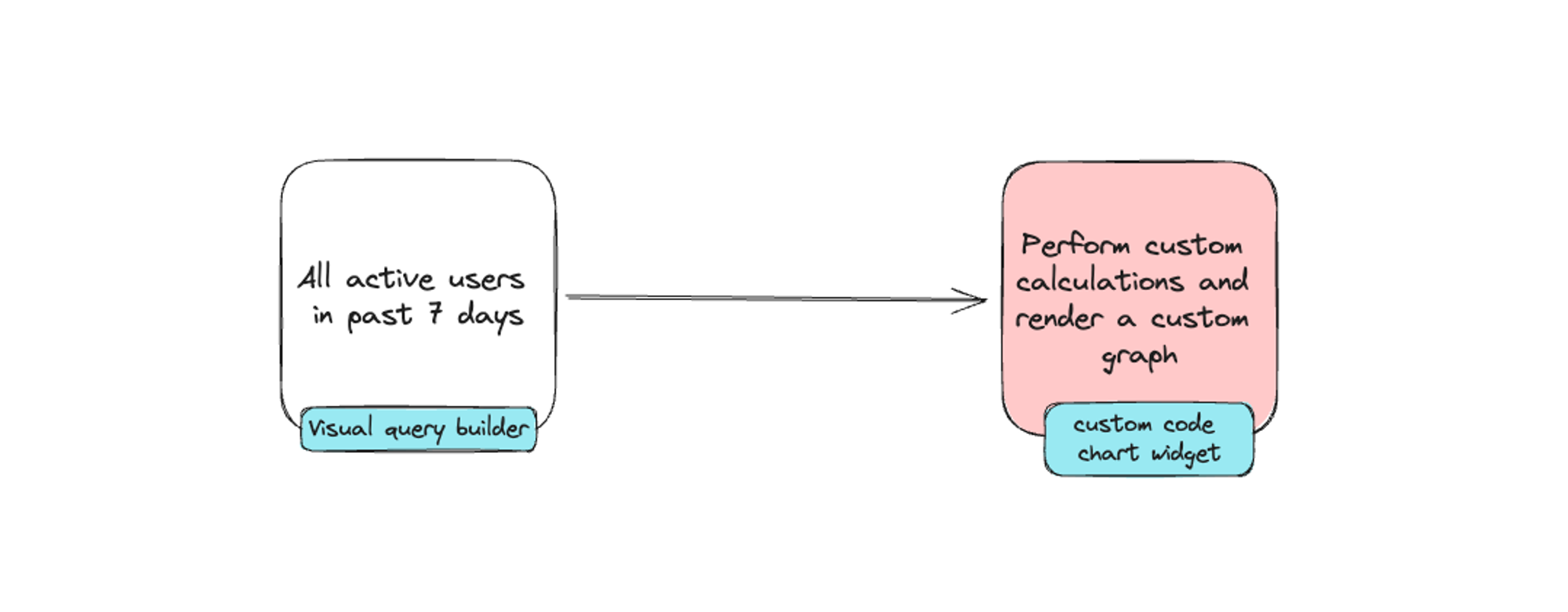
Adding a custom code block that allows users to build their own UI components.

By allowing your users to create custom UI components with code, it saves engineering resources from having to anticipate and build for a wide range of potential use cases. For instance, Brazil’s top e-commerce platform offers both a low-code wysiwyg site editor and the ability to edit raw code to create re-usable, composable widgets for store fronts. This escape hatch provides their users the most control and flexibility when it comes to building customized solutions to fit their needs.

Deno Subhosting: securely run untrusted JavaScript with minimal cold starts

While you can build your own infrastructure to run untrusted code, there is a significant design complexity when it comes to maximizing security and minimizing cold starts. Deno Subhosting was designed from the ground up with security in mind, is more performant than using AWS Lambda, and is battle tested as it supports enterprise use cases such as Netlify that process over 255m requests per day.

If you’re interested in launching custom code widgets in your low-code platform in weeks and not months, check out Deno Subhosting for free today.