










The Deno ecosystem continues to mature, and with the 1.38 release, we’re excited
to introduce significant improvements to the deno doc command. Topping the
list is the ability to produce static site documentation using the new
deno doc --html feature, a game-changer for developers looking to share and
publish their project documentation.
If you already have Deno installed, upgrade to version 1.38 in your terminal with:
If you don’t yet have Deno installed, you can install it with one of the following commands, or many other ways.
MacOS / Linux Install
curl -fsSL https://deno.land/x/install/install.sh | shWindows Install
irm https://deno.land/install.ps1 | iexHere’s an overview of what’s new in Deno 1.38.
deno doc improvements: The new deno doc --html
command generates a static site with documentation for your project.--unstable-hmr
flag will detect changes, reload your server, while preserving state, so you
can stay productive.npm and run it
with Deno.deno run --env: built-in support for .env files.deno task supports head commandDeno.test support in the REPL: Works great
with Jupyter.Deno API changes: Deno.serve now supports unix
sockets.window.name and EventSource.std/http/server.ts.--unstable-* flags: Better internal
feature flagging.structuredClone is
now much faster when transferables are not used.Array.fromAsync and Promise.withResolvers.deno doc updatesDrawing heavy inspiration from the acclaimed
rustdoc, we are proud
to introduce significant enhancements to the deno doc command in this release.
At the forefront is the new deno doc --html command. This enables you to
generate a static documentation site for your project, making it easier than
ever to share insights with your team or broadcast them on the web.
$ deno doc --html --name="My library" ./mod.ts
Written 11 files to ./docs/
The resulting site offers a comprehensive index of your library and dedicated pages for each exported symbol. Enhancing the user experience is a client-side symbol search, reminiscent of rustdoc’s indexed search. But don’t worry about dependencies; the site remains functional even with JavaScript disabled.
For a real-world glimpse of this output, explore the generated documentation for the standard library’s fs module.
For those eager to contribute, check out the curated list of issues to help elevate the documentation experience for the Deno community.
Furthermore, deno doc has expanded its horizons. Gone are the days of
restricting documentation generation to a single module. With this release, pass
multiple entrypoints and watch as deno doc crafts documentation for each
seamlessly.
$ deno doc ./mod.ts other.ts
Note, though, the slight alteration in filtering on the command line. To specify
a symbol, you’ll now need to use the --filter flag.
Documentation generation has become more intelligent in this release as well. With the power of a newly implemented symbol graph in Rust, it now comprehends intricate relations between types and symbols. For instance, it now recognizes when a private interface is used by an exported type, tailoring its output accordingly.
The new --lint flag makes it easier to find potential problems and
opportunities in your documentation. As you generate documentation, it scans for
issues, pointing out potential pitfalls and suggesting remedies. Whether it’s an
error due to an unexported type, a missing return type, or a missing JS doc
comment on a public type, deno doc --lint has you covered, ensuring your
documentation is of the highest caliber.
For instance, if you were to omit the : string return type in a sample, the
output might look something like:
$ deno doc --lint mod.ts
Type 'getName' references type 'Person' which is not exported from a root module.
Missing JS documentation comment.
Missing return type.
    at file:///mod.ts:8:1

error: Found 3 documentation diagnostics.
With these checks in place, deno doc not only helps you craft stellar documentation but also optimizes type-checking in your projects.
Deno v1.38 ships with hot module replacement. Hot Module Replacement (HMR) is a feature in JavaScript development that allows you to update and replace modules in an application without requiring a full page refresh or a complete application restart. It’s a valuable tool for improving the development workflow.
You can try it out using deno run --unstable-hmr mod.ts:
This flag works exactly like --watch flag, but instead of restarting the
process it tries to patch the files in-place. Similarly to --watch you can
pass additional files that should be watched for changes:
$ deno run --unstable-hmr=data.json ./mod.tsKeep in mind that all files passed to the flag will stil cause a full process restart; also in some situations it’s not possible to patch the file in-place (eg. if you changing a top-level symbol or an async function that is currently running). In such cases the process will also do a full restart.
This feature is very useful in various frameworks settings - you might have an
application that has both backend and frontend written in Deno, then it’s very
useful to be able to notify the browser that a file has been changed and the
browser should reload the page. To help in scenarios like that, you can
programatically listen for "hmr" events and act accordingly:
addEventListener("hmr", (e) => {


  console.log("HMR triggered", e.detail.path);
});
To make it easier to try Deno with a Node.js project, this release introduces unstable support for using the npm package manager of your choice with Deno.
To try it out, execute the following commands:
$ mkdir example && cd example
$ npm init -y
$ npm install cowsay
Now create a deno.json to enable the --unstable-byonm flag for our project:
{
  "unstable": ["byonm"]
}
And a simple main.ts file:
import cowsay from "cowsay";

console.log(cowsay.say({
  text: `Hello from Deno using BYONM!``,
}));
Now run the project:
$ deno run main.ts
✅ Granted read access to "node_modules/cowsay/cows/default.cow".
 ______________________________
< Hello from Deno using BYONM! >
 ------------------------------
        \   ^__^
         \  (oo)\_______
            (__)\       )\/\
                ||----w |
                ||     ||
If we go and delete the node_modules directory, you’ll see an error telling us
to run npm install first:
$ rm -rf node_modules
$ deno run main.ts
error: Could not resolve "cowsay", but found it in a package.json. Deno expects the node_modules/ directory to be up to date. Did you forget to run `npm install`?
    at file:///example/main.ts:1:20
Of course, we can also use pnpm:
$ pnpm install
$ deno run --allow-read=. main.ts
 ______________________________
< Hello from Deno using BYONM! >
 ------------------------------
        \   ^__^
         \  (oo)\_______
            (__)\       )\/\
                ||----w |
                ||     ||
This feature greatly increases the compatibility of Deno with the npm ecosystem. In order to make Deno work out of the box similarly to Node with no additional setup instructions, we are considering making this the default when a package.json exists in an upcoming release. This would be a breaking change–the current auto-install behavior would be opt-in instead of opt-out. See this issue comment for more details and please share your thoughts there.
Note that if you are using this feature in an editor, you will have to restart
the Deno Language Server after running npm install or pnpm install in order
for the new dependencies to be picked up. We will fix this in a future release.
Follow #21042 for updates.
If you want to know more about Node.js compatibility in Deno, check out our Node.js compatibility list.
In Deno, using Node.js built-ins requires a node: scheme:
import fs from "node:fs";
console.log(fs);
This works in both Node.js and Deno, but Deno errors if you only specify "fs":
> deno run main.ts
error: Relative import path "fs" not prefixed with / or ./ or ../
If you want to use a built-in Node module, add a "node:" prefix (ex. "node:fs").
    at file:/
Starting in this release, you can avoid this error by using the
--unstable-bare-node-builtins flag (or "unstable": ["bare-node-builtins"] in
a deno.json). Alternatively, this also works with --unstable-byonm. That
said, it’s still recommended to add a node: scheme to these specifiers.
A bunch of fixes to Node.js APIs landed in this release:
buffer.Buffer.utf8ToBytescrypto.randomFillSynchttp2.ClientHttp2Sessionos.availableParallelismprocess.argv0process.version now returns 18.18.0 version for nodetty.ReadStreamtty.WriteStreamuv.errnameThis release introduces a new JSX transform that is optimized for server-side rendering. It works by serializing the HTML parts of a JSX template into static string arrays at compile time, instead of creating hundreds of short lived objects.
Traditionally, JSX leaned quite heavily on the Garbage Collector because of its heritage as a templating engine for in-browser rendering.
const a = <div className="foo" tabIndex={-1}>hello<span /></div>


import { jsx } from "react/jsx-runtime";

const a = jsx(
  "div",
  {
    className: "foo",
    tabIndex: -1,
    children: [
      "hello",
      jsx("span", null)
    ]
  }
})
Every element expands to two object allocations, a number which grows very quickly the more elements you have.
const a = {
  type: "div",
  props: {
    className: "foo",
    tabIndex: -1,
    children: [
      "hello",
      {
        type: "span",
        props: null,
      },
    ],
  },
};
The new transform moves all that work to transpilation time and pre-serializes all the HTML bits of the JSX template.
const a = (
  <div className="greeting">
    <a href={link}>
      Hello <b>{name}!</b>
    </a>
  </div>
);


import { jsxAttr, jsxEscape, jsxTemplate } from "preact/jsx-runtime";

const tpl = ['<div class="greeting"><a ', ">hello <b>", "!</b></a></div>"];
const a = jsxTemplate(tpl, jsxAttr("href", link), jsxEscape(name));
The jsxTemplate function can be thought of as a tagged template literal. It
has very similar semantics around concatenating an array of static strings with
dynamic content. To note here is that the className has been automatically
transformed to class, same for tabIndex transformed to tabindex. Instead
of creating thousands of short lived objects, the jsxTemplate function
essentially just calls Array.join() conceptually. Only the output string is an
allocation, which makes this very fast.
In our testing we observed around 7-20x faster rendering times and a 50% reduction in Garbage Collection times. The more HTML parts the JSX has, the greater the speedup. For components we’ll fall back to the traditional JSX transform internally.
The transform was intentionally designed in a way that makes it independent of
any framework. It’s not tied to Preact or Fresh either. By setting a custom
jsxImportSource config in deno.json you can point it to your own runtime
module.
{
  "compilerOptions": {
    "jsx": "precompile",
    "jsxImportSource": "custom"
  },
  "imports": {
    "custom/jsx-runtime": "path/to/my/mod.ts"
  }
}
The custom jsx runtime is expected to export the following functions:
jsxTemplate(strings, ...dynamic)jsxAttr(name, value)jsxEscape(value)jsx(type, props, key)deno run --envA new unstable --env flag can now be used to specify a .env file to load
(ex. --env=.env.dev) or to load the .env file in the current working
directory if no value is provided (ex. --env). This has the advantage of not
needing --allow-read=.env permissions to load the .env file.
$ cat .env
MY_ENV_VAR="Loaded!"
$ cat main.js
console.log(Deno.env.get("MY_ENV_VAR"));
$ deno run --env main.js
✅ Granted env access to "MY_ENV_VAR".
Loaded!
We’ll be working on improving this in the coming releases to add features such as multi-line variable support.
Numerous bugs in were fixed in the WebSockets implementation, making sending of large packets over secure streams much more reliable and fixing occasional lockups in long-running WebSocket streams. WebSocket clients are also using the new rustls-tokio-stream crate which is our new TLS implementation that we’ll be rolling out slowly in Deno.
Deno also now supports RFC8441
WebSockets over http/2, which is supported for servers that advertise only
http/2 support, and support the http/2 extended connect protocol with the
websocket protocol. To match the behaviour of browsers, any server that
supports both http/1.1 and http/2 WebSockets will continue to use http/1.1.
deno task supports head commandThe deno task command now supports the head command cross-platform, which
allows you to view the first few lines of a file.
{
  "tasks": {
    "readmeSummary": "head -n 3 README.md"
  }
}
$ deno task readmeSummary
Deno is a simple, modern and secure runtime for JavaScript and TypeScript thatThe head accepts a single file and supports -n/--name argument to define
number of lines to print. By default it prints 10 lines.
Thank you @dahlia for contributing this feature!
Some of the Deno language server’s configuration options are re-implementations
of options for VSCode’s typescript-language-features. For example:
{
  "deno.inlayHints.parameterNames.enabled": "all"
}
These can now be toggled under their original keys. Here is the full list of supported options and their defaults:
{
  "javascript.inlayHints.enumMemberValues.enabled": false,
  "typescript.inlayHints.enumMemberValues.enabled": false,
  "javascript.inlayHints.functionLikeReturnTypes.enabled": false,
  "typescript.inlayHints.functionLikeReturnTypes.enabled": false,
  "javascript.inlayHints.parameterNames.enabled": "none",
  "typescript.inlayHints.parameterNames.enabled": "none",
  "javascript.inlayHints.parameterNames.suppressWhenArgumentMatchesName": true,
  "typescript.inlayHints.parameterNames.suppressWhenArgumentMatchesName": true,
  "javascript.inlayHints.parameterTypes.enabled": false,
  "typescript.inlayHints.parameterTypes.enabled": false,
  "javascript.inlayHints.propertyDeclarationTypes.enabled": false,
  "typescript.inlayHints.propertyDeclarationTypes.enabled": false,
  "javascript.inlayHints.variableTypes.enabled": false,
  "typescript.inlayHints.variableTypes.enabled": false,
  "javascript.inlayHints.variableTypes.suppressWhenTypeMatchesName": true,
  "typescript.inlayHints.variableTypes.suppressWhenTypeMatchesName": true,
  "javascript.preferences.autoImportFileExcludePatterns": [],
  "typescript.preferences.autoImportFileExcludePatterns": [],
  "javascript.preferences.importModuleSpecifier": "shortest",
  "typescript.preferences.importModuleSpecifier": "shortest",
  "javascript.preferences.jsxAttributeCompletionStyle": "auto",
  "typescript.preferences.jsxAttributeCompletionStyle": "auto",
  "javascript.preferences.quoteStyle": "auto",
  "typescript.preferences.quoteStyle": "auto",
  "javascript.preferences.useAliasesForRenames": true,
  "typescript.preferences.useAliasesForRenames": true,
  "javascript.suggest.autoImports": true,
  "typescript.suggest.autoImports": true,
  "javascript.suggest.classMemberSnippets.enabled": true,
  "typescript.suggest.classMemberSnippets.enabled": true,
  "javascript.suggest.completeFunctionCalls": false,
  "typescript.suggest.completeFunctionCalls": false,
  "javascript.suggest.enabled": true,
  "typescript.suggest.enabled": true,
  "javascript.suggest.includeAutomaticOptionalChainCompletions": true,
  "typescript.suggest.includeAutomaticOptionalChainCompletions": true,
  "javascript.suggest.includeCompletionsForImportStatements": true,
  "typescript.suggest.includeCompletionsForImportStatements": true,
  "javascript.suggest.names": true,
  "typescript.suggest.objectLiteralMethodSnippets.enabled": true,
  "javascript.suggest.paths": true,
  "typescript.suggest.paths": true,
  "javascript.updateImportsOnFileMove.enabled": "prompt",
  "typescript.updateImportsOnFileMove.enabled": "prompt"
}
Similar to VSCode’s built-in NPM scripts explorer, you can now explore ‘tasks’
specified by your deno.json in a side bar view.
Create a deno.json which includes task definitions:
{
  "tasks": {
    "run": "deno run --allow-net --allow-read=. main.ts",
    "dev": "deno run --watch --allow-net --allow-read=. main.ts"
  }
}
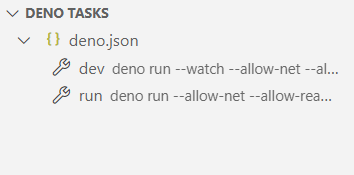
Thank you @ArmaanAS for contributing this feature!
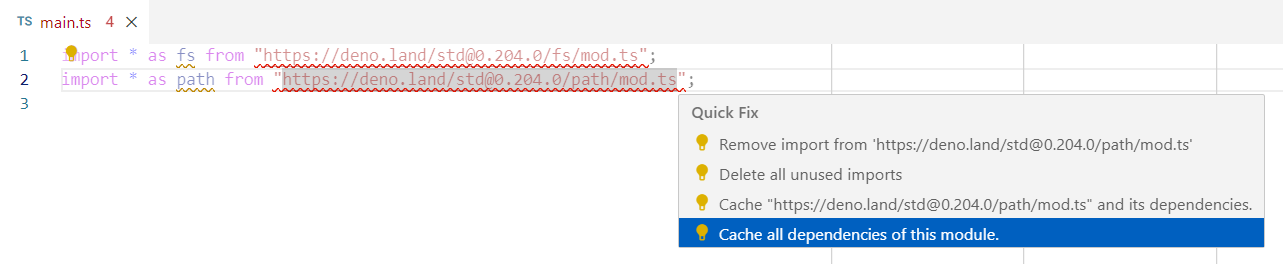
Diagnostics for uncached dependencies had been accompanied by a quick fix option to cache that dependency. Now there is an option to cache all uncached dependencies of the containing module.
/.Deno: Language Server Status
command.vendor/ directory.Deno.test support in the REPLThis release brings JSX and Deno.test support to the REPL. You can copy-paste
existing tests that will be run directly in the REPL:
$ deno
> Deno.test("foo", () => {
  if (1 !== 2) {
    throw new Error("1 !== 2");
  }
});

foo ... FAILED (3ms)

 ERRORS

foo => <anonymous>:1:27
error: Error: 1 !== 2
    at <anonymous>:3:11

 FAILURES

foo => <anonymous>:1:27

FAILED | 0 passed | 1 failed (0ms)
Similarly you can copy-paste existing JSX components to use them in the REPL.
$ deno
> /** @jsxImportSource https://esm.sh/preact */
undefined
> const test = <h1>Test</h1>
undefined
> test
{
  type: "h1",
  props: { children: "Test" },
  key: undefined,
  ref: undefined,
  __k: null,
  __: null,
  __b: 0,
  __e: null,
  __d: undefined,
  __c: null,
  __h: null,
  constructor: undefined,
  __v: -1,
  __source: undefined,
  __self: undefined
}
This feature enabled JSX usage in Jupyter notebooks as well!
Two new APIs were added to the Deno.jupyter namespace:
Deno.jupyter.displayDeno.jupyter.broadcastYou can now use these APIs to display rich content and communicate with the frontend in Jupyter notebooks:
await Deno.jupyter.display({
  "text/plain": "Hello, world!",
  "text/html": "<h1>Hello, world!</h1>",
  "text/markdown": "# Hello, world!",
}, { raw: true });
await Deno.jupyter.broadcast("comm_msg", {
  comm_id: comm_id,
  data: {
    method: "update",
    state: { value: 50, a: null, b: null },
    buffer_paths: [["a"], ["b"]],
  },
}, {
  buffers: [
    new TextEncoder().encode("Yay"),
    new TextEncoder().encode("It works"),
  ],
});
Thank you to Kyle Kelley and Trevor Manz for implementing these features.
Deno API changesDeno.serveThe Deno.serve API received a support for Unix domain sockets:
import { assertEquals } from "https://deno.land/std@0.204.0/assert/mod.ts";

const socketPath = "/tmp/path/to/socket.tmp";
const server = Deno.serve(
  {
    path: socketPath,
  },
  (_req, { remoteAddr }) => {
    assertEquals(remoteAddr, { path: filePath, transport: "unix" });
    return new Response("hello world!");
  },
);
Additionally, Deno.serve now returns a Deno.HttpServer instead of
Deno.Server. The old Deno.Server type is now deprecated and will be removed
in the future.
using with Deno APIsTypeScript 5.2 upgrade which shipped in Deno v1.37
introduced
using keyword
that adds support for the
Explicit Resource Management proposal.
This proposal introduces a convenient way to handle resources performing async
actions. This release adds support for disposable resources for the following
Deno APIs:
Deno.CommandDeno.FsFileDeno.FsWatcherDeno.HttpConnDeno.HttpServerDeno.KvDeno.ListenerYou can now use using keyword to automatically close the resource when they go
out of scope:
let kv2: Deno.Kv;

{
  using kv = await Deno.openKv(":memory:");
  kv2 = kv;

  const res = await kv.get(["a"]);
  assertEquals(res.versionstamp, null);

}


await assertRejects(() => kv2.get(["a"]), Deno.errors.BadResource);
Please note that using keyword is currently only supported in TypeScript
files.
window.nameFor compatibility we added window.name which is an empty string. In the future
we might consider setting this value to change the process name.
EventSourceThe EventSource Web API is a client for interacting with server-sent events, which is a one-way persistent connection for sending events.
Here is a simple example for a server, and then using the EventSource as a client. The server sends two events, and the client logs these two events and then on the second event closes the connection.
import {
  ServerSentEvent,
  ServerSentEventStreamTarget,
} from "https://deno.land/std@0.204.0/http/server_sent_event.ts";

Deno.serve({ port: 8000 }, (_) => {
  const target = new ServerSentEventStreamTarget();
  target.dispatchEvent(
    new ServerSentEvent("message", {
      data: "hello",
      id: 1,
    }),
  );
  target.dispatchEvent(
    new ServerSentEvent("message", {
      data: "world",
      id: 2,
    }),
  );
  return target.asResponse();
});
const source = new EventSource("http://localhost:8000");

source.onopen = () => {
  console.log("opened");
};

source.onmessage = (e) => {
  console.log(`Data for id '${e.lastEventId}':`, e.data);

  if (e.lastEventId == 2) {
    source.close();
    console.log("closed");
  }
};
std/path2 platform-specific submodules have been added in this release. You can now
import operations for posix paths from std/path/posix and ones for windows
from std/path/windows. Both submodules also have single API export paths, such
as std/path/posix/basename.ts, which were unavailable before this release.
Because of the above changes, the old methods of using platform specific APIs have been deprecated. If you are using the following patterns, please update thoses imports to the new specifiers.
import { posix, win32 } from "https://deno.land/std@0.205.0/path/mod.ts";
import * as posix from "https://deno.land/std@0.205.0/path/posix.ts";
import * as win32 from "https://deno.land/std@0.205.0/path/win32.ts";


import * as posix from "https://deno.land/std@0.205.0/path/posix/mod.ts";
import * as windows from "https://deno.land/std@0.205.0/path/windows/mod.ts";
std/httphttp/server has been deprecated in this release. Please use Deno.serve
instead.
http_errors, cookie_map, server_sent_event, method are now prefixed with
unstable_. These modules will be redesigned or removed in the future.
std/encodingencode and decode methods for hex, base64, base64url, base32,
base58, ascii85 are deprecated now. Instead these modules now exports
encodeHex, decodeHex, encodeBase64, decodeBase64, etc. The users are
encouraged to update the existing usages to the new APIs.
This change has been made because the existing encode and decode methods
have several different API signatures, such as
encode(input: Uint8Array): Uint8Array, encode(input: Uint8Array): string,
encode(input: ArrayBuffer | string): string. These subtle differences are hard
to remember and confusing. The new APIs always have
encode(input: string | Uint8Array | ArrayBuffer): string for encoding and
decode(input: string): Uint8Array for decoding.
std/iostd/io module has been deprecated to discourage the use of legacy
Reader/Writer interfaces. Most I/O operations are accessible through
ReadableStream-based APIs now, which are the recommended way to perform I/O in
Deno.
std/wasistd/wasi module has been deprecated due to low usage and minimal feedback from
the community. If you still need to use WASI in Deno, use
wasmer-js instead.
--unstable-* flagsYou may have noticed the introduction of flags prefixed with –unstable- in the details above. In this release, we have implemented a granular feature flagging system to enhance the way we introduce new features. Previously, to activate new features, the general –unstable flag was necessary. This flag, however, was rather generic–it activated all unstable features without giving users the option to select specific ones.
With this update, we offer a suite of flags that enable users to turn on specific unstable features:
--unstable-bare-node-builtins--unstable-broadcast-channel--unstable-byonm--unstable-cron--unstable-ffi--unstable-fs--unstable-hmr--unstable-http--unstable-kv--unstable-net--unstable-worker-optionsIf you want to use only the FFI API, you don’t have to enable all the other APIs, instead you can run like so:
$ deno run --allow-read --unstable-ffi main.ts
Additionally, you can now employ the deno.json configuration file to determine
which features you’d like to activate by using the"unstable" config key:
{
  "unstable": ["byonm", "fs", "kv"]
}
The above config file would enable the new “Bring your own node_modules” feature, unstable file system APIs as well as Deno KV API.
While the --unstable flag – which turns on all unstable features– remains
functional, we plan to start issuing deprecation warnings in the subsequent
release and will recommend the use of the more precise flags.
This release marks the end of our migration to our new Rust/v8 fast op system,
#[op2]. Every operation in Deno that interacts with the outside world
(fetch, Deno.serve, Kv, and many more) runs through the op infrastructure,
and the new version of the op system will allow us to continue tuning
performance, especially for async APIs.
We can now adjust the behavior of every type of parameter that we send between Rust and V8 to extract the maximum performance. We hope to blog more about the op interface later in the future. Keep an eye on the blog for more!
In addition to the new op system, we’ve also made a number of other performance improvements:
deno test should be even faster to startup thanks to the improvements in
test registration and stack trace collection
DOMException is now much cheaper to create
structuredClone is now much faster when transferables are not used
This release ships with V8 12.0 which adds two exciting JavaScript features:
As an example, Array.fromAsync plays well with Deno KV:
> await Array.fromAsync(kv.list({ prefix: [] }))
[
  {
    key: [ "foo" ],
    value: "bar",
    versionstamp: "00000000000000040000"
  }
]We couldn’t build Deno without the help of our community! Whether by answering questions in our community Discord server or reporting bugs, we are incredibly grateful for your support. In particular, we’d like to thank the following people for their contributions to Deno 1.38: Alessandro Scandone, Chen Su, Hirotaka Tagawa / wafuwafu13, Jared Flatow, Jesper van den Ende, Jérôme Benoit, Kenta Moriuchi, Kyle Kelley, Laurence Rowe, Marcos Casagrande, Mark A. Hershberger, Mikhail, Mikko, Rui He, Trevor Manz, sigmaSd, and 林炳权.
Would you like to join the ranks of Deno contributors? Check out our contribution docs here, and we’ll see you on the list next time.
Believe it or not, the changes listed above still don’t tell you everything that got better in 1.38. You can view the full list of pull requests merged in Deno 1.38 on GitHub here.
Thank you for catching up with our 1.38 release, and we hope you love building with Deno!
🍋 Did you know? Fresh got even fresher.
Fresh v1.5 apps are snappier and more responsive, thanks to client-side navigation with Partials, ahead-of-time tranpsilation, and more.
此内容由惯性聚合(RSS阅读器)自动聚合整理,仅供阅读参考。 原文来自 — 版权归原作者所有。