Modern JavaScript frameworks include a lot of JavaScript. That’s kinda obvious.
But most web sites don’t contain a lot of JavaScript.
Some do. If you’re building a dynamic interactive dashboard, JS your heart out. On the other end, documentation pages, blogs, static content sites, etc. require 0 JavaScript. This blog, for example, has no JS.
But then there’s this whole horde of websites in the middle that need some interactivity, but not a lot:
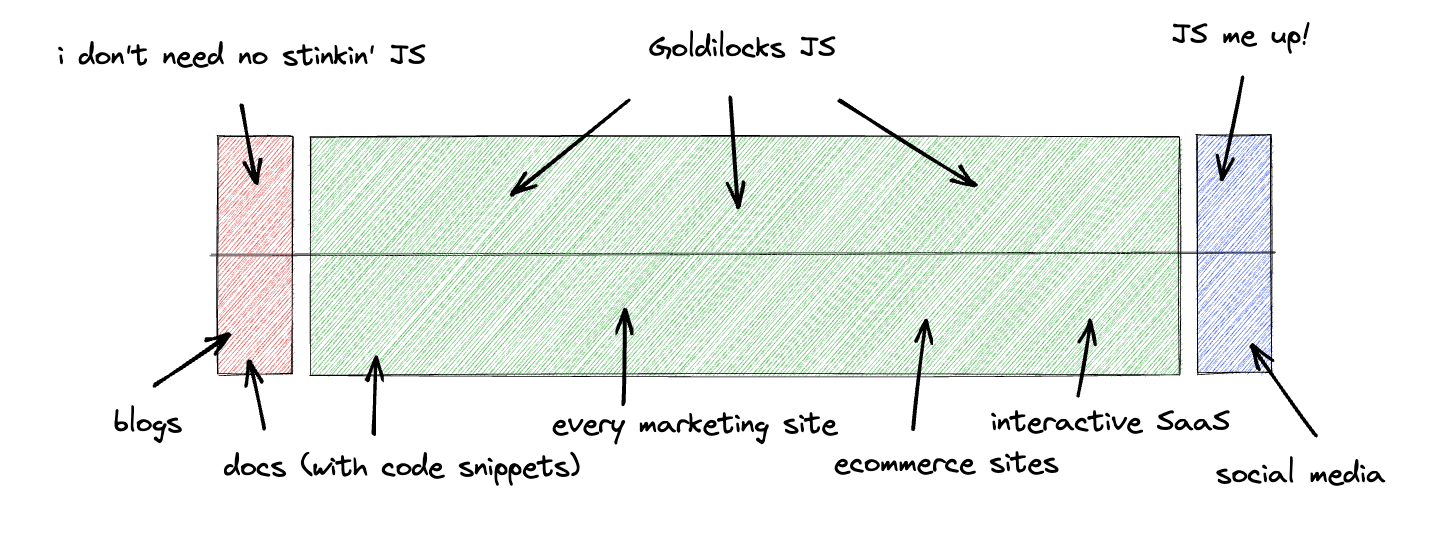
These goldilocks “just enough” sites are a problem for frameworks: you can’t statically generate these pages, but bundling an entire framework and sending it over a network for one image carousel button seems overkill. What can we do for these sites?
Give them islands.
Here’s how this looks on our merch site which is built with Fresh, our Deno-based web framework that uses islands:
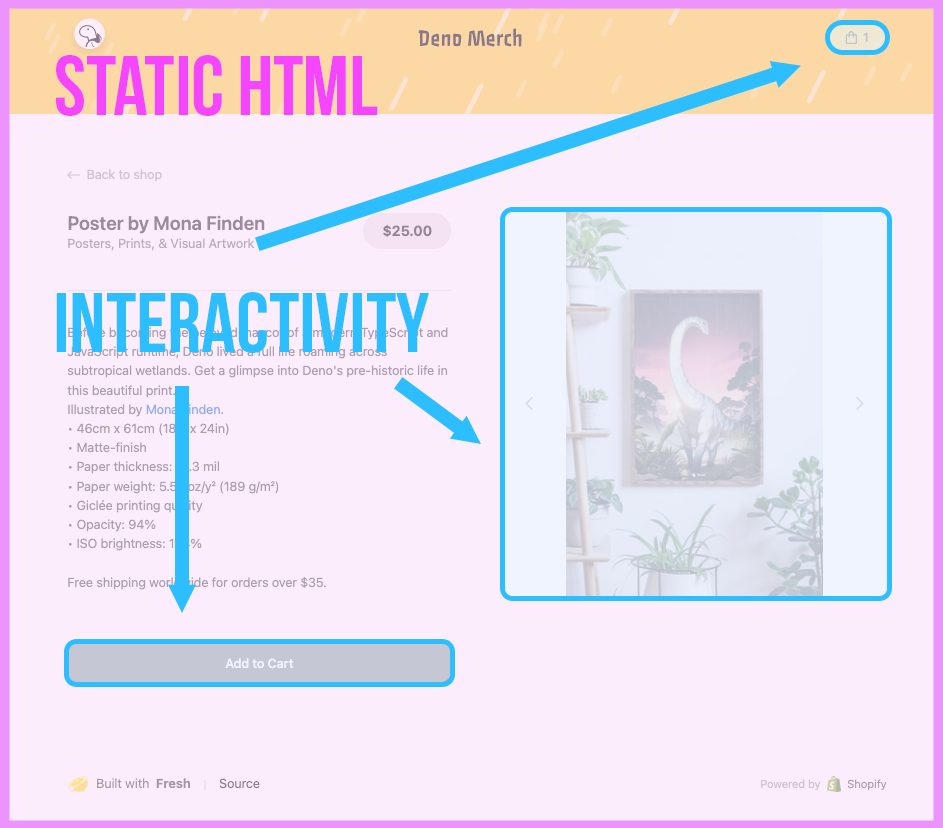
The main part of the page is static HTML: the header and footer, the headings, links, and text. None of these require interactivity so none use JavaScript. But three elements on this page do need to be interactive:
These are the islands. Islands are isolated Preact components that are then hydrated on the client within a statically-rendered HTML page.
The key part of that is the hydration. This is where JavaScript frameworks are struggling because it’s fundamental to how they work, but at the same time hydration is pure overhead.
JS frameworks are hydrating a page. Island frameworks are hydrating components.
Why does so much JavaScript get sent without islands? It’s a function of the way modern ‘meta’ JavaScript frameworks work. You use the frameworks to both create your content and add interactivity to your pages, send them separately, then combine them in a technique called ‘Hydration’ in the browser.
In the beginning, these were separated. You had a server-side language producing the HTML (PHP, Django, then NodeJS) and client-side plugins providing interactivity (jQuery being the most prevalent). Then we got to the React SPA era and everything was client side. You shipped a bare bones HTML skeleton and the whole site, with content, data, and interactivity was generated on the client.
Then pages got big and SPAs got slow. SSR came back, but with the interactivity added without the plugins through the same codebase. You create your entire app in JS, then during the build step the interactivity and initial state of the app (the state of your components along with any data pulled server-side from APIs) are serialized and bundled into JS and JSON.
Whenever a page is requested, the HTML is sent along with the bundle of JS needed for interactivity and state. The client then ‘hydrates’ the JS, which means:
This way, the HTML is shown quickly so the user isn’t staring at a blank page and then the page becomes interactive once the JS has loaded
You can think about hydration like this:
The build step takes all the juicy parts out of your application, leaving you
with a dry husk. You can then ship that dry husk along with a separate gallon of
water to be combined by your client’s Black & Decker hydrator browser. This
gets you an edible pizza/usable site back (h/t to this
SO answer
for that analogy).
What’s the problem with this? Hydration treats the page as one single component. Hydration takes place top-down and traverses through the entire DOM to find the nodes it needs to hydrate. Even though you’re decomposing your app into components in development, that is thrown away and everything is bundled together and shipped.
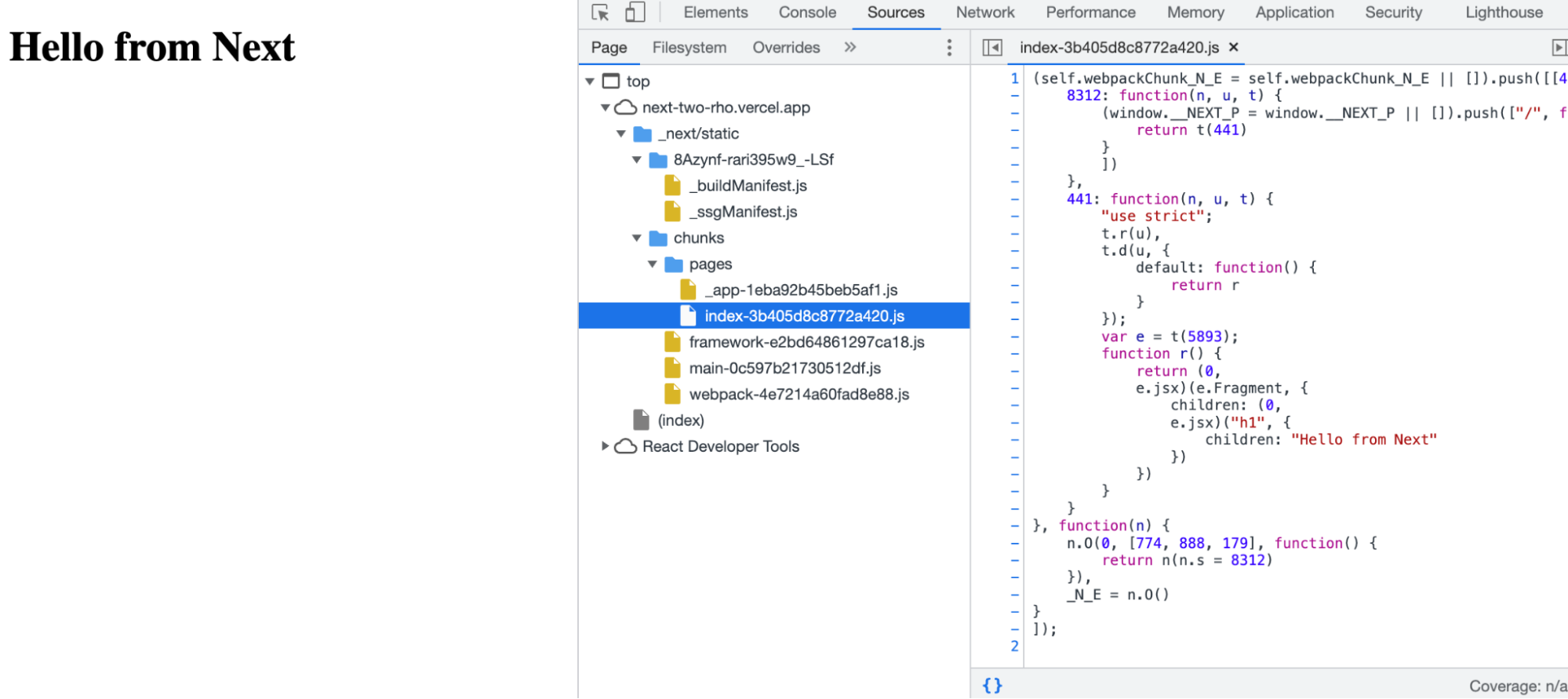
These frameworks also ship framework-specific JavaScript. If we create a new next app and remove everything but an h1 on the index page, we still see JS being sent to the client, including a JS version of the h1, even when the build process says this page is statically generated:
Code-splitting and progressive hydration are workarounds for this fundamental problem. They break up the initial bundle and the hydration into separate chunks and steps. This should make the page interactive quicker, as you can start hydrating from the first chunk before the rest is downloaded.
But you are still ultimately sending all this JavaScript to a client that may not be using it, and has to process it to find out if it’s going to use it.
If we do something similar with Fresh, our Deno-based web framework we see zero JavaScript:
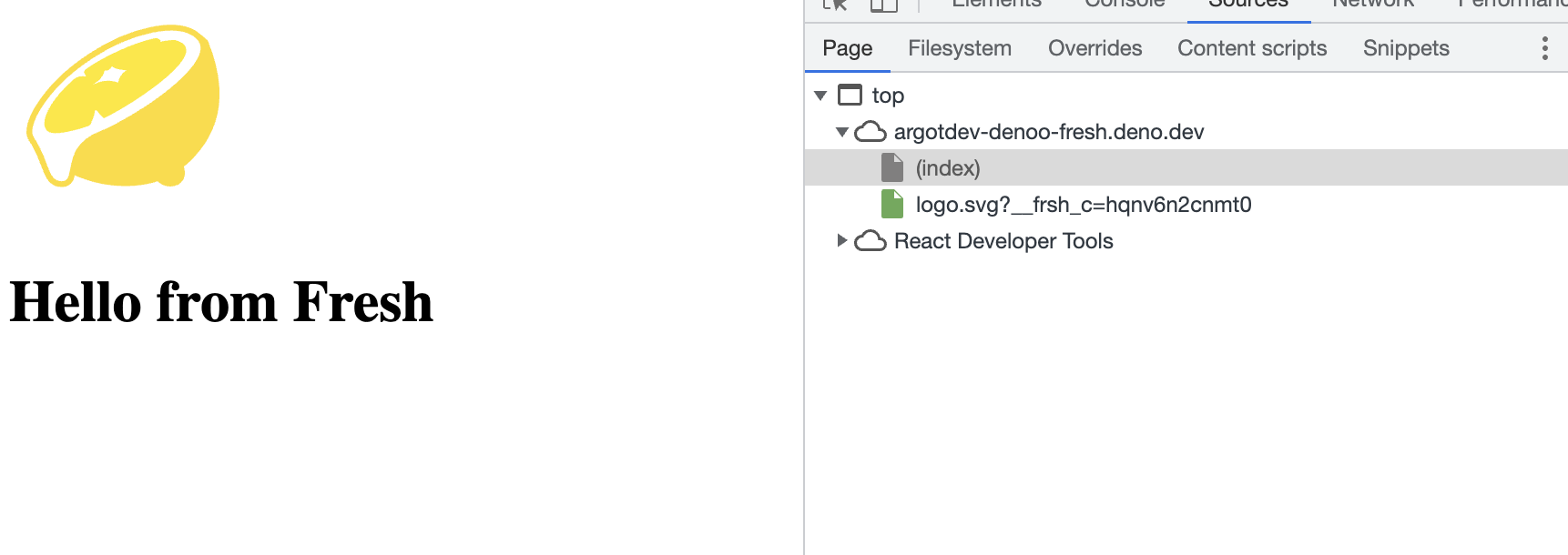
Nothing on the page requires JS, so no JS was sent.
Now let’s add in some JavaScript in the shape of an island:
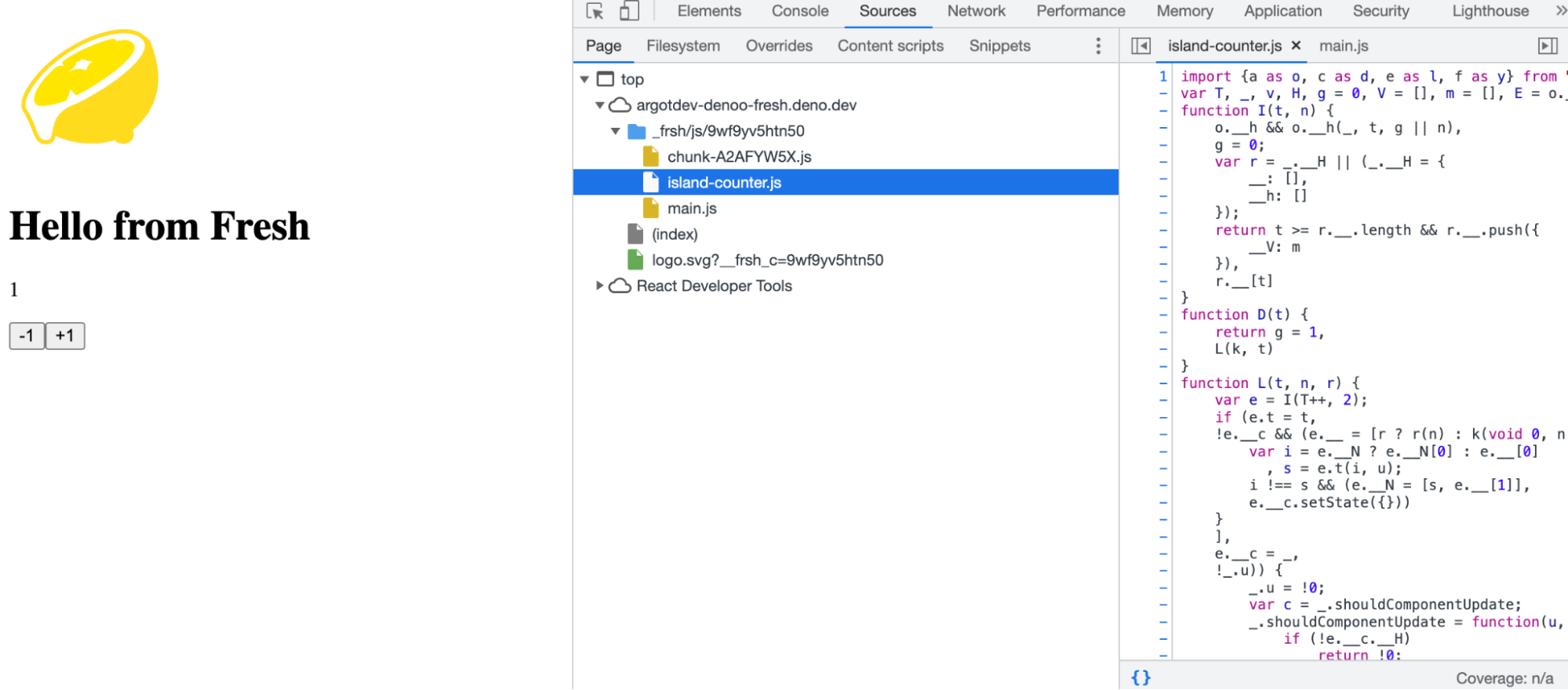
So we have three JavaScript files:
To show how those JS files appeared, here’s a timeline of what happens when a request is received:
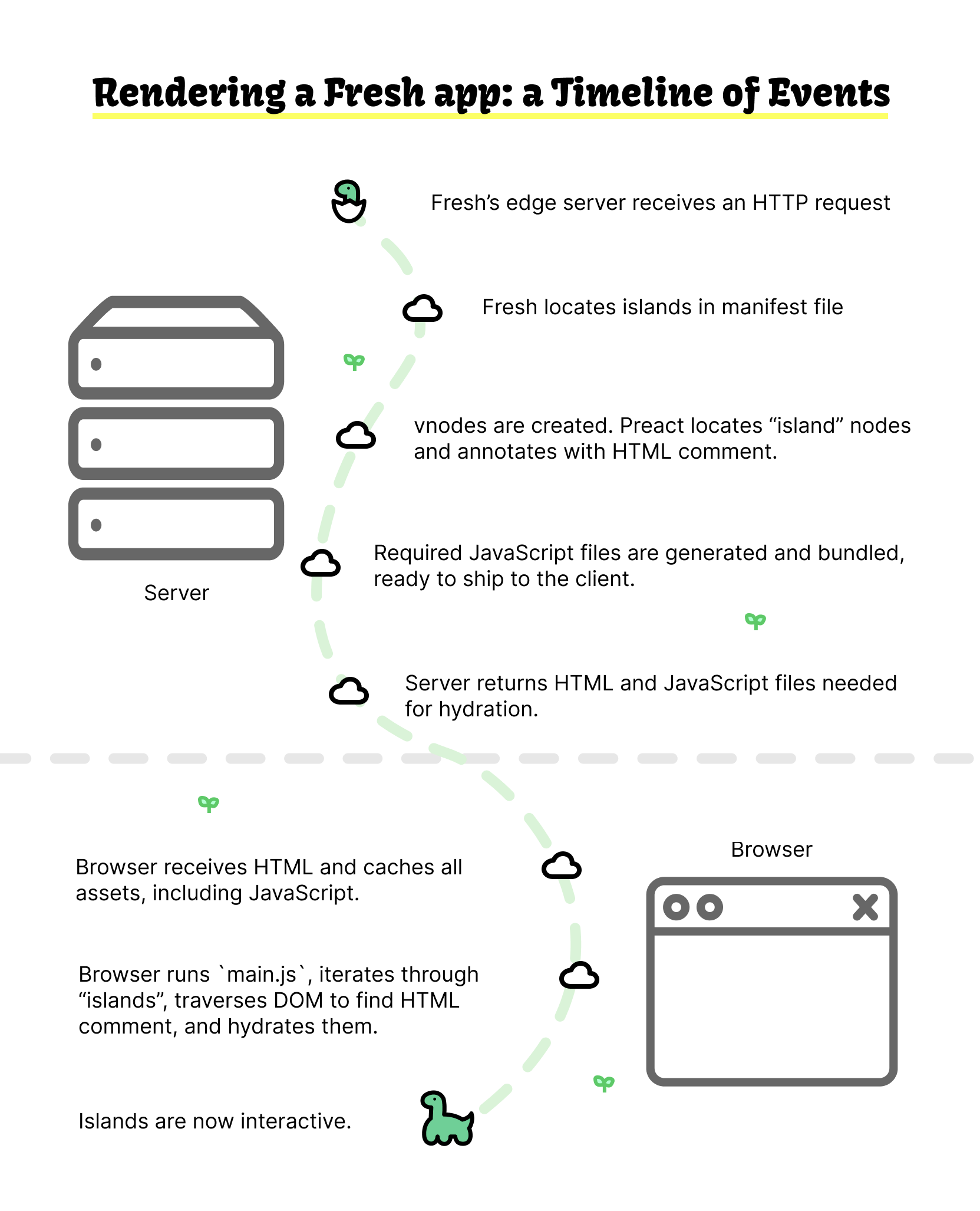
Note that this timeline is for the first request to a Fresh app. After the assets are cached, subsequent requests simply retrieve necessary scripts from the cache.
Let’s dig into the key steps that make islands work.
manifest from fresh.gen.ts for islandsThe first step to locating any islands is to check the manifest from
fresh.gen.ts. This is an auto-generated doc in your own app that lists the
pages and islands in the app:
import config from "./deno.json" with { type: "json" };
import * as $0 from "./routes/index.tsx";
import * as $$0 from "./islands/Counter.tsx";

const manifest = {
  routes: {
    "./routes/index.tsx": $0,
  },
  islands: {
    "./islands/Counter.tsx": $$0,
  },
  baseUrl: import.meta.url,
  config,
};

export default manifest;
The Fresh framework processes the manifest into individual pages (not shown here) and components. Any islands are pushed into an islands array:
for (const [self, module] of Object.entries(manifest.islands)) {
  const url = new URL(self, baseUrl).href;
  if (typeof module.default !== "function") {
    throw new TypeError(
      `Islands must default export a component ('${self}').`,
    );
  }
  islands.push({ url, component: module.default });
}
During server rendering with render.ts, Preact creates a virtual DOM. As each virtual node is created, the options.vnode hook is called in Preact:
options.vnode = (vnode) => {
  assetHashingHook(vnode);
  const originalType = vnode.type as ComponentType<unknown>;
  if (typeof vnode.type === "function") {
    const island = ISLANDS.find((island) => island.component === originalType);
    if (island) {
      if (ignoreNext) {
        ignoreNext = false;
        return;
      }
      ENCOUNTERED_ISLANDS.add(island);
      vnode.type = (props) => {
        ignoreNext = true;
        const child = h(originalType, props);
        ISLAND_PROPS.push(props);
        return h(
          `!--frsh-${island.id}:${ISLAND_PROPS.length - 1}--`,
          null,
          child,
        );
      };
    }
  }
  if (originalHook) originalHook(vnode);
};
The function options.vnode can mutate the vnode before it’s rendered. Most
vnodes (e.g., <div>) are rendered as expected. But if the vnode is both a
function and has the same type of function as an element in the islands array
(therefore, is the original node for the island), the vnode is wrapped in two
HTML comments:
// the island vnode

</!--frsh-${island.id}:${ISLAND_PROPS.length - 1}-->
For the nerds out there, despite the fact that the closing comment,
</!-- xxx --> is not valid HTML,
the browser still parses and renders this
correctly.
This info is also added to an ENCOUNTERED_ISLANDS set.
In our case, the title and the lemon image will render as expected, but once the
vnode for Counter is created, the HTML comment !--frsh-counter:0-- is
inserted.
(The reason why Fresh uses a comment (vs. a <div> or a custom element) is
because introducing a new element can sometimes disturb the styling and layout
on the page, leading to CLS issues.)
The next step is to generate hydration scripts based on the islands detected,
based on all of the islands added to the set ENCOUNTERED_ISLANDS.
In render.ts, if ENCOUNTERED_ISLANDS is greater than 0, then we’ll add an
import for the revive function from main.js to the hydration script
that’ll be sent to the client:
if (ENCOUNTERED_ISLANDS.size > 0) {

  script += `import { revive } from "${bundleAssetUrl("/main.js")}";`;
Note that if ENCOUNTERED_ISLANDS is 0, the entire islands part is skipped and
zero JavaScript is shipped to the client-side.
Then, the render function adds each island’s JavaScript
(/island-${island.id}.js) to an array and its import line to script:
  let islandRegistry = "";
  for (const island of ENCOUNTERED_ISLANDS) {
    const url = bundleAssetUrl(`/island-${island.id}.js`);
    script += `import ${island.name} from "${url}";`;
    islandRegistry += `${island.id}:${island.name},`;
  }
  script += `revive({${islandRegistry}}, STATE[0]);`;
}
By the end of the render function, script, which is a string of import
statements followed by the revive() function, is added to the body of the
HTML. On top of that, the imports array with the URL path of each island’s
JavaScript is rendered into an HTML string.
Here’s what the script string looks like when it’s loaded into the browser:
<script type="module">
  const STATE_COMPONENT = document.getElementById("__FRSH_STATE");
  const STATE = JSON.parse(STATE_COMPONENT?.textContent ?? "[[],[]]");
  import { revive } from "/_frsh/js/1fx0e17w05dg/main.js";
  import Counter from "/_frsh/js/1fx0e17w05dg/island-counter.js";
  revive({ counter: Counter }, STATE[0]);
</script>
When this script is loaded into the browser, it’ll execute the revive function
from main.js to hydrate the Counter island.
reviveThe revive function is defined in main.js (which is the minified version of
main.ts).
It traverses a virtual dom searching for a regex match to identify any of the
HTML comments Fresh inserted in the earlier step.
function revive(islands, props) {
  function walk(node) {
    let tag = node.nodeType === 8 &&
        (node.data.match(/^\s*frsh-(.*)\s*$/) || [])[1],
      endNode = null;
    if (tag) {
      let startNode = node,
        children = [],
        parent = node.parentNode;
      for (; (node = node.nextSibling) && node.nodeType !== 8;) {
        children.push(node);
      }
      startNode.parentNode.removeChild(startNode);
      let [id, n] = tag.split(":");
      re(
        ee(islands[id], props[Number(n)]),
        createRootFragment(parent, children),
      ), endNode = node;
    }
    let sib = node.nextSibling,
      fc = node.firstChild;
    endNode && endNode.parentNode?.removeChild(endNode),
      sib && walk(sib),
      fc && walk(fc);
  }
  walk(document.body);
}
var originalHook = d.vnode;
d.vnode = (vnode) => {
  assetHashingHook(vnode), originalHook && originalHook(vnode);
};
export { revive };
If we look in our index.html we’ll see we have that comment that would match
that regex:
When revive finds a comment, it calls the createRootFragment with
Preact’s render /
h to render
the component.
And now you have an island of interactivity ready to go on the client-side!
Fresh isn’t the only framework that uses islands. Astro also uses islands, though in a different configuration where you specify how you want each component to load its JavaScript. For instance, this component would load 0 JS:
But add a client directive and it’ll now load with JS:
<MyReactComponent client:load />Other frameworks such as Marko use partial hydration. The difference between islands and partial hydration is subtle.
In islands, it’s explicit to the developer and framework which component will be hydrated and which won’t. In Fresh, for instance, the only components that ship JavaScript are the ones in the islands directory with CamelCase or kebab-case naming.
With partial hydration, components are written normally and the framework, during the build process, determines which JS should ship during the build process.
Other answers to this problem are
React Server Components,
which underpin
NextJS’ new /app directory structure.
This helps more clearly define work done on the server and work done on the
client, though whether it reduces the amount of JS in the shipped bundle is
still up for debate.
The most exciting development apart from islands is Quik’s resumability. They remove hydration completely and instead serialize the JavaScript within the HTML bundle. Once the HTML gets to the client the entire app is good to go, interactivity and all.
It might be possible to combine islands and resumability to ship little JS and remove hydration.
But there is more to islands than just smaller bundles. A huge benefit of the islands architecture is the mental model it makes you develop. You have to opt-in to JavaScript with islands. You can never ship JavaScript to the client by mistake. As a developer builds an app, every inclusion of interactivity and JavaScript is an explicit choice by the developer.
That way, it’s not the architecture and the framework that is shipping less JavaScript–it’s actually you, the developer.
Don’t miss any updates — follow us on Twitter.
此内容由惯性聚合(RSS阅读器)自动聚合整理,仅供阅读参考。 原文来自 — 版权归原作者所有。