When servers were in Swiss basements, all they had to serve was static HTML. Maybe, if you were lucky, you got an image.
Now, a webpage can be a full-blown app, pulling in data from multiple sources, doing on the fly manipulations, and allowing an end-user full interactivity. This has greatly improved the utility of the web, but at the cost of size, bandwidth, and speed. In the past 10 years, the median size for a desktop webpage has gone from 468 KB to 2284 KB, a 388.3% increase. For mobile, this jump is even more staggering — 145 KB to 2010 KB — a whopping 1288.1% increase.
That’s a lot of weight to ship over a network, especially for mobile. As a result, users experience terrible UX, slow loading times, and a lack of interactivity until everything is rendered. But all that code is necessary to make our sites work the way we want.
This is the problem with being a frontend dev today. What started out fun for frontend developers, building shit-hot sites with all the bells and whistles, has kinda turned into not fun. We’re now fighting different browsers to support, slow networks to ship code over, and intermittent, mobile connections. Supporting all these permutations is a giant headache.
How do we square this circle? By heading back to the server (Swiss basement not required).
In the beginning there was PHP, and lo it was great, as long as you liked question marks.
The web started as a network of static HTML, but CGI scripting languages like Perl and PHP, which allow developers to render backend data sources into HTML, introduced the idea that websites could be dynamic based on the visitor.
This meant developers were able to build dynamic sites and serve real time data, or data from a database, to an end user (as long as their #, !, $, and ? keys were working).
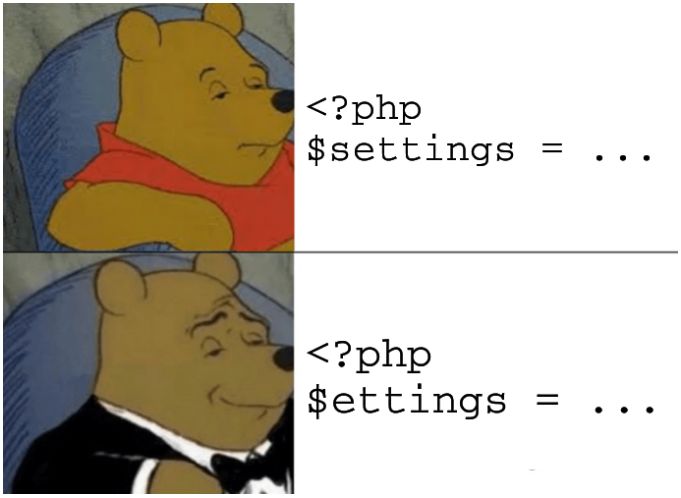
PHP worked on the server because servers were the powerful part of the network. You could grab your data and render the HTML on the server, then ship it all to a browser. The browser’s job was limited — simply interpret the document and show the page. This worked well, but this solution was all about showing information, not interacting with it.
Then two things happened: JavaScript got good and browsers got powerful.
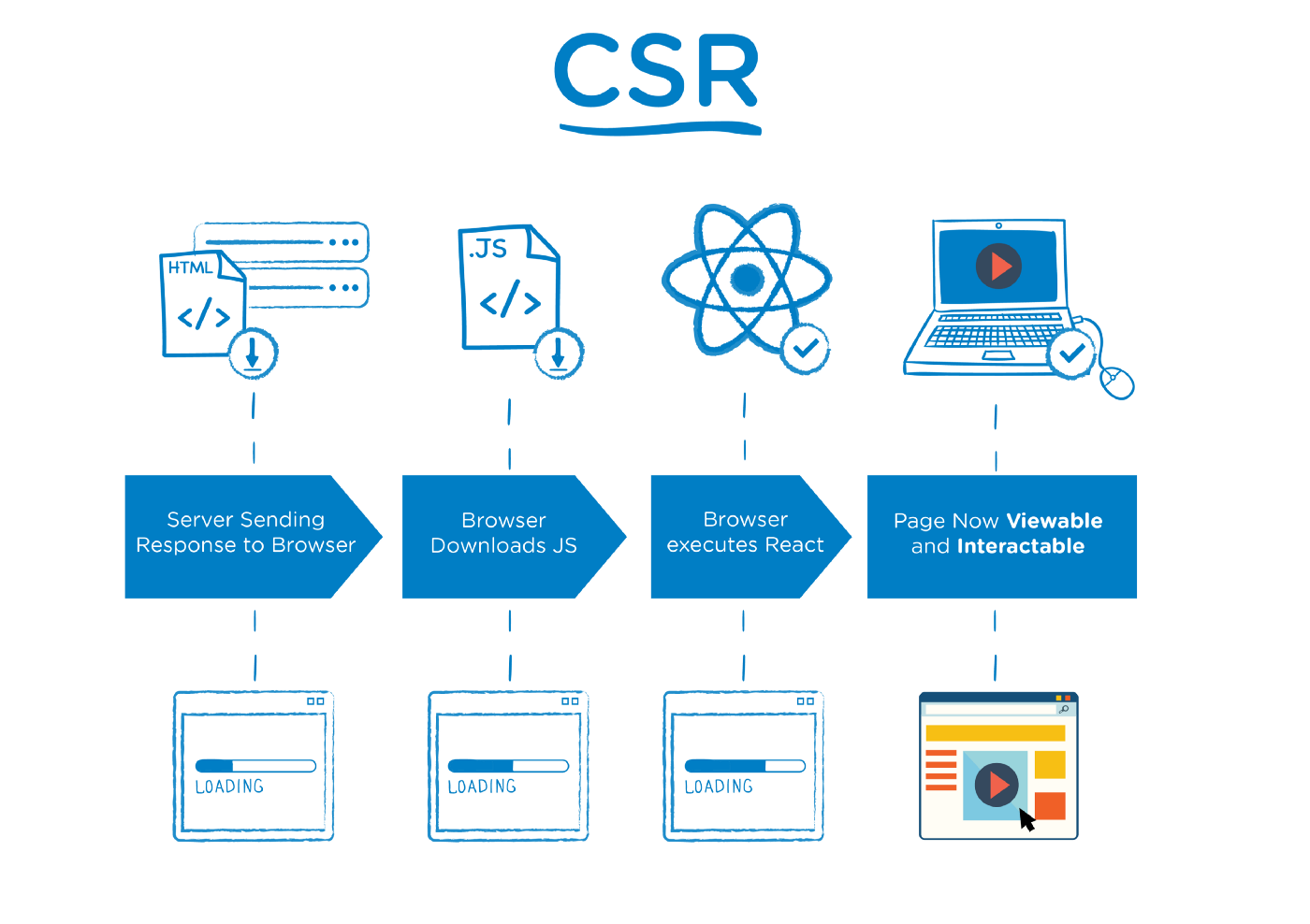
This meant we could do a ton of fun things directly on the client. Why bother rendering everything on the server first and shipping that when you could just pipe a basic HTML page to the browser along with some JS and let the client take care of it all?
This was the birth of single page applications (SPAs) and client-side rendering (CSR).
In CSR, also known as dynamic rendering, the code runs primarily on the client-side, the user’s browser. The client’s browser downloads the necessary HTML, JavaScript, and other assets, and then runs the code to render the UI.
The benefits of this approach are two-fold:
As the web got more interactive (thank you JavaScript and browsers), client-side rendering and SPAs became default. The web felt fast and furious… especially if you were on a desktop, using a popular browser, with a wired internet connection.
For everyone else, the web slowed to a crawl. As the web matured, it became available on more devices and on different connections. Managing SPAs to ensure a consistent user experience became harder. Developers had to not only make sure a site rendered the same on IE as it did in Chrome, but also consider how it would render on a phone on a bus in the middle of a busy city. If your data connection couldn’t download that bundle of JS from the cache, you had no site.
How can we easily ensure consistency across a wide range of devices and bandwidths? The answer: heading back to the server.
There are many benefits to moving the work a browser does to render a website to the server:
With SSR, we do everything on the server:
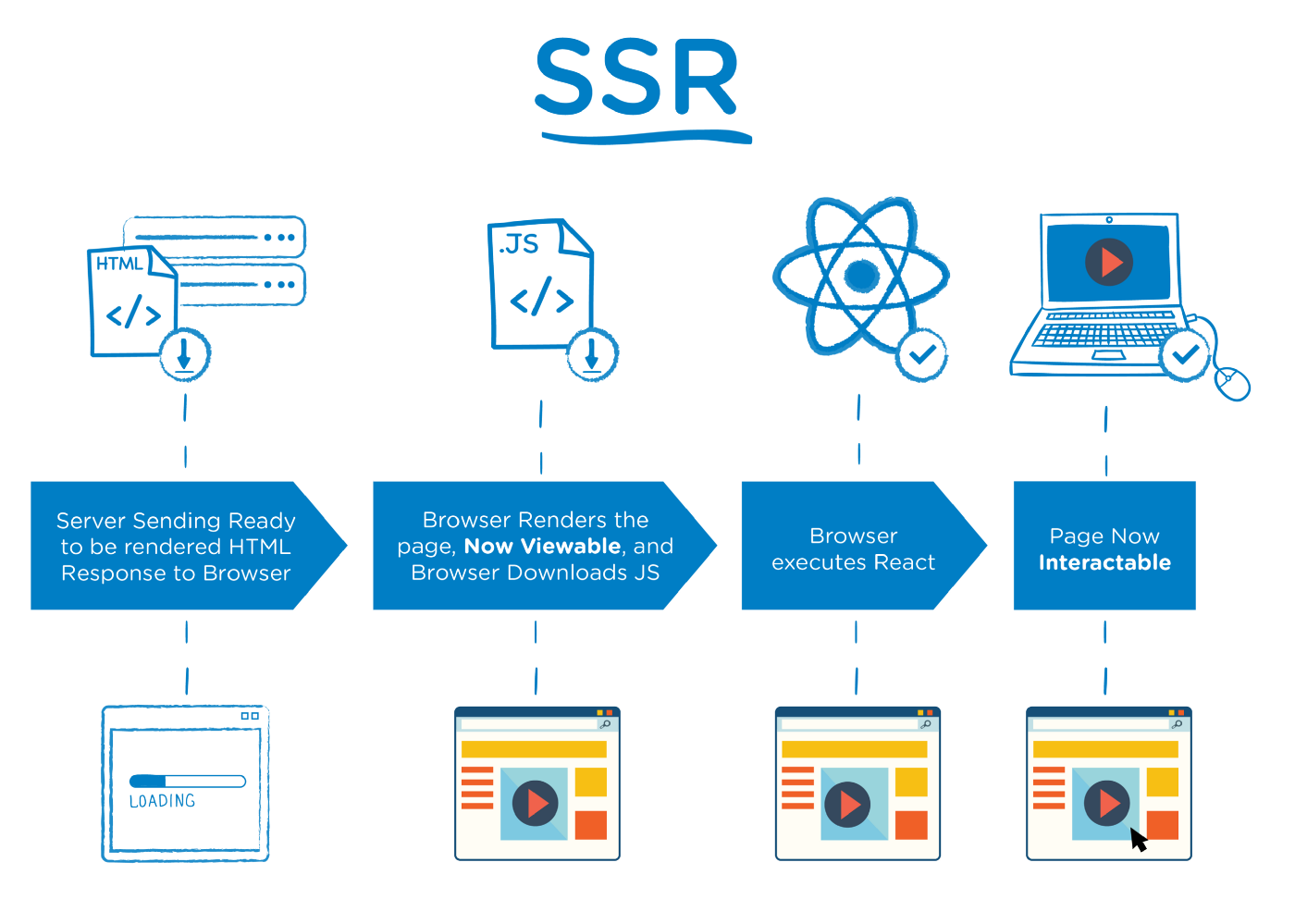
There are many isomorphic JavaScript frameworks that support SSR: they render HTML on the server with JavaScript and ship that HTML bundled with JavaScript for interactivity to the client. Writing isomorphic JavaScript means a smaller code base that is easier to reason about.
Some of these frameworks, such as NextJS and Remix, are built on React.
Out-of-the-box, React is a client-side rendering framework, but it does have SSR
capabilities, using
renderToString
(and other recommended versions such as
renderToPipeableStream,
renderToReadableStream,
and more). NextJS and Remix offer higher abstractions over renderToString,
making it easy to build SSR sites.
SSR does come with tradeoffs. We can control more and ship faster, but the limitation with SSR is that for interactive websites, you still need to send JS, which is combined with the static HTML in a process called “hydration”.
Sending JS for hydration runs into complexity issues:
On the client side, large bundles can lead to memory issues and the “Why is nothing happening?” feeling for the user as all the HTML is there, but you can’t actually use it until it hydrates.
One approach that we like here at Deno is islands architecture, as in, in a sea of static SSR’d HTML, there are islands of interactivity. (You’ve probably picked up that Fresh, our modern web framework that sends zero JavaScript to the client by default, uses islands.)
What you want to happen with SSR is for the HTML to be served and rendered quickly, then each of the individual components to be served and rendered independently. This way you are sending smaller chunks of JavaScript and doing smaller chunks of rendering on the client.
This is how islands work.
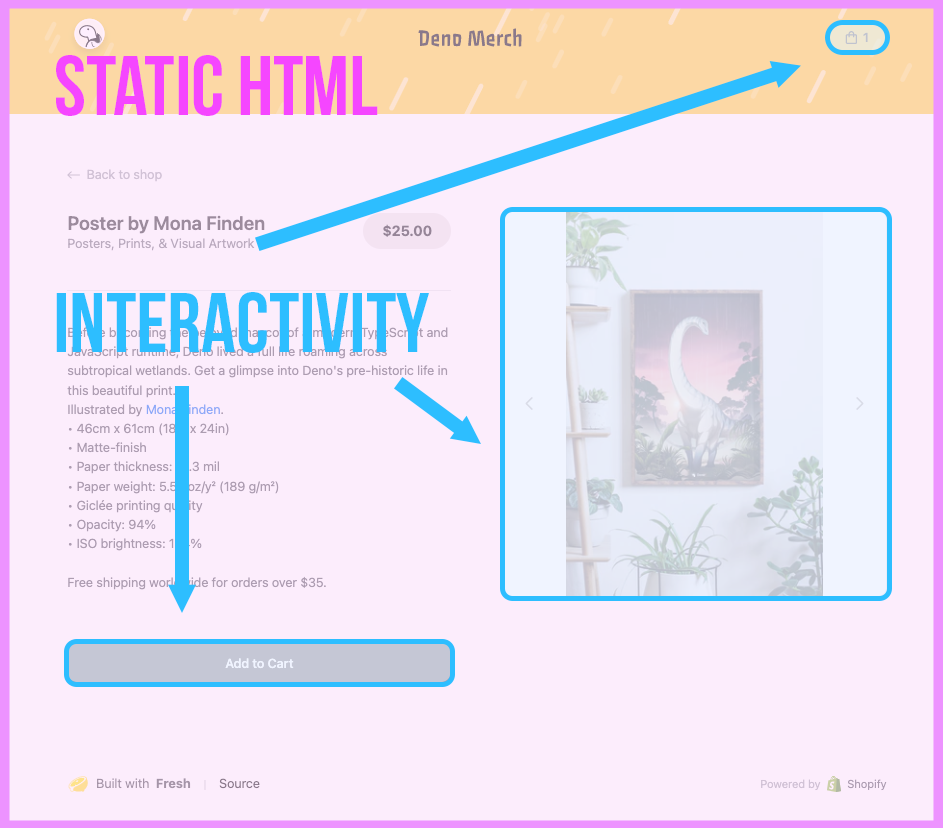
Islands aren’t progressively rendered, they are separately rendered. The rendering of an island isn’t dependent on the rendering of any previous component, and updates to other parts of the virtual DOM don’t lead to a re-render of any individual island.
Islands keep the benefits of overall SSR but without the tradeoff of big hydration bundles. Great success.
Not all server-side rendering is equal. There’s server side rendering, then there’s Server-Side Rendering.
Here we’re going to take you through a few different examples of rendering from a server in Deno. We’ll port Jonas Galvez’s great introduction to server rendering to Deno, Oak, and Handlebars, with three variations of the same app:
View the source of all examples here.
It is this third version that is SSR in the truest sense. We’ll have a single JavaScript file that will be used by both the server and the client, and any updates to the list will be made by updating the data model.
But first, let’s do some templating. In this first example, all we’re going to do is render a list. Here is the main server.ts:
import { Application, Router } from "https://deno.land/x/oak@v11.1.0/mod.ts";
import { Handlebars } from "https://deno.land/x/handlebars@v0.9.0/mod.ts";

const dinos = ["Allosaur", "T-Rex", "Deno"];
const handle = new Handlebars();
const router = new Router();

router.get("/", async (context) => {
  context.response.body = await handle.renderView("index", { dinos: dinos });
});

const app = new Application();

app.use(router.routes());
app.use(router.allowedMethods());

await app.listen({ port: 8000 });
Note we don’t need a client.html. Instead, with Handlebars we create the
following file structure:
|--Views
|    |--Layouts
|    |     |
|    |     |--main.hbs
|    |
|    |--Partials
|    |
|    |--index.hbs
main.hbs contains your main HTML layout with a placeholder for our
{{{body}}}:
<html lang="en">
 <head>
   <meta charset="UTF-8" />
   <meta name="viewport" content="width=device-width, initial-scale=1.0" />
   <title>Dinosaurs</title>
 </head>
 <body>
   <div>
     <!--content-->
     {{{body}}}
   </div>
 </body>
</html>
The {{{body}}} comes from index.hbs. In this case it is using Handlebars
syntax to iterate through our list:
<ul>
 {{#each dinos}}
   <li>{{this}}</li>
 {{/each}}
</ul>
So what happens is:
index.hbsmain.hbsServer-side rendering! Well, kinda. While it is rendered on the server, this is non-interactive.
Let’s add some interactivity to the list — the ability to add an item. This is a classic client-side rendering use-case, basically an SPA. The server doesn’t change much, with the exception of the addition of an /add endpoint to add an item to the list:
import { Application, Router } from "https://deno.land/x/oak@v11.1.0/mod.ts";
import { Handlebars } from "https://deno.land/x/handlebars@v0.9.0/mod.ts";

const dinos = ["Allosaur", "T-Rex", "Deno"];
const handle = new Handlebars();
const router = new Router();

router.get("/", async (context) => {
  context.response.body = await handle.renderView("index", { dinos: dinos });
});

router.post("/add", async (context) => {
  const { value } = await context.request.body({ type: "json" });
  const { item } = await value;
  dinos.push(item);
  context.response.status = 200;
});

const app = new Application();

app.use(router.routes());
app.use(router.allowedMethods());

await app.listen({ port: 8000 });
The Handlebars code changes substantially this time, though. We still have the
Handlebars template for generating the HTML list, but main.hbs includes its
own JavaScript to deal with the Add button: an EventListener event bound to
the button that will:
POST the new list item to the /add endpoint[...]
<input />
<button>Add</button>
</body>
</html>
<script>
document.querySelector("button").addEventListener("click", async () => {
const item = document.querySelector("input").value;
const response = await fetch("/add", {
method: "POST",
headers: {
"Content-Type": "application/json",
},
body: JSON.stringify({ item }),
});
const status = await response.status;
if (status === 200) {
const li = document.createElement("li");
li.innerText = item;
document.querySelector("ul").appendChild(li);
document.querySelector("input").value = "";
}
});
</script>But this isn’t server-side rendering in the true sense. With SSR you are running the same isomorphic JS on the client and the server side, and it just acts differently depending on where it’s running. In the above examples, we have JS running on the server and client, but they are working independently.
So on to true SSR. We’re going to do away with Handlebars and templating and
instead create a DOM that we’re going to update with our Dinosaurs. We’ll have
three files. First, server.ts again:
import { Application } from "https://deno.land/x/oak@v11.1.0/mod.ts";
import { Router } from "https://deno.land/x/oak@v11.1.0/mod.ts";
import { DOMParser } from "https://deno.land/x/deno_dom@v0.1.36-alpha/deno-dom-wasm.ts";
import { render } from "./client.js";

const html = await Deno.readTextFile("./client.html");
const dinos = ["Allosaur", "T-Rex", "Deno"];
const router = new Router();

router.get("/client.js", async (context) => {
  await context.send({
    root: Deno.cwd(),
    index: "client.js",
  });
});

router.get("/", (context) => {
  const document = new DOMParser().parseFromString(
    "<!DOCTYPE html>",
    "text/html",
  );
  render(document, { dinos });
  context.response.type = "text/html";
  context.response.body = `${document.body.innerHTML}${html}`;
});

router.get("/data", (context) => {
  context.response.body = dinos;
});

router.post("/add", async (context) => {
  const { value } = await context.request.body({ type: "json" });
  const { item } = await value;
  dinos.push(item);
  context.response.status = 200;
});

const app = new Application();

app.use(router.routes());
app.use(router.allowedMethods());

await app.listen({ port: 8000 });
A lot has changed this time. Firstly, again, we have some new endpoints:
client.js fileBut there is also a big change in our root endpoint. Now, we are creating a DOM
document object using DOMParser from
deno_dom. The DOMParser module works like
ReactDOM, allowing us to recreate the DOM on the server. We’re then using the
document created to render the notes list, but instead of using the handlebars
templating, now we’re getting this render function from a new file, client.js:
let isFirstRender = true; function sanitizeHtml(text) { return text .replace(/&/g, "&") .replace(/</g, "<") .replace(/>/g, ">") .replace(/"/g, """) .replace(/'/g, "'"); } export async function render(document, dinos) { if (isFirstRender) { const jsonResponse = await fetch("http://localhost:8000/data"); if (jsonResponse.ok) { const jsonData = await jsonResponse.json(); const dinos = jsonData; let html = "<html><ul>"; for (const item of dinos) { html += `<li>${sanitizeHtml(item)}</li>`; } html += "</ul><input>"; html += "<button>Add</button></html>"; document.body.innerHTML = html; isFirstRender = false; } else { document.body.innerHTML = "<html><p>Something went wrong.</p></html>"; } } else { let html = "<ul>"; for (const item of dinos) { html += `<li>${sanitizeHtml(item)}</li>`; } html += "</ul>"; document.querySelector("ul").outerHTML = html; } } export function addEventListeners() { document.querySelector("button").addEventListener("click", async () => { const item = document.querySelector("input").value; const dinos = Array.from( document.querySelectorAll("li"), (e) => e.innerText, ); dinos.push(item); const response = await fetch("/add", { method: "POST", headers: { "Content-Type": "application/json", }, body: JSON.stringify({ item }), }); if (response.ok) { render(document, dinos); } else { console.error("Something went wrong."); } }); }
This client.js file is available to both the server and the client — it is the
isomorphic JavaScript we need for true SSR. We’re using the render function
within the server to render the HTML initially, but then we’re also using
render within the client to render updates.
Also, on each call, the data is pulled directly from the server. Data is added
to the data model using the /add endpoint. Compared to the second example,
where the client appends the item to the list directly in the HTML, in this
example all the data is routed through the server.
The JS from client.js is also used directly on the client, in client.html:
<script type="module">
  import { addEventListeners, render } from "./client.js";
  await render(document);
  addEventListeners();
</script>
When the client calls client.js for the first time, the HTML becomes hydrated,
where client.js calls the /data endpoint to get the data needed for future
renders. Hydration can get slow and complex for larger SSR pages (and where
islands can really help).
This is how SSR works. You have:
We’re building complex apps for every screen size and every bandwidth. People might be using your site on a train in a tunnel. The best way to ensure a consistent experience across all these scenarios, while keeping your code base small and easy to reason about is SSR.
Performant frameworks that care about user experience will send exactly what’s needed to the client, and nothing more. To minimize latency even more, deploy your SSR apps close to your users at the edge. You can do all of this today with Fresh and Deno Deploy.
Stuck? Come get your questions answered in our Discord.
此内容由惯性聚合(RSS阅读器)自动聚合整理,仅供阅读参考。 原文来自 — 版权归原作者所有。