







Deno 1.23 has been tagged and released with the following new features and changes:
Deno.sleepSync APIdeno taskdeno fmtDeno.getGid() APIdeno info supports --config and --no-config flags"deflate-raw" in CompressionStream and DecompressionStreamflags standard moduleassertThrows and assertRejectsIf you already have Deno installed, you can upgrade to 1.23 by running:
If you are installing Deno for the first time, you can use one of the methods listed below:
curl -fsSL https://deno.land/x/install/install.sh | sh


iwr https://deno.land/x/install/install.ps1 -useb | iex


brew install deno


scoop install deno


choco install deno
Deno has always run a type-checking pass when asked to execute a program. Evaluation and type-checking however are completely different operations, involving completely different compilers, each with completely different execution speeds. Evaluating code uses Google’s V8 while Type-Checking uses Microsoft’s TypeScript Compiler. Type-checking is quite slow - often taking many seconds to complete. V8 startup and evaluation on the other hand are very fast.
Most programmers these days interact with the type-checker through their editor
via the LSP. This means they’re getting hints and completion continuously while
they program. Inserting, by default, a full other type-check pass into the
deno run operation does not make sense. Type-checking is much more of a
lint-like operation - something you do to during CI to make sure there are no
type errors.
It should also be highlighted that type-stripping, unlike type-checking, is a fast operation (linear time in the size of the source code). Deno will be type-stripping by default rather than type-checking.
If you still want the previous behavior (type-check then execute) use the
--check flag.
We have been planning this change for months, making sure to give users warning
and introducing the --check flag.
See the notes in v1.22.
This change affects deno run, deno eval, and deno cache. The following
table describes the type-checking behavior of various subcommands. Here “Local”
means that only errors from local code will induce type-errors, modules imported
from https URLs (remote) may have type errors that are not reported. (To turn on
type-checking for all modules, use --check=all.)
| Subcommand | Type checking mode |
|---|---|
deno bench |
📁 Local |
deno bundle |
📁 Local |
deno cache |
❌ None |
deno check |
📁 Local |
deno compile |
📁 Local |
deno eval |
❌ None |
deno repl |
❌ None |
deno run |
❌ None |
deno test |
📁 Local |
Deno.sleepSync APIIn this release, Deno.sleepSync has been removed because there was no clear
necessity for it since this functionality is already available via existing Web
APIs. Furthermore, it’s a function that is likely to cause problems:
Deno.sleepSync completely blocked the event loop. For example, if it was
called in a web server handler function, the server will stop serving requests
until it returned.
If you really want this functionality, you can implement it by using the following function:
function sleepSync(timeout) {
  const sab = new SharedArrayBuffer(1024);
  const int32 = new Int32Array(sab);
  Atomics.wait(int32, 0, 0, timeout);
}
Starting with v1.23 the built-in file watcher (that you can activate using
--watch flag) will also watch for changes in files that were dynamically
imported.
import foo from "./foo.ts";

console.log(foo);

const bar = await import("./bar.ts");
This feature has allowed for a much better developer experience in the Fresh web framework.
deno taskDeno includes an unstable
deno task sub command
that provides a cross platform way to define and execute custom commands
specific to a codebase. This release includes several improvements.
--cwd <path> flagdeno task has a property where by default it executes commands with the
directory of the Deno configuration file (ex. deno.json) as the current
working directory. This allows tasks to use relative paths and continue to work
regardless of where in the descendant directory tree you happen to execute the
deno task from.
Although this behavior is mostly desired, there are scenarios where it’s not. In
those situations, you may now provide a --cwd <path> flag.
For example, given a task called wasmbuild in a deno.json file:
# use the sub directory project1 as the cwd for the task
deno task --cwd project1 wasmbuild
# use the cwd (project2) as the cwd for the task
cd project2 && deno task --cwd . wasmbuildSome redirect support has been added to provide a way to pipe stdout and/or stderr to a file.
For example, the following redirects stdout of deno run main.ts to a file
called file.txt on the file system when defined in a deno task and running
deno task collect:
{
  "tasks": {
    "collect": "deno run main.ts > file.txt"
  }
}
To instead redirect stderr, use 2> instead of >:
deno run main.ts 2> file.txtTo redirect both stdout and stderr, use &>:
deno run main.ts &> file.txtTo append to a file, instead of overwriting an existing one, use two right angle brackets instead of one:
deno run main.ts >> file.txtSuppressing either stdout, stderr, or both of a command is possible by
redirecting to /dev/null. This works in a cross platform way including on
Windows.
deno run main.ts > /dev/null

deno run main.ts 2> /dev/null

deno run main.ts &> /dev/null
Note that multiple redirects were not implemented and are currently not supported.
cat and xargsdeno task features several built in cross platform commands to help reduce
verbosity. This update adds a basic implementation of
cat and
xargs that works on
Linux, Mac, and Windows.
Note that not every flag is implemented and please report any issues to the
deno_task_shell repo. Also
remember that you can always run the native system commands in a non-cross
platform way by running it through sh on Linux and Mac (sh -c <command>).
deno fmtdeno fmt now formats .cjs, .cts, .mjs, and .mts files by default.
Additionally, some unnecessary parenthesis in types will be automatically removed. For example…
type Test = (string | number);
…will now format as…
type Test = string | number;
Deno.getGid() APIIn v1.23 we’ve added a new unstable API: Deno.getGid().
Using this API you can retrieve the ID of the user group. Note that this API
works on Linux and macOS, but will return null on Windows.
console.log(Deno.getGid());
This API requires the --allow-env permission flag.
Thank you to James Bradlee for contributing this feature.
deno info supports --config and --no-config flagsThis release adds support for --config and --no-config flags. In previous
releases, deno info automatically looked up deno.json files, but there was
no way to manually specify the config file or disable it entirely.
Thank you to Mark Ladyshau for contributing this feature.
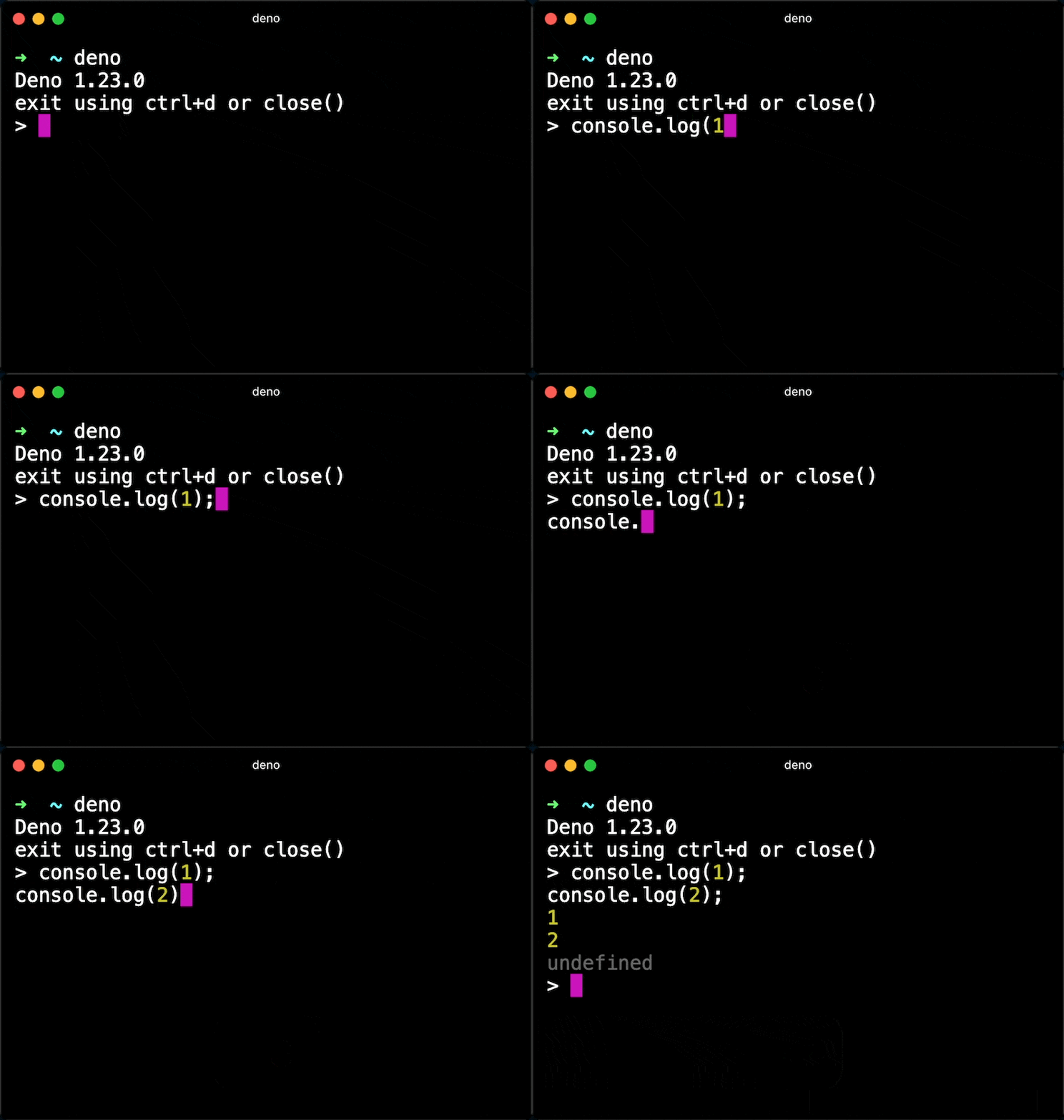
This release brings a small quality-of-life improvement to the REPL.
Using ctrl + s combination you can now force a new line when editing code in
the REPL.
Thank you to @sigmaSd for contributing this feature.
Previously when functions called via FFI returned 64-bit numbers, normal
JavaScript numbers were returned. However, JavaScript numbers only have 53 bits
of integer precision—meaning you’d get incorrect results at times. With this
change a
BigInt
is returned instead. The change also allows passing BigInt values as
parameters.
Thanks to Elias Sjögreen who contributed this feature.
This release adds the ability to listen for SIGINT (ctrl+c) and SIGBREAK (ctrl+break) on Windows.
Deno.addSignalListener("SIGINT", () => {
  console.log("Received ctrl+c");
});

Deno.addSignalListener("SIGBREAK", () => {
  console.log("Received ctrl+break");
});
Read more about OS signals in the manual.
For Deno.kill SIGINT and SIGBREAK support on Windows, please follow issue
#14866.
Thanks to Geert-Jan Zwiers and @juzi5201314 for their contributions on this feature.
"deflate-raw" in CompressionStream and DecompressionStreamDeno now suppoorts “The DEFLATE algorithm”
RFC1951 via the "deflate-raw" format
string as specified in the
spec. (Not to be
confused with "deflate" which is the “ZLIB Compressed Data Format”
RFC1950.)
let input = await Deno.open("README.md");
const compressed = input.readable.pipeThrough(
  new CompressionStream("deflate-raw"),
);
let output = await Deno.open("README.md.zz", { create: true, write: true });
compressed.pipeTo(output.writable);
Deno v1.23 ships with the latest stable version of TypeScript. For more information on new features in TypeScript see TypeScript’s 4.7 blog post
flags standard modulestd/flags started as a fork of
minimist and there haven’t been any
substantial changes introduced to it until recently.
In this release, there are two breaking changes to the parse function.
collect optionThe collect option is a new option to specify that the option argument is
collectible. When you specify an argument name in a collect option, then
multiple occurrences of the same argument are collected into the array.
import { parse } from "https://deno.land/std@0.144.0/flags/mod.ts";

console.log(parse(Deno.args, { string: "foo", collect: "foo" }));
This executes as follows:
$ deno run cli.js
{ _: [], foo: [] }
$ deno run cli.js --foo 1
{ _: [], foo: [ "1" ] }
$ deno run cli.js --foo 1 --foo 2
{ _: [], foo: [ "1", "2" ] }
$ deno run cli.js --foo 1 --foo 2 --foo 3
{ _: [], foo: [ "1", "2", "3" ] }
Note that foo in the parsed result always has a string[] type.
Before this change, all arguments were automatically collectible and it had a
type of T | T[] where T was typically boolean or string.
We found this behavior not reasonable because in most cases, most arguments are
not supposed to be specified multiple times, but because of this behavior, a
tool author would always needs to check the type of arguments with
Array.isArray().
So this behavior was made optional, and this collecting feature only happens
when it’s explicitly specified in the collect option.
To migrate, specify the argument name in the collect option if your CLI tool
uses array type arguments.
negatable optionThe negatable option is a new option. If you specify the argument name in
negatable, then the flags of the form of --no-arg are considered as
--arg=false.
Here is an example:
import { parse } from "https://deno.land/std@0.144.0/flags/mod.ts";
console.log(parse(Deno.args, { boolean: "foo", negatable: "foo" }));
This executes as follows:
$ deno run cli.js
{ _: [], foo: false }
$ deno run cli.js --foo
{ _: [], foo: true }
$ deno run cli.js --no-foo
{ _: [], foo: false }
negatable also can be used with string:
import { parse } from "https://deno.land/std@0.144.0/flags/mod.ts";
console.log(
  parse(Deno.args, {
    string: "foo",
    negatable: "foo",
    default: { foo: "bar" },
  }),
);
This executes like:
$ deno run cli.js
{ _: [], foo: "bar" }
$ deno run cli.js --foo baz
{ _: [], foo: "baz" }
$ deno run cli.js --no-foo
{ _: [], foo: false }
foo becomes false even if foo is specified as a string option. This is
useful for removing the default value of the option as illustrated in the above
example.
This negatable behavior was applied to every argument by default in the previous version, but we found that wasn’t reasonable. So this was changed to be optional.
To migrate, specify the argument name in the negatable option, if your CLI
tool depends on this --no-arg type argument.
Thanks to Benjamin Fischer who contributed this feature.
assertThrows and assertRejectsThe signature of assertThrows that accepts an errorCallback as the 2nd
argument has been deprecated. Instead assertThrows now returns the thrown
error value.
If you use any assertions like the below:
import { assertThrows } from "https://deno.land/std@0.144.0/testing/asserts.ts";

assertThrows(
  () => someFunc(),
  (err) => {

  },
);
Then please update it to the following form:
import { assertThrows } from "https://deno.land/std@0.144.0/testing/asserts.ts";

const err = assertThrows(
  () => someFunc(),
);
The motivation behind this change is that the errorCallback only accepts
synchronous assertions on the thrown value. With this change, you can perform
whatever assertions on the thrown value, including asynchronous operations.
The same change is also applied to the assertRejects function. The promise it
returns now resolves with the error retrieved from the inner promise rejection.
Thanks Mark Ladyshau for contributing this feature.
此内容由惯性聚合(RSS阅读器)自动聚合整理,仅供阅读参考。 原文来自 — 版权归原作者所有。