











Drizzle ORM is a TypeScript ORM that provides a type-safe way to interact with your database. In this tutorial, we’ll set up Drizzle ORM with Deno and PostgreSQL to create, read, update, and delete dinosaur data:
You can find all the code for this tutorial in this GitHub repo.
🚨️ Deno 2 is here. 🚨️
With backwards compatibility with Node/npm, built-in package management, all-in-one zero-config toolchain, and native TypeScript and web API support, writing JavaScript has never been simpler.
First, we’ll install the required dependencies using Deno’s npm compatibility. We’ll be using Drizzle with Postgres, but you can also use MySQL or SQLite. (If you don’t have Postgres, you can install it here.)
deno install npm:drizzle-orm npm:drizzle-kit npm:pg npm:@types/pgThis installs Drizzle ORM and its associated tools — drizzle-kit for schema migrations, pg for PostgreSQL connectivity, and the TypeScript types for PostgreSQL. These packages will allow us to interact with our database in a type-safe way while maintaining compatibility with Deno’s runtime environment.
It will also create a deno.json file in your project root to manage the npm
dependencies:
{
  "imports": {
    "@types/pg": "npm:@types/pg@^8.11.10",
    "drizzle-kit": "npm:drizzle-kit@^0.27.2",
    "drizzle-orm": "npm:drizzle-orm@^0.36.0",
    "pg": "npm:pg@^8.13.1"
  }
}
Next, let’s create a drizzle.config.ts file in your project root. This file
will configure Drizzle to work with your PostgreSQL database:
import { defineConfig } from "drizzle-kit";

export default defineConfig({
  out: "./drizzle",
  schema: "./src/db/schema.ts",
  dialect: "postgresql",
  dbCredentials: {
    url: Deno.env.get("DATABASE_URL")!,
  },
});
These config settings determine:
./drizzle)./src/db/schema.ts)The drizzle-kit will use this configuration to manage your database schema and
generate SQL migrations automatically.
We’ll also need a .env file in the project root containing the DATABASE_URL
connection string:
DATABASE_URL=postgresql://[user[:password]@][host][:port]/[dbname]
Be sure to replace the login credentials with yours.
Next, let’s connect to the database and use Drizzle to populate our tables.
There are two ways that you can define your table schema with Drizzle. If you
already have Postgres tables defined, you can infer them with pull; otherwise,
you can define them in code, then use Drizzle to create a new table. We’ll
explore both approaches below.
pullIf you already have Postgres tables before adding Drizzle, then you can
introspect your database schema to automatically generate TypeScript types and
table definitions with the command
npm:drizzle-kit pull. This
is particularly useful when working with an existing database or when you want
to ensure your code stays in sync with your database structure.
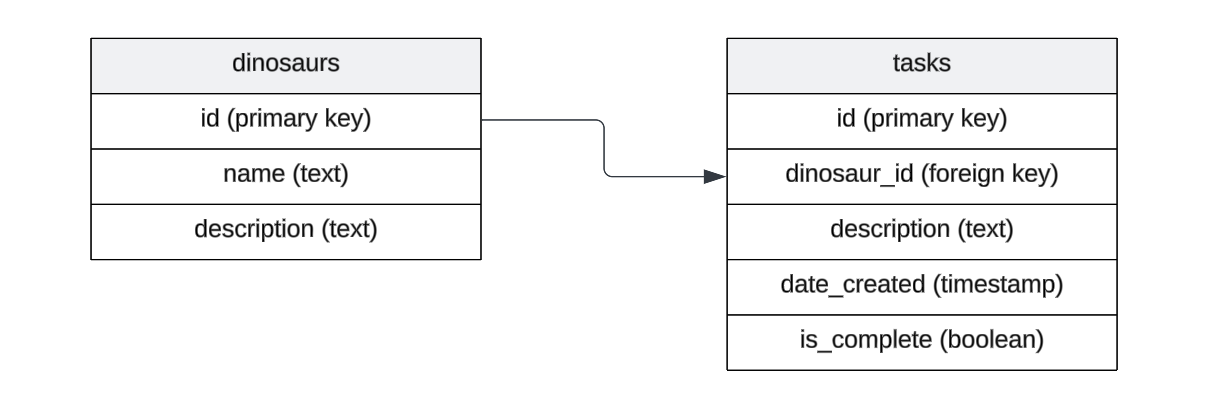
Let’s say our current database already has the following table schemas:
We’ll run the following command to instrospect the database and populate several
files under a ./drizzle directory:
deno --env -A --node-modules-dir npm:drizzle-kit pull

Failed to find Response internal state key
No config path provided, using default 'drizzle.config.ts'
Reading config file '/private/tmp/deno-drizzle-example/drizzle.config.ts'
Pulling from ['public'] list of schemas

Using 'pg' driver for database querying
[✓] 2 tables fetched
[✓] 8 columns fetched
[✓] 0 enums fetched
[✓] 0 indexes fetched
[✓] 1 foreign keys fetched
[✓] 0 policies fetched
[✓] 0 check constraints fetched
[✓] 0 views fetched

[i] No SQL generated, you already have migrations in project
[✓] You schema file is ready ➜ drizzle/schema.ts 🚀
[✓] You relations file is ready ➜ drizzle/relations.ts 🚀
--env flag to read the .env file with our database url and the
--node-modules-dir flag to create a node_modules folder that will allow us
to use drizzle-kit correctly.
The above command will create a number of files within a ./drizzle directory
that define the schema, track changes, and provide the necessary information for
database migrations:
drizzle/schema.ts: This file defines the database schema using Drizzle ORM’s
schema definition syntax.drizzle/relations.ts: This file is intended to define relationships between
tables using Drizzle ORM’s relations API.drizzle/0000_long_veda.sql: A SQL migration file that contains the SQL
code to create the database table(s). The code is commented out — you can
uncomment this code if you want to run this migration to create the table(s)
in a new environment.drizzle/meta/0000_snapshot.json: A snapshot file that represents the current
state of your database schema.drizzle/meta/_journal.json: This file keeps track of the migrations that
have been applied to your database. It helps Drizzle ORM know which migrations
have been run and which ones still need to be applied.If you don’t already have an existing table defined in Postgres (e.g. you’re starting a completely new project), you can define the tables and types in code and have Drizzle create them.
Let’s create a new directory ./src/db/ and in it, a schema.ts file, which
we’ll populate with the below:
import {
  boolean,
  foreignKey,
  integer,
  pgTable,
  serial,
  text,
  timestamp,
} from "drizzle-orm/pg-core";

export const dinosaurs = pgTable("dinosaurs", {
  id: serial().primaryKey().notNull(),
  name: text(),
  description: text(),
});

export const tasks = pgTable("tasks", {
  id: serial().primaryKey().notNull(),
  dinosaurId: integer("dinosaur_id"),
  description: text(),
  dateCreated: timestamp("date_created", { mode: "string" }).defaultNow(),
  isComplete: boolean("is_complete"),
}, (table) => {
  return {
    tasksDinosaurIdFkey: foreignKey({
      columns: [table.dinosaurId],
      foreignColumns: [dinosaurs.id],
      name: "tasks_dinosaur_id_fkey",
    }),
  };
});
dinosaurs and tasks and their relation. Learn more about using Drizzle to define schemas and their relations.
Once we have defined ./src/db/schema.ts, we can create the tables and their
specified relationship by creating a migration:
deno -A npm:drizzle-kit generate

Failed to find Response internal state key
No config path provided, using default 'drizzle.config.ts'
Reading config file '/private/tmp/drizzle/drizzle.config.ts'
2 tables
dinosaurs 3 columns 0 indexes 0 fks
tasks 5 columns 0 indexes 1 fks
The above command will create a ./drizzle/ folder that contains migration
scripts and logs.
Now that we have setup Drizzle ORM, we can use it to simplify managing data in
our Postgres database. First, Drizzle suggests taking the schema.ts and
relations.ts and copying them to the ./src/db directory to use within an
application.
Let’s create a ./src/db/db.ts which exports a few helper functions that’ll
make it easier for us to interact with the database:
import { drizzle } from "drizzle-orm/node-postgres";
import { dinosaurs as dinosaurSchema, tasks as taskSchema } from "./schema.ts";
import { dinosaursRelations, tasksRelations } from "./relations.ts";
import pg from "pg";
import { integer } from "drizzle-orm/sqlite-core";
import { eq } from "drizzle-orm/expressions";


const { Pool } = pg;


export const db = drizzle({
  client: new Pool({
    connectionString: Deno.env.get("DATABASE_URL"),
  }),
  schema: { dinosaurSchema, taskSchema, dinosaursRelations, tasksRelations },
});


export async function insertDinosaur(dinosaurObj: typeof dinosaurSchema) {
  return await db.insert(dinosaurSchema).values(dinosaurObj);
}


export async function insertTask(taskObj: typeof taskSchema) {
  return await db.insert(taskSchema).values(taskObj);
}


export async function findDinosaurById(dinosaurId: typeof integer) {
  return await db.select().from(dinosaurSchema).where(
    eq(dinosaurSchema.id, dinosaurId),
  );
}


export async function findDinosaurByName(name: string) {
  return await db.select().from(dinosaurSchema).where(
    eq(dinosaurSchema.name, name),
  );
}


export async function findDinosaurTasksByDinosaurId(
  dinosaurId: typeof integer,
) {
  return await db.select().from(taskSchema).where(
    eq(taskSchema.dinosaurId, dinosaurId),
  );
}


export async function updateDinosaur(dinosaurObj: typeof dinosaurSchema) {
  return await db.update(dinosaurSchema).set(dinosaurObj).where(
    eq(dinosaurSchema.id, dinosaurObj.id),
  );
}


export async function updateTask(taskObj: typeof taskSchema) {
  return await db.update(taskSchema).set(taskObj).where(
    eq(taskSchema.id, taskObj.id),
  );
}


export async function deleteDinosaurById(id: typeof integer) {
  return await db.delete(dinosaurSchema).where(
    eq(dinosaurSchema.id, id),
  );
}


export async function deleteTask(id: typeof integer) {
  return await db.delete(taskSchema).where(eq(taskSchema.id, id));
}
Now we can import some of these helper functions to a script where we can
perform some simple CRUD operations on our database. Let’s create a new file
./src/script.ts:
import {
  deleteDinosaurById,
  findDinosaurByName,
  insertDinosaur,
  insertTask,
  updateDinosaur,
} from "./db/db.ts";


await insertDinosaur({
  name: "Denosaur",
  description: "Dinosaurs should be simple.",
});


const res = await findDinosaurByName("Denosaur");


await insertTask({
  dinosaurId: res.id,
  description: "Remove unnecessary config.",
  isComplete: false,
});


const newDeno = {
  id: res.id,
  name: "Denosaur",
  description: "The simplest dinosaur.",
};
await updateDinosaur(newDeno);


await deleteDinosaurById(res.id);
We can run it and it will perform all of the actions on the database:
deno -A --env ./src/script.ts
Drizzle ORM is a popular data mapping tool to simplify managing and maintaining data models and working with your database. Hopefully, this tutorial gives you a start on how to use Drizzle in your Deno projects.
Now that you have a basic understanding of how to use Drizzle ORM with Deno, you could:
🦕 Happy coding with Deno and Drizzle ORM! The type-safety and simplicity of this stack make it a great choice for building modern web applications.
🚨️ Want to learn more Deno? 🚨️
Check out our new Learn Deno tutorial series, where you’ll learn:
…and more, in short, bite-sized videos. New tutorials published every Tuesday and Thursday.
此内容由惯性聚合(RSS阅读器)自动聚合整理,仅供阅读参考。 原文来自 — 版权归原作者所有。