


Deno 1.11 has been tagged and released with the follow features:
crypto.subtle.digest and crypto.randomUUID landeddeno lint now stable: lint projects 100%
faster than ESLintTextEncoderStream and
TextDecoderStream: web standard
stream combinators for streaming textIf you already have Deno installed you can upgrade to 1.11 by running
If you are installing Deno for the first time, you can use one of the methods listed below:
curl -fsSL https://deno.land/x/install/install.sh | sh


iwr https://deno.land/x/install/install.ps1 -useb | iex


brew install deno


scoop install deno


choco install deno
There are now official Docker images for Deno available on Dockerhub.
To start the deno repl:
$ docker run -it --init denoland/deno:1.11.0 repl
To shell into the docker runtime:
$ docker run -it --init --entrypoint sh denoland/deno:1.11.0
To run main.ts from your working directory:
$ docker run -it --init -p 1993:1993 -v $PWD:/app denoland/deno:1.11.0 run --allow-net /app/main.ts
Here, -p 1993:1993 maps port 1993 on the container to 1993 on the host,
-v $PWD:/app mounts the host working directory to /app on the container, and
--allow-net /app/main.ts is passed to deno on the container.
Thank you to Andy Hayden who maintained the Deno Docker images over the past two years.
This release marks the start of our efforts to add the Web Crypto API to Deno.
It exposes cryptographic primitives to your application, that can be used to
easily build secure systems using cryptography. We have supported
crypto.getRandomValues() since Deno 1.0, but we have now added support for
hashing and UUID generation.
You can now securely hash data using the sha-256, sha-384, sha-512, or
sha-1 algorithms using the SubtleCrypto.digest API, also available in
browsers and Node.js. Here is an example:
import { encodeToString } from "https://deno.land/std@0.97.0/encoding/hex.ts";
const data = new TextEncoder().encode("Deno 1.11 has been released!");
const digest = await crypto.subtle.digest("sha-256", data.buffer);
console.log("Digest:", encodeToString(new Uint8Array(digest)));
Additionally we have added support for the recently standardized
crypto.randomUUID function. It allows you to generate UUID v4 as per RFC 4122.
This feature is already in Node.js and will ship in Chrome/Edge 92 by the end of
next month.
console.log("Random UUID:", crypto.randomUUID());
We aim to expand the Web Crypto APIs in the next release, Deno 1.12, scheduled for July 13th.
Sometimes it is desirable to abort an ongoing fetch, for example if you want
to time out a request if it has not responded after a few seconds. This release
adds support for aborting fetch using an AbortSignal, the web standard API
for aborting fetches. Here is an example of how this works:
const controller = new AbortController();


setTimeout(() => controller.abort(), 5000);


const response = await fetch("https://myslowapi.com/users", {
  signal: controller.signal,
});


const users = await response.json();
A request can be aborted in all parts of its lifecycle, so during sending headers to the server, sending a body to the server, receiving back headers, or receiving back the response body.
deno lint is now stableDeno ships with a built-in linter available as deno lint sub-command.
It was first introduced in v1.1.0 back in June 2020, but as a precaution it
required --unstable flag when using deno lint to signal that the linter is
still early in development and might have bugs.
Over the following months deno_lint went through a few rounds of refactors to
improve its stability as well as adding more rules to match recommended set from
ESLint.
We were still receiving feedback that some users don’t want to use deno lint
yet, because it’s unstable. In v1.10.0 we removed requirement for --unstable
flag, and today we’re happy to announce that deno lint is considered stable.
However, we still reserve the right to change set of recommended rules.
Thank you to Yusuke Tanaka who contributed countless PRs over the months and implemented a lot of rules.
deno compileProducing self contained binaries has been the most requested feature in Deno’s
issue tracker and first landed in v1.6.
The functionality provided was limited in scope and one of missing features that was highly requested was using dynamic imports inside produced binaries. This release adds support for dynamic imports using data URIs which allows to read a source file from disk or remote location and execute it. Please keep in mind that importing directly from file system or remote location is still not supported.
Example:
console.log("Hello Deno!");
const sourceCode = await Deno.readTextFile("./some_source_code.js");
const dataUrl = "data:text/javascript;base64," + btoa(sourceCode);
const c = await import(dataUrl);
console.log(c.default);
Another highly requested feature for self contained binaries was access to the
runtime compiler API (Deno.emit()). We’re happy to announce that this API is
now be available in all produced binaries.
This release adds support for two modern web APIs: TextEncoderStream and
TextDecoderStream. These stream combinators can be used with ReadableStream
to easily decode a stream from bytes to string or from string to bytes.
Here is an example where we pipe a fetch response body stream through a
TextDecoderStream. This converts the stream of raw bytes into a string of
string segments. This example will print each segment to the console on a new
line.
const response = await fetch("https://http2.golang.org/clockstream");
const body = response.body.pipeThrough(new TextDecoderStream());
for await (const chunk of body) {
  console.log("!!chunk start!!", chunk, "!!chunk end!!");
}
In addition we also now support the stream option on standard TextDecoder.
In this release we are prototyping support for BroadcastChannel under
--unstable. BroadcastChannel can be used to broadcast messages consisting of
complex JavaScript objects between workers. Currently this is restricted to
workers in the same process, but in the future we want to allow
BroadcastChannel to communicate between multiple processes sharing an origin
(an origin is the protocol, hostname, and port of the URL you can pass to
--location).
Here is an example of broadcasting a message to three workers:
const c = new BroadcastChannel("foo");
const url = new URL("./worker.js", import.meta.url).href;

for (let i = 0; i < 3; i++) {
  const w = new Worker(url, { type: "module" });
  await new Promise((resolve) => w.onmessage = resolve);
}

c.postMessage({ hello: [1, 2, 3] });
And the worker.js module:
const c = new BroadcastChannel("foo");
self.postMessage("ready");
c.onmessage = (e) => {
  console.log("got message", e.data);
};
More details about broadcast channels can be found on MDN.
deno lspThis release brings a number of features to the language server:
LSP now provides code lenses for tests, which allow clients to launch the Deno CLI executing specific tests identified in the IDE.
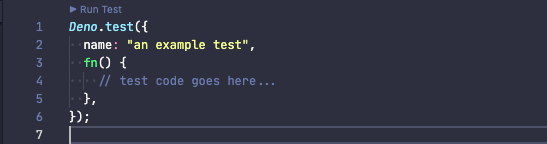
For Visual Studio Code, you need version 3.6.0 or later of the vscode_deno extension to take advantage of this feature.
The LSP now supports per resource configuration as part of the LSP protocol. In
Visual Studio Code, this manifests itself as
multi-root workspaces
which allow you to have specific configurations for different folders. Also
checkout out the
workspace folders
documentation in the vscode_deno extension for more information.
In Deno 1.10 we added support for import completions for remote registries.
Previously you had to manually register remote registries you want to get
completions for in your LSP settings. With this release the Deno extension will
prompt you if it discovers that an registry you are importing supports registry
import completions. You can opt out of auto discovery by setting the
deno.suggest.imports.autoDiscover extension option to false.
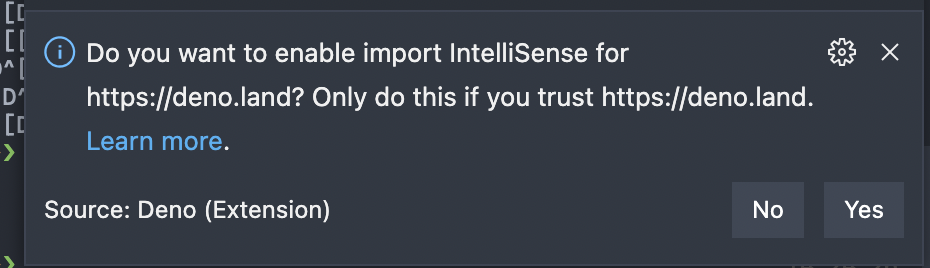
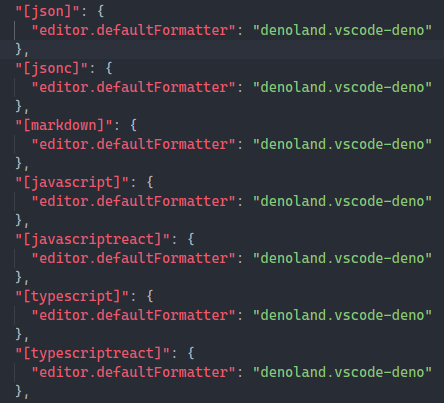
In addition to formatting JavaScript, JSX, TypeScript and TSX file, LSP can now format JSON, JSONC and Markdown files as well.
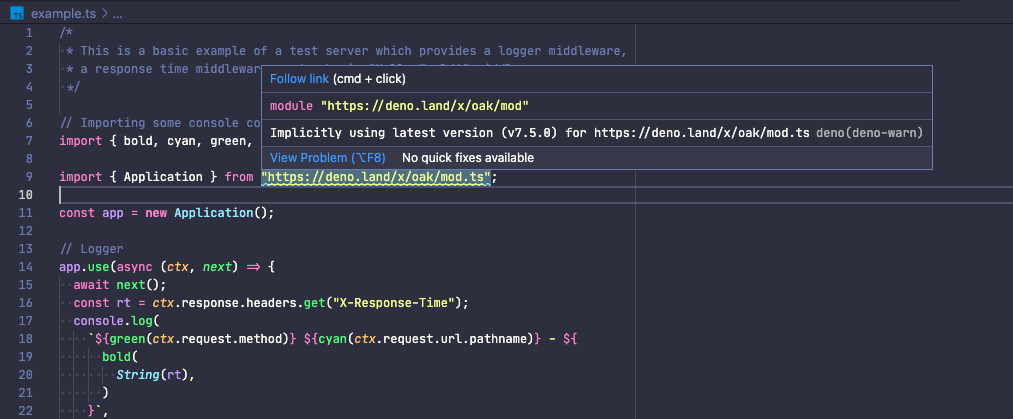
When serving source code CDNs can provide X-Deno-Warning header that will be
displayed when first downloading the source code. Now LSP can show those
warnings inline. For example: when using deno.land/x warnings are shown if URL
has no version included.
Deno LSP provides diagnostics from the built-in linter and with this release it will display hints alongside the diagnostics.
Previously (1.10):

Now (1.11):

@deno-types and triple-slash refsLSP can now understand // @deno-types and /// <reference /> comments and
will provide diagnostics for those comments.
Following Deno APIs added support for using argument of type URL instead of
string for arguments that represent filepath (URL with scheme other than
file:// will not work).
Deno.chdirDeno.realPathDeno.realPathSyncDeno.renameDeno.renameSyncDeno.symlinkDeno.symlinkSyncDeno.utimeDeno.utimeSyncThis change is backwards compatible.
Deno 1.11 ships with the latest stable version of TypeScript. For more information on new features in TypeScript see Announcing TypeScript 4.3
With every release we are continuing our work on improving the compatibility between APIs in Deno and APIs in web browsers.
One way we are doing this is by sharing a test suite with browsers like Chrome, Firefox, Safari, and Servo. This shared web platform test suite checks that all browsers adhere to the same web platform specifications, so your code can be portable across engines.
You can now view our progress towards web compatibility on our new web platform test dashboard at https://wpt.deno.land. It displays the status of all the WPTs we execute in our continuous integration flow. We are also working with Philip Jägenstedt from the Chromium ecosystem infrastructure team to get Deno compatibility data on https://wpt.fyi. This will allow for comparisons between different versions of Deno, or between Deno and other browser engines.
We are also working on getting Deno compatibility data displayed on MDN so you can figure out what APIs Deno supports, right on the canonical source of documentation for Web APIs.
此内容由惯性聚合(RSS阅读器)自动聚合整理,仅供阅读参考。 原文来自 — 版权归原作者所有。