




Deno Deploy has always been great at dynamically generating content at the edge. We can run JavaScript code close to users, which can significantly reduce the response time latency. Many applications are not completely dynamic though: they have static assets like CSS files, client side JS, and images.
Until now Deno Deploy has not had a great way to deal with static assets. You had the choice of encoding them into the JavaScript code, hand rolling a CDN, or pulling the files from your GitHub repository. None of these options are ideal.
Deno Deploy now has first class support for static files. Your static files
are stored on our network when you deploy your code, and are then distributed
around the world close to where your users are. You can use the Deno file system
APIs, and fetch to access these files from your JavaScript code running at the
edge.
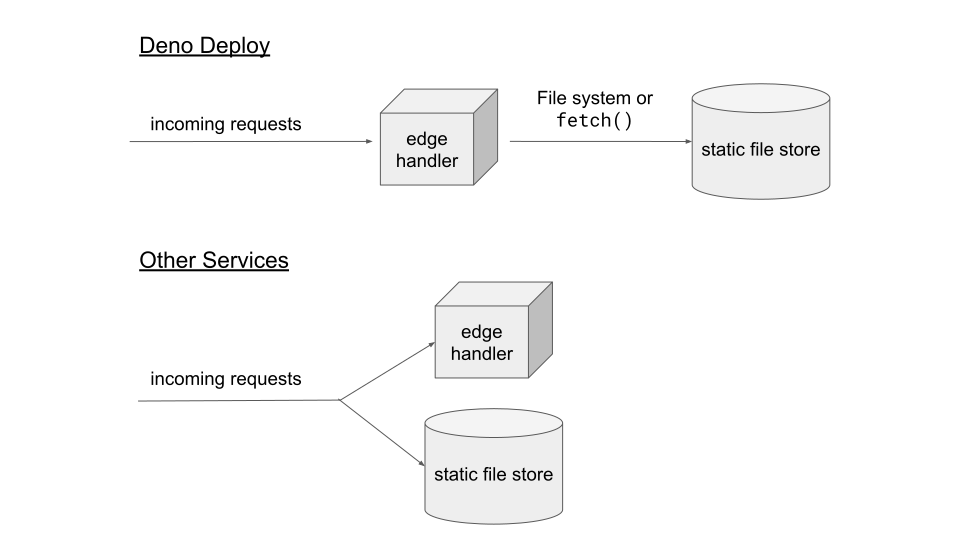
Because the actual serving of the files is still controlled by your code running at the edge, you have full control over all responses, even those to static files. For example, this can be used to:
In Deno Deploy static files are not a completely separate system.
The most basic thing you can do, is read the entire file into memory and serve it to the user:
import { serve } from "https://deno.land/std@0.140.0/http/server.ts";

const HTML = await Deno.readFile("./index.html");

serve(async () => {
  return new Response(HTML, {
    headers: {
      "content-type": "text/html",
    },
  });
});
This works great for small files. For larger files, you can stream the file directly to the user instead of buffering it in memory:
import { serve } from "https://deno.land/std@0.140.0/http/server.ts";

const FILE_URL = new URL("/movie.webm", import.meta.url).href;

serve(async () => {
  const resp = await fetch(FILE_URL);
  return new Response(resp.body, {
    headers: {
      "content-type": "video/webm",
    },
  });
});
Want a directory listing of all the available files? Easy enough with
Deno.readDir:
import { serve } from "https://deno.land/std@0.140.0/http/server.ts";

serve(async () => {
  const entries = [];
  for await (const entry of Deno.readDir(".")) {
    entries.push(entry);
  }

  const list = entries.map((entry) => {
    return `<li>${entry.name}</li>`;
  }).join("");

  return new Response(`<ul>${list}</ul>`, {
    headers: {
      "content-type": "text/html",
    },
  });
});
The standard library’s file serving utilities can be utilized to
serve static files. These will set appropriate Content-Type headers and
support more complex features like Range requests out of the box:
import { serve } from "https://deno.land/std@0.140.0/http/server.ts";
import { serveFile } from "https://deno.land/std@0.140.0/http/file_server.ts";

serve(async (req) => {
  return await serveFile(req, `${Deno.cwd()}/static/index.html`);
});
You can also use Deno Deploy if you’re using a full-fledged HTTP framework like
oak to serve your static content:
import { Application } from "https://deno.land/x/oak/mod.ts";

const app = new Application();
app.use(async (ctx) => {
  try {
    await ctx.send({
      root: `${Deno.cwd()}/static`,
      index: "index.html",
    });
  } catch {
    ctx.response.status = 404;
    ctx.response.body = "404 File not found";
  }
});

await app.listen({ port: 8000 });
A full list of the file system APIs Deno Deploy currently supports:
Deno.readFile to read a file into memoryDeno.readTextFile to read a file into memory as a UTF-8 stringDeno.readDir to get a list of files and folders in a folderDeno.open to open a file for reading in chunks (for streaming)Deno.stat to get information about a file or folder (get size or type)Deno.lstat same as above, but doesn’t follow symlinksDeno.realPath to get the path of a file or folder, after resolving symlinksDeno.readLink to get the target for a symlinkNow you may ask yourself: how do I add these newfangled static files to my deployments?
By default, if you’ve linked a GitHub repository to Deploy, all of the files in your repository will available as static files. No changes needed. This is great if you use static files for a few assets stored in your repository, like images or the markdown files for your blog.
However, sometimes you want to generate static files at deploy time. For example when using a framework like Remix.run, or when you use a static site generator. For this scenario we now let you deploy your code and static assets with the deployctl tool. Serving your current working directory at the edge is as simple as:
deployctl deploy --project my-project --prod https://deno.land/std@0.140.0/http/file_server.tsThis works great when you just want to deploy once or if you don’t have your code in version control and always deploy from your local machine, but that isn’t the case for most projects.
Projects hosted on Github will want to use Github Actions to run a build step to generate HTML, or other static content, and then upload to Deno Deploy. We’ve provided a special Github Action step for exactly this purpose:
- name: Upload to Deno Deploy
  uses: denoland/deployctl@v1
  with:
    project: my-project
    entrypoint: main.js
    root: dist
One doesn’t even need to configure any access tokens or secrets for this to work. Just link your GitHub repository in the Deno Deploy dashboard and set the project to “GitHub Actions” deployment mode. Authentication is handled transparently by GitHub Actions.
Why GitHub Actions instead of a custom CI system? GitHub Actions is the de-facto standard for continuous integration now, and many many developers are already familiar with it. Why re-invent something that is already awesome?
To close out the blog post, here is a real example of a server
running on deploy that serves a static site that is built in GitHub Actions. The
site is built by a static site generator (in this case the awesome
https://lumeland.github.io). Next to the static files, the site also includes a
/api/time endpoint that dynamically returns the current time.
Try out the example at https://lume-example.deno.dev/.
Here is the GitHub Actions workflow file the project uses:
name: ci
on:
  push:
    branches: [main]
  pull_request:
    branches: [main]

jobs:
  deploy:
    name: deploy
    runs-on: ubuntu-latest
    permissions:
      id-token: write
      contents: read
    steps:
      - name: Clone repository
        uses: actions/checkout@v2

      - name: Install Deno
        uses: denoland/setup-deno@main
        with:
          deno-version: 1.18.2

      - name: Build site
        run: deno run -A https://deno.land/x/lume/ci.ts

      - name: Upload to Deno Deploy
        uses: denoland/deployctl@v1
        with:
          project: lume-example
          entrypoint: server/main.ts
And the actual code that serves the site and the API endpoint:
import { Application, Router } from "https://deno.land/x/oak@v10.2.0/mod.ts";

const app = new Application();


app.use(async (ctx, next) => {
  try {
    await ctx.send({
      root: `${Deno.cwd()}/_site`,
      index: "index.html",
    });
  } catch {
    next();
  }
});

const router = new Router();


router.get("/api/time", (ctx) => {
  ctx.response.body = { time: new Date().toISOString() };
});


app.use(router.routes());
app.use(router.allowedMethods());

await app.listen({ port: 8000 });
How fast are deployments? The time from git push to changes being live around
the globe is around 25 seconds on this repo. 15 of those seconds is waiting for
the GitHub Actions runner to get ready. For “automatic” mode deployments that
don’t involve GitHub Actions, we average between 1-10s deploy times.
If you have any questions, comments, or suggestions, please let us know by opening an issue on feedback repository, or by sending us an email. Happy Denoing!
You can read more about the file system APIs in our docs: https://deno.com/deploy/docs/runtime-fs. More info about the GitHub integration can be found here: https://deno.com/deploy/docs/projects#git-integration.
此内容由惯性聚合(RSS阅读器)自动聚合整理,仅供阅读参考。 原文来自 — 版权归原作者所有。