







Though browsers and JavaScript have come a long way, writing and publishing JavaScript modules is still painful. To maximize adoption, your module should support CommonJS and ESM, JavaScript with TypeScript declarations, and work in Deno, Node.js, and web browsers. To achieve that, many resort to complex release pipelines or maintaining two copies of code with slightly different module syntax.
What if you could write your module once with modern tooling like TypeScript and transform it to support all use cases?
dnt — Deno to Node transformdnt is a build tool that transforms Deno
modules into Node.js/npm-compatible packages. Not only that, the transformed
package:
How does it work? At a high level:
Deno.test() API.You can develop and test all your code in Deno and TypeScript. When it’s time to
publish, you can use dnt to export it to Node.js/npm-compatible format.
Let’s run through an example with my module, is-42. (You can also
view the final source code here.)
We’ve created a simple and totally real module that tests whether a variable is
the number 42. The main logic will be in mod.ts:
export function is42(num: number): boolean {
  return num === 42;
}
We’ll write some tests in mod_test.ts:
import { assertEquals } from "https://deno.land/std@0.192.0/testing/asserts.ts";
import { is42 } from "./mod.ts";

Deno.test("42 should return true", () => {
  assertEquals(true, is42(42));
});

Deno.test("1 should return false", () => {
  assertEquals(false, is42(1));
});
We can run the tests without any additional configuration with
deno test:
$ deno test
Check file:///Users/andyjiang/Developer/deno/is-42/mod_test.ts
running 2 tests from ./mod_test.ts
42 should return true ... ok (13ms)
1 should return false ... ok (7ms)

ok | 2 passed | 0 failed (142ms)
Finally, let’s also add a LICENSE and README.md file in the directory root,
because it’s a real module:
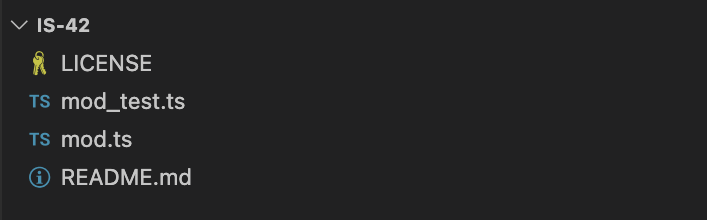
That’s it!
Let’s transform this to an npm package by creating the build script,
build_npm.ts:
import { build, emptyDir } from "https://deno.land/x/dnt@0.37.0/mod.ts";

await emptyDir("./npm");

await build({
  entryPoints: ["./mod.ts"],
  outDir: "./npm",
  shims: {
    deno: true,
  },
  package: {
    name: "is-42",
    version: Deno.args[0],
    description:
      "Boolean function that returns whether or not parameter is the number 42",
    license: "MIT",
    repository: {
      type: "git",
      url: "git+https://github.com/lambtron/is-42.git",
    },
    bugs: {
      url: "https://github.com/lambtron/is-42/issues",
    },
  },
  postBuild() {
    Deno.copyFileSync("LICENSE", "npm/LICENSE");
    Deno.copyFileSync("README.md", "npm/README.md");
  },
});
This script creates a new npm folder as the output directory, where it outputs
an entire npm package from your module.
In the build() options, we set the
entry file, output directory, shims, and all the context needed to build out a
package.json file.
In the postBuild() function, we include filesystem operations to copy our
LICENSE and README.md files accordingly.
Let’s run build_npm.ts script with the version as a parameter:
$ deno run -A build_npm.ts 0.0.1
[dnt] Transforming...
[dnt] Running npm install...

added 6 packages, and audited 7 packages in 2s

found 0 vulnerabilities
[dnt] Building project...
[dnt] Type checking ESM...
[dnt] Emitting ESM package...
[dnt] Emitting script package...
[dnt] Running post build action...
[dnt] Running tests...

> test
> node test_runner.js

Running tests in ./script/mod_test.js...

test 42 should return true ... ok
test 1 should return false ... ok

Running tests in ./esm/mod_test.js...

test 42 should return true ... ok
test 1 should return false ... ok
[dnt] Complete!
If you’re following along, your directory should have a new subdirectory npm,
in it contains your transformed npm package (which supports CJS and ESM) as well
as tests in both formats.
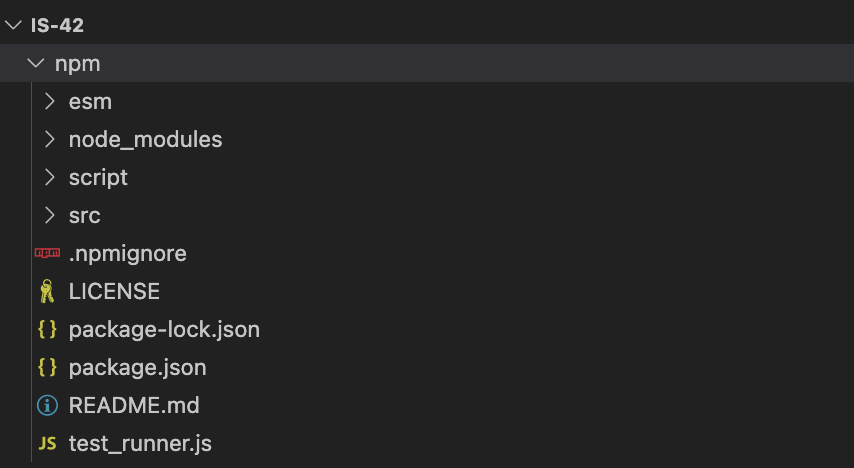
Not only are tests generated for CJS and ESM, they’re also run using both Deno and Node, so you can be confident your code runs in both runtimes.
Now, publishing your CommonJS/ESM compatible npm package is as simple as:
Check out the published package on npm.
With dnt transforming your module to support CommonJS and ES Modules,
maintaining your module is easier, as your code base is smaller.
To make it easier to publish everytime we tag a release, we can use
GitHub Actions with dnt. Note that the
below is an extremely simplified version, but should get you started in the
right direction.
Create a .github/workflows/action.yml directory and file, which will perform
the following steps anytime a new release is tagged and published:
build_npm.ts script with release version numbernpm publish npm/name: Publish to registry on: release: types: [published] jobs: publish_to_npm: name: Publish to npm runs-on: ubuntu-latest steps: - name: Checkout is-42 uses: actions/checkout@v3 - name: Set env run: echo "RELEASE_VERSION=${GITHUB_REF - name: Setup Deno uses: denoland/setup-deno@v1 with: deno-version: v1.x - name: Build npm package run: deno run -A build_npm.ts $RELEASE_VERSION - name: Setup Node/npm uses: actions/setup-node@v3 with: node-version: 18 registry-url: "https://registry.npmjs.org" scope: "@lambtron" - name: Publish to npm run: npm publish npm/ --access=public env: NODE_AUTH_TOKEN: ${{ secrets.NPM_AUTH_TOKEN }}
Note that you will need to
create a Classic Token (type Automation) from npmjs.com
and save that as a
GitHub Actions secret
as NPM_AUTH_TOKEN.
Now, everytime you publish a new tagged release, it will trigger this action and publish your module to npm.
For more details on using GitHub Actions with dnt,
check out the documentation.
Writing software should be productive, simple, and fun. It shouldn’t also include managing complex build pipelines or intricate code bases to support the widest user base.
And while we believe ESM is the future,
we recognize that many npm modules still use CommonJS. Module authors
unfortunately bear the brunt of needing to support both CommonJS and ESM. So we
like abstractions that make creating and publishing software simpler, such as
dnt.
此内容由惯性聚合(RSS阅读器)自动聚合整理,仅供阅读参考。 原文来自 — 版权归原作者所有。