




Deno’s mission is to dramatically simplify software development. In Deno 1.37,
we’re happy to extend this to interactive
Jupyter notebooks. Starting in 1.37, you can use the new
deno jupyter command to create a Deno kernel
that can be used within notebooks. Additionally, Deno 1.37 comes with stronger
Visual Studio Code and LSP support, better testing performance, improved Node
compatibility, and many bug fixes.
If you already have Deno installed, upgrade to version 1.37 in your terminal with:
If you don’t yet have Deno installed, you can install it with one of the following commands, or many other ways.
MacOS / Linux Install
curl -fsSL https://deno.land/x/install/install.sh | shWindows Install
irm https://deno.land/install.ps1 | iexHere’s an overview of what’s new in Deno 1.37.
Deno v1.37 ships with a built-in support for Jupyter notebook kernel, which brings modern JavaScript and TypeScript and unlocks a whole new set of data science and machine learning possibilities.
If you haven’t already, start by installing Jupyter - this command assumes Python and pip are installed on your system.
pip install jupyterlabIf you have Python 3 installed, you might need to use the pip3 command
instead. Other install options are covered here.
To get started using Deno in Jupyter, run:
deno jupyter --unstableand then follow the prompts to complete the installation. More documentation on
deno jupyter --unstable
can be found here.
You can now create interactive REPL sessions using either Jupyter Lab or your favorite IDE which supports these notebooks.
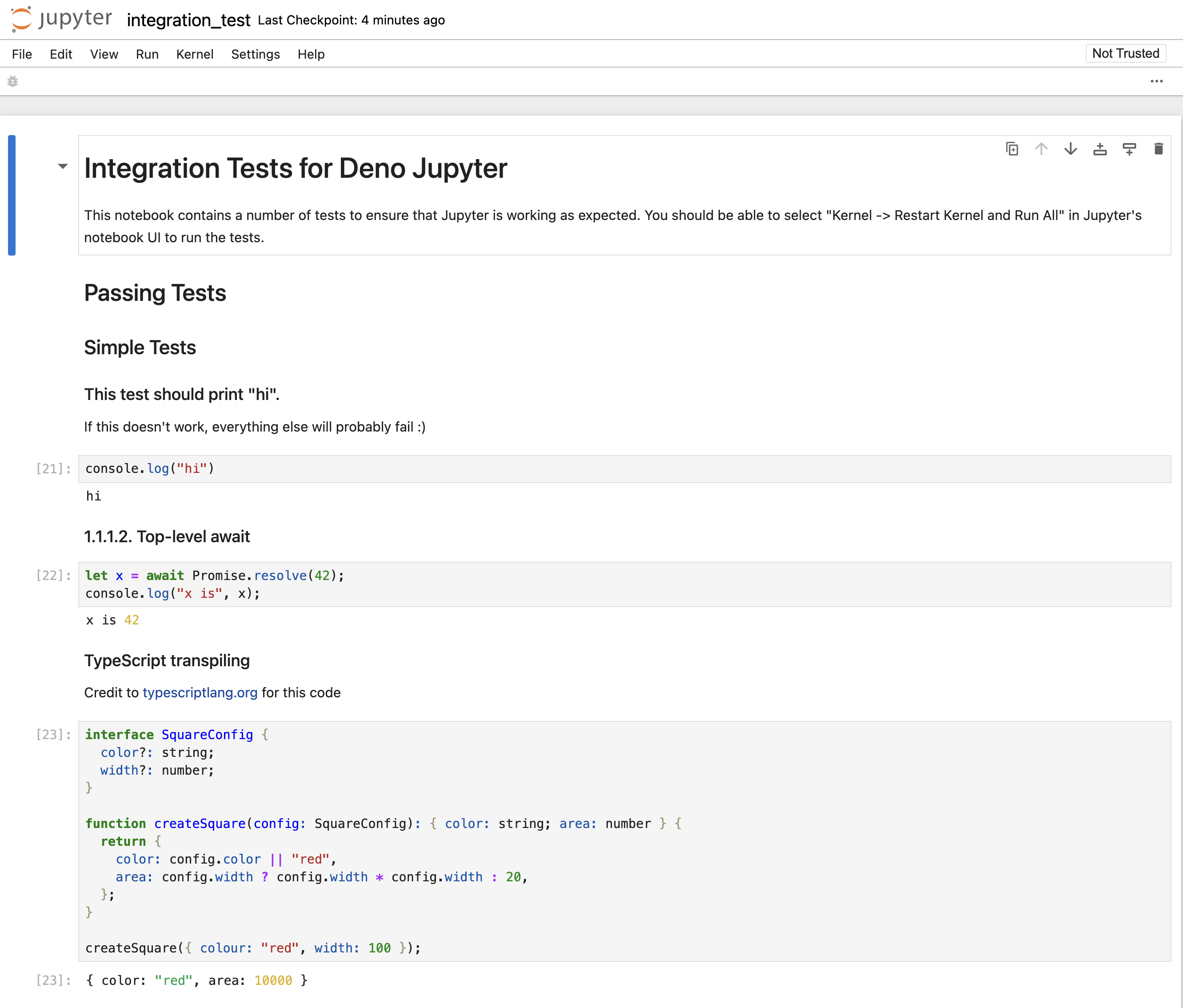
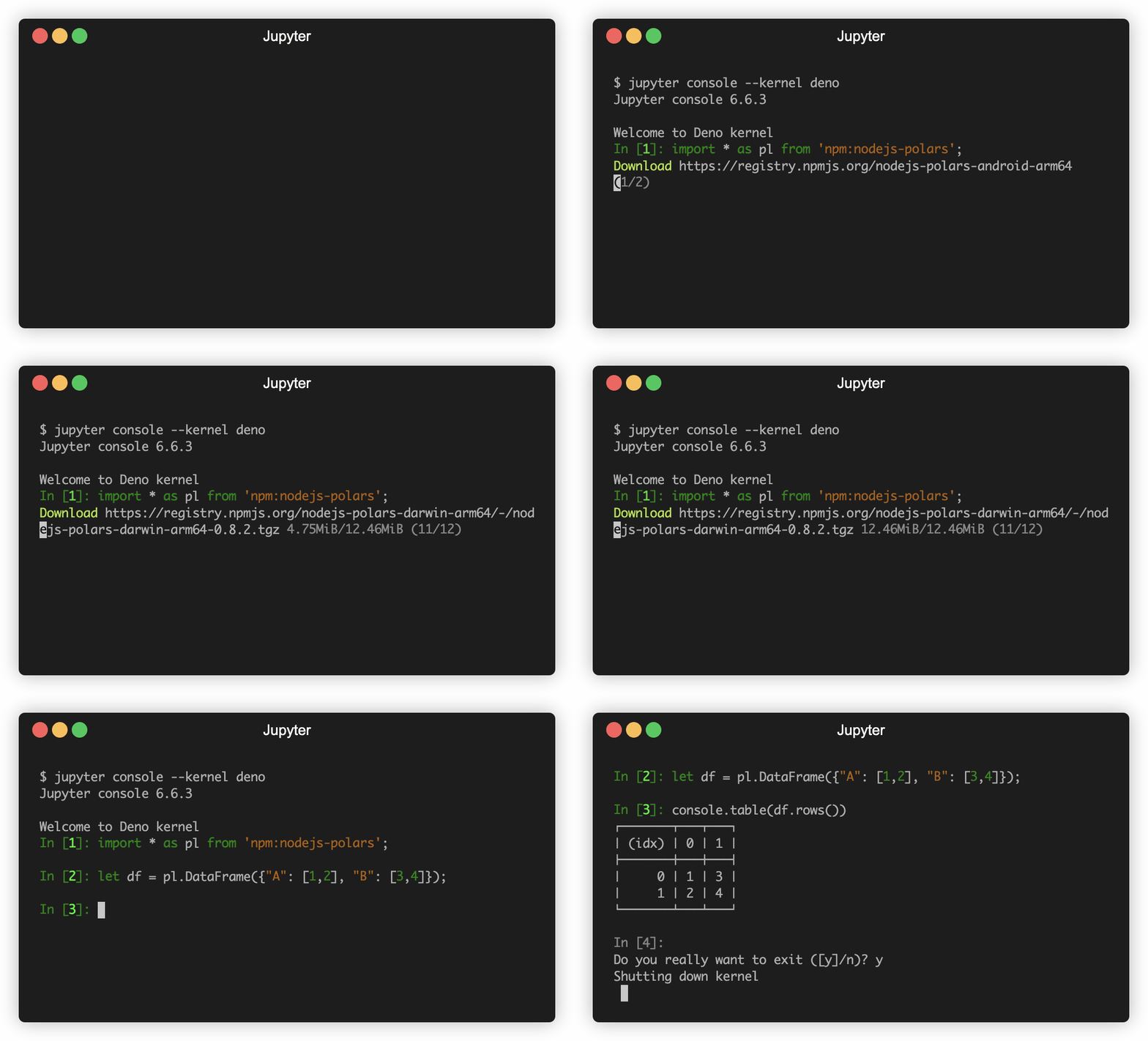
You have access to all of Deno’s APIs, as well as npm modules right from your notebook.
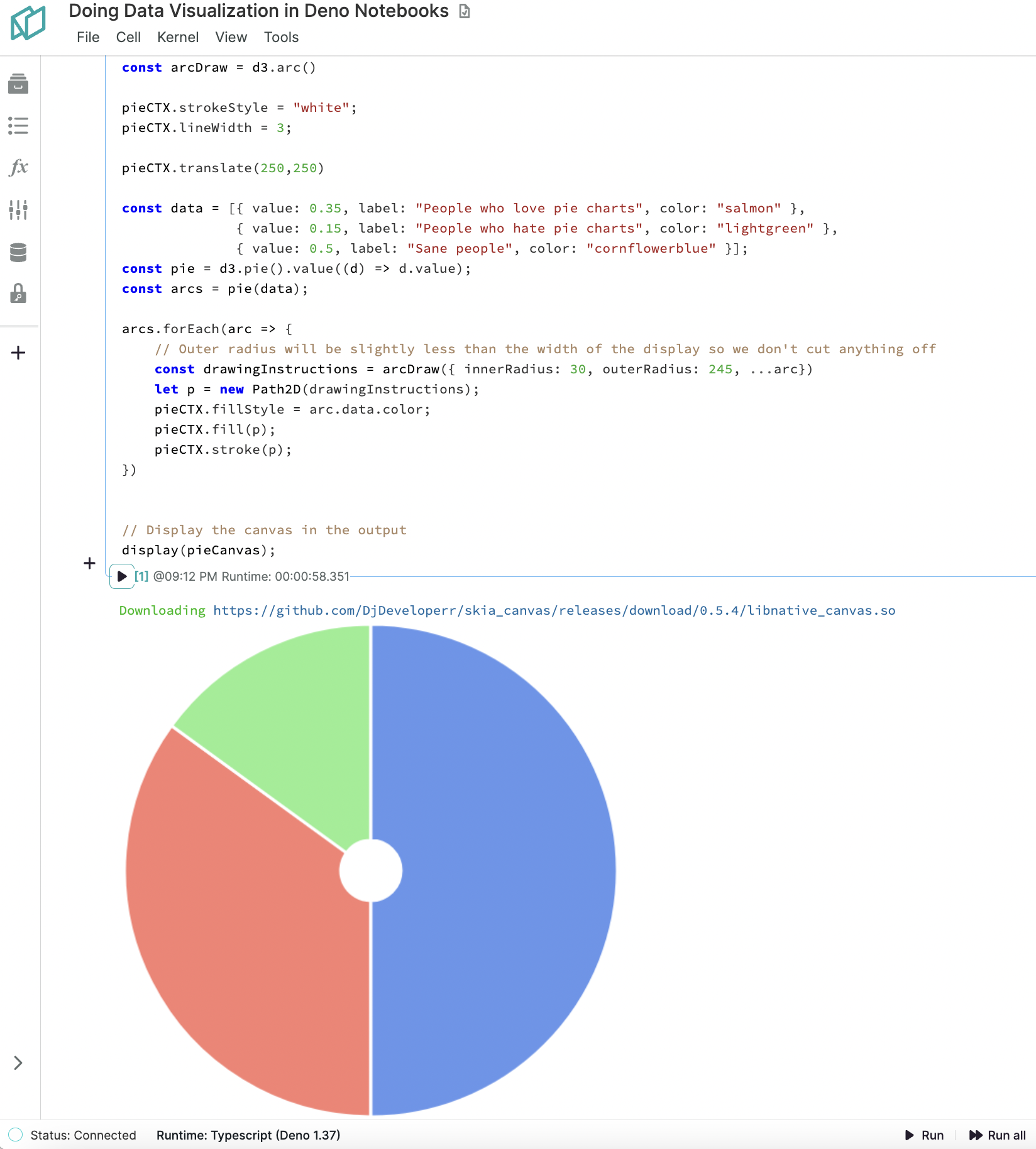
Not only can you use modern JavaScript in Jupyter notebooks, but you can also import D3 from npm to visualize your data:
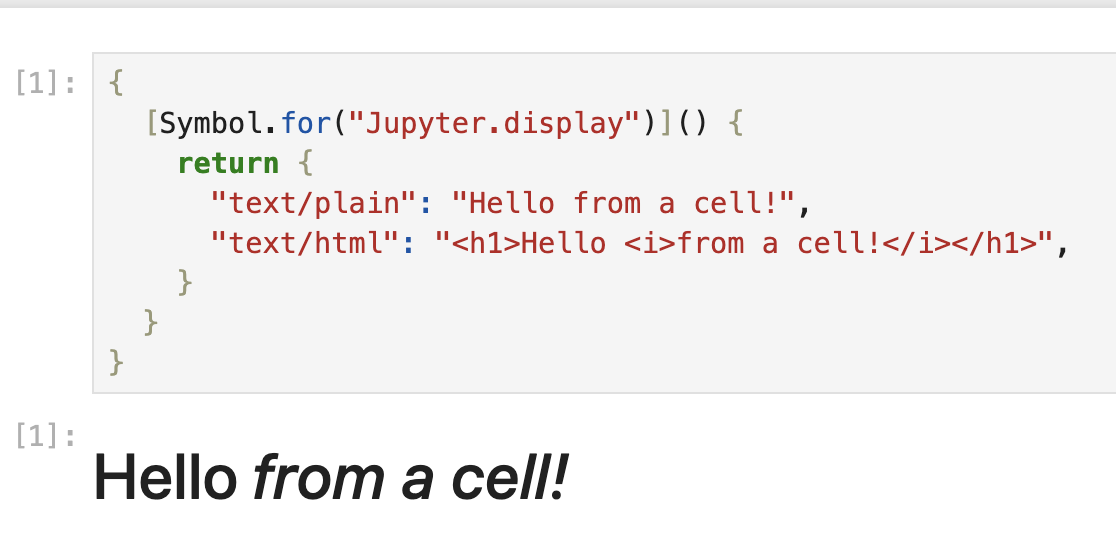
In addition, you can also provide rich output from your cells by returning an
object that contains the Symbol.for("Jupyter.display") function:
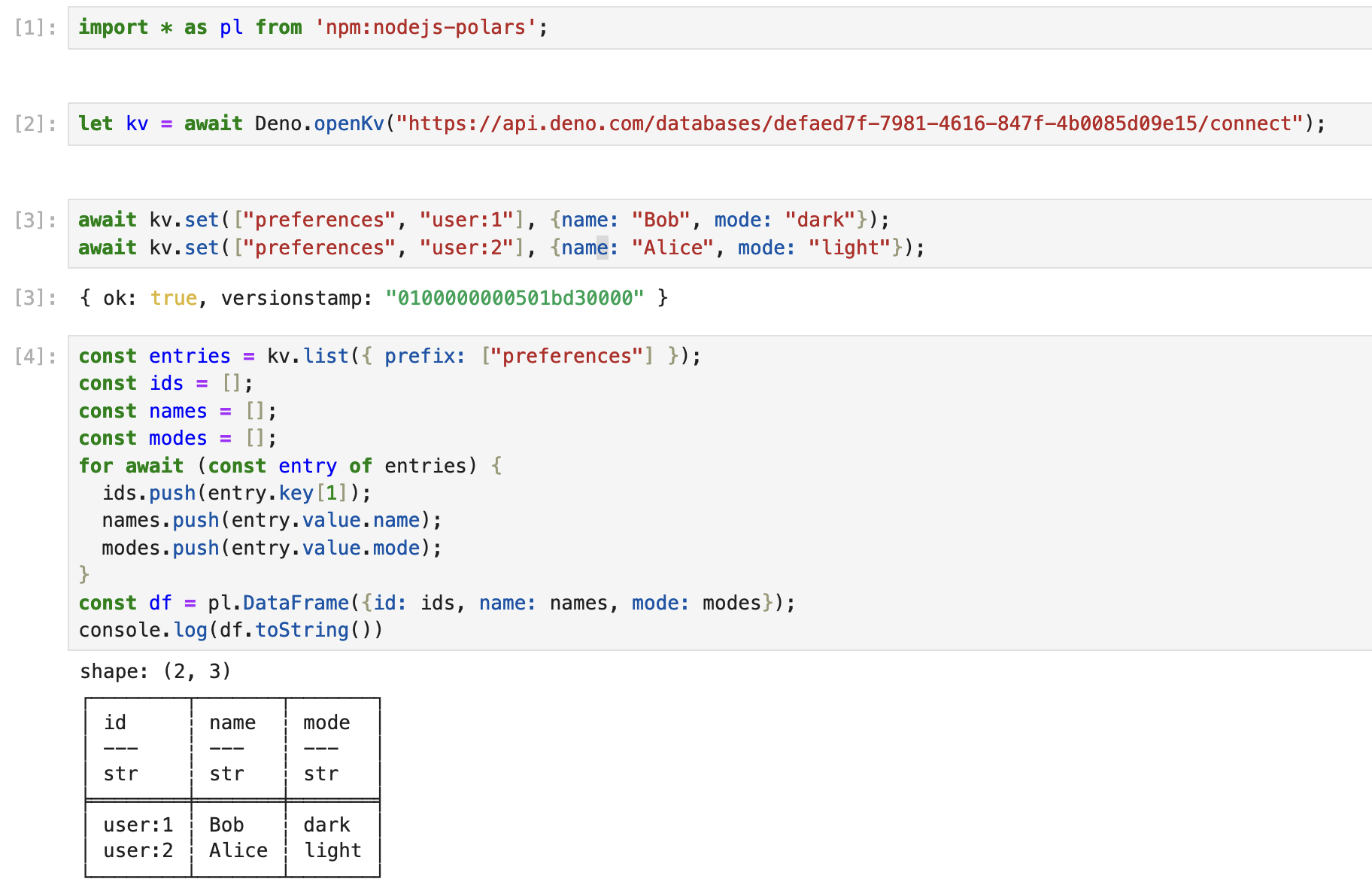
You can even connect to your hosted Deno KV with Deno KV Connect and pull live data straight into a notebook:
Finally, if you’re using Noteable.io, you can use Deno in your hosted Jupyter notebooks today. Noteable.io’s Chief Architect and a core maintainer of the Jupyter project, Kyle Kelley, describes the possibilities unlocked from this integration:
Deno’s new Jupyter kernel unlocks tremendous potential for data science workflows by people who can write JavaScript. I’m thrilled by the possibilities enabled by native access to Deno’s modern JavaScript runtime and built-in TypeScript support. JavaScript developers can create notebooks to analyze data, build models, and create interactive reports.
Gone are the days of configuring Babel and TypeScript with a Jupyter JavaScript kernel. Since Deno supports ESM imports based on URLs, the Deno kernel makes it incredibly easy to share notebooks that run anywhere. Dependencies are declarative. Organizations can take advantage of existing Jupyter deployments and immediately get access to Deno’s secure runtime sandbox without giving up the flexible workflow Jupyter enables.
For more details on using Deno’s Jupyter integration, check out our docs. We’re looking for feedback from the community on this feature, so please try it out and let us know if you find any problems or missing features.
deno.jsonThe Deno extension is disabled by default for the convenience of users working
on non-Deno TypeScript projects. Previously, you must have specified
"deno.enable": true in your editor’s workspace settings to enable it. Now, as
long as your project root contains a deno.json file, you may leave it
unspecified. You can still specify "deno.enable": false to override this.
"deno.disablePaths"To assist with cases like the above, a new "deno.disablePaths" setting has
been introduced. This is a complement to the existing "deno.enablePaths"
setting. If you have nested non-Deno sub-projects, it will disable the Deno
extension for the specified paths.
{
  "deno.disablePaths": ["./node_api/", "./vsc_extension/"]
}
This is a widely used refactor among many languages. Deno’s language server now offers this functionality – upon renaming a JS/TS file, you will be prompted to optionally update import specifiers discovered across your project which point to that file.
When typing an npm: URL in an import specifier, you will now be shown
autocomplete options for NPM packages. These are retrieved by searching the NPM
registry.
But potentially more useful: If you’ve typed npm:<package_name>@, you’ll see
autocomplete options for the latest published versions of that package. Looking
up valid versions was a tedious part of using NPM specifiers. Now this is done
for you.
Set "deno.suggest.completeFunctionCalls": true to include parentheses and
argument placeholders when selecting an autocomplete option for a function whose
signature is known. This is a re-implementation of
"typescript.suggest.completeFunctionCalls" and
"javascript.suggest.completeFunctionCalls".
// Type the following:
addEventLi
// and select the autocomplete option for `addEventListener`.

// `"deno.suggest.completeFunctionCalls": false`:
addEventListener

// `"deno.suggest.completeFunctionCalls": true`:
addEventListener(type, listener)deno.cacheOnSaveA new "deno.cacheOnSave" setting has been introduced. When enabled, the
extension will automatically cache new dependencies when you save a file. This
is a huge convenience for users who are frequently adding new dependencies to
their projects and removes the need to run “Cache dependencies” command from the
command pallete. Currently this setting is off by default, but we plan to enable
it by default in a future release.
Many testing API bugs have been fixed since 1.36.0:
{ only: true }, would previously not run any tests and log a failure because
the only option was used. Now it behaves as expected and properly ignores
other tests.foo via the code lens no longer runs other tests in the
same file whose names contain foo (eg. foobar). Thanks
@Leokuma!Run test code lens are now filtered based on deno.json fields exclude,
test.exclude and test.include..json no longer show an erroneous
diagnostic about not having a default export. This affects data URLs and
specifiers containing a query string or fragment.tsc, deno, then deno-lint."deno.enablePaths" entries by whole path components. Previously file
names that were string-prefixed by an entry would be enabled (eg. foo would
enable both foo.ts and foobar.ts). Now it must be path-prefixed, i.e. an
entry must be the exact name of the file or one of its parent directories.--inspect-wait over --inspect-brk when debugging a test. There
were still cases where the less suitable --inspect-brk was used. Thanks
@jeiea!workspace/configuration requests. These requests were sent to clients
incapable of handling them in some cases."deno.testing.enable" setting. This didn’t do anything.Continuing improvements to Deno’s testing APIs from the last release, we have some exciting updates this month as well.
We improved performance of running tests and Deno can now run up to 14,000 tests per second. This was achieved by optimizing the sanitizers that Deno’s test runner has built-in, lowering baseline overhead from 3ms to less that 0.1ms per test case.
We have further plans to improve testing performance and you can expect more speed ups in the next release.
TAP test reporterdeno test can now output test results in the
Test Anything Protocol. You can enable it by using
--reporter=tap flag:
$ deno test --reporter=tap ./test.ts
TAP version 14

ok 1 - test 0
ok 2 - test 1
ok 3 - test 2
ok 4 - test 3
ok 5 - test 4
ok 6 - test 5
ok 7 - test 6
ok 8 - test 7
ok 9 - test 8
ok 10 - test 9
1..10
Thank you to Valentin Anger for implementing this feature.
You can now focus and ignore tests using shorthand methods Deno.test.only and
Deno.test.ignore, like so:
Deno.test.only(function myTest() {

});


Deno.test.ignore(function myTest() {

});
It’s a little change, but makes it easier and faster to iterate than having to
specify an option bag like Deno.test({ only : true }, function myTest() ....
Besides changes described above, we have plethora of other small changes that makes testing experience in Deno better:
If you use --filter <name> flag to run only a subset of tests, the test runner
will now only show the filtered tests in the output. This makes it easier to
focus on the tests you care about.
Before Deno v1.37:
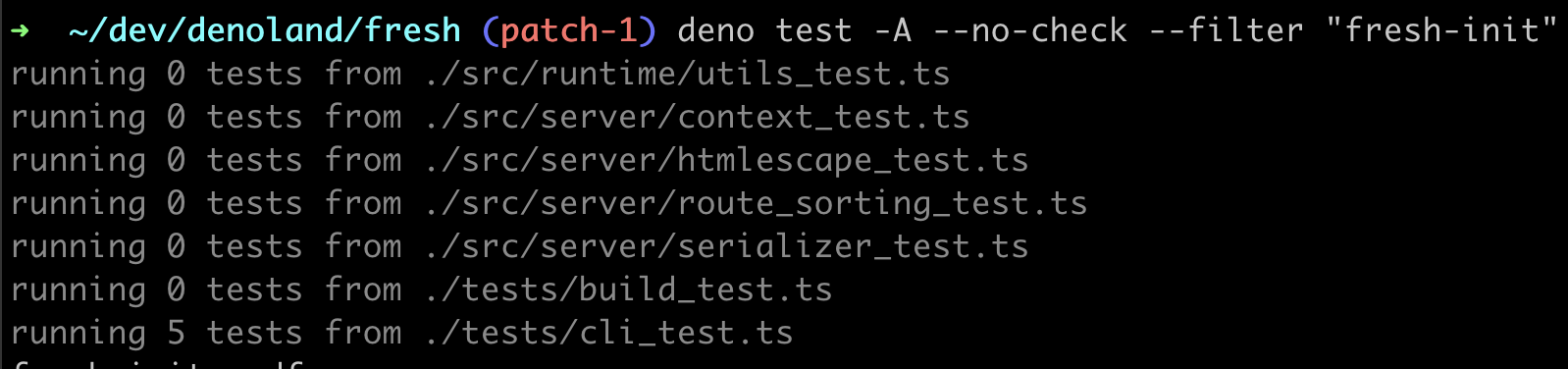
In Deno v1.37:

Characters like \n, \t, etc are now properly escaped in test names, so you
if you really need to include them in the test name, the reporter output won’t
get broken.
--trace-ops shows more detailsIf you have leaking ops in your tests, --trace-ops flag can help you catch
where the leak is coming from. With this release, this flag got smarter and can
show useful information in more cases.
only optionIf you have a test suite with the only option set to true, but you want to
run some other test filtered by a name (using --filter <name> flag), the test
will be properly run.
File, line and column attributes are properly added to the produced report.
The coverage just got faster and less noisy, by excluding internal Deno code from the generated report.
If you have other ideas how to make Deno’s test runner better, please let us know by opening an issue in Deno’s bug tracker.
A bunch of very important fixes to Node.js APIs landed in this release:
child_process no longer throws if env var is undefined or nullcrypto module implements AES GCM cipherhttp now correctly handles Content-Length header, emits "error" event,
destroying request properly cleans up allocated resourceshttp2 adds support for ClientHttp2Session and connect APIprocess.title no longer throwsrepl._builtinLibs is now supportedtls now implements TLSSocket._start methodworker_threads.Worker now correctly handles process.argvzlib supports dictionary optionrequire now uses canonicalized paths for loading contentmssql, mineflayer, infiscal,
and web-pushIf you want to know more about Node.js compatibility in Deno, check out our Node.js compatibility list.
It is now possible to vendor dependencies by simply adding the following to your
deno.json:
The next time you run or cache (ex. deno cache mod.ts), Deno will populate a
./vendor folder with the remote https/http dependencies used by the program.
Alternatively, vendoring is possible via the --vendor flag.
Note that Deno treats the ./vendor folder differently because it is not always
possible to map urls directly to a file system.
You will probably find this feature much easier to use than the deno vendor
subcommand as it takes very little overhead to manage and works in more
scenarios. For that reason, it might make sense for the deno vendor subcommand
to be removed from the CLI and distributed as a separate tool instead (for more
details, see issue #20584).
This release adds support for the Import Attributes proposal. The proposal was earlier know as “import assertions”, and Deno had support for it since version 1.17.
Import attributes allow you to import JSON files using import declarations:
import jsonData from "./data.json" with { type: "json" };
It also works with dynamic imports:
const jsonData = await import("./data.json", { with: { type: "json" } });
The old syntax using assert is still supported, but deprecated. We are going
to phase it out over the next few releases; in the next releases Deno will print
a warning if you use the deprecated assert syntax in your own code.
Deno.Server.prototype.shutdown()This release brings a new, unstable API:
Deno.Server.prototype.shutdown(): Promise<void>.
const server = Deno.serve((_req) => new Response("hello world!"));


setTimeout(async () => {
  await server.shutdown();
}, 3000);
Before this release, it was only possible to close the server “abruptly”, by
using the AbortSignal passed to the server during construction. However it’s
not always desirable to close the server in such fashion, in most cases you want
to wait for all the in-flight requests to finish before closing down the server.
This new API is unstable, because we want to gather feedback from the community
before stabilizing it; additionally we want to add a timeout parameter, that
will control how long the server waits for the pending requests to complete
before closing them forcefully.
This release we optimized numerous Web APIs as well HTTP related APIs (both in
Deno APIs as well as built-in Node.js APIs). Here’s the full list:
Event and addEventListener have undergone a deep optimization, making them
much faster; Event.timeStamp is now always set to 0
Headers was optimized for iteration and lookup scenarios, additionally
validation of header names was optimized
node:http got optimizations for handling headers -
IncomingMessageForServer.headers now uses caching to not compute headers on
every access
node:buffer was rewritten from ground up to provide faster result when
outputting strings
node:net received an optimization for socket reads, which makes npm:ws
package much more performant
All these optimizations provide up to 10% more RPS in HTTP benchmarks.
Thank you to Marcos Casagrande for implementing a lot of these optimizations.
The Lockfile format has been updated to version 3. Deno 1.37 will automatically migrate your existing lockfile to the new format on first run, but loading v3 in older versions of Deno will error.
The new format includes information on redirects, which is used by Deno to lock http(s) redirects to the destination they were resolved to at the time they were inserted into the lockfile.
std/urlIn this release, std/url module has been added to the Deno Standard Library.
std/url supports various path-like operations on URLs, which are not supported
by
the Web standard URL methods or properties.
Currently std/url has the below 5 methods:
basenamedirnameextnamejoinnormalizeimport { basename, dirname, extname, join, normalize, } from "https://deno.land/std@0.202.0/std/url/mod.ts"; const url = new URL("https://example.com/home/page.html?foo=bar"); basename(url); dirname(url); extname(url); join("https://example.com", "foo", "bar.html"); normalize("https://example.com///about///page.html");
Thank you to Aritra Karak for implementing this module.
std/ulidstd/ulid has been added to the Deno Standard Library in this release.
std/ulid supports generating ULID and
decoding the timestamp from the given ULID.
import { decodeTime, ulid } from "https://deno.land/std@0.202.0/ulid/mod.ts";

const id = ulid();
const timestamp = decode(id);
ULID is alternative to UUID, and because the leading part of a ULID is generated from a timestamp, these IDs are lexically sorted in generation time order. This property is convenient when you use it for a part of keys for Deno KV items.
Thank you to Asher Gomez for suggesting this feature and thank you to Lino Le Van for implementing it.
Finally, Deno v1.37 ships with V8 11.8 and TypeScript 5.2.2.
Believe it or not, the changes listed above still don’t tell you everything that got better in 1.37. You can view the full list of pull requests merged in Deno 1.37 on GitHub here.
We couldn’t build Deno without the help of our community! Whether by answering questions in our community Discord server or reporting bugs, we are incredibly grateful for your support. In particular, we’d like to thank the following people for their contributions to Deno 1.37: Adam Powers, Alexander Michaud, Curran McConnell, Evan, Fabian, Filip Skokan, Jakub Jirutka, Jonathan Rezende, Juan Gonzalez, Kira, Kyle Kelley, Laurence Rowe, Leigh McCulloch, Marcos Casagrande, Shreyas, Valentin Anger, VlkrS, await-ovo, lionel-rowe, osddeitf, sigmaSd, zuisong, 林炳权, 第二扩展.
Would you like to join the ranks of Deno community contributors? Check out our contribution docs here, and we’ll see you on the list next time.
Thank you for catching up with our 1.37 release, and we hope you love building with Deno!
🍋 Did you know? Fresh got even fresher.
Deno Fresh v1.4 released a few weeks ago, featuring faster page loads with an optional AOT compile step, async layouts, route groups, and more. Learn more about the latest release of the modern web framework for Deno.
此内容由惯性聚合(RSS阅读器)自动聚合整理,仅供阅读参考。 原文来自 — 版权归原作者所有。