惯性聚合 高效追踪和阅读你感兴趣的博客、新闻、科技资讯
阅读原文 在惯性聚合中打开

推荐订阅源

Google DeepMind News
F
Fortinet All Blogs
阮一峰的网络日志
阮一峰的网络日志
Apple Machine Learning Research
爱范儿
爱范儿
WordPress大学
WordPress大学
让小产品的独立变现更简单 - ezindie.com
J
Java Code Geeks
罗磊的独立博客
S
SegmentFault 最新的问题
V
V2EX
V
Visual Studio Blog
钛媒体:引领未来商业与生活新知
钛媒体:引领未来商业与生活新知
美团技术团队
博客园 - 三生石上(FineUI控件)
Stack Overflow Blog
Stack Overflow Blog
Y
Y Combinator Blog
MyScale Blog
MyScale Blog
D
Docker
Google DeepMind News
Blog — PlanetScale
Blog — PlanetScale
M
Microsoft Research Blog - Microsoft Research
Martin Fowler
Martin Fowler
S
Secure Thoughts
B
Blog
cs.CL updates on arXiv.org
www.infosecurity-magazine.com
Recent Announcements
MongoDB | Blog
MongoDB | Blog
C
Cisco Blogs
C
CERT Recently Published Vulnerability Notes
T
True Tiger Recordings
GbyAI
GbyAI
P
Proofpoint News Feed
P
Privacy International News Feed
Jina AI
Jina AI
The Cloudflare Blog
I
Intezer
AWS News Blog
AWS News Blog
Hacker News - Newest:
Hacker News - Newest: "LLM"
S
Security Archives - TechRepublic
NISL@THU
NISL@THU
The Register - Security
Recent Commits to openclaw:main
P
Palo Alto Networks Blog
S
Schneier on Security
L
LINUX DO - 热门话题
C
CXSECURITY Database RSS Feed - CXSecurity.com
Security Latest
Security Latest
C
Cybersecurity and Infrastructure Security Agency CISA

阿豪运维笔记

Win10系统中Windows 资源管理器是什么进程为啥重启下这个进程界面就正常了 Win7系统中explorer.exe是什么进程为啥重启下这个进程桌面显示就正常了 解决普通用户使用su命令切换root用户时提示su Authentication failure图文教程 Windows2025系统如何设置指定时间定时自动重启系统图文教程 Windows2022系统如何设置指定时间定时自动重启系统图文教程 Windows2019系统如何设置指定时间定时自动重启系统图文教程 Windows2016系统如何设置指定时间定时自动重启系统图文教程 Windows2012系统如何设置指定时间定时自动重启系统图文教程 OpenSUSE 16如何安装Linux Web可视化管理工具Cockpit Fedora 41如何安装Linux Web可视化管理工具Cockpit Fedora 40如何安装Linux Web可视化管理工具Cockpit Debian13如何安装Linux Web可视化管理工具Cockpit Debian12如何安装Linux Web可视化管理工具Cockpit Ubuntu24如何安装Linux Web可视化管理工具Cockpit Ubuntu22如何安装Linux Web可视化管理工具Cockpit Alibaba Cloud Linux 4如何安装Linux Web可视化管理工具Cockpit Alibaba Cloud Linux 3如何安装Linux Web可视化管理工具Cockpit Rocky Linux 10如何安装Linux Web可视化管理工具Cockpit
轻松搞定Windows系统自定义安装日期图文教程
2026-05-13 · via 阿豪运维笔记

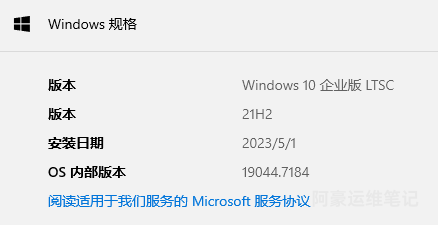
Windows系统设置系统信息详情中Windows规格有个安装日期显示的是当前系统的安装日期,想自定义修改成自己喜欢的日期是否可以修改?这个安装日期是可以修改的,它是以Unix时间戳写入Windows注册表,写个教程记录下如何轻松搞定Windows系统自定义安装日期,同时也给有需要的同学提供一丢丢帮助。
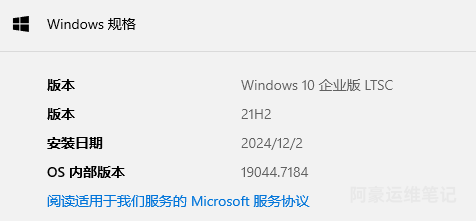
image.png

操作步骤

1、访问 https://www.epochconverter.com/  获取时间戳

站长这边定义2023年5月1号时间15点30分10秒,选择local time当地时间,点击Date to timestamp生成,它生成的Unix时间戳为:1682926210
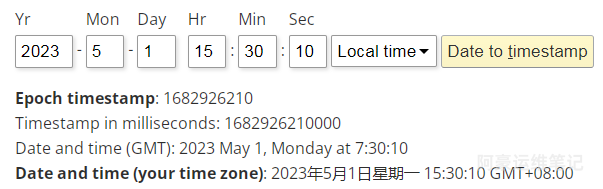
image.png

2、访问 https://www.epochconverter.com/ldap  获取LDAP时间戳

站长这边定义2023年5月1号时间15点30分10秒,选择local time当地时间,点击Create LDAP timestamp生成,它生成的LDAP时间戳为:133273998100000000
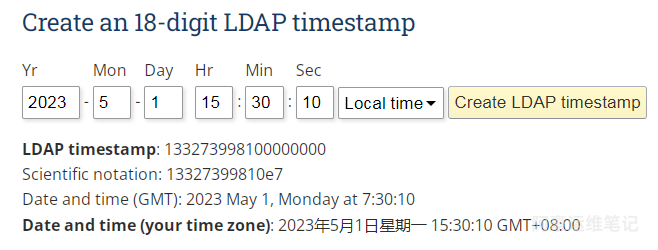
image.png

3、按键盘的Win+R打开运行窗口或者开始菜单搜索运行命令点击打开,输入regedit点击确定打开注册表编辑器
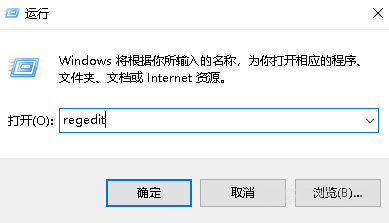
image.png

4、打开注册表编辑后定位到计算机\HKEY_LOCAL_MACHINE\SOFTWARE\Microsoft\Windows NT\CurrentVersion
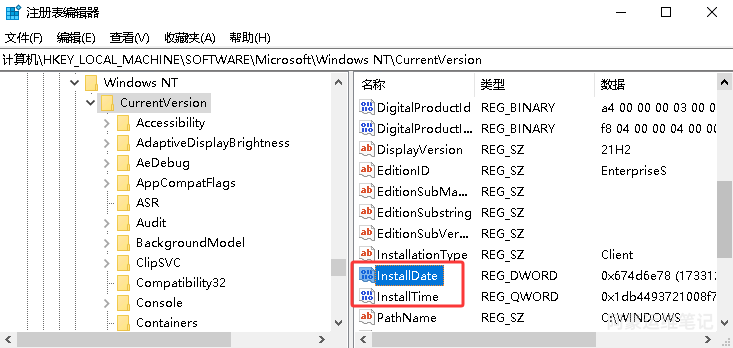
image.png

5、修改InstallDate(systeminfo日期)

找到InstallDate右键修改选十进制,输入生成的Unix时间戳:1682926210,修改完后点击确定
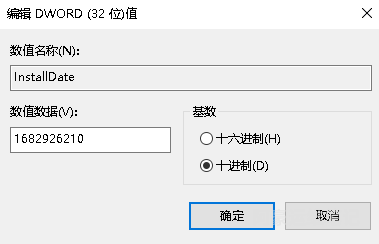
image.png

6、修改InstallTime(设置里显示的日期)

找到InstallTime右键修改选十进制,输入生成的LDAP时间戳:133273998100000000,修改完后点击确定
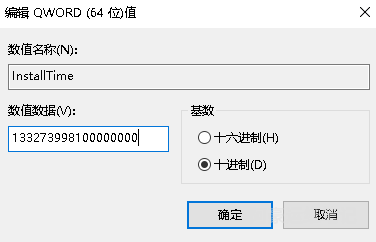
image.png

7、修改完后重启下电脑

image.png