





惯性聚合 高效追踪和阅读你感兴趣的博客、新闻、科技资讯
阅读原文 在惯性聚合中打开

推荐订阅源

WordPress大学
WordPress大学
D
Darknet – Hacking Tools, Hacker News & Cyber Security
Hacker News: Ask HN
Hacker News: Ask HN
N
News and Events Feed by Topic
Forbes - Security
Forbes - Security
The Last Watchdog
The Last Watchdog
TaoSecurity Blog
TaoSecurity Blog
Schneier on Security
SecWiki News
SecWiki News
V
Vulnerabilities – Threatpost
Project Zero
Project Zero
O
OpenAI News
W
WeLiveSecurity
Security Archives - TechRepublic
Exploit-DB.com RSS Feed
H
Hacker News: Front Page
Cisco Talos Blog
Cisco Talos Blog
Spread Privacy
Spread Privacy
Help Net Security
Help Net Security
P
Privacy & Cybersecurity Law Blog
K
Kaspersky official blog
S
Security @ Cisco Blogs
Latest news
Latest news
AWS News Blog
AWS News Blog
U
Unit 42
Martin Fowler
Martin Fowler
阮一峰的网络日志
阮一峰的网络日志
S
Secure Thoughts
CTFtime.org: upcoming CTF events
Application and Cybersecurity Blog
Know Your Adversary
Know Your Adversary
Scott Helme
Scott Helme
博客园 - 司徒正美
B
Blog RSS Feed
C
Check Point Blog
Hacker News - Newest:
Hacker News - Newest: "LLM"
D
Docker
Google Online Security Blog
Jina AI
Jina AI
aimingoo的专栏
aimingoo的专栏
Recent Commits to openclaw:main
Last Week in AI
Last Week in AI
月光博客
月光博客
C
CXSECURITY Database RSS Feed - CXSecurity.com
S
SegmentFault 最新的问题
NISL@THU
NISL@THU
T
The Blog of Author Tim Ferriss
C
Cisco Blogs
Attack and Defense Labs
小众软件
小众软件

林中阴影

林中阴影 | 关于蓝光刻录的一些调查 林中阴影 | 与IPv6地址战斗 林中阴影 | 半年前的NAS升级 林中阴影 | “智能” 家居笔记:一→两年后的回顾 林中阴影 | 旧手机做RDP客户端的一些尝试 林中阴影 | 一些矿渣的耗电量 林中阴影 | 穷人的IP-KVM远程访问 林中阴影 | 内网访问第三季:在运营商的CGNAT网络下 林中阴影 | “智能”家居笔记,其之二 林中阴影 | “智能”家居笔记,其之一 林中阴影 | 仅IPv6家庭内网服务实现v6+v4双栈访问 林中阴影 | 下载装小蜜监理拍摄的图片 林中阴影 | 几物互联 林中阴影 | 整了个“新”平板 林中阴影 | 获取招商信用卡账单的另一种方法 林中阴影 | 我在GitHub的⭐ 林中阴影 | Python与光学计算,2021 林中阴影 | 你可能并不需要内网穿透 林中阴影 | 2020 林中阴影 | 和(基本上)什么也不能连的电脑传递信息 林中阴影 | 我将贻笑于大方之家 林中阴影 | 一个新主题 林中阴影 | 2019过去了,我…… 林中阴影 | Beancount试用,半年后 林中阴影 | 自动输入剪贴板中的内容 林中阴影 | Unicode与数学公式 林中阴影 | Python中光学计算相关的库/Awesome Python for Optics 林中阴影 | 一本厕纸小说 林中阴影 | 震惊!为了在Windows上访问EXT4分区,他竟然做出了这样的事! 林中阴影 | 我的2018 林中阴影 | 笔记软件踩雷 林中阴影 | 关于BitMEX的杠杆 林中阴影 | 用Cloudflare的v4 API实现动态DNS(DDNS) 林中阴影 | 随机性从哪里来? 林中阴影 | 这次是纽约公共图书馆……而且居然还有第三部分? 林中阴影 | 这次是纽约公共图书馆…… History Data for Bitcoin and Altcoins 林中阴影 | 幂律分布与Zipf's Law 林中阴影 | 学习笔记:神经网络的优化策略 林中阴影 | 最近对博客的改动 林中阴影 | 换了个新域名 林中阴影 | VPS初始化checklist 林中阴影 | 利用kcpraw流量加速 Aeolipile boiling: Your blog (with code and formula) on Steem! Aeolipile update: new theme, link generator and more! 林中阴影 | 离 林中阴影 | 社交恐惧症患者也想用Steem,所以我做了Aeolipile Aeolipile: your code and formula on Steem 林中阴影 | 2017年的fontconfig设置 林中阴影 | 为hugo加入数学公式支持 林中阴影 | 更琐碎的编辑器细节 / Some more trival details about Steemit 林中阴影 | 对Steem的一些细节考察 / A closer look to Steem 林中阴影 | 在Hugo中折叠部分内容 Brave New World: Firefox to Quantum Yesterday Once More: Firefox to Waterfox 林中阴影 | 首都图书馆半日游 林中阴影 | 关于那个IME helper Auto-Switch IME in Vim-Mode-Plus for Atom Editor 林中阴影 | 短消息:联通IPV6 林中阴影 | 迁移到hugo,第三部分:可是我想要更多的feed地址… 林中阴影 | 由wordpress到hugo:I 林中阴影 | 迁移到hugo,第二部分:部署到github 林中阴影 | Dota 2里,什么技能的冷却时间最短? 林中阴影 | 五年 林中阴影 | 为什么已经在Word里用M$的EMF格式了,图像还是不清楚? 林中阴影 | 用nethogs实时监控每个程序的流量使用 林中阴影 | shadowsocks 2016: 一次性认证,KCP及其他 林中阴影 | Deus ex machina 林中阴影 | QArt:更漂亮的QR码 林中阴影 | 我失去了heysh.tk域名 林中阴影 | 一个简单的在线LRC编辑器 林中阴影 | 野路子科研工具二则 林中阴影 | 我有显示器辣 林中阴影 | pentadactyl 和 Firefox 43 林中阴影 | 2014年的总结 林中阴影 | shadowsocks,ipv6和便宜的VPS,还有OpenVPN 林中阴影 | 红色楼梯 林中阴影 | 用于OPENWRT的流量监控脚本:wrtbwmon 林中阴影 | SFW:治疗拖延症的一次有益尝试 林中阴影 | 木漏れ日 林中阴影 | 一次奇怪的firefox故障,还有,一个普通市民是怎么修电脑的 林中阴影 | Mortal 林中阴影 | vim again 林中阴影 | 邪恶的Archlinux 林中阴影 | 十一年前,以及今天 林中阴影 | 贺叶霜的树 林中阴影 | Limited Gear Works 林中阴影 | 永生,其二 林中阴影 | 我的云上逃亡,或,google reader的替代品 林中阴影 | 如果你像我一样主力使用xfce但又觉得GNOME3也许会变得好一点于是安装之后才发现果然还是无法接受 林中阴影 | CATIA是个好软件 林中阴影 | blog再次复活 林中阴影 | 2012-2013 林中阴影 | Texlive 在archlinux上的安装,以及中文字体的设置 林中阴影 | phpwind论坛刷分脚本(可用于openwrt) 林中阴影 | THU课程表导出,油猴脚本,输出vcal 林中阴影 | html5-世界变动率计数器(仮) 林中阴影 | 总结:简单的vCal/iCalendar/.ics格式说明 林中阴影 | Hello Again~ 林中阴影 | chicken
林中阴影 | 这次是纽约公共图书馆……的第二天!
2018-02-22 · via 林中阴影

(精神上)坐在图书馆里,我想:能不能把这些旧书借走呢?

当然是可以的!贴心的图书管理员已经提供了API接口:http://api.repo.nypl.org/,申请账号之后,就可以做各种各样的事了~

当然,如果只是想下片的话,用digital-collections可能会更简单一些:

digital-collections -t API_TOKEN -s UUID -o OUTPUT.json

其中,API_TOKEN在申请账号以后会得到一个;在你想要下载的专辑(比如这个)下面,可以看到UUID;运行这条命令之后,图片的信息列表会保存在OUTPUT.json里。
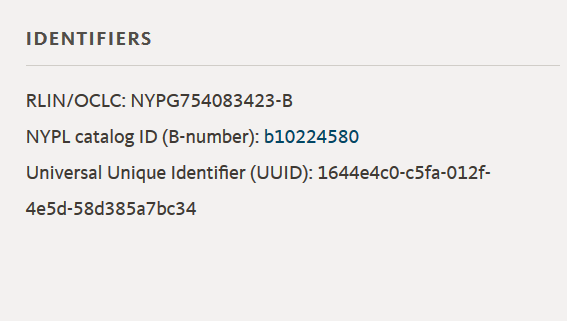
对,就是那个Universal Unique Identifier

之后,获得的json文件大概像是这样:

{
	"uuid": "510d47dd-c1f5-a3d9-e040-e00a18064a99",
	"imageLinks": {
		"imageLink": [
			"http://images.nypl.org/index.php?id=1125721&t=w&download=1&suffix=510d47dd-c1f5-a3d9-e040-e00a18064a99.001",
			"http://images.nypl.org/index.php?id=1125721&t=r&download=1&suffix=510d47dd-c1f5-a3d9-e040-e00a18064a99.001",
			"http://images.nypl.org/index.php?id=1125721&t=t&download=1&suffix=510d47dd-c1f5-a3d9-e040-e00a18064a99.001",
			"http://images.nypl.org/index.php?id=1125721&t=b&download=1&suffix=510d47dd-c1f5-a3d9-e040-e00a18064a99.001",
			"http://images.nypl.org/index.php?id=1125721&t=f&download=1&suffix=510d47dd-c1f5-a3d9-e040-e00a18064a99.001"
		]
	},
	"apiUri": "http://api.repo.nypl.org/api/v1/items/mods/510d47dd-c1f5-a3d9-e040-e00a18064a99",
	"typeOfResource": "still image",
	"imageID": "1125721",
	"sortString": "0000000001|0000000002|0000000001",
	"itemLink": "http://digitalcollections.nypl.org/items/510d47dd-c1f5-a3d9-e040-e00a18064a99",
	"highResLink": "http://link.nypl.org/7nC9VyT_TJWvGX9_H0mYBQ8",
	"title": "Dandelion.",
	"dateDigitized": "2016-08-04T04:53:12Z",
	"rightsStatement": "The New York Public Library believes that this item is in the public domain under the laws of the United States, but did not make a determination as to its copyright status under the copyright laws of other countries. This item may not be in the public domain under the laws of other countries. Though not required, if you want to credit us as the source, please use the following statement, \"From The New York Public Library,\" and provide a link back to the item on our Digital Collections site. Doing so helps us track how our collection is used and helps justify freely releasing even more content in the future.",
	"rightsStatementURI": "http://rightsstatements.org/vocab/NoC-US/1.0/"
}

之后,只要下载imageLink就好了。我用了一个简单的python脚本来做这件事。

# 注意:这玩意没有经过测试,可能会爆炸
# 啊对了,而且是python3.6
import urllib.request as ur
import json
import os

dir_name="Himalayan_plants" #可能要改这里……
os.mkdir(dir_name)
with open("OUTPUT.json","r") as source: #……还有这里
    source_dict=json.load(source)

for _i,_s in enumerate(source_dict):
    file_name=dir_name+"/"+str(_i)+".jpg"
    if os.path.exists(file_name)==False:
        try:
            ur.urlretrieve(_s["imageLinks"]["imageLink"][0],file_name)
        except Exception as e:
            print(_i)
            print(str(e))