


惯性聚合 高效追踪和阅读你感兴趣的博客、新闻、科技资讯
阅读原文 在惯性聚合中打开

推荐订阅源

T
Tor Project blog
博客园 - 聂微东
奇客Solidot–传递最新科技情报
奇客Solidot–传递最新科技情报
IT之家
IT之家
I
InfoQ
The Cloudflare Blog
Cyber Security Advisories - MS-ISAC
人人都是产品经理
人人都是产品经理
美团技术团队
B
Blog
D
Darknet – Hacking Tools, Hacker News & Cyber Security
Last Week in AI
Last Week in AI
TaoSecurity Blog
TaoSecurity Blog
Hacker News: Ask HN
Hacker News: Ask HN
T
Threatpost
H
Heimdal Security Blog
爱范儿
爱范儿
博客园_首页
SecWiki News
SecWiki News
腾讯CDC
大猫的无限游戏
大猫的无限游戏
GbyAI
GbyAI
The Register - Security
N
News | PayPal Newsroom
Recent Commits to openclaw:main
云风的 BLOG
云风的 BLOG
酷 壳 – CoolShell
酷 壳 – CoolShell
Application and Cybersecurity Blog
Security Latest
Security Latest
A
Arctic Wolf
P
Privacy & Cybersecurity Law Blog
T
The Blog of Author Tim Ferriss
M
MIT News - Artificial intelligence
Microsoft Security Blog
freeCodeCamp Programming Tutorials: Python, JavaScript, Git & More
量子位
Schneier on Security
Microsoft Azure Blog
Attack and Defense Labs
钛媒体:引领未来商业与生活新知
钛媒体:引领未来商业与生活新知
Webroot Blog
Webroot Blog
C
Check Point Blog
Y
Y Combinator Blog
T
The Exploit Database - CXSecurity.com
aimingoo的专栏
aimingoo的专栏
I
Intezer
博客园 - 叶小钗
Cisco Talos Blog
Cisco Talos Blog
OSCHINA 社区最新新闻
OSCHINA 社区最新新闻
小众软件
小众软件

博客园 - Peter Zhang

TF42064: The build number already exists for build definition error in TFS2010 模拟ORACLE wm_concat函数(把一列中的多行数据在一行显示) [转]重建损坏的Windows Management Instrumentation(WMI)服务 获取系统闲置时间 .NET 程序内存占用问题 存储过程锁问题、存储过程编译锁问题 ORA-00054错误解决方案 Oracle循环语句 【转】物化视图刷新 Oracle查询条件带有汉字时查询不出数据的原因 ORA-01658: 无法为表空间中段创建 INITIAL 区 Oracle未启用Partitioning功能 Oracle 表空间 Redmine 插件安装 Redmine 如何使用版本库 Redmine 配置 Redmine EMAIL /SMTP 服务器设置 redmine svn:issuer is not trusted 问题的解决办法 redmine 1.2.1安装和安装会出现的问题
Redmine running under Mongrel as windows service
Peter Zhang · 2011-10-03 · via 博客园 - Peter Zhang

原文:https://sites.google.com/site/alensit/software-tools/redmine#TOC-Running-under-Mongrel

天朝局域网威武,原文链接有可能必须通过特殊手段才能打开,谨此提示。

首先完成Redmine安装见 http://www.cnblogs.com/fromchaos/archive/2011/09/19/2181755.html

1、安装Mongrel,命令提示窗口下输入:

gem install mongrel

命令提示窗口输出:

Successfully installed gem_plugin-0.2.3

Successfully installed cgi_multipart_eof_fix-2.5.0

Successfully installed mongrel-1.1.5-x86-mingw32

3 gems installed

2、转到redmine安装目录

cd redmine安装目录

set RAILS_ENV=production

mongrel_rails start

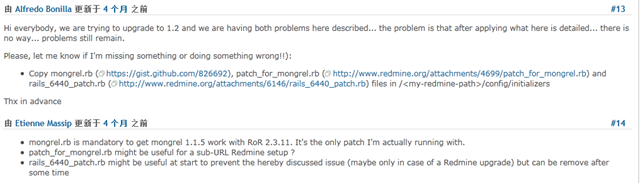
3、登陆的时候会出问题

解决方法:复制mongrel.rbhttps://gist.github.com/826692) , patch_for_mongrel.rbrails_6440_patch.rb到redmine目录下\config\initializers文件夹中,重启mongrel_rails。

参考:http://www.redmine.org/issues/7857
image

4、安装mongrel service,命令提示符下安装mongrel_service

gem install mongrel_service

使用的版本号是0.4.0

image

5、安装windows service

mongrel_rails service::install -N mongrel_redmine -D "Mongrel serving Redmine on 3000" -p 3000 -e production -c redmine安装目录

6、启动windows service

net start mongrel_redmine

配置windows service自动运行

sc config mongrel_redmine start= auto

测试:

浏览器输入URL:http://127.0.0.1:3000/

7、卸载windows service

mongrel_rails service::remove -N mongrel_redmine

如果安装gem的时候可能会因为网速的原因导致等待时间过长或者安装失败,可以去http://rubygems.org/下载gem,然后使用gem –l 安装

gem install gem名 -l