


惯性聚合 高效追踪和阅读你感兴趣的博客、新闻、科技资讯
阅读原文 在惯性聚合中打开

推荐订阅源

云风的 BLOG
云风的 BLOG
TaoSecurity Blog
TaoSecurity Blog
V
Visual Studio Blog
The GitHub Blog
The GitHub Blog
Apple Machine Learning Research
Vercel News
Vercel News
The Register - Security
月光博客
月光博客
M
MIT News - Artificial intelligence
B
Blog RSS Feed
博客园 - 叶小钗
Last Week in AI
Last Week in AI
Application and Cybersecurity Blog
T
The Blog of Author Tim Ferriss
奇客Solidot–传递最新科技情报
奇客Solidot–传递最新科技情报
Microsoft Azure Blog
cs.AI updates on arXiv.org
C
Check Point Blog
Attack and Defense Labs
The Cloudflare Blog
Cloudbric
Cloudbric
O
OpenAI News
Security Archives - TechRepublic
Help Net Security
Help Net Security
Google DeepMind News
Stack Overflow Blog
Stack Overflow Blog
Cyber Security Advisories - MS-ISAC
V
V2EX
大猫的无限游戏
大猫的无限游戏
www.infosecurity-magazine.com
V2EX - 技术
V2EX - 技术
Google Online Security Blog
博客园 - Franky
雷峰网
雷峰网
J
Java Code Geeks
L
LINUX DO - 最新话题
T
Tenable Blog
爱范儿
爱范儿
Engineering at Meta
Engineering at Meta
T
Tailwind CSS Blog
Spread Privacy
Spread Privacy
H
Heimdal Security Blog
S
Schneier on Security
量子位
N
Netflix TechBlog - Medium
G
Google Developers Blog
T
The Exploit Database - CXSecurity.com
Cyberwarzone
Cyberwarzone
F
Full Disclosure
S
Securelist

博客园 - 范文轩

Sharepoint中的Feature Stapling功能 SharePoint 2010中的WebProvisioned Event Handler 如何向列表中添加数据值(开发篇补充REST) 如何向列表中添加数据值(开发篇) 如何向列表中添加数据值(管理员篇) 在SharePoint 2010中动态加载Visio Web Part 使用编程的方式来启动SharePoint的工作流 InfoPath 2010调用REST的一个小应用 SharePoint 2010 WSP包部署过程中究竟发生什么? 如何查看SharePoint 2010的CU版本 SharePoint 2010多语言包的安装 自定义ASP.NET WebApplication中调用SharePoint2010的对象 在Infopath 2010中调用Web Service 谈谈SharePoint 2010的客户端对象模型的性能问题 给Document Set里面添加文件夹 给Chart Web Part 添加过滤功能 SharePoint 2010的Form认证的用户注册功能 SharePoint 调查列表的自定义错误页面 Reporting Services 2008 and SharePoint 2010
在SharePoint 2010中使用Linq时候,请注意特殊字符
范文轩 · 2011-03-20 · via 博客园 - 范文轩

SharePoint 2010 增加了对LINQ的支持,增强了开发的能力。那么其中好事有一些晓得细节需要我们注意的。

例子:有一个自定义列表“Citys”, 其中包含一个”选项”类型的字段“GDP”,它包含如下的两个选项:
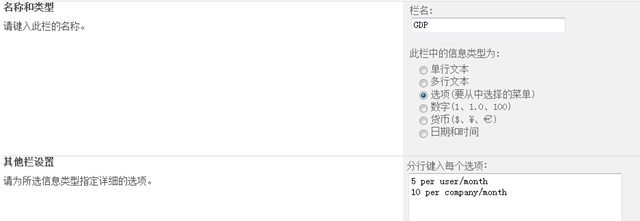
image

那么你有没有尝试过如何去使用LINQ获得这列的值,我们来看一下:

首先使用SPMetal工具生成实体类,我们在实体类中找到“GDP”这个字段:

 internal enum GDP : int
    {
        None = 0,
        Invalid = 1,
        [Microsoft.SharePoint.Linq.ChoiceAttribute(Value = "5 per user/month")]
        _5PerUserMonth = 2,
        [Microsoft.SharePoint.Linq.ChoiceAttribute(Value = "10 per company/month")]
        _10PerCompanyMonth = 4,
    }

如果这个时候,你直接使用

item.GDP.Value

来获得这列的值,那么你得到的肯定是“_5PerUserMonth” 或者 “_10PerCompanyMonth” , 而没有办法得到他真正的值。谁叫C#的变量命名规则不让使用“空格”或者“/”等呢。这个时候我们需要利用发射来获取到里面的值。

public void GetGDP()
{
    var ctx =
       new CityDataContext(WebUrl);
    var cityList = from c in ctx.Citys
                   select c;
    foreach (var item in cityList)
    {
        Console.WriteLine(stringValueOf(item.GDP));
    }
    
}

public string stringValueOf(Enum value)
{
    FieldInfo fi = value.GetType().GetField(value.ToString());
    Microsoft.SharePoint.Linq.ChoiceAttribute[] attributes =
        (Microsoft.SharePoint.Linq.ChoiceAttribute[])fi.GetCustomAttributes(
        typeof(Microsoft.SharePoint.Linq.ChoiceAttribute),false);
    if (attributes.Length > 0)
    {
        return attributes[0].Value;
    }
    else
    {
        return value.ToString();
    }
}
如果列表中的其他列里面也存有这样的值,那么你使用的时候还真的要注意了。