






说明:
这不是一个完成的方案,过程中还是有很多的用户体验方面的问题需要改进。
前提:
SharePoint 2010 配置好了Form认证。相关的配置方法参考:http://donalconlon.wordpress.com/2010/02/23/configuring-forms-base-authentication-for-sharepoint-2010-using-iis7/
如果要配置 LDAP provider的form认证,这篇文章是个不错的选择:http://blogs.technet.com/b/speschka/archive/2009/11/05/configuring-forms-based-authentication-in-sharepoint-2010.aspx
场景:
SharePoint 2010 配置完Form认证之后,我们需要向SQL数据库中添加新的用户。这一步有什么问题吗?当然有,就是所有的操作都的管理员来做:管理员添加帐号,设置初始密码等等。那么有没有其他的解决方案?用户能不能自定注册网站用户,管理员审批权限呢?
答案是肯定的,要不然也不会写这篇博客了。
方案:
首先我们看一下Form认证的登录页面:
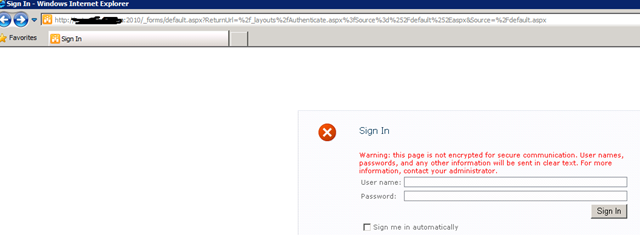
通过URL我们得知,这是一个Application页面,也就是在服务器上真实存在的,路径是:C:\inetpub\wwwroot\wss\VirtualDirectories\<Applicationname>\_forms\default.aspx.
打开页面查看源代码(主要代码):
<asp:login id="signInControl" FailureText="<%$Resources:wss,login_pageFailureText%>" runat="server" width="100%">
    <layouttemplate>
        <asp:label id="FailureText" class="ms-error" runat="server"/>
        <table width="100%">
                         ...
        </table>
    </layouttemplate>
 </asp:login>
其实就是普通的ASP.Net控件,所以接下来的操作也不太难了。
步骤:
第一步,向这个页面添加一个链接按钮,指向注册页面:
代码以及效果如下:
<asp:login id="signInControl" FailureText="<%$Resources:wss,login_pageFailureText%>" runat="server" width="100%">
    <layouttemplate>
        <asp:label id="FailureText" class="ms-error" runat="server"/>
        <table width="100%">
        ...
        <tr>
        <td colspan="2" align="right"><asp:LinkButton id="RegisterNew" text="Sign Up" runat="server" PostBackUrl="SignUp.aspx" /></td>
        </tr>
        </table>
    </layouttemplate>
 </asp:login>
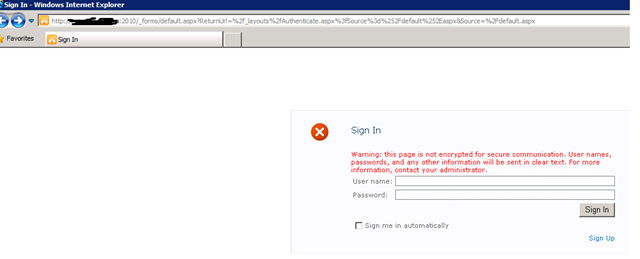
第二步,创建自定义注册页面,并且保存在C:\inetpub\wwwroot\wss\VirtualDirectories\<Applicationname>\_forms文件夹下面。这里主要使用了<asp:CreateUserWizard>控件。这样就不要要而外写逻辑代码了。
 <%@ Page Language="C#" MasterPageFile="~/_layouts/simple.master"       %>
 <asp:Content ContentPlaceHolderId="PlaceHolderPageTitle" runat="server">
    SignUp
</asp:Content>
<asp:Content ContentPlaceHolderId="PlaceHolderPageTitleInTitleArea" runat="server">
    Sign Up
</asp:Content>
<asp:Content ContentPlaceHolderId="PlaceHolderSiteName" runat="server"/>
<asp:Content ContentPlaceHolderId="PlaceHolderMain" runat="server">
<asp:CreateUserWizard ID="SignUp" runat="server" CreateUserButtonText="Sign Up">
<TextBoxStyle CssClass="ms-inputuserfield" />
        <WizardSteps>
        <asp:CreateUserWizardStep runat="server" Title="Sign Up"></asp:CreateUserWizardStep>
        <asp:CompleteWizardStep runat="server"></asp:CompleteWizardStep>
        </WizardSteps>
</asp:CreateUserWizard>
</asp:Content>
第三步,测试。
注册:

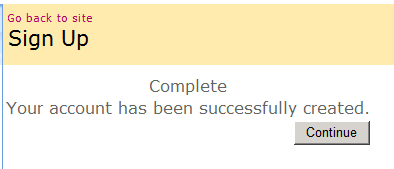
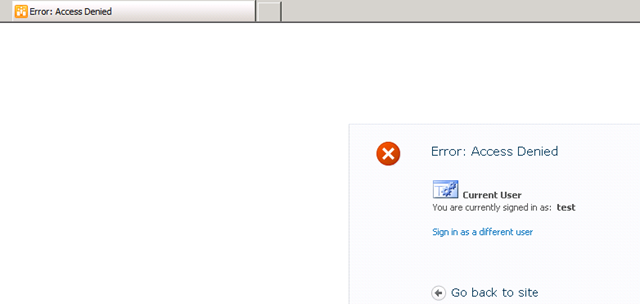
关闭浏览器,重新登录。(由于方案不完善,如果不关掉浏览器的话,那么会报错)。登录的结果如下:(管理员还没有给该用户添加权限)
添加权限:

不足:
1.注册页面的样式没有搞定,很丑,很丑;
2.注册完毕后必须要关掉浏览器,然后重新打开浏览器登录,否则报错。
此内容由惯性聚合(RSS阅读器)自动聚合整理,仅供阅读参考。 原文来自 — 版权归原作者所有。