惯性聚合 高效追踪和阅读你感兴趣的博客、新闻、科技资讯
阅读原文 在惯性聚合中打开

推荐订阅源

T
Threat Research - Cisco Blogs
NISL@THU
NISL@THU
A
Arctic Wolf
Threat Intelligence Blog | Flashpoint
S
Schneier on Security
T
Tenable Blog
I
Intezer
S
Securelist
Scott Helme
Scott Helme
V
Visual Studio Blog
Simon Willison's Weblog
Google DeepMind News
T
The Blog of Author Tim Ferriss
D
Darknet – Hacking Tools, Hacker News & Cyber Security
AWS News Blog
AWS News Blog
H
Hackread – Cybersecurity News, Data Breaches, AI and More
MongoDB | Blog
MongoDB | Blog
L
LangChain Blog
F
Fortinet All Blogs
cs.CL updates on arXiv.org
C
Cisco Blogs
L
Lohrmann on Cybersecurity
M
MIT News - Artificial intelligence
G
GRAHAM CLULEY
博客园 - 司徒正美
aimingoo的专栏
aimingoo的专栏
雷峰网
雷峰网
MyScale Blog
MyScale Blog
D
DataBreaches.Net
Cyber Security Advisories - MS-ISAC
Recent Announcements
C
CXSECURITY Database RSS Feed - CXSecurity.com
量子位
博客园 - 三生石上(FineUI控件)
P
Proofpoint News Feed
Blog — PlanetScale
Blog — PlanetScale
云风的 BLOG
云风的 BLOG
大猫的无限游戏
大猫的无限游戏
GbyAI
GbyAI
Cisco Talos Blog
Cisco Talos Blog
Security Latest
Security Latest
Project Zero
Project Zero
K
Kaspersky official blog
罗磊的独立博客
Know Your Adversary
Know Your Adversary
T
The Exploit Database - CXSecurity.com
P
Privacy International News Feed
P
Privacy & Cybersecurity Law Blog
C
Cyber Attacks, Cyber Crime and Cyber Security
Apple Machine Learning Research

博客园 - 范文轩

Sharepoint中的Feature Stapling功能 SharePoint 2010中的WebProvisioned Event Handler 如何向列表中添加数据值(开发篇补充REST) 如何向列表中添加数据值(开发篇) 如何向列表中添加数据值(管理员篇) 在SharePoint 2010中动态加载Visio Web Part 使用编程的方式来启动SharePoint的工作流 InfoPath 2010调用REST的一个小应用 SharePoint 2010 WSP包部署过程中究竟发生什么? 如何查看SharePoint 2010的CU版本 SharePoint 2010多语言包的安装 在SharePoint 2010中使用Linq时候,请注意特殊字符 自定义ASP.NET WebApplication中调用SharePoint2010的对象 谈谈SharePoint 2010的客户端对象模型的性能问题 给Document Set里面添加文件夹 给Chart Web Part 添加过滤功能 SharePoint 2010的Form认证的用户注册功能 SharePoint 调查列表的自定义错误页面 Reporting Services 2008 and SharePoint 2010
在Infopath 2010中调用Web Service
范文轩 · 2011-03-14 · via 博客园 - 范文轩

刚刚和同事讨论了一个关于在InfoPath中调用Web Service的问题。

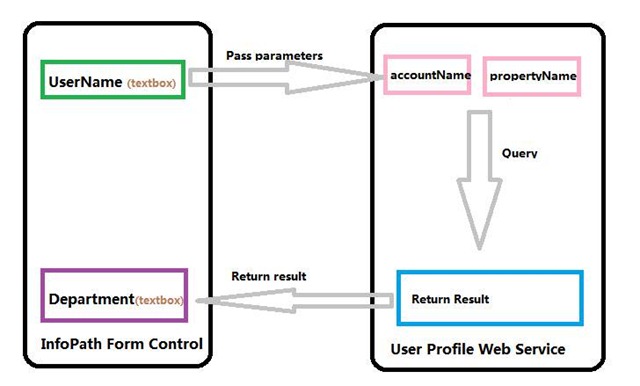
需求: 我需要在InfoPath表单中通过输入用户名来获得用户的其他信息,例如:部门, 上级等等。 并且通过无代码的方式实现。

clip_image002

环境: SharePoint Server 2010, InfoPath 2010.

技术:

1. 在SharePoint Server 2010 中有一个 “User Profile Service Web service” 可以用来调用用户数据;

2. Infopath中可以添加 数据来接来读取外部的数据。

步骤:

1. 创建一个空的InfoPath 2010表单;

2. 添加两个字段(字符串类型),然后把基于字段的控件添加到InfoPath表单上;

3. 添加一个按钮;

4. 添加数据连接;
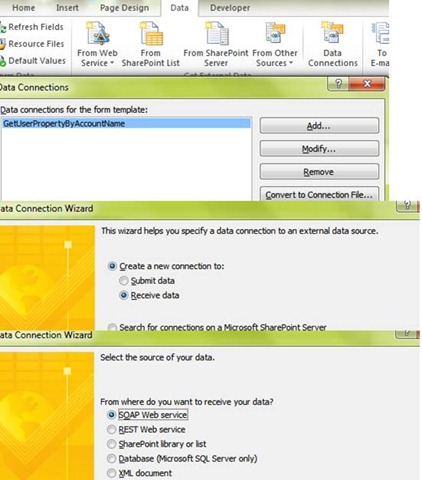
clip_image004

5. 输入 User Profile Web Service的地址 http://servername/_vti_bin/userprofileservice.asmx

clip_image006

6. 选择 “GetUserPropertyByAccountName” 方法

7. 有两个参数需要输入: “accountName” and “propertyName”. 我们暂时只为“propertyName” 字段指定一个默认值“Department”

clip_image008

8. 完成。

到现在为止,完成所有的步骤了吗?没有!我们还没有把Web Service的参数和InfoPath的控件联系起来。 在我的例子中查询操作是由button控件的”Rules“完成的。 所有,有三件事情需要button控件去做: 为表Web Service的参数赋值;查询; 获得返回参数;
clip_image010

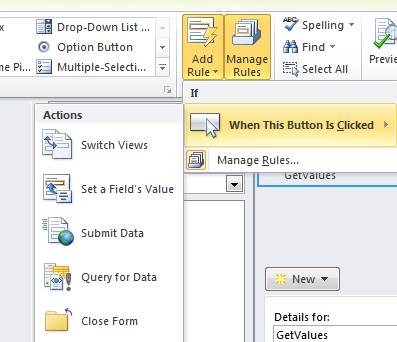
9. 为button控件添加三个Rules;

clip_image012

a. Set a field’s Value: Field: accountName; Value: UserName

b. Query for Data:

c. Set a field’s value: Field: Department; Value: Value

10. 保存模板。

11. 你可以预览或者发布到SharePoint的表单库进行测试。

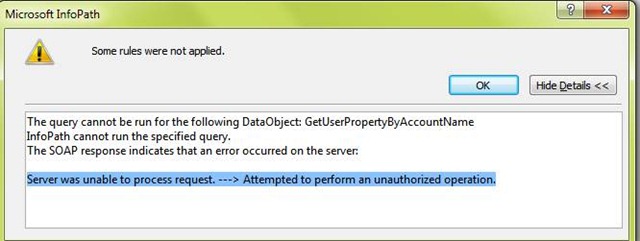
请确保当前的应用程序”没有启用匿名登录“否则,你将会得到如下的错误” Server was unable to process request. ---> Attempted to perform an unauthorized operation.”
clip_image014

Good luck.