


惯性聚合 高效追踪和阅读你感兴趣的博客、新闻、科技资讯
阅读原文 在惯性聚合中打开

推荐订阅源

The Hacker News
The Hacker News
Google Online Security Blog
K
Kaspersky official blog
D
Darknet – Hacking Tools, Hacker News & Cyber Security
S
Schneier on Security
C
Cybersecurity and Infrastructure Security Agency CISA
Security Archives - TechRepublic
Hacker News - Newest:
Hacker News - Newest: "LLM"
Cisco Talos Blog
Cisco Talos Blog
Threat Intelligence Blog | Flashpoint
Recent Commits to openclaw:main
Cyberwarzone
Cyberwarzone
L
LINUX DO - 最新话题
PCI Perspectives
PCI Perspectives
酷 壳 – CoolShell
酷 壳 – CoolShell
云风的 BLOG
云风的 BLOG
N
News and Events Feed by Topic
N
News and Events Feed by Topic
V
Vulnerabilities – Threatpost
T
Troy Hunt's Blog
GbyAI
GbyAI
C
CERT Recently Published Vulnerability Notes
G
Google Developers Blog
Microsoft Azure Blog
量子位
Scott Helme
Scott Helme
月光博客
月光博客
Attack and Defense Labs
aimingoo的专栏
aimingoo的专栏
博客园 - 聂微东
Project Zero
Project Zero
G
GRAHAM CLULEY
博客园 - 【当耐特】
Recorded Future
Recorded Future
K
KPMG report finds enterprise disconnect between AI and its ROI | CIO
小众软件
小众软件
D
DataBreaches.Net
T
The Blog of Author Tim Ferriss
OSCHINA 社区最新新闻
OSCHINA 社区最新新闻
O
OpenAI News
钛媒体:引领未来商业与生活新知
钛媒体:引领未来商业与生活新知
V
V2EX
Stack Overflow Blog
Stack Overflow Blog
爱范儿
爱范儿
S
Security @ Cisco Blogs
The Last Watchdog
The Last Watchdog
MongoDB | Blog
MongoDB | Blog
H
Hacker News: Front Page
Latest news
Latest news
P
Proofpoint News Feed

博客园 - 范文轩

Sharepoint中的Feature Stapling功能 SharePoint 2010中的WebProvisioned Event Handler 如何向列表中添加数据值(开发篇补充REST) 如何向列表中添加数据值(开发篇) 如何向列表中添加数据值(管理员篇) 在SharePoint 2010中动态加载Visio Web Part 使用编程的方式来启动SharePoint的工作流 InfoPath 2010调用REST的一个小应用 SharePoint 2010 WSP包部署过程中究竟发生什么? 如何查看SharePoint 2010的CU版本 SharePoint 2010多语言包的安装 在SharePoint 2010中使用Linq时候,请注意特殊字符 自定义ASP.NET WebApplication中调用SharePoint2010的对象 在Infopath 2010中调用Web Service 谈谈SharePoint 2010的客户端对象模型的性能问题 给Document Set里面添加文件夹 给Chart Web Part 添加过滤功能 SharePoint 2010的Form认证的用户注册功能 Reporting Services 2008 and SharePoint 2010
SharePoint 调查列表的自定义错误页面
范文轩 · 2010-09-18 · via 博客园 - 范文轩

场景:

使用SharePoint的调查列表做调查问卷的时候,我们经常要设置成不允许多次答复,这样的话每个人就只能答复一次。

问题:

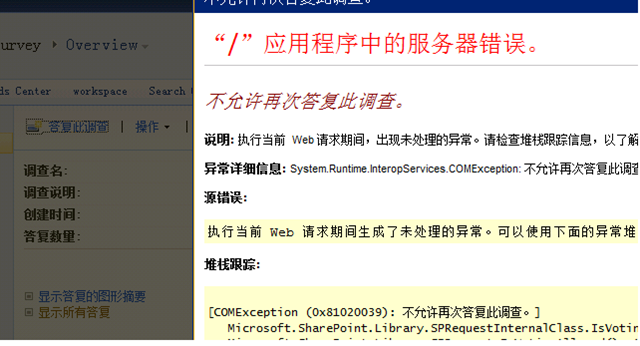
可是这样会产生一个问题,就是如果一个人第二次答复的话,那么出现的错误提示页面(如下图)不是很友好。
image

尝试的解决方案:

如果熟悉SharePoint 2010的开发的话,那么可定会想到Event Handler这个解决方案。因为在2010中,可是实现使用Event Handler实现自定义错误页面。有了这个方案,那么接下来就是一些细节性的问题了。

1.首先查询当前用户是否在列表中回复过帖子;

2.如果回复过,那么就跳到自定义页面。

代码:

  public override void ItemAdding(SPItemEventProperties properties)
       {
           SPList currentList = properties.List;
           SPQuery query = new SPQuery();
           query.Query = "<Where><Eq><FieldRef Name='Author'/><Value Type='Integer'><UserID Type='Integer'/></Value></Eq></Where>";
           SPListItemCollection items = currentList.GetItems(query);
           if (items.Count == 1)
           {
               properties.Cancel = true;
               properties.Status = SPEventReceiverStatus.CancelWithRedirectUrl;
               properties.RedirectUrl = "/_Layouts/MyEventError.aspx";
           }          
       }

疑问:

当你代码完成后,并且成功部署,去没有结果。也就是说如果重复答复调查,依然会跳到默认的错误页面。问题出现在哪里?个人猜测是默认错误页面实现机理和Event Handler不一样,通俗一点就是:他们不是一个道上的。怎么办?难道没有办法了。有,但只能说是Workaround, 不是真正的解决方案。

解决方案:

首先把调查列表设置成“允许多次答复”,然后激活你的Event Handler的feature。ok,自定义的错误页面实现了。

为什么说是一种折中的方案呢?因为错误页面发生在用户完成调查的表单,并且提交表单的过程中,而不是发生在用户点击“答复此调查”的过程中。