




惯性聚合 高效追踪和阅读你感兴趣的博客、新闻、科技资讯
阅读原文 在惯性聚合中打开

推荐订阅源

Hacker News: Ask HN
Hacker News: Ask HN
C
Cisco Blogs
The Hacker News
The Hacker News
T
Tor Project blog
Cyber Security Advisories - MS-ISAC
The GitHub Blog
The GitHub Blog
A
Arctic Wolf
CTFtime.org: upcoming CTF events
The Register - Security
云风的 BLOG
云风的 BLOG
Simon Willison's Weblog
P
Palo Alto Networks Blog
Vercel News
Vercel News
C
CERT Recently Published Vulnerability Notes
I
InfoQ
freeCodeCamp Programming Tutorials: Python, JavaScript, Git & More
M
MIT News - Artificial intelligence
I
Intezer
aimingoo的专栏
aimingoo的专栏
U
Unit 42
C
Cyber Attacks, Cyber Crime and Cyber Security
L
LINUX DO - 热门话题
Microsoft Security Blog
酷 壳 – CoolShell
酷 壳 – CoolShell
Cyberwarzone
Cyberwarzone
P
Proofpoint News Feed
P
Proofpoint News Feed
B
Blog
T
Threat Research - Cisco Blogs
博客园 - 叶小钗
Recorded Future
Recorded Future
Last Week in AI
Last Week in AI
N
News and Events Feed by Topic
cs.AI updates on arXiv.org
Know Your Adversary
Know Your Adversary
Engineering at Meta
Engineering at Meta
G
Google Developers Blog
PCI Perspectives
PCI Perspectives
Google DeepMind News
WordPress大学
WordPress大学
Application and Cybersecurity Blog
MyScale Blog
MyScale Blog
Security Archives - TechRepublic
Schneier on Security
N
News | PayPal Newsroom
C
Cybersecurity and Infrastructure Security Agency CISA
H
Help Net Security
博客园 - 聂微东
H
Hackread – Cybersecurity News, Data Breaches, AI and More
G
GRAHAM CLULEY

博客园 - 范文轩

Sharepoint中的Feature Stapling功能 SharePoint 2010中的WebProvisioned Event Handler 如何向列表中添加数据值(开发篇补充REST) 如何向列表中添加数据值(开发篇) 如何向列表中添加数据值(管理员篇) 使用编程的方式来启动SharePoint的工作流 InfoPath 2010调用REST的一个小应用 SharePoint 2010 WSP包部署过程中究竟发生什么? 如何查看SharePoint 2010的CU版本 SharePoint 2010多语言包的安装 在SharePoint 2010中使用Linq时候,请注意特殊字符 自定义ASP.NET WebApplication中调用SharePoint2010的对象 在Infopath 2010中调用Web Service 谈谈SharePoint 2010的客户端对象模型的性能问题 给Document Set里面添加文件夹 给Chart Web Part 添加过滤功能 SharePoint 2010的Form认证的用户注册功能 SharePoint 调查列表的自定义错误页面 Reporting Services 2008 and SharePoint 2010
在SharePoint 2010中动态加载Visio Web Part
范文轩 · 2011-06-23 · via 博客园 - 范文轩

今天跟同事讨论一个关于Visio Web Part的问题。需求大抵是这样的:在SharePoint文档库中有一系列已经发布的Visio图形,我想在页面中动态的根据一些逻辑来显示出来。我希望是通过JavaScript的代码实现。

首先第一个问题,在页面中显示Visio图形。这个比较简单,SharePoint 2010中提供了Visio Web Access这个web Part控件。你可以通过指定Web Part的属性,来轻松显示Visio图形。

第二个问题,动态显示,这个问题稍微有些难度。因为Visio Web Access中的Visio图形的地址已经提前指定好了。怎么办呢?幸运的是,在SharePoint 2010中,增加了Visio Services Class Library,这是一些列封装好了的JavaScipt。其中提供了针对Visio的类,如下图:(具体参考:http://msdn.microsoft.com/en-us/library/ee557781.aspx)

Name

Description

Vwa.VwaControl Class

Represents an instance of the Visio Web Access Web Part.

Vwa.Page Class

Represents the page that is currently displayed in the rendering area of the Visio Web Access Web Part.

Vwa.ShapeCollection Class

Represents the collection of Shape objects on the active page displayed in the rendering area of the Visio Web Access Web Part.

Vwa.Shape Class

Represents a single Shape object on the active page displayed in the rendering area of the Visio Web Access Web Part.

我们这里使用的是Vwa.VwaControl.openDiagram() 方法来实现动态加载Visio图形的需求。

逻辑:逻辑并不复杂。就是在visio 图形加载完毕之后重新制定一个新的Visio图形的URL;

技术实现:使用Visio Web Access + 内容编辑web部件。

具体操作:

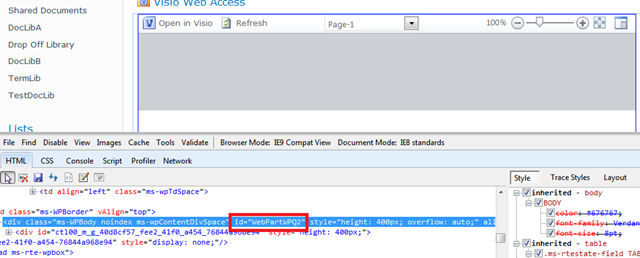
1. 通过IE Developer来检查一下当前页面的Visio图形所在的Web Part的ID。
image

2.在本地的文本文件中写处理逻辑的代码,然后上传到文档库。代码如下:

<script type="text/javascript">
Sys.Application.add_load(onApplicationLoad);

var webPartElementID = "WebPartWPQ2";
var vwaControl;
function onApplicationLoad() {
        try{            
                vwaControl= new Vwa.VwaControl(webPartElementID)                    
                vwaControl.addHandler("diagramcomplete", onDiagramComplete);                  
        }
        catch(err){
        }
}

function onDiagramComplete() {
        try{            
                vwaControl.openDiagram("http://servername:port/DocLibA/Drawing2.vdw");
                vwaControl.removeHandler("diagramcomplete",onDiagramComplete);    
        }
        catch(err){
        }
}

</script>

3.页面中添加内容编辑Web部件,并且指定“内容链接(Content Link)”属性到刚刚上传到文档库的js文件。

保存测试效果。

当然我这里仅仅完成需求的一部分。剩余的部分,就是如何去处理并且形成“vwaControl.openDiagram()”的参数。