惯性聚合 高效追踪和阅读你感兴趣的博客、新闻、科技资讯
阅读原文 在惯性聚合中打开

推荐订阅源

T
Troy Hunt's Blog
F
Fortinet All Blogs
D
DataBreaches.Net
Google DeepMind News
Y
Y Combinator Blog
The Register - Security
T
Tailwind CSS Blog
OSCHINA 社区最新新闻
OSCHINA 社区最新新闻
月光博客
月光博客
V
Vulnerabilities – Threatpost
S
Securelist
S
SegmentFault 最新的问题
T
Threat Research - Cisco Blogs
CTFtime.org: upcoming CTF events
让小产品的独立变现更简单 - ezindie.com
P
Privacy International News Feed
S
Schneier on Security
钛媒体:引领未来商业与生活新知
钛媒体:引领未来商业与生活新知
L
LangChain Blog
GbyAI
GbyAI
Apple Machine Learning Research
cs.CL updates on arXiv.org
美团技术团队
Cyberwarzone
Cyberwarzone
C
Cisco Blogs
Application and Cybersecurity Blog
Google Online Security Blog
M
MIT News - Artificial intelligence
U
Unit 42
V
V2EX
C
CERT Recently Published Vulnerability Notes
云风的 BLOG
云风的 BLOG
B
Blog
博客园 - 叶小钗
Attack and Defense Labs
Security Archives - TechRepublic
aimingoo的专栏
aimingoo的专栏
Hacker News: Ask HN
Hacker News: Ask HN
博客园 - Franky
Engineering at Meta
Engineering at Meta
Schneier on Security
C
CXSECURITY Database RSS Feed - CXSecurity.com
酷 壳 – CoolShell
酷 壳 – CoolShell
T
The Blog of Author Tim Ferriss
IT之家
IT之家
W
WeLiveSecurity
Cisco Talos Blog
Cisco Talos Blog
K
Kaspersky official blog
Martin Fowler
Martin Fowler
SecWiki News
SecWiki News

博客园 - 范文轩

Sharepoint中的Feature Stapling功能 SharePoint 2010中的WebProvisioned Event Handler 如何向列表中添加数据值(开发篇补充REST) 如何向列表中添加数据值(开发篇) 如何向列表中添加数据值(管理员篇) 在SharePoint 2010中动态加载Visio Web Part 使用编程的方式来启动SharePoint的工作流 InfoPath 2010调用REST的一个小应用 SharePoint 2010 WSP包部署过程中究竟发生什么? 如何查看SharePoint 2010的CU版本 SharePoint 2010多语言包的安装 在SharePoint 2010中使用Linq时候,请注意特殊字符 自定义ASP.NET WebApplication中调用SharePoint2010的对象 在Infopath 2010中调用Web Service 谈谈SharePoint 2010的客户端对象模型的性能问题 给Document Set里面添加文件夹 给Chart Web Part 添加过滤功能 SharePoint 2010的Form认证的用户注册功能 SharePoint 调查列表的自定义错误页面
Reporting Services 2008 and SharePoint 2010
范文轩 · 2010-09-08 · via 博客园 - 范文轩

问: 当我安装 Reporting Services 2005的时候, 我需要下载一个Reporting Service 插件, 那么Reporting Services 2008需要吗?

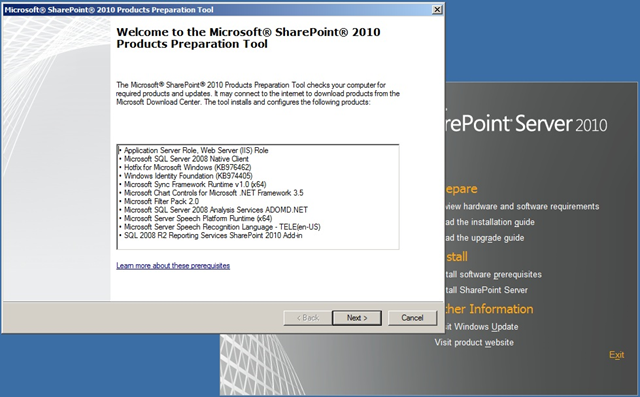
答: 不再需要(不是不需要), 你还记得这张图片吗?
clip_image001

其实当我们安装SharePoint 2010的时候, Reporting Services 2008 插件已经预安装了。

如果你先一步一步的学习Reporting Services的安装,那么非常建议你去看一下这篇文章

http://www.codeproject.com/Articles/88285/Integrating-Sharepoint-2010-and-SQL-Reporting-Serv.aspx

带有截图,比较简单。不过他那里面是单个服务器的安装,如果安装到多个服务器上,可能会有所不同。

以下是我的一些想法以及过程中遇到的一些错误,希望对需要的人能有所帮助。
  1. 1.Reporting Services必须安装在SharePoint 服务器上。
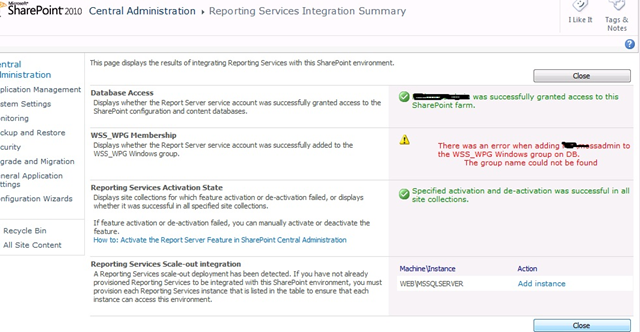
  2. 以前我比喜欢把Reporting Services与SQL Services一起安装在DB服务器上,但是当我这样配置的时候,会发生如下的错误:
  3. "There was an error when adding domain\account to the WSS_WPG Windows group on servername. The group name could not be found ". 以下是错误截图.

clip_image002

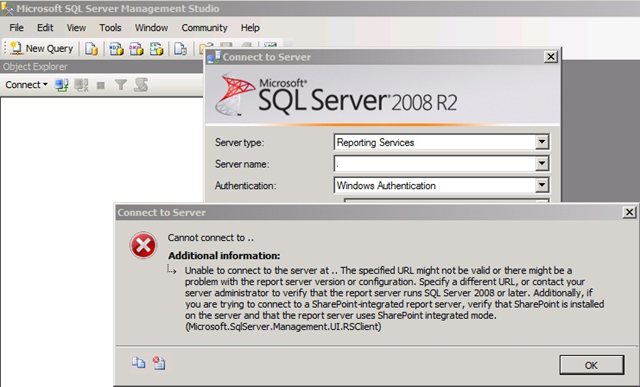
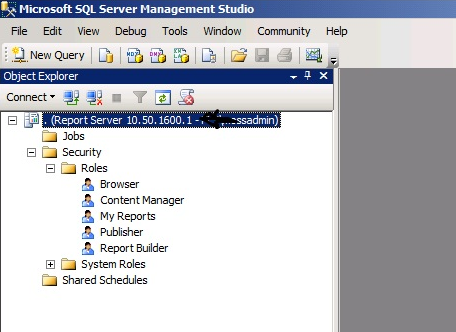
  1. 2.当你配置了SharePoint的集成模式之后,就无法使用SSMS (SQL Server Management Studio)打开Reporting Services;

以下是集成模式的截图:

clip_image003

非集成模式的截图。

clip_image004

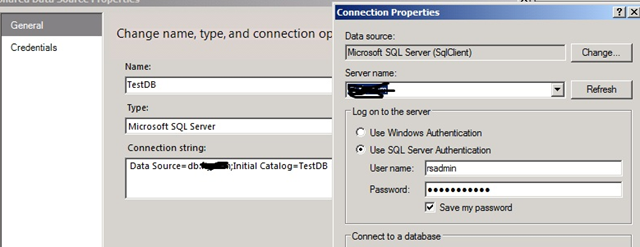
  1. 3.个人推荐你使用 SQL 链接认证,如果你不想在上面浪费时间的话。

Reporting Services 的认证会一起很多的问题,譬如说。

当你发布项目的时候,一遍又一遍的弹出对话框,让你输入用户名和密码,烦啊!

还有当你发布项目之后,页面上又报错,如图:

clip_image005

所以个人推荐SQL认证链接,步骤如下:

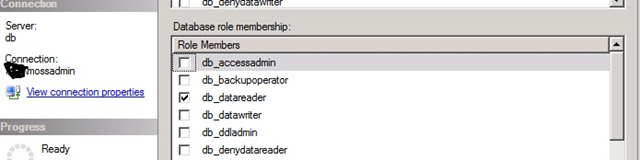
1.给Reporting Services数据库常见一个只读权限的SQL帐户;
clip_image006

  1. 项目中添加数据源的时候,选择SQL认证.
  2. clip_image007
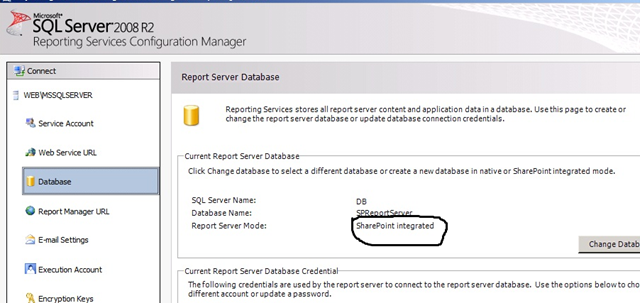
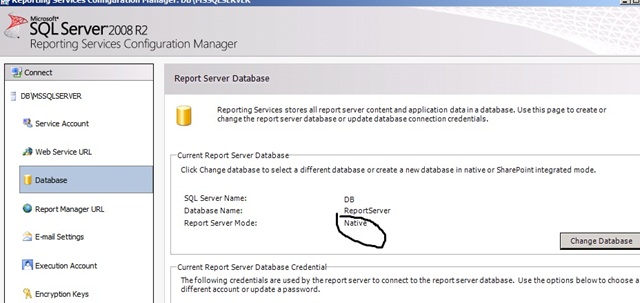
  1. 4.在那里可以看到我的Reporting Services的模式,集成的?独立的?使用Reporting Services配置工具可以轻松看到。

clip_image008

clip_image009

  1. 5.Reporting Services 项目的发布配置.

clip_image010

发布结果

clip_image011

  1. 6.发布之后的Reporting Services,会出现在文档库中。这里每个项目都有动作选项,熟悉一下,对于排错以及优化还是很有帮助的。
  2. clip_image012