



惯性聚合 高效追踪和阅读你感兴趣的博客、新闻、科技资讯
阅读原文 在惯性聚合中打开

推荐订阅源

云风的 BLOG
云风的 BLOG
IT之家
IT之家
D
Docker
博客园 - 叶小钗
A
About on SuperTechFans
博客园_首页
Apple Machine Learning Research
Recorded Future
Recorded Future
Stack Overflow Blog
Stack Overflow Blog
腾讯CDC
V
V2EX
S
SegmentFault 最新的问题
量子位
P
Proofpoint News Feed
酷 壳 – CoolShell
酷 壳 – CoolShell
Latest news
Latest news
大猫的无限游戏
大猫的无限游戏
月光博客
月光博客
有赞技术团队
有赞技术团队
The GitHub Blog
The GitHub Blog
C
Cyber Attacks, Cyber Crime and Cyber Security
I
InfoQ
奇客Solidot–传递最新科技情报
奇客Solidot–传递最新科技情报
D
DataBreaches.Net
G
GRAHAM CLULEY
P
Proofpoint News Feed
Threat Intelligence Blog | Flashpoint
Microsoft Security Blog
cs.CL updates on arXiv.org
Y
Y Combinator Blog
小众软件
小众软件
NISL@THU
NISL@THU
L
Lohrmann on Cybersecurity
aimingoo的专栏
aimingoo的专栏
让小产品的独立变现更简单 - ezindie.com
I
Intezer
Last Week in AI
Last Week in AI
T
Threatpost
人人都是产品经理
人人都是产品经理
U
Unit 42
Security Latest
Security Latest
AWS News Blog
AWS News Blog
T
The Blog of Author Tim Ferriss
MongoDB | Blog
MongoDB | Blog
罗磊的独立博客
GbyAI
GbyAI
P
Palo Alto Networks Blog
G
Google Developers Blog
MyScale Blog
MyScale Blog
L
LangChain Blog

博客园 - 范文轩

Sharepoint中的Feature Stapling功能 SharePoint 2010中的WebProvisioned Event Handler 如何向列表中添加数据值(开发篇补充REST) 如何向列表中添加数据值(开发篇) 如何向列表中添加数据值(管理员篇) 在SharePoint 2010中动态加载Visio Web Part 使用编程的方式来启动SharePoint的工作流 InfoPath 2010调用REST的一个小应用 SharePoint 2010 WSP包部署过程中究竟发生什么? 如何查看SharePoint 2010的CU版本 SharePoint 2010多语言包的安装 在SharePoint 2010中使用Linq时候,请注意特殊字符 自定义ASP.NET WebApplication中调用SharePoint2010的对象 在Infopath 2010中调用Web Service 谈谈SharePoint 2010的客户端对象模型的性能问题 给Chart Web Part 添加过滤功能 SharePoint 2010的Form认证的用户注册功能 SharePoint 调查列表的自定义错误页面 Reporting Services 2008 and SharePoint 2010
给Document Set里面添加文件夹
范文轩 · 2011-02-06 · via 博客园 - 范文轩

注:此文仅仅是回答客户的一个帖子,至于有没有实际的价值,本人不知道。

Document Set 这是SharePoint 2010 里面的一个新的功能。 有人已经在博客中对这个功能做了一些阐述(http://www.cnblogs.com/ww3128/archive/2010/12/15/1906167.html)。

废话:

上一次,一个客户问了:能不能在Document Set里面添加文件夹类型呢?我在界面上面试了试,结果是NO。想通过添加内容类型的方式来实现?No, Document Set本身已经是内容类型了,就不能再添加了。

解决方案:

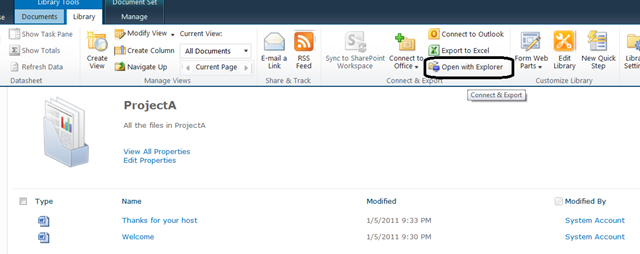
其实我们可以通过 “windows Explorer”的方式来实现添加文件夹的目的。

1. 点击”Open with Explorer”, 如下图,
image

2. 拷贝文件夹过去。

image

3. 看一下,是不是你的Document Set里面有了文件夹?