



声明:本文是我阅读了Steve Peschka的一些列文章之后的一些感受。如果你对客户端对象模型感兴趣,那么建议你读一下这一些列文章http://blogs.technet.com/b/speschka/archive/2009/11/01/using-the-sharepoint-2010-client-object-model-part-1.aspx
影响SharePoint 的客户端对象模型很重要的两个因素是:传递数据量的大小,以及与服务器来回传递数据(Roundtrips)的次数,我这里将借助Fiddler(http://www.fiddler2.com/fiddler2/) 工具对此进行说明。
例子1:使用对象模型获取当前站点所有的列表的标题。
之前:
 public void QueryAllList()
        {
            Web web = ctx.Web;
            var lists = ctx.LoadQuery(web.Lists);
            ctx.ExecuteQuery();
            foreach (List lst in lists)
            {
                Console.WriteLine("Title:{0}",
                    lst.Title);
            }
        }
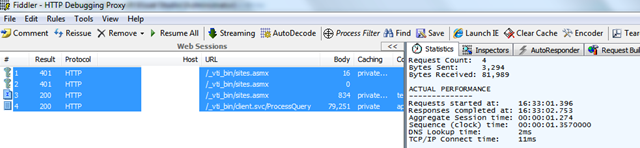
Fiddler数据:
之后:
public void QueryAllList()
        {
            Web web = ctx.Web;
            var lists = ctx.LoadQuery(web.Lists.Include(
                lst=>lst.Title));
            ctx.ExecuteQuery();
            foreach (List lst in lists)
            {
                Console.WriteLine("Title:{0}",
                    lst.Title);
            }
        }
Fiddler数据
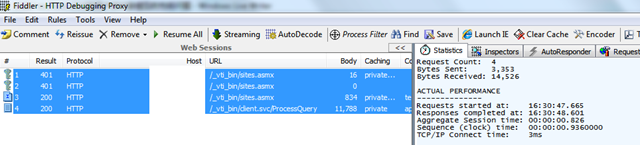
对比:
| 之前 | 之后 | |
| Request Count: | 4 | 4 |
| Bytes Sent: | 3.294 | 3.353 |
| Bytes Received: | 81.989 | 14.526 |
| Sequence (clock) time (s) | 1.357 | 0.936 |
例子二:获取当前站点的所有组(ID属性),以及组内的用户(用户的Title属性)。
之前:
public void GetAllUsersInGroups()
        {
            ctx.Load(ctx.Web.SiteGroups);
            ctx.ExecuteQuery();

            foreach (Group currentGroup in ctx.Web.SiteGroups)
            {
                ctx.Load(currentGroup);
                ctx.ExecuteQuery();
                try
                {
                    ctx.Load(currentGroup.Users);
                    ctx.ExecuteQuery();
                    foreach (User currentUser in currentGroup.Users)
                    {
                        Console.WriteLine(currentGroup.Id + "--" + currentUser.Title);
                    }
                }
                catch { };
            }
        }
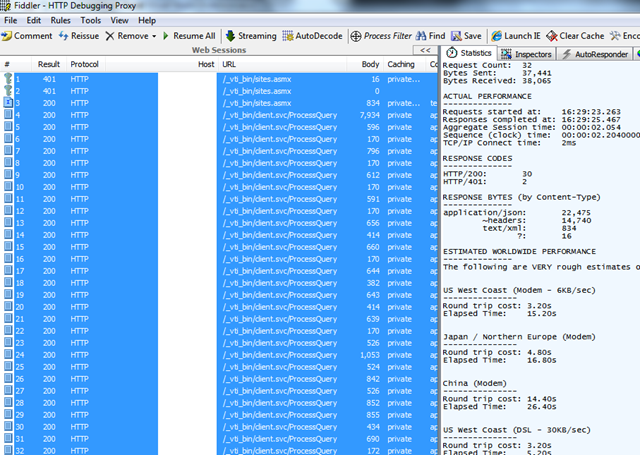
Fiddler数据:
之后:
 public void GetAllUsersInGroups()
        {
            ctx.Load(ctx.Web.SiteGroups,
                grps => grps.Include(
                    grp => grp.Id,
                    grp => grp.Users.Include(usr => usr.Title)));

            ctx.ExecuteQuery();

            foreach (Group currentGroup in ctx.Web.SiteGroups)
            {
                foreach (User usr in currentGroup.Users)
                {
                    Console.WriteLine(currentGroup.Id + "--" + usr.Title);
                }
            }
        }
Fiddler数据:
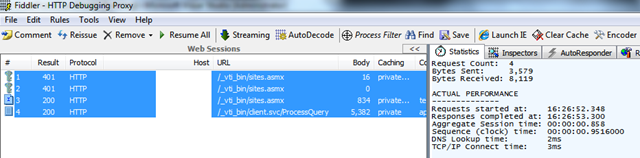
对比:
| 之前 | 之后 | |
| Request Count: | 32 | 4 |
| Bytes Sent: | 37.441 | 3.379 |
| Bytes Received: | 38.065 | 8.119 |
| Sequence (clock) time (s) | 2.204 | 0.956 |
结论:当你使用SharePoint 客户端对象模型的时候:
1. 只查询你需要的数据,或者列;
2. 尽量减少与服务器之间来回传递(Roundtrips)数据的次数。
此内容由惯性聚合(RSS阅读器)自动聚合整理,仅供阅读参考。 原文来自 — 版权归原作者所有。