

惯性聚合 高效追踪和阅读你感兴趣的博客、新闻、科技资讯
阅读原文 在惯性聚合中打开

推荐订阅源

博客园 - Franky
C
CXSECURITY Database RSS Feed - CXSecurity.com
S
Schneier on Security
Know Your Adversary
Know Your Adversary
Security Latest
Security Latest
Spread Privacy
Spread Privacy
Project Zero
Project Zero
T
The Exploit Database - CXSecurity.com
cs.AI updates on arXiv.org
AI
AI
N
News | PayPal Newsroom
A
Arctic Wolf
NISL@THU
NISL@THU
W
WeLiveSecurity
Security Archives - TechRepublic
Hacker News: Ask HN
Hacker News: Ask HN
P
Palo Alto Networks Blog
Hacker News - Newest:
Hacker News - Newest: "LLM"
大猫的无限游戏
大猫的无限游戏
L
Lohrmann on Cybersecurity
Last Week in AI
Last Week in AI
T
Threatpost
The Last Watchdog
The Last Watchdog
博客园_首页
C
Cybersecurity and Infrastructure Security Agency CISA
酷 壳 – CoolShell
酷 壳 – CoolShell
量子位
Engineering at Meta
Engineering at Meta
爱范儿
爱范儿
aimingoo的专栏
aimingoo的专栏
S
Security Affairs
P
Privacy & Cybersecurity Law Blog
B
Blog RSS Feed
AWS News Blog
AWS News Blog
P
Proofpoint News Feed
雷峰网
雷峰网
T
Tenable Blog
Schneier on Security
H
Heimdal Security Blog
V2EX - 技术
V2EX - 技术
V
V2EX
Exploit-DB.com RSS Feed
S
Secure Thoughts
Latest news
Latest news
Help Net Security
Help Net Security
Jina AI
Jina AI
Stack Overflow Blog
Stack Overflow Blog
The Cloudflare Blog
V
Vulnerabilities – Threatpost
cs.CL updates on arXiv.org

博客园 - 空紫竹

Crystal Report Error: Either the Crystal Reports registy key permission are insufficient or the Crystal Reports runtime is not installed correctly SSRS 例子的网站 SSRS配置 JQuery, Silverlight 公用WCF 获取数据库中有默认值的所以字段 sql server xml nodes 的使用 Could not load type 'System.ServiceModel.Activation.HttpModule' from assembly 'System.ServiceModel, Version=3.0.0.0 IIS 时间问题 sql server 创建临时表 系统程序监控软件 Window 7sp1 安装vs2010 sp1 打开xaml文件崩溃 详解Silverlight中PivotViewer控件编程实例 CSS资源网址 SQL server 2008 安装和远程访问的问题 vss File for <file> (<physical file>) Was Not Found silverlight 报错超时 sql server isnumeric 函数 asp 中的getChunk(img_size) Windows 7 恢复删除的数据
windows 2008 安装 sql server 2008
空紫竹 · 2011-10-09 · via 博客园 - 空紫竹

 Expand .NET Framework 3.5 and check the box in front of .NET Framework 3.5.1 (or current version may change with Windows Updates). Then click the Next button to reach the confirmation screen. Then Click the Install button to complete the process of adding a feature.

Right-click on Computer and choose Manage… Then click on Features in the left column. On the right-side of the screen, click Add Features. 
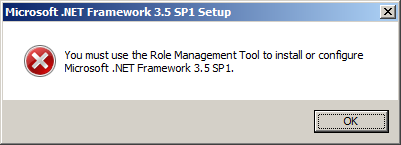
  在windows 2008 中安装sql 2008 提示错误如上。

解决办法:

Right-click on Computer and choose Manage… Then click on Features in the left column. On the right-side of the screen, click Add Features.

 Expand .NET Framework 3.5 and check the box in front of .NET Framework 3.5.1 (or current version may change with Windows Updates). Then click the Next button to reach the confirmation screen. Then Click the Install button to complete the process of adding a feature.