








Reading Time: 7 minutes
Is it worth being on Apple for podcasters? Let’s take a look at the streaming giant, including how to upload a podcast to Apple Podcasts and whether it’s free, plus frequently asked questions.
Apple Podcasts is a directory app and streaming service, similar to Spotify, which allows users to download and listen to podcasts. Apple Podcasts currently hosts over 2.6 million podcasts, as of January 2024.
Yes, it’s free to get your podcast listed on Apple Podcasts. You’ll need your Apple ID, but that’s free to create – it’s just Apple’s way of identifying you. We’ll walk you through the whole process of getting your show on Apple below!
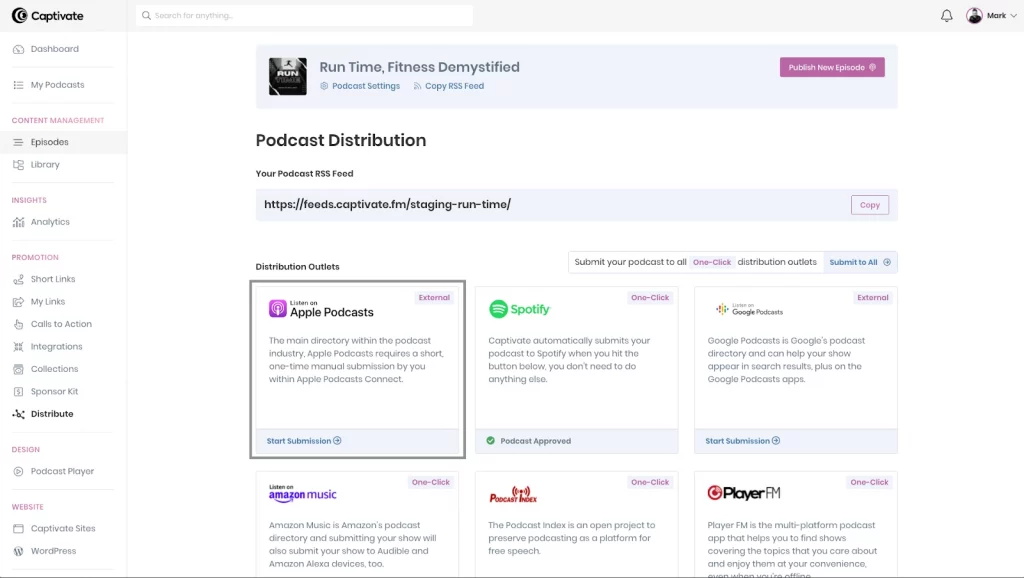
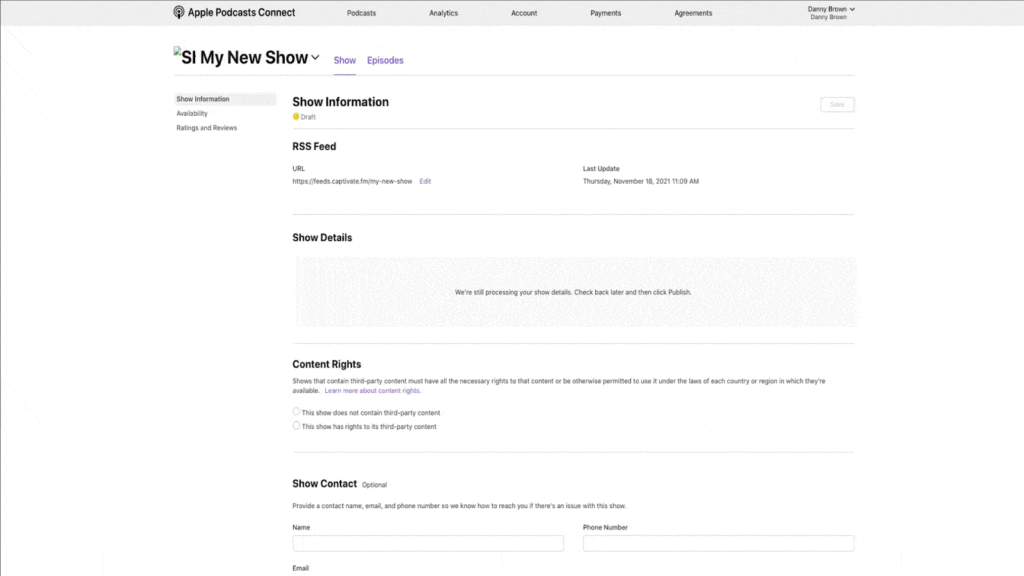
If there are any errors with your show on this screen, Apple will advise what they are and how to fix, so you can make any relevant changes.
Here’s what Apple itself says about artwork requirements:
“Artwork must be original and can’t contain any of the following:
For inspiration, go to New & Noteworthy shows in the Browse section on Apple Podcasts.
If you’re submitting your show via RSS feed, Apple Podcasts accepts show cover artwork ranging from 1400 x 1400 to 3000 x 3000 pixels. The largest size is preferred.”
At Captivate, we’ll make sure everything is technically OK for you before you’ve distributed to Apple, so you’ll never need to worry about them rejecting your show for the wrong artwork specs.
Apple Podcasts is the most popular podcast platform out there, boasting 37.4% of all podcast listeners. That means if your show isn’t on it, you’re missing out on the largest single section of podcast listeners out there – it’s a real no brainer.
As well as its popularity, Apple boasts some cool features to help showcase and promote popular and emerging podcasts:
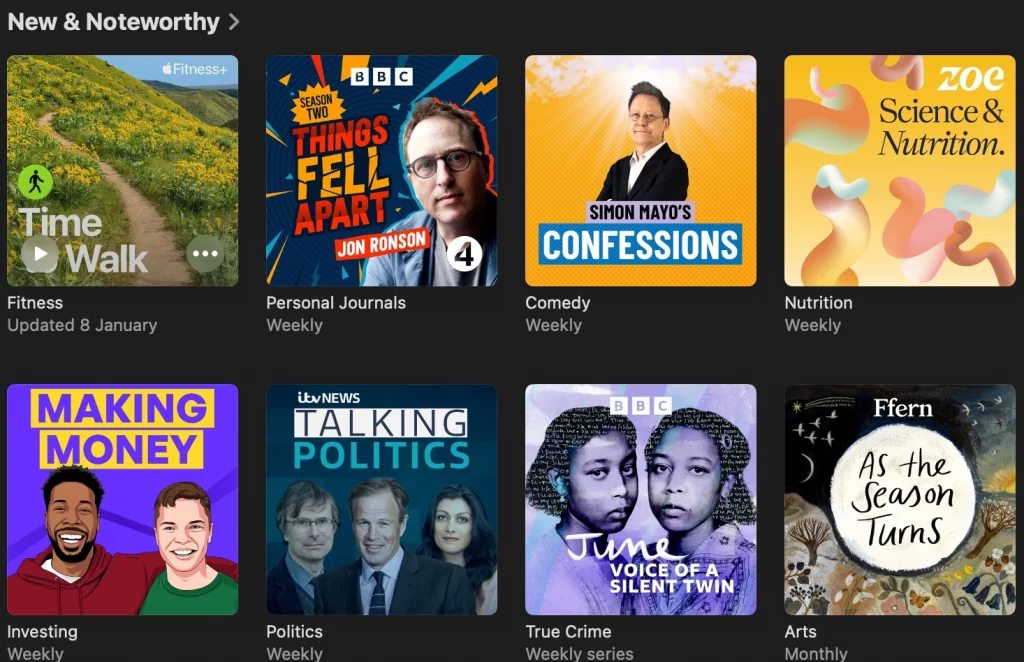
Apple’s “New and Noteworthy” section is a curated podcast chart visible to all Apple Podcasts users. Getting your show in it is a huge boost, not only in terms of getting your show in front of more potential listeners, but for positioning too. Being seen to be in New and Noteworthy is something you can put in your Sponsor Kit forever, and it shows advertisers that you’re the real deal.
You can apply to be featured here – make sure all your podcast specifications match Apple’s requirements, including your artwork, and include a really strong subject line and first paragraph. Remember, you need to really stand out!
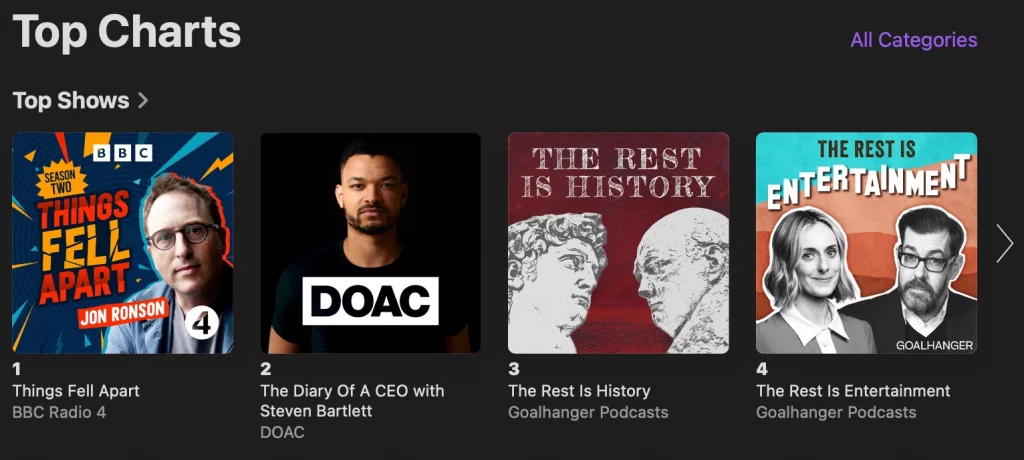
Similar to new and noteworthy, Apple’s charts are based purely on listener and download rankings rather than personal curation. There’s a chart for each podcast category, so you don’t have to be raking in millions of downloads to get featured on the front page of the biggest podcast directory in the world, you just need to get up to speed with your peers!
Through something called delegated delivery, podcasters can offer premium, paid content available to their listeners directly within Apple. You can sell your early access, exclusive, ad-free or otherwise premium content in your Apple feed, manage it entirely within Captivate, and take advantage of how intuitive it is for your listeners, as they’re already at the place of purchase.
You need to be a member of the Apple Podcasters Program, which costs around $20 per month, to take part.
For discoverability, your podcast should be on as many different directory apps as possible. While not as much as Apple’s 37%, Spotify itself boasts 26.8% of all podcast listeners – if you’re not there, you’re missing out on over a quarter of your potential audience. If you’re only on Apple Podcasts, you’re missing out on nearly two thirds of all podcast listeners, so you really should be everywhere.
Don’t neglect the independent podcast apps, either – they’re where a lot of die-hard podcast fans access content, so make sure you’re casting your net as wide as possible.
Luckily, you can distribute your podcast to all directories with a single click on every single plan with Captivate!
Apple Podcasts for Creators, also known as Apple Podcasts Connect, is a hub for your podcast on Apple Podcasts. From within the Creators dashboard, you can view your podcast analytics specifically for the directory, manage your premium subscribers and exclusive content through the Apple Podcasters Program and make use of Apple’s marketing tools such as social posts and QR codes.
The Apple Podcasters Program allows members to submit premium, paywalled content purchasable to listeners directly within Apple. This can include early access or exclusive episodes or ad-free listening.
The Apple Podcasters Program costs around $20 per year to sign up to, but it’s really worth it from a monetization standpoint, and once you’re in you can manage it all directly from within Captivate.
Delivering premium content directly within Apple Podcasts will undoubtedly have a positive impact on the amount of revenue your show generates for you, simply because it makes the process of paying for content seamless for your listeners. Make sure that your listeners know how and where to support you, and you’ll be away!
The program allows you to get really granular with your monetization, putting single episodes or whole shows behind a paywall, so spend some time testing to see what works best for you. If you’re paywalling single episodes, it’s best to present them as “bonus” or “extras” to what listeners are currently getting for free – fans are always willing to pay for additional content, but might not be so keen to fork out for what they’ve historically gotten for free.
Yes, but it’s not the best idea. If you do that you’re limited to Apple as a directory, whereas if you work with a podcast host like Captivate then you can submit to all directories, including Spotify and everyone else, with a single click. This is to say nothing of the management, monetization and growth tools offered by a host like Captivate, too.
Yes, you can upload your episodes directly to Apple Podcasts, but this means your episodes only go to that directory. You’re far better to upload to a hosting site like Captivate and let us distribute your episodes everywhere.
Apple Podcasts will reject podcasts that don’t meet its specifications, including artwork sizing and dimensions. If your podcast is explicit, that’s fine – but you need to tag it as such. If you’re swearing and not tagging your show as explicit, you’ll get removed. Likewise if you’re using any copyrighted material.
Apple can take up to five working days to approve a new podcast for listing. Once your podcast has been approved, you can expect any new episodes to go live on the platform within 24 hours of you uploading them.
You can easily edit all of your podcast information after you’ve uploaded it from within your podcast host. You can make changes in Podcast Settings and it will track through to all Apple, and all other directories, within 24 hours.
Apple Podcasts is linked to your Apple Podcasts Connect account, so you need your Apple ID in order to submit your podcasts. It’s totally free, though.
Yes, you can link all of your podcasts under the same Apple ID. You can also aggregate multiple podcasts onto one page by creating a channel. You decide how you want to group shows together, you can have one channel or create multiple channels to showcase podcasts with similar themes and topics.
While some third party services do pull their podcast listings from Apple Podcasts, most other big names don’t. This means you’ll need to choose within your host to submit to other big names like Spotify and Castos – you can do this with one click in Captivate!
Apple Podcasts is free for listeners, you just need to sign in using your Apple ID. When you’ve done that, you can listen, subscribe and download to your heart’s content without ever paying a penny.
Apple Podcasts is the biggest, most popular directory app for podcast listeners, so it’s really important that you get your podcast on there. It’s totally free to get listed on the platform, you just need to link or create your Apple ID, and Captivate makes the process nice and simple for you. Once your show is on Apple, you’ve got the opportunity to become featured in their created “New and Notable” feed, boosting discoverability and status, as well as their top-level and category specific podcast charts.
Over one third of podcast listeners access content through Apple Podcasts – get your show listed today!
Reading Time: 6 minutes Starting a podcast or looking to switch podcast hosts in 2021? We break down exactly what a podcast host does, what to look for in podcast hosting platforms and how to find the best one for you.
Need help adding your podcast feed to YouTube, or how to use your podcast RSS feed for YouTube? We have you covered in Captivate’s Help Centre.
Ben is a content writer and podcast support expert for Captivate, and has been with the team since 2021. He has a first-class degree in Journalism, and uses these skills to help new and veteran podcasters alike level up their content: reviewing tech, crafting product guides and sharing cutting edge podcasting news. Ben is always on hand to help Captivate podcasters with anything they run into, from when they first import their show to advanced questions like how to grow your audience or where to start with monetization. He loves what he does, and is committed to helping podcasters grow their show using Captivate. He’s always been a podcast fan - current favourites include Steven West’s ‘Philosophize This’ and Bob Mortimer’s ‘Athletico Mince’.
此内容由惯性聚合(RSS阅读器)自动聚合整理,仅供阅读参考。 原文来自 — 版权归原作者所有。
