

惯性聚合 高效追踪和阅读你感兴趣的博客、新闻、科技资讯
阅读原文 在惯性聚合中打开

推荐订阅源

酷 壳 – CoolShell
酷 壳 – CoolShell
H
Hacker News: Front Page
P
Palo Alto Networks Blog
T
ThreatConnect
Apple Machine Learning Research
博客园_首页
T
True Tiger Recordings
P
Privacy & Cybersecurity Law Blog
B
Blog
IT之家
IT之家
Last Week in AI
Last Week in AI
F
Full Disclosure
Hacker News: Ask HN
Hacker News: Ask HN
C
Comments on: Blog
Microsoft Azure Blog
C
Cybersecurity and Infrastructure Security Agency CISA
Microsoft Security Blog
博客园 - 【当耐特】
N
News and Events Feed by Topic
NISL@THU
NISL@THU
腾讯CDC
雷峰网
雷峰网
Security Latest
Security Latest
李成银的技术随笔
M
Microsoft Research Blog - Microsoft Research
L
LangChain Blog
L
Lohrmann on Cybersecurity
cs.CL updates on arXiv.org
C
Check Point Blog
Y
Y Combinator Blog
Recent Announcements
博客园 - Franky
N
News | PayPal Newsroom
V
V2EX
A
About on SuperTechFans
The Register - Security
月光博客
月光博客
奇客Solidot–传递最新科技情报
奇客Solidot–传递最新科技情报
Google Online Security Blog
MyScale Blog
MyScale Blog
Cisco Talos Blog
Cisco Talos Blog
Vercel News
Vercel News
WordPress大学
WordPress大学
C
Cyber Attacks, Cyber Crime and Cyber Security
The Hacker News
The Hacker News
IntelliJ IDEA : IntelliJ IDEA – the Leading IDE for Professional Development in Java and Kotlin | The JetBrains Blog
爱范儿
爱范儿
A
Arctic Wolf
L
LINUX DO - 最新话题
freeCodeCamp Programming Tutorials: Python, JavaScript, Git & More

博客园 - sunfishlu

一步一步学习Windows Azure(二)Azure之Hello World 一步一步学习Windows Azure(一)概述 一步一步学习CakePHP(三)model - sunfishlu 一步一步学习CakePHP(二)controllers 一步一步学习CakePHP(一)基本概念 JQuery写的个性导航菜单 - sunfishlu JQueryUI(四):Dialog(第一部分) - sunfishlu JQueryUI(三):Accordion JQueryUI(二):Tabs(第二部分) JQueryUI(一):Tabs(第一部分) - sunfishlu - 博客园 封装的Ext Grid javascript与dom编程(五)ajax 无法在Web服务器上启动调试。您不具备调试此应用程序的权限,此项目的URL位于Internet区域。 - sunfishlu - 博客园 ToolTip(图片文字) with Jquery - sunfishlu Ext中combobox在Grid里显示问题 javascript与dom编程(四)animation(例)Tooltips javascript与dom编程(三)animation - sunfishlu extjs grid设置某列背景颜色 javascript与dom编程(二)Event
JQueryUI(五):Dialog(第二部分)
sunfishlu · 2009-09-28 · via 博客园 - sunfishlu

3:事件

3.1:close,关闭对话框时执行

3.2:drag,拖动对话框时执行

3.3:dragStart,开始拖动对话框时执行

3.4:dragStop,结束拖动对话框时执行

3.5:focus,对话框获得焦点时执行

3.6:open,打开对话框时执行

3.7:resize,调整对话框大小时执行

3.8:resizeStart/resizeStop,开始、结束调整对话框大小时执行

3.9:beforeclose,对话框关闭前执行。

    <script type="text/javascript">
            $(document).ready(function () {
                var dialogOpts = {
                    open: function(){
                        $("#status").text("The dislog is open");
                    },
                    close: function(){
                        $("#status").text("The dialog is closed");
                    }
                };
               $("#myDialog").dialog(dialogOpts);
            });
    </script>

4:方法

4.1:close,关闭对话框。.dialog(“close”);

4.2:destroy,销毁。$("#destroy").dialog("destroy");

4.3:isOpen,对话框可见时返回true。

4.4:moveToTop,使对话框处于最前方。

4.5:open,显示对话框。$("#myDialog").dialog("open");

5:从对话框获取数据

因为对话框是页面的一个部件,所以要从对话框获取数据非常容易,对话框和页面上别的元素一样,例:

<!DOCTYPE HTML PUBLIC "-//W3C//DTD HTML 4.01//EN" "http://www.w3.org/TR/html4/strict.dtd">
<html>
<head>
    <meta http-equiv="Content-Type" content="text/html; charset=iso-8859-1" />
    <title>A basic dialog</title>
    <link href="../css/redmond/jquery-ui.css" rel="stylesheet" type="text/css" />
    <link rel="stylesheet" type="text/css" href="../css/redmond/ui.dialog.css" />
    <script type="text/javascript" src="../jquery-1.3.2.min.js"></script>
    <script type="text/javascript" src="../ui/ui.core.js"></script>
    <script type="text/javascript" src="../ui/ui.dialog.js"></script>
    <script type="text/javascript" src="../ui/ui.draggable.js"></script>
    <script type="text/javascript" src="../ui/ui.resizable.js"></script>

    <script type="text/javascript">
        $(function(){
            var cancel = function() {
                $("#myDialog").dialog("close");
            }
            var getResponse = function(){
                var answer;
                $("input").each(function(){
                    (this.checked == true) ? answer = $(this).val() : null;
                });
                $("<p>").text("Thanks for selecting " + answer)
                .insertAfter($("#poll"));
                $("#myDialog").dialog("close");
            }

            var dialogOpts = {
                modal: true,
                overlay: {
                background: "url(img/modal.png) repeat"
                },
                buttons: {
                "Done": getResponse,
                "Cancel": cancel
                },
                autoOpen: false
            };

            $("#myDialog").dialog(dialogOpts);

            $("#poll").click(function() {
                $("#myDialog").dialog("open");
            });
        });
    </script>

    <style type="text/css">
        body
        {
            font: 62.5% "Trebuchet MS" , sans-serif;
            margin: 10px;
        }
    </style>
</head>
<body>
    <p>
        Answer the opinion poll:</p>
    <button id="poll">
        Poll</button>
    <div id="myDialog" class="flora" title="This is the title">
        <p>
            Is jQuery UI the greatest JavaScript extensions library in the universe?</p>
        <label for="yes">
            Yes!</label><input type="radio" id="yes" value="yes" name="question"><br>
        <label for="no">
            No!</label><input type="radio" id="no" value="no" name="question">
    </div>
</body>
</html>

效果图:
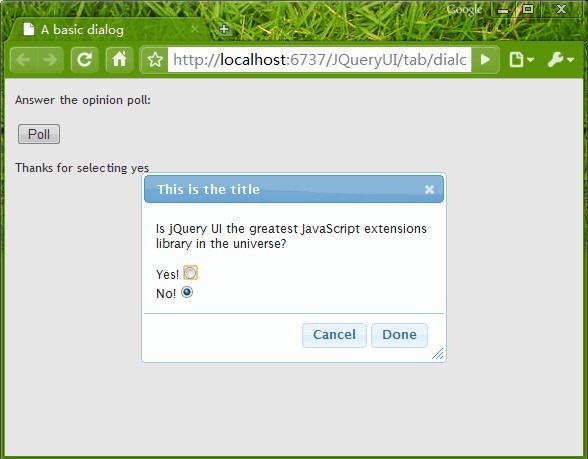
DEJ9F60KNX@I857FTV$05$8