


因为之前看到人家的一个匹配下拉控件,做得好酷,所以自己也开发了一个,虽然现在还比较丑陋,但还是能用的,还有很多不方便的地方要修改,所以源码就先不公布了。
先看看效果:

我点文本框的绿色图标,它会自动给我显示下拉项。
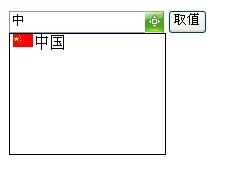
当我输入一个中字,它会自动匹配到凡是中字开头的项而显示出来。
基本上现在这个控件能达到这样的效果,可能用起来不是很方便有待改善,用时需要一个文本框,一个隐藏按钮控件,然后再拖拽这个匹配控件出来设置几个属性即可。
匹配控件的实现:
新建一个类,继承
WebControl。开始定义控件的属性。
 [System.ComponentModel.NotifyParentProperty(true)]
[Description("要匹配的控件的ID号")]
[TypeConverter(typeof(ValidatedControlConverter))]
[DefaultValue("")]
public string MatchTextBoxID
 {
{
 get
get
 {
{
string s = (string)ViewState["MatchTextBoxID"];
return (s == null) ? "" : s;
 }
}
set
{
ViewState["MatchTextBoxID"] = value;
}
 }
}
[System.ComponentModel.NotifyParentProperty(true)]
[Description("存储匹配的控件值的ID号")]
[TypeConverter(typeof(ValidatedControlConverter))]
[DefaultValue("0")]
public string MatchTextBoxValueID
{
get
{
string s = (string)ViewState["MatchTextBoxValueID"];
return (s == null) ? "0" : s;
}
set
{
ViewState["MatchTextBoxValueID"] = value;
}
}
protected override void OnPreRender(EventArgs e)
{
if (Page.ClientScript.IsClientScriptBlockRegistered(this.GetType(), "IwoakTextBoxMatch") == false)
{
this.Page.ClientScript.RegisterClientScriptInclude(
this.GetType(), "TextBoxMatch",
Page.ClientScript.GetWebResourceUrl(this.GetType(),
"Iwoak.Controls.TextBoxMatch.js"));
}
base.OnPreRender(e);
}
protected override void Render(HtmlTextWriter writer)
{
。。。。。。。。。。。。
}
再新建一个js
//****************
//可输可选可匹配输入的控件类
//参数(高,文本框的ID,隐藏控件的ID用于保存选择的ID值,图片的路径)
//****************
function TextMatch(Height, TextMatchText,TextMatchValue,imgurl)
{
var TextMatchObject = this;
if(imgurl !="")
TextMatchObject.img = imgurl;
var TextMatchDiv = document.createElement('div');
var TextMatchFrame = document.createElement('iframe');
var TextMatchButton = document.createElement('input');
TextMatchDiv.style.position = 'absolute';
TextMatchFrame.style.zIndex = '100';
TextMatchFrame.src = 'javascript:void(0)';
设置TextMatchDiv,TextMatchButton ,TextMatchFrame ,的样式.......................
//关闭选项层
function hideTextMatch(e)
{
e = (e == null) ? window.event : e;
target = (e.target) ? e.target : e.srcElement;
TextMatchDiv.style.display = 'none';
TextMatchFrame.style.display = 'none';
}
//展开匹配层
function showTextMatch()
{
。。。
}
//注册事件
xtMatchText.addEventListener('keyup', function(){showMatch()}, false);
TextMatchButton.addEventListener('click', function(){showTextMatch()}, false);
window.addEventListener('click', function(e){hideTextMatch(e)}, false);
}
基本上就完成了。
别人的更牛,选了之后输入框都可以有图片和链接的,不知道到他的“文本框”是用什么组合实现的。
放出他的效果图给大家瞧瞧。

我觉得这个效果可以,下个阶段目标就是要实现这个。有兴趣的朋友可以交流交流。
此内容由惯性聚合(RSS阅读器)自动聚合整理,仅供阅读参考。 原文来自 — 版权归原作者所有。