





This chapter introduces the simplest plug-in solution that are applicable to the four major components. This solution involves the following aspects:
1) Combine the dex of all plugins to solve the problem of loading plug-in's class.
2) Declare the four major components of the plugin in the host app’s AndroidManifest file. It’s a nuisance for hundreds of activities in the plug-in.
3) Merge all the resources in the plug-in into the host's resources in one time. Of course, this may result in conflict of resource ids.
8.1 Declaring Components in a Plug-in in Android Manifest
As we mentioned earlier, the four major components in the plug-in are just ordinary classes that the system does not recognize at all.
To make the host app to recognize them, you must declare the four major components in the host app's AndroidManifest.xml.
Then there is the simplest plug-in solution in history. The four components in the plug-in are declared in the host app.
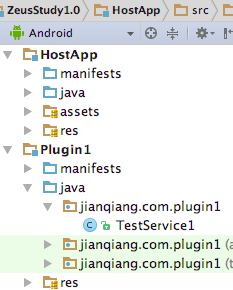
Look at the example ZeusStudy1.0, as shown in the figure below. Plugin1 has a TestService1 component
.
Correspondingly, in the Host app’s AndroidManifest file, the statement is as follows:
<service android:name="jianqiang.com.plugin1.TestService1" />
1.Use the class of plug-in’s ClassLoader;
2.Combine the dexs of host app and plug-in.
The second one is simpler.
Once the plug-in dex is merged into the host's dex, then the ClassLoader corresponding to the host App loads all the classes in the plug-in as follows:
public final class BaseDexClassLoaderHookHelper {
public static void patchClassLoader(ClassLoader cl, File apkFile, File optDexFile)
throws IllegalAccessException, NoSuchMethodException, IOException, InvocationTargetException, InstantiationException, NoSuchFieldException {
// Obtain BaseDexClassLoader : pathList
Object pathListObj = RefInvoke.getFieldObject(DexClassLoader.class.getSuperclass(), cl, "pathList");
// Obtain PathList: Element[] dexElements
Object[] dexElements = (Object[]) RefInvoke.getFieldObject(pathListObj, "dexElements");
// Element type
Class<?> elementClass = dexElements.getClass().getComponentType();
// Create an array to replace the original array
Object[] newElements = (Object[]) Array.newInstance(elementClass, dexElements.length + 1);
// Construct a plugin Element(File file, boolean isDirectory, File zip, DexFile dexFile) This constructor
Class[] p1 = {File.class, boolean.class, File.class, DexFile.class};
Object[] v1 = {apkFile, false, apkFile, DexFile.loadDex(apkFile.getCanonicalPath(), optDexFile.getAbsolutePath(), 0)};
Object o = RefInvoke.createObject(elementClass, p1, v1);
Object[] toAddElementArray = new Object[] { o };
// Copy the original elements
System.arraycopy(dexElements, 0, newElements, 0, dexElements.length);
// The element of the plugin is copied in
System.arraycopy(toAddElementArray, 0, newElements, dexElements.length, toAddElementArray.length);
// replace
RefInvoke.setFieldObject(pathListObj, "dexElements", newElements);
}
}
Combined with the previous two parts, the host App can start a service that in plug-in.
Intent intent = new Intent();
String serviceName = "jianqiang.com.plugin1.TestService1";
intent.setClassName(this, serviceName);
startService(intent);
Not just Service, four major components can be implemented as plug-in program. Both ContentProvider and Receiver are relatively simple, you can try to implement it by yourself.
Service, ContentProvider, and Receiver just need to merge dex, because they have no resources.
The solution for Activity here is a bit complicated.
Activity is heavily dependent on resources. Therefore, if you want to implement the plug-in of the Activity, you must solve the problem of loading the resources in the plug-in.
Chapter 7 introduced the relationship between AssetManager and Resources. AssetManager has an addAssetPath method that can populate the plugin's path all at once, and then generates a "super" Resource based on this "super" AssetManager.
Save this Super Resources in the global variable PluginManager. After you find the plugin or the host resource, you can find it too.
The above logic is implemented as follows (located in MyApplication):
private static void reloadInstalledPluginResources() {
try {
AssetManager assetManager = AssetManager.class.newInstance();
Method addAssetPath = AssetManager.class.getMethod("addAssetPath", String.class);
addAssetPath.invoke(assetManager, mBaseContext.getPackageResourcePath());
addAssetPath.invoke(assetManager, pluginItem1.pluginPath);
Resources newResources = new Resources(assetManager,
mBaseContext.getResources().getDisplayMetrics(),
mBaseContext.getResources().getConfiguration());
RefInvoke.setFieldObject (mBaseContext, "mResources", newResources);
// This is the main need to replace, if you do not support the plug-in runtime update, just leave this one
RefInvoke.setFieldObject (mPackageInfo, "mResources", newResources);
mNowResources = newResources;
// Need to clean up the mTheme object, otherwise it will report an error when loading resources through inflate mode
// If the activity dynamically loads the plugin, you need to set the activity's mTheme object to null RefInvoke.setFieldObject (mBaseContext, "mTheme", null);
} catch (Throwable e) {
e.printStackTrace();
}
The plug-in Activity must implement the base class ZeusBaseActivity. In this base class, the getResource method is overridden, thereby ensuring that the plug-in Activity is fetched from the "super" Resources each time it fetches resources.
public class ZeusBaseActivity extends Activity {
@Override
public Resources getResources() {
return PluginManager.mNowResources;
}
}
Here is the code for TestActivity1 in plug-in which called Plugin1. It uses the layout xml resource called activity_test1 in the plug-in:
public class TestActivity1 extends ZeusBaseActivity {
private final static String TAG = "TestActivity1";
@Override
protected void onCreate(Bundle savedInstanceState) {
super.onCreate(savedInstanceState);
setContentView(R.layout.activity_test1);
findViewById(R.id.button1).setOnClickListener(new View.OnClickListener() {
@Override
public void onClick(View v) {
try {
Intent intent = new Intent();
String activityName = "jianqiang.com.hostapp.ActivityA";
intent.setComponent(new ComponentName("jianqiang.com.hostapp", activityName));
startActivity(intent);
} catch (Exception e) {
e.printStackTrace();
}
}
});
}
}
At this point, the simplest plug-in solution of activity is complete, and we can even jump from the plug-in activity to the activity in the host.
However, there has a fatal problem: The four major components in the plugin must be declared in the host's AndroidManifest file beforehand and cannot be added.
In fact, for most of the App, rarely use Service, Receiver and ContentProvider, so the plug-in has these three components, is also typically updated logic, and will not add new.
However, there are many activities in the plug-in, and also add new, at this moment, we cannot pre-empt in the host AndroidManifest file.
This issue will be completely resolved in Chapter 9.
This chapter introduces the simplest plug-in solution. Although the plug-in can be successfully loaded, there are many problems:
1) Because the plugin and host resources are merged together, the resource ids will conflict.
2) Activity in the plug-in cannot be expected in advance, especially add new Activity1 in the plug-in.
These problems will be solved in the subsequent chapters.
[1] This section example code, please refer to https://github.com/Baobaojianqiang/ZeusStudy1.0
[2] This section example code, please refer to https://github.com/Baobaojianqiang/ZeusStudy1.1
此内容由惯性聚合(RSS阅读器)自动聚合整理,仅供阅读参考。 原文来自 — 版权归原作者所有。