



惯性聚合 高效追踪和阅读你感兴趣的博客、新闻、科技资讯
阅读原文 在惯性聚合中打开

推荐订阅源

Y
Y Combinator Blog
V
V2EX
Jina AI
Jina AI
爱范儿
爱范儿
M
MIT News - Artificial intelligence
量子位
L
LangChain Blog
Google DeepMind News
酷 壳 – CoolShell
酷 壳 – CoolShell
罗磊的独立博客
腾讯CDC
MongoDB | Blog
MongoDB | Blog
P
Proofpoint News Feed
宝玉的分享
宝玉的分享
OSCHINA 社区最新新闻
OSCHINA 社区最新新闻
Last Week in AI
Last Week in AI
H
Hackread – Cybersecurity News, Data Breaches, AI and More
F
Fortinet All Blogs
The GitHub Blog
The GitHub Blog
Engineering at Meta
Engineering at Meta
博客园 - 聂微东
让小产品的独立变现更简单 - ezindie.com
Vercel News
Vercel News
T
The Blog of Author Tim Ferriss

博客园 - Sheva

Two Xaml Tricks - Sheva I See Cool Stuff Today DataTemplate Is A Bit Naughtier To Play With XmlnsDefinitionAttribute Is Pretty Nifty Application.DoEvents In WPF 征召译者 C# Trivia Test CreateParams Is Pretty Cool! In-Place Editing In WPF SingleLinkedList Implementation Data Binding In WPF C# Application Markup Language Regex 101 Exercise I10 - Extract repeating hex blocks from a string AvalonPaint: Features Added Regex 101 Exercise I9 - Count the number of matches Crossbow: Hosting WPF Controls In Winforms Application Crossbow? WTF? The Architecture Of Avalon XamlReader.Load(): Build Up Your Own XamlPad
Drop Shadow Effect In WPF
Sheva · 2006-02-23 · via 博客园 - Sheva

    In WPF, it ships with three built-in BitmapEffect classes, namely DropShadowBitmapEffect, OuterGlowBitmapEffect and BlurBitmapEffect, you can think of those bitmap effects as those available in IE CSS, actually both of them do exactly the same thing, i.e add flashy look and feel to your UI display, here is some xaml code demonstrating how to use those BitmapEffects in WPF application:

<Border xmlns="http://schemas.microsoft.com/winfx/avalon/2005" 
           xmlns:x
="http://schemas.microsoft.com/winfx/xaml/2005" 
           CornerRadius
="30" Height="200" Width="800" Margin="20" 
           BorderThickness
="4" BorderBrush="Red" Background="Green">
<StackPanel>
   
<StackPanel.Resources>
        <BitmapEffectGroup x:Key="effects">
    
       <DropShadowBitmapEffect Color="White" ShadowDepth="10" Softness="10"/>
            <BlurBitmapEffect Radius="6" KernelType="Box"/>
        </BitmapEffectGroup>
        <OuterGlowBitmapEffect x:Key="outerglow"/>
   
</StackPanel.Resources>
 
  <Label Margin="5,20,5,5" Content="Andriy Shevchenko" FontSize="80"  
           FontFamily
="Segoe UI" FontWeight="Bold" BitmapEffect="{StaticResource effects}" />
   <Label FontSize="20" Margin="240,0,5,5" FontFamily="Segoe UI" 
          Content
="The Number One Striker In The World" BitmapEffect="{StaticResource outerglow}"/>
</StackPanel>
</Border>
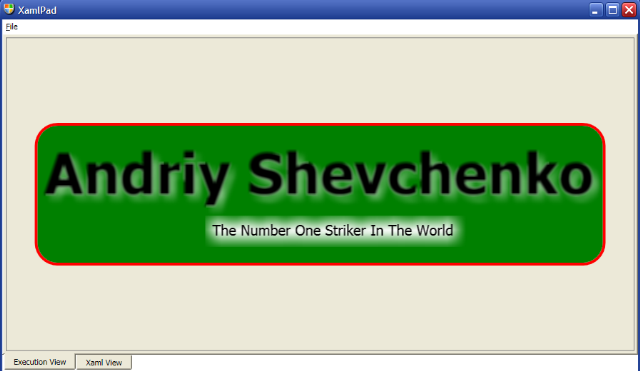
 
    And here is the screenshot of this little nice logo:

    As an off topic, Sheva a.k.a Andriy Shevchenko is my idol:-)