


惯性聚合 高效追踪和阅读你感兴趣的博客、新闻、科技资讯
阅读原文 在惯性聚合中打开

推荐订阅源

Simon Willison's Weblog
P
Privacy International News Feed
www.infosecurity-magazine.com
T
Troy Hunt's Blog
Hacker News - Newest:
Hacker News - Newest: "LLM"
Attack and Defense Labs
S
Secure Thoughts
V2EX - 技术
V2EX - 技术
cs.AI updates on arXiv.org
O
OpenAI News
Cloudbric
Cloudbric
Google Online Security Blog
Schneier on Security
cs.CV updates on arXiv.org
Help Net Security
Help Net Security
Cyberwarzone
Cyberwarzone
G
GRAHAM CLULEY
L
Lohrmann on Cybersecurity
Threat Intelligence Blog | Flashpoint
Spread Privacy
Spread Privacy
NISL@THU
NISL@THU
N
News and Events Feed by Topic
T
Tenable Blog
S
Security @ Cisco Blogs
N
News and Events Feed by Topic
The Hacker News
The Hacker News
C
CXSECURITY Database RSS Feed - CXSecurity.com
宝玉的分享
宝玉的分享
月光博客
月光博客
酷 壳 – CoolShell
酷 壳 – CoolShell
美团技术团队
奇客Solidot–传递最新科技情报
奇客Solidot–传递最新科技情报
Google DeepMind News
钛媒体:引领未来商业与生活新知
钛媒体:引领未来商业与生活新知
T
Tailwind CSS Blog
V
Visual Studio Blog
P
Proofpoint News Feed
Webroot Blog
Webroot Blog
让小产品的独立变现更简单 - ezindie.com
博客园 - 三生石上(FineUI控件)
cs.CL updates on arXiv.org
Jina AI
Jina AI
雷峰网
雷峰网
T
The Blog of Author Tim Ferriss
Hugging Face - Blog
Hugging Face - Blog
腾讯CDC
L
LangChain Blog
The Register - Security
OSCHINA 社区最新新闻
OSCHINA 社区最新新闻
博客园 - 聂微东

博客园 - 工具人Kim哥

mysql数据库备份命令大全 Vue获取url网址参数的两种方法 在vscode下编译vue神坑40% building 过不去 PHP获取本周的每一天的时间 vue元素对齐方式 一个身高体重测量工具(BMI测量工具) 一个不错的常用小工具站点 Fiddler使用 不错的SDL源码分析 unity3d中获得物体的size PPT文化 Unity消息 Unity3D中的UnitySendMessage方法的使用 Android性能优化之渲染 问题记录 VS2012项目中使用CocoStudio相关文件的设置 国际金融基础知识 Nutch 安装文档 sed linux 命令
HTML代码格式化实现方式
工具人Kim哥 · 2023-07-10 · via 博客园 - 工具人Kim哥

开发过程中,经常遇到html被压缩了无法查看,需要对html进行格式化,

或者html写的比较乱,需要格式化, 那么HTML格式化的方式有哪些?

总结下来有几种:

1.手动编辑:使用编辑器手动对HTML代码进行格式化和缩进。
2.在线工具:使用在线HTML格式化工具,如Code Beautify、HTML Formatter等。
3.文本编辑器插件:使用文本编辑器插件,如Notepad++等。
4.代码编辑器:使用代码编辑器,如Sublime Text、Atom等,这些编辑器都有插件或扩展可用于格式化HTML代码。
5.命令行工具:使用命令行工具,如HTML Tidy、HTML Beautifier等。
6.自动化工具:使用自动化工具,如Gulp、Grunt等,这些工具可以自动化地格式化HTML代码

其实,基本上没有必要自己实现,比如 这些在线工具可以直接实现, 直接打开:

https://www.guud.cn/tools/html-formatter.html
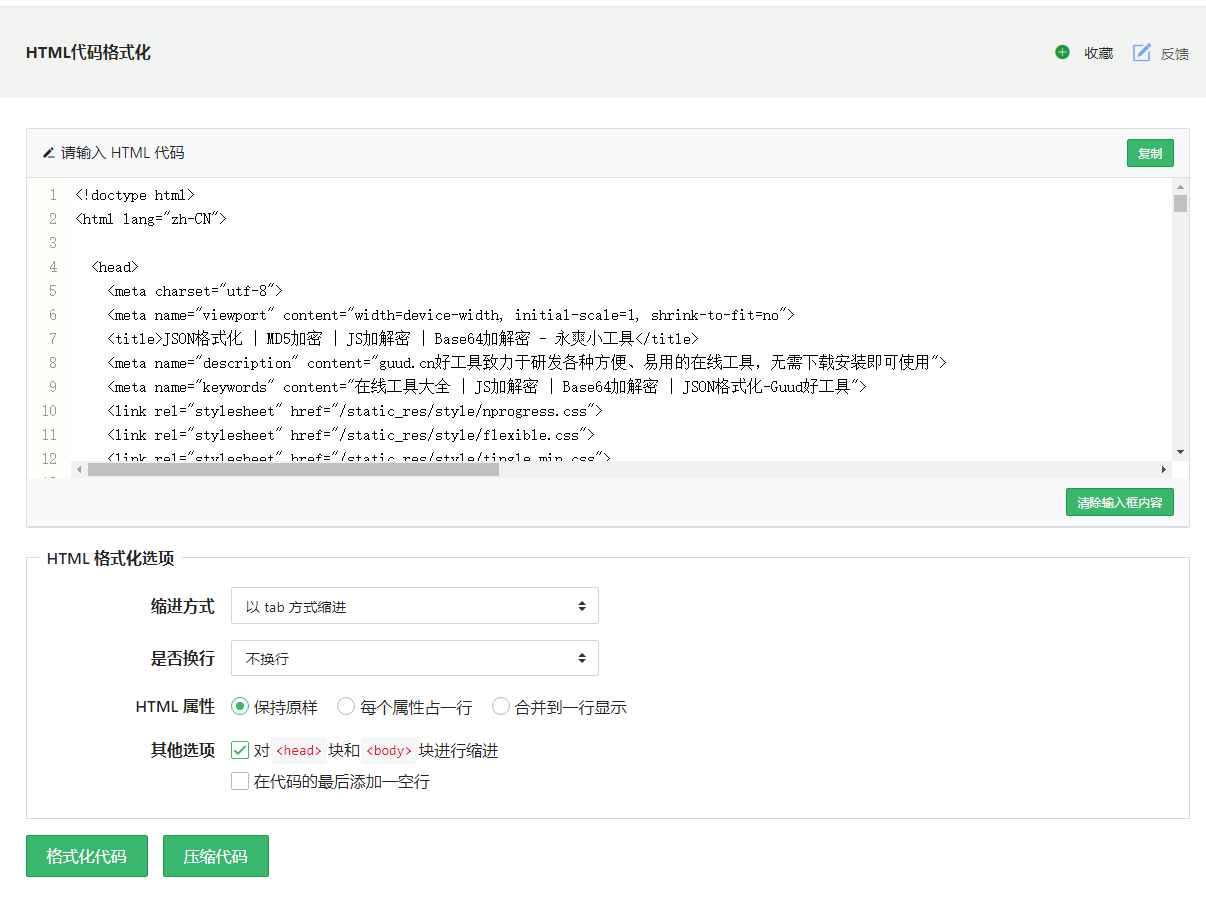
查看源码可知,使用的是

 1 /*
 2   源码地址
 3   https://www.guud.cn/tools/html-formatter.html
 4 */
 5 var options = {
 6     "indent_size": indent_size,
 7     "indent_char": indent_char,
 8     "max_preserve_newlines": "5",
 9     "preserve_newlines": true,
10    "keep_array_indentation": false,
11    "break_chained_methods": false,
12    "indent_scripts": "normal",
13    "brace_style": "collapse",
14    "space_before_conditional": true,
15    "unescape_strings": false,
16    "jslint_happy": false,
17    "end_with_newline": end_with_newline,
18    "wrap_line_length": wrap_line_length,
19    "indent_inner_html": indent_inner_html,
20    "comma_first": false,
21    "e4x": false,
22    "indent_empty_lines": false
23 };
24 
25 
26 sFormat = html_beautify(text, options);


使用的是 beautify-html 组件