惯性聚合 高效追踪和阅读你感兴趣的博客、新闻、科技资讯
阅读原文 在惯性聚合中打开

推荐订阅源

M
MIT News - Artificial intelligence
博客园 - Franky
H
Help Net Security
A
About on SuperTechFans
Know Your Adversary
Know Your Adversary
罗磊的独立博客
Help Net Security
Help Net Security
腾讯CDC
博客园 - 三生石上(FineUI控件)
月光博客
月光博客
Project Zero
Project Zero
有赞技术团队
有赞技术团队
Blog — PlanetScale
Blog — PlanetScale
T
Threat Research - Cisco Blogs
The Hacker News
The Hacker News
Engineering at Meta
Engineering at Meta
Threat Intelligence Blog | Flashpoint
Simon Willison's Weblog
T
Threatpost
Google DeepMind News
V
V2EX
B
Blog
人人都是产品经理
人人都是产品经理
J
Java Code Geeks
N
Netflix TechBlog - Medium
P
Privacy International News Feed
Recorded Future
Recorded Future
D
Darknet – Hacking Tools, Hacker News & Cyber Security
CTFtime.org: upcoming CTF events
Stack Overflow Blog
Stack Overflow Blog
Cisco Talos Blog
Cisco Talos Blog
C
CXSECURITY Database RSS Feed - CXSecurity.com
S
Securelist
NISL@THU
NISL@THU
The GitHub Blog
The GitHub Blog
T
Troy Hunt's Blog
S
Security @ Cisco Blogs
Vercel News
Vercel News
L
LINUX DO - 热门话题
博客园_首页
The Register - Security
GbyAI
GbyAI
TaoSecurity Blog
TaoSecurity Blog
Exploit-DB.com RSS Feed
V2EX - 技术
V2EX - 技术
L
LangChain Blog
T
Tor Project blog
P
Privacy & Cybersecurity Law Blog
Security Latest
Security Latest
K
Kaspersky official blog

博客园 - Timothy Ye

扩展方法使用小结 IIS7中Host WCF遇到的问题 博客园字体美化小技巧 - Timothy Ye - 博客园 个人闲置物品挥泪处理(8月27日更新) HTC Touch Pro 的重力感应功能 C# IDE Mobile – Write your C# code anywhere! Visual Studio 2010 Beta1 is available for download 小黑降温记 Windows 7 新特性体验 Unity 学习笔记(3) -- 生命周期管理 换了新鼠标 Unity 学习笔记(2) -- 配置文件的使用 Unity 学习笔记(1) -- Unity简介及简单使用 Microsoft My Phone 体验 SQL中的日期计算 快速开启、屏蔽Vista下的UAC提示 Dynamic Plugins Manager (五) Plugins Manager 源码下载 Dynamic Plugins Manager (四) 插件及Demo源码下载 Dynamic Plugins Manager (三) Demo
Visual Studio IDE配色方案
Timothy Ye · 2009-07-13 · via 博客园 - Timothy Ye

2009-07-13 21:29  Timothy Ye  阅读(2567)  评论()    收藏  举报

对于咱们代码民工来说,每天都要面对电脑,而平时眼睛盯得最多的,莫过于Visual Studio集成开发环境了。而Visual Studio的默认背景色颜色是白色的,久而久之,眼睛最容易疲劳。所以,一个好的配色方案,能减少屏幕对眼睛的刺激,也能减缓疲劳。经过长久的收集和摸索,老衲收藏了几种十分不错的配色方案,颜色都很柔和,不刺激眼睛,相当的绿色和环保。下面一一和大家分享一下:

所有的配色方案,都采用的是微软的Consolas字体,这可是微软官方推荐的编程御用字体哦~!效果怎样大家可以自己看了,反正我一直用它。

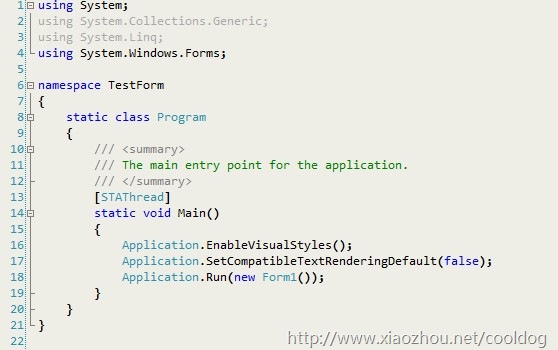
第一种配色方案(BlueTheme)浅绿色,也是老衲最喜欢的一种颜色。基本上字体颜色都没怎么变,只是改了背景色,色彩柔和。
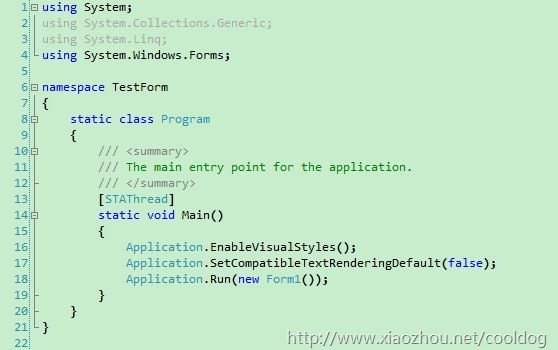
bluetheme

第二种配色方案(YellowTheme)浅黄,也没改字体颜色,只是该了背景,浅黄,颜色不刺眼
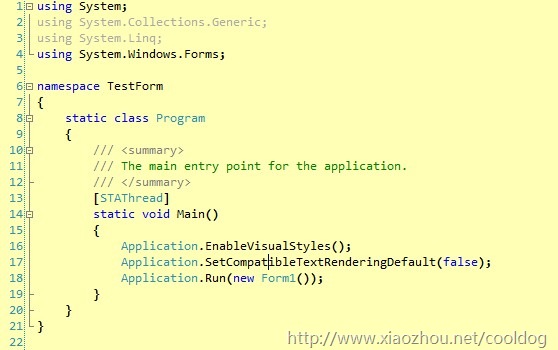
yellowtheme

第三种配色方案(GrayTheme)浅灰色

violettheme

第四种配色方案(DarkTheme)黑色主题,这是一个国外哥们推荐的,很黑很酷
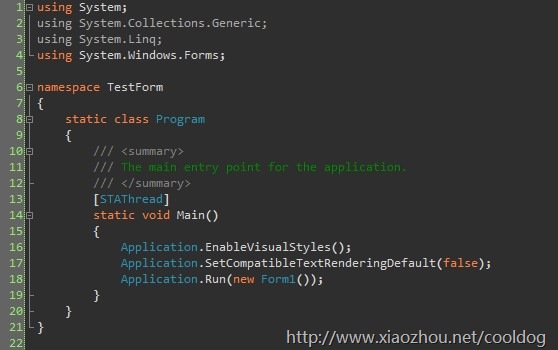
darktheme

所有的配色方案,我都打包上传了,也就是Visual Studio IDE的配置文件,通过Tools->Import and Export Settings可以方便的导入和导出配置,用以切换主题。

点击下载此文件

大家还有什么好的配色方案,欢迎分享~