








转载请注明出处:博客园 老蒋
 转换函数如下:
function convertDate(value) {
return value ? DateToStr(eval("new " + value.substr(1, value.length - 2))) : undefined;
}
b、我们需要实现当鼠标移动到数据行时,会显示 “双击行进行编辑”
字样,要实现这个功能,我们需要进行这样的处理:
grid.on("mouseover", function(e, t) {
var row;
if ((row = this.getView().findRowIndex(t)) !== false) {
Ext.QuickTips.register({
target: e.target,
text: '双击行进行编辑',
autoHide:
true,
hideDelay: 0,
showDelay: 0
})
}
}, grid);
c、我们需要在双击某个数据行时,弹出编辑窗口,这个功能实现的代码如下:
//双击记录进行查看或编辑
grid.on('rowdblclick', function(grid, rowIndex, e) {
var selectedKeys = grid.selModel.selections.keys;
EditRecord(selectedKeys);
});
d、ext-2.0.2版本grid在Firefox里显示过长的内容时,不会像IE一样过长的内容会自动加上…;同时还有一个日历控件的在Firefox显示过长的问题。要显示过长的问题,我要需要加上以下这段代码。(日历的解决方法见:http://www.extjs.org.cn/node/219 ,另外的过长问题也是从http://www.extjs.org.cn 找到的解决方法,具体链接不太清楚了。):
//firefox下文本过长自动换行
if (!Ext.isIE) {
grid.store.on('load', function() {
grid.el.select("table[class=x-grid3-row-table]").each(function(x) {
x.addClass('x-grid3-cell-text-visible');
});
});
}
在页面上的CSS定义如下:
.x-grid3-cell-text-visible .x-grid3-cell-inner
{
overflow:visible;padding:3px 3px 3px 5px;white-space:normal;
}
二、添加功能(编辑窗口与此类似)
添加窗口的效果如下:
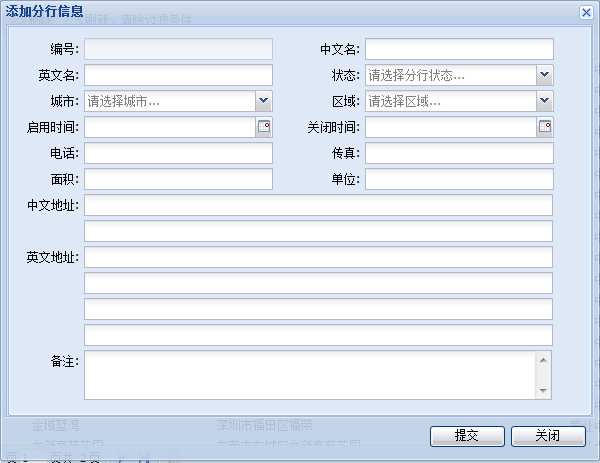 在网上看到的FormPanel的示例,都是一列的,现在我们要两列的效果,而且有些行是要跨两列的,还有的我们的例子里,地址类型的有两个字段,在表单里,我们只需要其中一行有字段提示就行了,第二个字段只要有输入框就可以了。
a、
两行的实现
在FormPanel的items里添加一个item,layout方式为column,即两列;然后我们在这个item里添加两个子item,layout方式为form。
b、
跨两列的实现
在FormPanel的items里添加一个item, layout方式为form,然后在添加一个子item,layout方式为form。
c、
在输入框前面不需要显示fieldLabel和那个:号
在这里,我们不能使用hideLabel等于true来实现,如果这样,文本输入框就直接在最左边显示了,跟其它的不对齐,这里我们使用一个变通的方法,就是不设置fieldLabel,但是还有一个问题,有个:号在输入框前面呢,还是没有实现我们的效果,那再加个labelSeparator: ''就可以实现我们的效果了。
d、
其他一些小细节allowBlank: false不能为空, maxLength: 40 可以输入的最大长度 , maxLengthText内容过长时的提示。
三、过滤功能的实现
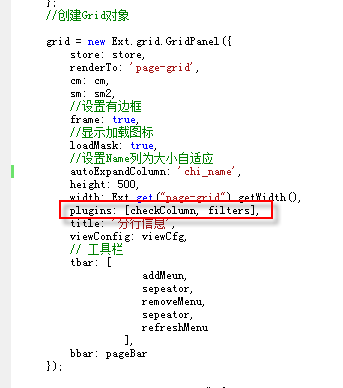
Ext 2.0.2没有实现列的过滤功能,我们从网上找到了牛人们写的扩展,代码见示例JS目录下的GridFilter文件夹,我们只需要把相关的JS代码在使用的页面引用,并在grid中以插件的方式加到grid里,代码如下:
var filters = new Ext.grid.GridFilters({
filters: [
{ type:
'numeric', dataIndex: 'branch_id' },{ type:
'string', dataIndex: 'chi_name' },{ type:
'string', dataIndex: 'eng_name' },{ type:
'string', dataIndex: 'status' },{ type:
'numeric', dataIndex: 'area' },{ type:
'date', dataIndex: 'open_date' },{ type:
'date', dataIndex: 'close_date' },{ type:
'string', dataIndex: 'chi_addr_1' },{ type:
'string', dataIndex: 'phone_no' },{ type:
'string', dataIndex: 'fax_no' }
]
});
Grid里的代码见下图
 四、删除功能
删除功能我们主要是要获取到选中项的id,可以通过grid.selModel.selections.keys来获取
本示例下载:ExtJsSample
此内容由惯性聚合(RSS阅读器)自动聚合整理,仅供阅读参考。 原文来自 — 版权归原作者所有。