









有时候我们会有这样的需求,将 WebService URL 中的 asmx 后缀去掉;或者我们要模拟普通 Web 的 URL,接口名称直接拼接在 URL 中。这些情况我们都要用到URL重写。
首先,在 WebService 项目中添加一个 Global.asax 类。Global.asax 是一个文本文件,它提供全局可用代码。这些代码包括应用程序的事件处理程序以及会话事件、方法和静态变量。有时该文件也被称为应用程序文件。这里的重点不是它,而是它里边的一个事件。
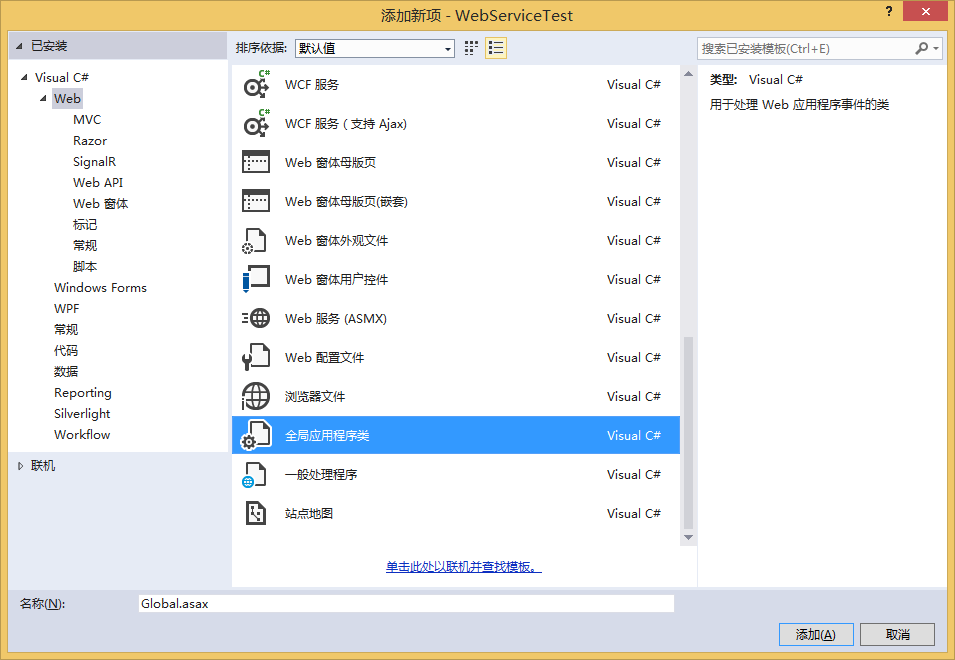
在 Global.asax.cs 父类中我们会发现有这样一个事件:BeginRequest。该事件在接收到一个应用程序请求时触发。对于一个请求来说,它是第一个被触发的事件,请求一般是用户输入的一个页面请求(URL)。所以关于URL的重写自然是写在 Application_BeginReques 事件处理函数中。
URL 重写是截取传入 Web 请求并自动将请求重定向到其他资源的过程。执行 URL 重写时,通常会检查被请求的 URL,并基于 URL 的值将请求重定向到其他 URL。比如我们要将http://localhost:25060/testService.asmx?op=Add重写为http://localhost:25060/services/testService/add。
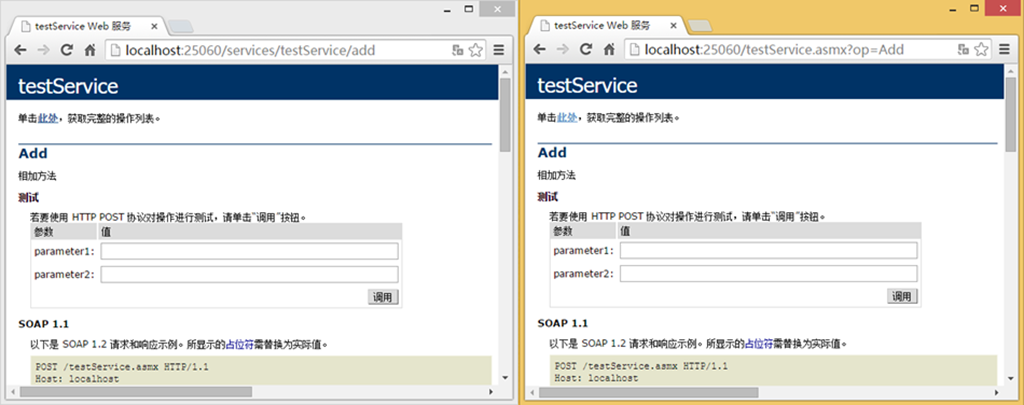
通过System.Web.HttpContext 类的 RewritePath() 方法,可以在 ASP.NET 级别实现 URL 重写。HttpContext 类包含有关特定 HTTP 请求的 HTTP 特定信息。对于 ASP.NET 引擎收到的每个请求,均为该请求创建一个 HttpContext 实例。此类具有如下属性:Request 和 Response,提供对传入请求和传出响应的访问;Application 和 Session,提供对应用程序和会话变量的访问;User,提供有关通过了身份验证的用户的信息;其他相关属性。
使用 RewritePath() 方法可以接受单个字符串作为要使用的新路径。HttpContext 类的 RewritePath(string) 方法在内部对 Request 对象的 Path 属性和 QueryString 属性进行更新。除了 RewritePath(string),HttpContext中还包括另一种形式的 RewritePath() 方法,此方法可以接受三个字符串输入参数。此备用重载形式不仅要设置 Request 对象的 Path 属性和 QueryString 属性,还要设置内部成员变量,这些变量用于计算 Request 对象的 PhysicalPath、PathInfo 和 FilePath 属性值。
赘述这么多也只是想让大家知其所以然。关于代码很简单,只需在事件处理函数中添加如下代码即可。

 1      protected void Application_BeginRequest(object sender, EventArgs e)
 2         {
 3             string path = Request.Url.LocalPath;
 4             if (!path.Contains(".asmx"))
 5             {
 6                 if (path.Contains(@"services/testService/add"))
 7                 {
 8                     Context.RewritePath(path.Replace("services/testService/add", "testService.asmx?op=Add"));
 9                 }
10             }
11         }
扩展阅读
https://msdn.microsoft.com/zh-cn/library/ms972974.aspx
http://www.cnblogs.com/top5/archive/2009/12/28/1633837.html
http://www.cnblogs.com/I-am-Betty/archive/2010/09/06/1819558.html
此内容由惯性聚合(RSS阅读器)自动聚合整理,仅供阅读参考。 原文来自 — 版权归原作者所有。