







Unity的动态加载简单使用
Unity可以快速,轻量化的实现IOC,不用自已写类似反射代码来动态加载类或dll了
使用Unity先要用nuget获取相关引用文件
Unity可通过代码或config文件来配置要加动态加载的内容
使用示例
        static void Main(string[] args)
        {
            Console.WriteLine("'Y' use Config Register Type,Otherwise use Code Register Type");
            bool isUseConfig = Console.ReadLine().ToUpper().Equals("Y");

            IUnityContainer container = new UnityContainer();//定义ioc容器

            if (isUseConfig)
            {
                //通过Config来注册Type
                UnityConfigurationSection configuration = (UnityConfigurationSection)ConfigurationManager.GetSection(UnityConfigurationSection.SectionName);
                configuration.Configure(container, "defaultContainer");//defaultContainer为在config中定义的IOC容器名称
            }
            else
            {
                //通过代码来注册Type
                CodeReg(container);
            }

            A a = container.Resolve<IA>() as A;//演示动态构造对像
            B b = container.Resolve<IB>() as B;

            var list = new ParameterOverrides();
            list.Add("name", "TomMao");//构造函数的参数名,参数值
            IE e = container.Resolve<IE>("e",list);//演示构造函数传参 构造对像
            e.ShowName();
            e = container.Resolve<IE>("ee", list);//演示通过ioc不同名字,用不同的class构造同一接口对像,ee,e即是不同的ioc名字,代表使用不同的class,在注册时加上ioc名字
            e.ShowName();

            if (null != a)
            {
                Console.WriteLine("a.B == null ? {0}", a.B == null ? "Yes" : "No");
                Console.WriteLine("a.C == null ? {0}", a.C == null ? "Yes" : "No");
                Console.WriteLine("a.D == null ? {0}", a.D == null ? "Yes" : "No");
            }
            Console.ReadLine();
        }
使用代码配置加载项
        //通过代码来实现Ioc容器的Type注册
        private static void CodeReg(IUnityContainer container)
        {
            container.RegisterType(typeof(IA), Type.GetType("UnityDemo.A"));
            container.RegisterType(typeof(IB), Type.GetType("UnityDemo.B"));
            container.RegisterType(typeof(IC), Type.GetType("UnityDemo.C"));
            container.RegisterType(typeof(ID), Type.GetType("UnityDemo.D"));
            container.RegisterType(typeof(IE), Type.GetType("UnityDemo.E"), "e");//加入注册的别名,可通过此名称实现同一接口,不同实现
            container.RegisterType(typeof(IE), Type.GetType("UnityDemo.EE"), "ee");
        }
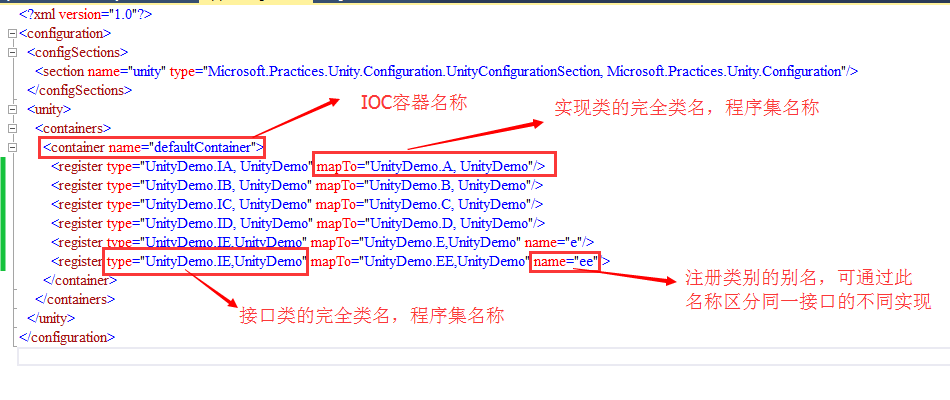
使用Config配置加载项
此内容由惯性聚合(RSS阅读器)自动聚合整理,仅供阅读参考。 原文来自 — 版权归原作者所有。