


惯性聚合 高效追踪和阅读你感兴趣的博客、新闻、科技资讯
阅读原文 在惯性聚合中打开

推荐订阅源

Stack Overflow Blog
Stack Overflow Blog
博客园 - Franky
MyScale Blog
MyScale Blog
Jina AI
Jina AI
B
Blog
Microsoft Security Blog
T
Troy Hunt's Blog
博客园_首页
T
Threatpost
Threat Intelligence Blog | Flashpoint
L
Lohrmann on Cybersecurity
GbyAI
GbyAI
T
Tenable Blog
B
Blog RSS Feed
S
Securelist
T
Threat Research - Cisco Blogs
P
Privacy International News Feed
P
Proofpoint News Feed
T
The Exploit Database - CXSecurity.com
H
Hackread – Cybersecurity News, Data Breaches, AI and More
量子位
博客园 - 三生石上(FineUI控件)
大猫的无限游戏
大猫的无限游戏
雷峰网
雷峰网
C
CXSECURITY Database RSS Feed - CXSecurity.com
罗磊的独立博客
AWS News Blog
AWS News Blog
V
V2EX
宝玉的分享
宝玉的分享
J
Java Code Geeks
小众软件
小众软件
Spread Privacy
Spread Privacy
腾讯CDC
Google Online Security Blog
月光博客
月光博客
V
Visual Studio Blog
The Hacker News
The Hacker News
C
CERT Recently Published Vulnerability Notes
Project Zero
Project Zero
Know Your Adversary
Know Your Adversary
T
The Blog of Author Tim Ferriss
Last Week in AI
Last Week in AI
Apple Machine Learning Research
NISL@THU
NISL@THU
C
Check Point Blog
Webroot Blog
Webroot Blog
D
DataBreaches.Net
Cloudbric
Cloudbric
cs.AI updates on arXiv.org
IT之家
IT之家

博客园 - sdxd.bgl

将SQL Server中的数据显示到SharePoint中 拓展训练总结 在PowerShell中,如何获取SharePoint的默认数据库服务器 在SharePoint页面中如何显示来自其他网站的List 恢复导出XSLT List View WebPart 实战部署FAST Search Server 2010 for SharePoint Sharepoint开发中代码运行权限级别 在InfoPath中如何获取当前用户的信息(Profile) 晒晒我的家乡 关于模式的思考 小心委托 利用System.Linq.Expressions实现四则运算计算器(三) 利用System.Linq.Expressions实现四则运算计算器(二) 利用System.Linq.Expressions实现四则运算计算器(一) 初识System.Linq.Expressions 请拆招:将两个已排序集合分解成两个独立部分的集合和一个共有部分的集合? 如何实现Windows服务 我的生活 电脑是个神奇的东西!
用javascript实现下拉列表的自动筛选功能 - sdxd.bgl - 博客园
sdxd.bgl · 2007-01-16 · via 博客园 - sdxd.bgl

下拉列表大家都用的多了,如果下拉列表里面有太多项,用户在查找其中的一项就比较困难。这种时候大家都会想到排序,但有时候关键字不总是排在第一位,排序后还是有些难找。对下拉列表项目进行简单筛选就变得特别有效。

function SelectFilter(sel)
{
    
var txt = window.prompt("请输入过滤条件:""");
    
if(document.filter == undefined)
    {
        document.filter 
= new Array();
    }
    
if(document.filter[sel.id] == undefined)
    {
        document.filter[sel.id] 
= new Array();
        
for(var i = 0; i < sel.options.length; i++)
        {
            document.filter[sel.id][i] 
= sel.options[i];
        }
    }
    
else
    {
        
for(var i = sel.options.length - 1; i >= 0; i--)
        {
            sel.options.remove(i);
        }
        
for(var i = 0; i < document.filter[sel.id].length; i++)
        {
            sel.options.add(document.filter[sel.id][i]);
        }
    }
    
if(txt == undefined || txt == "")
    {
        
return;
    }
    
for(var i = sel.options.length - 1; i >= 0; i--)
    {
        
if(sel.options[i].text.indexOf(txt) < 0)
        {
            sel.options.remove(i);
        }
    }
    
if(sel.options.length > 0)
    {
        sel.options[
0].selected = true;
    }
}

在使用的时候,向如下调用:

1 <input type="button" value="" onclick="javascript:SelectFilter(<%= ddlInterval.ClientID %>);">

看看效果,应用之前:

进行筛选,输入2422:
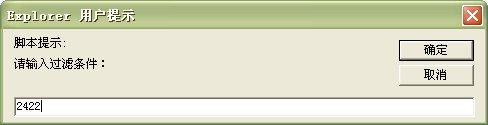
筛选出来的结果:


之前发的脚本还有些小问题,如果用户点“取消”按钮,会将下拉项全部清空,也不会默认选择第一项。这些都已经修正。