惯性聚合 高效追踪和阅读你感兴趣的博客、新闻、科技资讯
阅读原文 在惯性聚合中打开

推荐订阅源

S
Security Affairs
OSCHINA 社区最新新闻
OSCHINA 社区最新新闻
N
Netflix TechBlog - Medium
云风的 BLOG
云风的 BLOG
M
MIT News - Artificial intelligence
A
About on SuperTechFans
Last Week in AI
Last Week in AI
博客园 - 叶小钗
博客园 - Franky
腾讯CDC
钛媒体:引领未来商业与生活新知
钛媒体:引领未来商业与生活新知
The GitHub Blog
The GitHub Blog
Google DeepMind News
H
Hackread – Cybersecurity News, Data Breaches, AI and More
Cyber Security Advisories - MS-ISAC
小众软件
小众软件
The Hacker News
The Hacker News
C
Cisco Blogs
C
CXSECURITY Database RSS Feed - CXSecurity.com
L
LangChain Blog
WordPress大学
WordPress大学
美团技术团队
P
Proofpoint News Feed
T
Threat Research - Cisco Blogs
AWS News Blog
AWS News Blog
S
Securelist
T
Tenable Blog
I
Intezer
Threat Intelligence Blog | Flashpoint
L
LINUX DO - 热门话题
博客园 - 三生石上(FineUI控件)
Y
Y Combinator Blog
Cisco Talos Blog
Cisco Talos Blog
T
Tor Project blog
Security Latest
Security Latest
Apple Machine Learning Research
C
Cybersecurity and Infrastructure Security Agency CISA
S
Schneier on Security
L
Lohrmann on Cybersecurity
P
Privacy & Cybersecurity Law Blog
月光博客
月光博客
P
Proofpoint News Feed
Vercel News
Vercel News
Simon Willison's Weblog
G
GRAHAM CLULEY
T
The Blog of Author Tim Ferriss
F
Fortinet All Blogs
博客园 - 【当耐特】
A
Arctic Wolf
aimingoo的专栏
aimingoo的专栏

博客园 - LuckPanda

安装程序检测到另一个程序要求计算机重新启动.必须重新启动计算机后才能安装visualstudio.net系统必备 尝试live writer写csdn/cnblogs日志 修复vs2003调试器 艾宾浩斯记忆曲线 vs2003和vs2005安装程序制作笔记 Using 未声明 使用线程加载控件,通过delegate创建控件,但仍报错“在某个线程上创建的控件不能成为在另一个线程上创建的控件的父级” winform不能用窗体设计器打开,只能用代码编辑器打开 crystal report(水晶报表) 在vista 下无法预览,与UAC(用户帐号控制)有关 给alimama的建议 十大常用杀毒软件试用 云计算最终会将软件变为免费 云计算淹没了虚拟主机业务 最近网站接连被攻击 SQL 注入 常用手法 Qq2007 正式版 登录协议分析之发报程序C#版本 qq 2007 正式版 协议 分析 91 62 ba dd 22 怎样在Sharepoint webpart中写 Repeat 、datalist 、datagrid ,读懂这段代码应该可以解决这类问题了 SharePoint 和 Reporting Service 的集成 今早发现 sharepoint 线程被终止 的提示
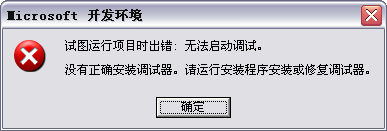
试图运行项目时出错:无法启动调试 & mdm.exe 伪装 病毒
LuckPanda · 2011-05-04 · via 博客园 - LuckPanda

image

C:\Program Files\Common Files\Microsoft Shared\VS7DEBUG>mdm.exe /regserver

同时,上述位置也是mdm.exe的正确位置,如果在其他位置发现mdm.exe,那么很可能就是病毒伪装了。