


惯性聚合 高效追踪和阅读你感兴趣的博客、新闻、科技资讯
阅读原文 在惯性聚合中打开

推荐订阅源

博客园_首页
I
InfoQ
The Register - Security
L
LangChain Blog
H
Help Net Security
The GitHub Blog
The GitHub Blog
S
Schneier on Security
博客园 - 【当耐特】
W
WeLiveSecurity
Attack and Defense Labs
IT之家
IT之家
CTFtime.org: upcoming CTF events
Google DeepMind News
The Cloudflare Blog
H
Heimdal Security Blog
让小产品的独立变现更简单 - ezindie.com
Y
Y Combinator Blog
雷峰网
雷峰网
N
Netflix TechBlog - Medium
Security Archives - TechRepublic
cs.AI updates on arXiv.org
Cyber Security Advisories - MS-ISAC
L
Lohrmann on Cybersecurity
OSCHINA 社区最新新闻
OSCHINA 社区最新新闻
T
The Exploit Database - CXSecurity.com
P
Privacy & Cybersecurity Law Blog
G
GRAHAM CLULEY
Exploit-DB.com RSS Feed
V
Visual Studio Blog
博客园 - 聂微东
PCI Perspectives
PCI Perspectives
Last Week in AI
Last Week in AI
A
Arctic Wolf
宝玉的分享
宝玉的分享
T
The Blog of Author Tim Ferriss
S
Secure Thoughts
T
Threat Research - Cisco Blogs
GbyAI
GbyAI
云风的 BLOG
云风的 BLOG
D
Darknet – Hacking Tools, Hacker News & Cyber Security
S
SegmentFault 最新的问题
SecWiki News
SecWiki News
月光博客
月光博客
大猫的无限游戏
大猫的无限游戏
Schneier on Security
P
Proofpoint News Feed
博客园 - Franky
奇客Solidot–传递最新科技情报
奇客Solidot–传递最新科技情报
AI
AI
Engineering at Meta
Engineering at Meta

博客园 - lansh

Boot 44b0x by uboot lxvoip Remove "Click here to enable Instant Search" - lansh Sipdroid Error “Registration failed (404 not found)” - lansh VoIP使用总结 Test 如何压缩word2007文档的图片? 通过Word 2007发布Blog - lansh - 博客园 vi的复制粘贴命令 UT斯达康 G680手机那些事儿 有些确实牛擦的有点嚣张!!! (zz) You may receive an "Access Denied" or a "Permission Denied" scripting error message when you browse a secure Web site that contains multiple frames - lansh CMake,如何将临时文件产生到一个特定的目录里面 如何静态编译QT (zz) 来个7.0的破解截图,和6.0的过程完全一样,花了不到1个小时搞定。 终于把著名的背单词软件给破了 关于翻译软件 上班中午 测试一下子
如何去除《谷歌金山词霸 1.95》软件内的广告,来加速启动。
lansh · 2009-10-20 · via 博客园 - lansh

仅供研究,若有侵权,敬请告知,立即删除,谢谢。

主页的广告:

大概的原理是(猜测),通过web方式将首页的内容取下来(具体的地址是:http://client.g.iciba.com/1.9/page.zip),然后解压到目录<账户信息>\Application Data\kingsoft\PowerWord Lite\config\webpage下面,另外,在安装目录的webpage文件下也有一份。

这样,每次软件启动的时候,就加载voc_index.htm这个页面。

当然最简单的改动是,将voc_index内容清空。

但我为了安全,将XDict.exe里面的字符串“http://client.g.iciba.com/1.9/page.zip”也给干掉了,世界终于清静了。
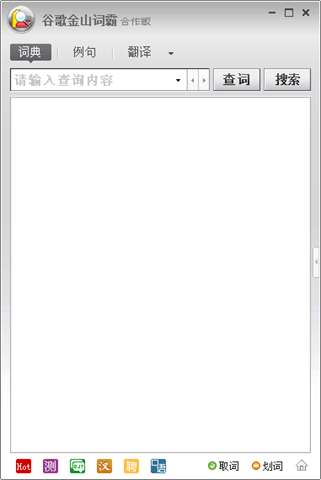
2009-10-19 22-07-51

页面内部的广告:

是通过内嵌一个iframe的方式来实现的,具体内容为:

<div id=adsXXXX style="text-align:center"><iframe src="http://goto.www.iciba.com/216/2452/scode_index.htm?sid=216&pid=2452" width="266" height="30" frameborder="no" border="0" marginwidth="0" marginheight="0" scrolling="no" allowTransparency="true"></iframe></div>

我们可以直接将height改为”00”,即可。
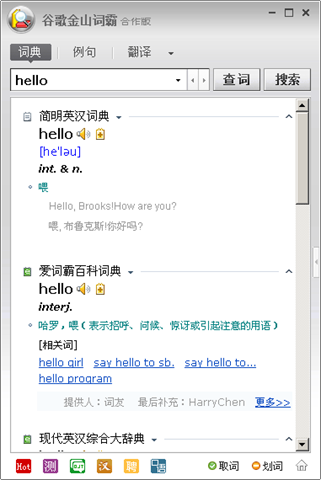
2009-10-19 22-08-51