










Authenticate a user against the Active Directory using the user ID and password
By April 05, 2006
This article serves as a guide to using System.DirectoryServices (SDS) ADSI to access user and group in the Windows Active Directory. Authenticate a user against the Active Directory using the user ID and password.
This article serves as a guide to using System.DirectoryServices (SDS) ADSI to access user and group in the Windows Active Directory. Authenticate a user against the Active Directory using the user ID and password.
LDAP, ADSI and SDS
Lightweight Directory Access Protocol (LDAP) is an industry standard directory access protocol (basically set of protocols) for accessing information directories. In Windows, LDAP is the primary way the Operating System accesses the Active Directory database. Active Directory is the information hub of the Windows Server operating system and index all the data in their entries, and "filters" may be used to select just the person or group you want, and return just the information you want. Active Directory enables centralized, secure management of an entire network and promises to support a single unified view of all objects (such as user accounts, groups, computers and sites) on a network and locating and managing resources faster and easier.
Active Directory Service Interfaces (ADSI) is a COM-based programmatic interface for Microsoft Windows Active Directory that allows you to create custom scripts to administer Active Directory. ADSI-enabled scripts are capable of performing a wide range of administrative tasks involving Active Directory. Active Directory administration involves managing the life cycle of directory objects from initial creation, modification, searching to deletion.
In the .NET Framework, System.DirectoryServices (SDS) is a namespace that provides simple programming access to LDAP directories such as Active Directory from managed code. System.DirectoryServices is built on the Active Directory Service Interfaces (ADSI) API.
User's login using SDS (ADSI) and Database
Authenticate a user against the Active Directory using the user ID and password. When a user wants to login to your software, he can login using network user/pass provided to him by network administrator. You need not implement and maintain the custom implementation for user/pass using database table. You can simply check for windows users using SDS (ADSI) and validate the entered user/pass against the windows domain. You can even set the permission that user should also belong to particular group in order to access the software.
In the example shown here both types of login are used, one using the simple database table to maintain username/password and second, using Windows domain user by SDS ADSI.
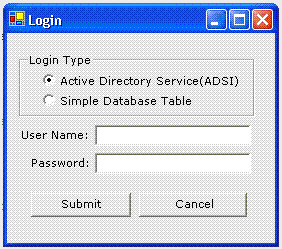
Login Using Active Directory Services (SDS)
In order to use SDS, first we have to set properties of LDAP server. Here database ADSI_PARAMETER table is used to set the LDAP properties.
CREATE TABLE [dbo].[ADSI_PARAMETER] (
[ParameterName] [varchar] (50) COLLATE SQL_Latin1_General_CP1_CI_AS NOT NULL,
[ParameterValue] [varchar] (50) COLLATE SQL_Latin1_General_CP1_CI_AS NOT NULL
) ON [PRIMARY]
GO
Enter following data to table in ParameterName and ParameterValue fields
| Parameter Name | ParameterValue |
| ServerName | WindowsDomainServer |
| BaseDN | DC=DomainName,DC=COM |
| UserDN | OU=Users |
| GroupName | CN=Operater, OU=Groups |
| AccountFilter | sAMAccountName |
Where ServerName is your domain server machine name. BaseDN is your domain name, most of the time it is company name. UserDN is organizational unit where user should exist. GroupName is organizational unit, to which user should belong in order to access your software. AccountFilter is filter for account name; mostly it is sAMAccountName in windows.
Now we have set the parameter for LDAP server, when the user submit the user/pass from login dialog box with ADSI option. We will pick up the LDAP parameters from database and search the data against parameters and user/pass.
Code for submit button click event. Declare a form level variable int i=0.
private void btnSubmit_Click(object sender, System.EventArgs e)
{
if(txtUserName.Text.Trim().Equals("") || txtPassword.Text.Trim().Equals(""))
{
MessageBox.Show("Please Enter UserName/Password...");
txtPassword.Text="";
txtUserName.Text="";
}
else
{
//if ADSI radio box is selected call ADSI Login else call simple database login
if(rdoADSI.Checked==true)
{
GetADSILogin();
}
else
{
GetDatabaseLogin();
}
}
}
Code for GetADSILogin function. You need to set reference to System.DirectoryService through add reference dialog box in order to use SDS.
public void GetADSILogin()
{
try
{
string strServerName = "";
string strBaseDN = "" ;
string strUserDN = "";
string strGroupName = "";
string strAccountFilter = "";
//Port no for LDAP Default is 389
string strPortNo = "389";
Boolean blnGroupUser=false;
//Data source string
string source = "Data Source=ATHAKUR;Initial Catalog=Times;user=sa;password=sa" ;
//SQL statement that will be issued
string select = "SELECT * from ADSI_PARAMETER";
//SQL Connection
SqlConnection conn=new SqlConnection(source);
// Open the database connection
conn.Open () ;
// Create the SQL command...
SqlCommand cmd = new SqlCommand ( select , conn ) ;
//Execute Data reader
SqlDataReader myReader = cmd.ExecuteReader();
//Check if any rows return against user/pass
if(myReader.HasRows)
{
while(myReader.Read())
{
//Store the parameter's data in variables
string strParameterName = myReader.GetString(0).Trim();
string strParameterValue = myReader.GetString(1).Trim();
if(strParameterName.ToUpper().Equals("SERVERNAME"))
strServerName=strParameterValue;
if(strParameterName.ToUpper().Equals("BASEDN"))
strBaseDN=strParameterValue;
if(strParameterName.ToUpper().Equals("USERDN"))
strUserDN=strParameterValue;
if(strParameterName.ToUpper().Equals("GROUPNAME"))
strGroupName=strParameterValue;
if(strParameterName.ToUpper().Equals("ACCOUNTFILTER"))
strAccountFilter=strParameterValue;
}
}
//Search for user
DirectoryEntry deSystem = new DirectoryEntry("LDAP://" + strServerName + "/" + strUserDN + ","
+ strBaseDN);
deSystem.AuthenticationType=AuthenticationTypes.Secure;
deSystem.Username=txtUserName.Text;
deSystem.Password =txtPassword.Text;
//Search for account name
string strSearch=strAccountFilter + "=" + txtUserName.Text;
DirectorySearcher dsSystem = new DirectorySearcher(deSystem,strSearch);
//Search subtree of UserDN
dsSystem.SearchScope= SearchScope.Subtree;
//Find the user data
SearchResult srSystem = dsSystem.FindOne();
//Pick up the user group belong to
ResultPropertyValueCollection valcol = srSystem.Properties["memberOf"];
if(valcol.Count>0)
{
foreach( object o in valcol )
{
//check user exist in Group we are searching for
if(o.ToString().Equals(strGroupName+","+strBaseDN))
{
blnGroupUser=true;
break;
}
}
}
if(blnGroupUser==true)
MessageBox.Show("Login Sucessfull...");
else
MessageBox.Show("User Does Not Belong to Specified ADSI Group");
}
catch(Exception ex)
{
MessageBox.Show(ex.Message);
}
i=i+1;
if(i==5)
{
MessageBox.Show("Login failed for 5 times. Quiting...");
this.Close();
}
}
If everything works fine then you will get the message "Login Successful". If user does not belong to group specified in LDAP properties then will the message "User Does Not Belong to Specified ADSI Group". If you enter wrong user/pass, you will get Logon failure message.
Login Using Simple Database Table
You can also give the permission to the user, who are not domains user and wants to use your software. For this we can simply use traditional database LOGIN table.
CREATE TABLE [dbo].[LOGIN] (
[USERNAME] [varchar] (50) COLLATE SQL_Latin1_General_CP1_CI_AS NULL ,
[PASSWORD] [varchar] (50) COLLATE SQL_Latin1_General_CP1_CI_AS NULL
) ON [PRIMARY]
GO
And admin can enter the username/password in table. And when user selects simple database login option from Login dialog, we can simply check against LOGIN table.
Code for GeDatabaseLogin function.
public void GetDatabaseLogin()
{
//Data source string
string source = "Data Source=ATHAKUR;Initial Catalog=Times;user=sa;password=sa" ;
//SQL statement that will be issued
string select = "SELECT * from LOGIN where USERNAME='" + txtUserName.Text + "'And PASSWORD
COLLATE Latin1_General_CS_AS='" + txtPassword.Text + "'";
//SQL Connection
SqlConnection conn=new SqlConnection(source);
// Open the database connection
conn.Open () ;
// Create the SQL command...
SqlCommand cmd = new SqlCommand ( select , conn ) ;
//Execute Data reader
SqlDataReader myReader = cmd.ExecuteReader();
//Check if any rows return against user/pass
if(myReader.HasRows)
MessageBox.Show("Login Sucessfull");
else
MessageBox.Show("Login Failed");
//Close datareader and connection
myReader.Close();
conn.Close () ;
//check for % attempts
i=i+1;
if(i==5)
{
MessageBox.Show("Login failed for 5 times. Quiting...");
this.Close();
}
}
If user/pass does exist in database then you will get the message "Login successful", otherwise "Login failed" message will be displayed.
Conclusion
We have seen here, how System.DirectoryServices searches the LDAP directory for a user object and validate that against groups. One single domain login user/pass can be used to access the your software. And how SDS manages resources under Windows Active Directory Services.
Aah! Another bug! Well, it's the life.
此内容由惯性聚合(RSS阅读器)自动聚合整理,仅供阅读参考。 原文来自 — 版权归原作者所有。