In recent months I played with QEMU emulation of an ARM Versatile Platform Board, making it run bare metal programs, the U-Boot boot-loader and a Linux kernel complete with a Busybox-based file system. I tried to put everything together to emulate a complete boot procedure, but it was not so simple. What follows is a description of what I’ve done to emulate a complete boot for an emulated ARM system, and the applied principles can be easily transferred to other different platforms.
Prerequisites
qemu-system-arm: can be installed on Ubuntu with “sudo apt-get install qemu-kvm-extras“, on Debian with “aptitude install qemu” as root.mkImage: can be installed with the package uboot-mkimage. Alternatively, it is compiled from U-Boot source.arm-none-eabi toolchain: can be downloaded from the the CodeSourcery ARM EABI toolchain pagezImage: the Linux kernel created in my previous post hererootfs.img.gz: the Busybox-based file system created in my previous post here
The boot process
On real, physical boards the boot process usually involves a non-volatile memory (e.g. a Flash) containing a boot-loader and the operating system. On power on, the core loads and runs the boot-loader, that in turn loads and runs the operating system. QEMU has the possibility to emulate Flash memory on many platforms, but not on the VersatilePB. There are patches ad procedures availablethat can add flash support, but for now I wanted to leave QEMU as it is.
QEMU can load a Linux kernel using the -kernel and -initrd options; at a low level, these options have the effect of loading two binary files into the emulated memory: the kernel binary at address0x10000 (64KiB) and the ramdisk binary at address 0x800000 (8MiB). Then QEMU prepares the kernel arguments and jumps at 0x10000 (64KiB) to execute Linux. I wanted to recreate this same situation using U-Boot, and to keep the situation similar to a real one I wanted to create a single binary image containing the whole system, just like having a Flash on board. The -kernel option in QEMU will be used to load the Flash binary into the emulated memory, and this means the starting address of the binary image will be 0x10000 (64KiB).
Understanding memory usage during the boot process is important because there is the risk of overwriting something during memory copy and relocation. One feature of U-Boot is self-relocation, which means that on execution the code copies itself into another address, which by default is 0x1000000 (16MiB). This feature comes handy in our scenario because it frees lower memory space in order to copy the Linux kernel. The compressed kernel image size is about 1.5MiB, so the first 1.5MiB from the start address must be free and usable when U-Boot copies the kernel. The following figure shows the solution I came up with:
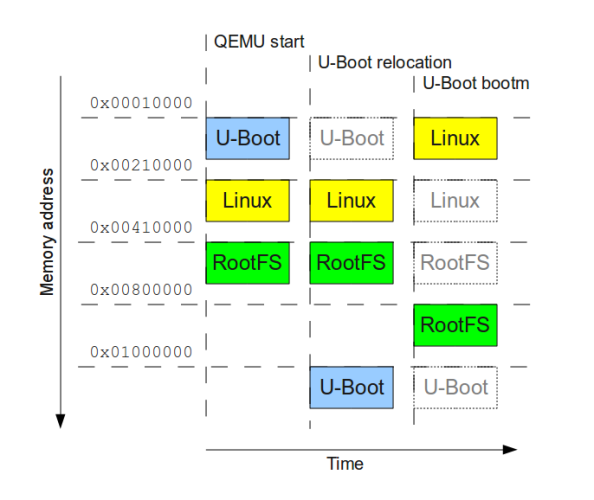
Timeline of the memory usage
At the beginning we have three binary images together: U-Boot (about 80KiB), Linux kernel (about 1.5MiB) and the root file system ramdisk (about 1.1MiB). The images are placed at a distance of 2MiB, starting from address 0x10000. At run-time U-boot relocates itself to address 0x1000000, thus freeing 2MiB of memory from the start address. The U-Boot command bootm then copies the kernel image into 0x10000 and the root filesystem into 0x800000; after that then jumps at the beginning of the kernel, thus creating the same situation as when QEMU starts with the -kernel and-initrd options.
Building U-Boot
The problem with this solution is that U-Boot, when configured to be built for VersatilePB, does not support ramdisk usage, which means that it does not copy the ramdisk during the bootmcommand, and it does not give any information about the ramdisk to the kernel. In order to give it the functionality I need, I patched the original source code of U-Boot before compilation. The following code is the patch to apply to u-boot-2010.03 source tree:
01 | diff -rupN u-boot-2010.03.orig/common/image.c u-boot-2010.03/common/image.c |
02 | --- u-boot-2010.03.orig/common/image.c 2010-03-31 23:54:39.000000000 +0200 |
03 | +++ u-boot-2010.03/common/image.c 2010-04-12 15:42:15.911858000 +0200 |
04 | @@ -941,7 +941,7 @@ int boot_get_ramdisk (int argc, char *ar |
08 | -#if defined(CONFIG_B2) || defined(CONFIG_EVB4510) || defined(CONFIG_ARMADILLO) |
09 | +#if defined(CONFIG_B2) || defined(CONFIG_EVB4510) || defined(CONFIG_ARMADILLO) || defined(CONFIG_VERSATILE) |
11 | * We need to copy the ramdisk to SRAM to let Linux boot |
13 | diff -rupN u-boot-2010.03.orig/include/configs/versatile.h u-boot-2010.03/include/configs/versatile.h |
14 | --- u-boot-2010.03.orig/include/configs/versatile.h 2010-03-31 23:54:39.000000000 +0200 |
15 | +++ u-boot-2010.03/include/configs/versatile.h 2010-04-12 15:43:01.514733000 +0200 |
17 | #define CONFIG_BOOTP_SUBNETMASK |
19 | #define CONFIG_BOOTDELAY 2 |
20 | -#define CONFIG_BOOTARGS "root=/dev/nfs mem=128M ip=dhcp "\ |
21 | - "netdev=25,0,0xf1010000,0xf1010010,eth0" |
22 | +/*#define CONFIG_BOOTARGS "root=/dev/nfs mem=128M ip=dhcp "\ |
23 | + "netdev=25,0,0xf1010000,0xf1010010,eth0"*/ |
24 | +#define CONFIG_BOOTARGS "root=/dev/ram mem=128M rdinit=/sbin/init" |
25 | +#define CONFIG_BOOTCOMMAND "bootm 0x210000 0x410000" |
26 | +#define CONFIG_INITRD_TAG 1 |
29 | * Static configuration when assigning fixed address |
I also changed the boot arguments (CONFIG_BOOTARGS)so that they are the same as those given from QEMU command line, and then added a command (CONFIG_BOOTCOMMAND) to start the Linux boot automatically. To apply the patch:
- save the patch to a file, for example
~/u-boot-2010.03.patch - download u-boot-2010.03 source tree and extract it, for example in
~/u-boot-2010.03 cd into the source tree directory- apply the patch, for example with “
patch -p1 < ~/u-boot-2010.03.patch“
After applying the patch, U-Boot can be built as seen in my previous post:
1 | make CROSS_COMPILE=arm-none-eabi- versatilepb_config |
2 | make CROSS_COMPILE=arm-none-eabi- all |
The building process will create a u-boot.bin image that supports ramdisks for the VersatilePB. Incidentally, it will also build the mkimage executable in the tools directory; it can be used instead of the one installed with Debian/Ubuntu packages.
Creating the Flash image
As I said earlier, I need to create a flash image in which the three binary images are placed at a distance of 2MiB. U-Boot needs to work with binary images wrapped with a custom header, created using the mkimage tool. After creating the Linux and root file system images, we can write them inside a big binary at a given address with the dd command. Assuming that we have in the same directory: u-boot.bin, zImage and rootfs.img.gz, the list of commands to run are:
1 | mkimage -A arm -C none -O linux -T kernel -d zImage -a 0x00010000 -e 0x00010000 zImage.uimg |
2 | mkimage -A arm -C none -O linux -T ramdisk -d rootfs.img.gz -a 0x00800000 -e 0x00800000 rootfs.uimg |
3 | dd if=/dev/zero of=flash.bin bs=1 count=6M |
4 | dd if=u-boot.bin of=flash.bin conv=notrunc bs=1 |
5 | dd if=zImage.uimg of=flash.bin conv=notrunc bs=1 seek=2M |
6 | dd if=rootfs.uimg of=flash.bin conv=notrunc bs=1 seek=4M |
These commands do the following:
- create the two U-Boot images,
zImage.uimg and rootfs.uimg, that contain also information on where to relocate them - create a 6MiB empty file called
flash.bin - copy the content of
u-boot.bin at the beginning of flash.bin - copy the content of
zImage.uimg at 2MiB from the beginning of flash.bin - copy the content of
rootfs.uimg at 4MiB from the beginning of flash.bin
At the end we have a binary image, flash.bin, containing the memory layout that I had in mind.
Booting Linux
To boot Linux we can finally call:
1 | qemu-system-arm -M versatilepb -m 128M -kernel flash.bin -serial stdio |
The U-Boot-related messages will appear on the console:
01 | U-Boot 2010.03 (Apr 12 2010 - 15:45:31) |
04 | ## Unknown FLASH on Bank 1 - Size = 0x00000000 = 0 MB |
06 | *** Warning - bad CRC, using default environment |
12 | Hit any key to stop autoboot: 0 |
13 | ## Booting kernel from Legacy Image at 00210000 ... |
15 | Image Type: ARM Linux Kernel Image (uncompressed) |
16 | Data Size: 1492328 Bytes = 1.4 MB |
17 | Load Address: 00010000 |
19 | ## Loading init Ramdisk from Legacy Image at 00410000 ... |
21 | Image Type: ARM Linux RAMDisk Image (uncompressed) |
22 | Data Size: 1082127 Bytes = 1 MB |
23 | Load Address: 00800000 |
25 | Loading Kernel Image ... OK |
30 | Uncompressing Linux... done, booting the kernel. |
Then the Linux kernel will execute inside the emulated screen and the message “Please press Enter to activate this console” will appear, indicating that the root file system is working and so the boot process completed successfully. If something doesn’t work, one can always check that the system works without U-Boot, with the following command:
1 | qemu-system-arm -M versatilepb -m 128M -kernel zImage -initrd rootfs.img.gz -append "root=/dev/ram mem=128M rdinit=/sbin/init" -serial stdio |
The kernel should uncompress and execute up to the activation of the console.
This procedure has room for improvements and optimizations, for example there’s too much memory copying here and there, where mostly everything can be executed in place. It is anyway a nice exercise and a good starting point that reveals interesting details about the boot process in embedded systems. As usual, this is possible mainly due to the fact that all the tools are free and open source.






