惯性聚合 高效追踪和阅读你感兴趣的博客、新闻、科技资讯
阅读原文 在惯性聚合中打开

推荐订阅源

I
InfoQ
C
CERT Recently Published Vulnerability Notes
The Last Watchdog
The Last Watchdog
P
Proofpoint News Feed
D
Darknet – Hacking Tools, Hacker News & Cyber Security
让小产品的独立变现更简单 - ezindie.com
GbyAI
GbyAI
T
Tenable Blog
博客园 - 三生石上(FineUI控件)
P
Privacy & Cybersecurity Law Blog
Simon Willison's Weblog
Jina AI
Jina AI
Threat Intelligence Blog | Flashpoint
T
Tor Project blog
博客园_首页
F
Fortinet All Blogs
博客园 - Franky
Latest news
Latest news
Last Week in AI
Last Week in AI
T
Threat Research - Cisco Blogs
Scott Helme
Scott Helme
L
LINUX DO - 热门话题
U
Unit 42
Cyber Security Advisories - MS-ISAC
Hugging Face - Blog
Hugging Face - Blog
D
Docker
Project Zero
Project Zero
OSCHINA 社区最新新闻
OSCHINA 社区最新新闻
MongoDB | Blog
MongoDB | Blog
F
Full Disclosure
D
DataBreaches.Net
Google DeepMind News
Cisco Talos Blog
Cisco Talos Blog
Y
Y Combinator Blog
WordPress大学
WordPress大学
C
Cyber Attacks, Cyber Crime and Cyber Security
H
Help Net Security
奇客Solidot–传递最新科技情报
奇客Solidot–传递最新科技情报
月光博客
月光博客
cs.CL updates on arXiv.org
Blog — PlanetScale
Blog — PlanetScale
钛媒体:引领未来商业与生活新知
钛媒体:引领未来商业与生活新知
S
Schneier on Security
C
Cybersecurity and Infrastructure Security Agency CISA
P
Proofpoint News Feed
PCI Perspectives
PCI Perspectives
Cloudbric
Cloudbric
V
Visual Studio Blog
Recorded Future
Recorded Future
人人都是产品经理
人人都是产品经理

博客园 - kuning的程序博客

第一章 第二课 Using Resources 第一章 第一课 Using WPF Control Cmd,powershell 参考 百度WSUS 我也转关于软件测试的文章 了解WMI 英文面试题 据说是微软面试哦 算法 之 万年历 算法 之 哥德巴赫猜想 - kuning的程序博客 C# 理论学习 之 面向对象设计 C# 理论学习 之 类、组,名称空间 C# 深入学习 之 Winform记录日志 C#深入学习 之 委托和事件 C#数据结构-排序之快速排序法 PHP之安装篇 Sql Server中的行列互换 再叙2005Web控件(一) - kuning的程序博客 - 博客园 Poket PC 与 sqlserver2000(以上) RDA 方案
.Net本地化资源
kuning的程序博客 · 2009-05-11 · via 博客园 - kuning的程序博客

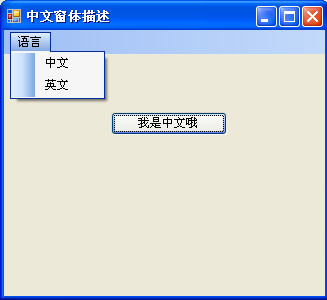
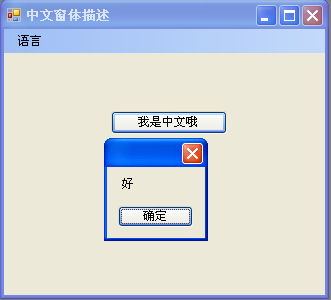
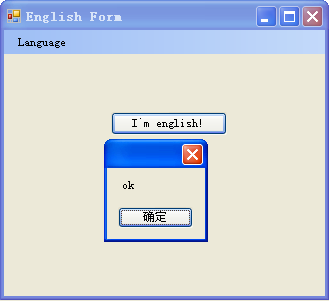
一、 演示如下图:


二、 下载源代码:/Files/NewLand/CustomerCulter.rar

三、 参考资料:

Msdn:

http://msdn.microsoft.com/zh-cn/library/system.globalization.cultureinfo(VS.80).aspx
http://msdn.microsoft.com/zh-cn/library/c6zyy3s9(VS.80).aspx
http://msdn.microsoft.com/zh-cn/library/y99d1cd3.aspx
http://msdn.microsoft.com/zh-cn/library/9xdxwwkc.aspx

StringResourceTool:
http://stringresourcetool.codeplex.com/
http://social.msdn.microsoft.com/Forums/en-US/vsx/thread/8f92a4cf-9598-4758-b385-1adeccf56afd 

Other:

http://www.codeproject.com/KB/cs/formlanguageswitch.aspx?fid=132823&select=2307173#xx2307173xx

四、关键步骤

    1)本地化UI

           1. 将Form的localizable设为true

           此时你将看到Form1.Designer.cs中关于控件的属性都消失了,而是用类似这样的语句替代了:
           resources.ApplyResources(this.button1, "button1");
           其他:其他控件如图所示摆放,并写上中文Text
           2. 将Form的language选为‘英语’
           此时你将看到在解决方案资源管理器中新生成了一个名为Form1.en.resx。这个文件存放了英文环境下的资源。
           3. 将Form中的button的Text改为‘I`m english’;菜单项也做相应的英文修改
           4. 接下来就是点击【英文】菜单时候将界面的元素应用英文的资源 
        private void ReInitial()//重新应用界面元素的资源,没有找到更好的方法,就采取了这种简单的方法,有待提高
         {
            this.Controls.Clear();
            InitializeComponent(); 
         }
           void ChangeUICulter(string language)
          {
             Thread.CurrentThread.CurrentCulture = new CultureInfo(language);
             Thread.CurrentThread.CurrentUICulture = Thread.CurrentThread.CurrentCulture;
          }

         private void englishToolStripMenuItem_Click(object sender, EventArgs e)
          {
              ChangeUICulter("en-us");
                    ReInitial();
                }


           2)本地化动态字符串

                   1.  在项目上右击添加新项->资源文件:取名为WinFormStrings.resx

                    在资源文件中添加一个变量msgStr,值为’好‘
            按照1的步骤再加一个资源文件取名为:WinFormStrings.en-us.resx
            在资源文件中添加一个变量msgStr,值为’ok‘
               2.  在按钮点击时间中这样写:
              private void button1_Click(object sender, EventArgs e)
              {
                  ResourceManager LocRM = new ResourceManager("CustomerCulter.WinFormStrings"typeof(Form1).Assembly);

                   MessageBox.Show(LocRM.GetString("msgStr"));

               }