








Follow these 3 easy steps to add IntelliSense support to your project:
1. Install the latest DXperience v2010.1 release. (Currently, the DXperience v2010.1 beta is available to DXperience subscription license holders).
2. Click the ‘Add Existing Item’ in your project menu. Then add the ASPxScriptIntelliSense.js file to your project which should be located in the following folder:
%DevExpress Install Folder %\DevExpress2010.1\Components\Sources\DevExpress.Web.ASPxScriptIntellisense\ASPxScriptIntelliSense.js
For example, on my local machine the ASPxScriptIntelliSense.js file is located here:
C:\Program Files\DevExpress 2010.1\Components\Sources\DevExpress.Web.ASPxScriptIntellisense\ASPxScriptIntellisense.js
3. Type the following code in the page <body> section in the page that you want to enable JavaScript IntelliSense:
view plain | print | copy to clipboard
1
<% if (DesignMode){ %>
2
<script src="../ASPxScriptIntelliSense.js" type="text/javascript"></script>
3
<% } %>
<% if (DesignMode){ %>
    <script src="../ASPxScriptIntelliSense.js" type="text/javascript"></script>
<% } %>
Note: It's important to check the “if(DesignMode)” statement because it helps to avoid additional round trips to the server for the ASPxScriptIntelliSense.js file. It also helps to prevent mixing up the IntelliSense schema classes and production scripts classes.
That's it - you now have full IntelliSense support for DevExpress client controls in BLOCKED SCRIPT
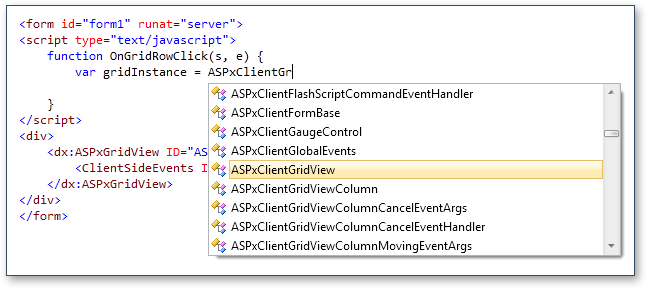
We’ve also added special static Cast methods which enable you to cast the DevExpress control's client object and then get the client object’s properties, methods and events via IntelliSense.
(e.g. ASPxClientButton.Cast(obj), ASPxClientTreeList.Cast(obj), etc.). You can use these methods with event arguments:
view plain | print | copy to clipboard
1
<script type="text/javascript">
2
function OnGridRowDblClick(s, e) {
3
var gridInstance = ASPxClientGridView.Cast(s);
4
gridInstance.StartEditRow(gridInstance.GetFocusedRowIndex());
5
}
6
</script>
<script type="text/javascript">
    function OnGridRowDblClick(s, e) {
        var gridInstance = ASPxClientGridView.Cast(s);
        gridInstance.StartEditRow(gridInstance.GetFocusedRowIndex());
    }
</script>
These new cast methods also accept the ClientInstanceName of the client object. Therefore, to get a client object with IntelliSense support, simply pass the ClientInstanceName as a string to the Cast method:
view plain | print | copy to clipboard
1
<form id="form1" runat="server">
2
<script type="text/javascript">
3
function OnGridRowClick(s, e) {
4
var gridInstance = ASPxClientGridView.Cast("grid");
5
}
6
</script>
7
<div>
8
<dx:ASPxGridView ID="ASPxGridView1" runat="server" ClientInstanceName="grid">
9
<ClientSideEvents Init="OnGridRowClick" />
10
</dx:ASPxGridView>
11
</div>
12
</form>
<form id="form1" runat="server">
    <script type="text/javascript">
        function OnGridRowClick(s, e) {
            var gridInstance = ASPxClientGridView.Cast("grid");
        }
    </script>
    <div>
        <dx:ASPxGridView ID="ASPxGridView1" runat="server" ClientInstanceName="grid">
            <ClientSideEvents Init="OnGridRowClick" />
        </dx:ASPxGridView>
    </div>
</form>
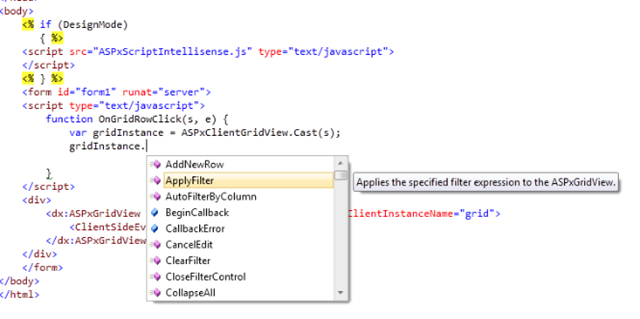
You also get JavaScript IntelliSense for the gridInstance variable. For example, this method shows how you can cast the sender object and get JavaScript IntelliSense:
Fig.1:
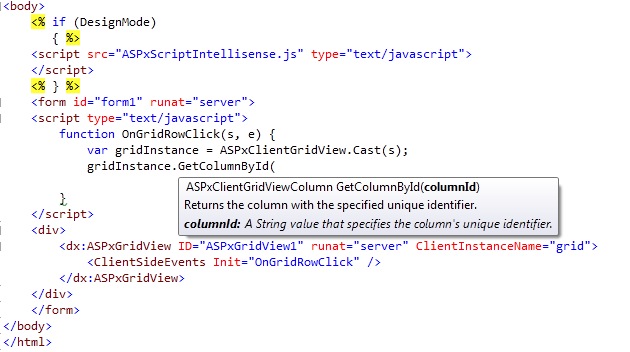
Fig.2:

Fig.3:
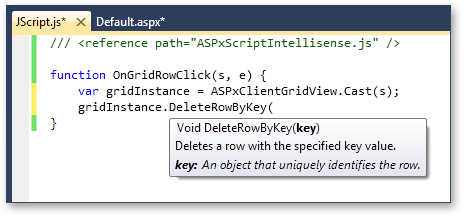
If you want to enable IntelliSense for our controls in a standalone JavaScript file then simply add a reference to our ASPxScriptIntelliSense file at the top:
Please note that this feature is only available in Visual Studio 2008 and 2010.
此内容由惯性聚合(RSS阅读器)自动聚合整理,仅供阅读参考。 原文来自 — 版权归原作者所有。