








Flux is an architectural pattern based on unidirectional data flow. Although it is originated in the React community, it is general and can be used with any non-opinionated framework. In this article I will show how to use it with Angular.
There are four core components in Flux.
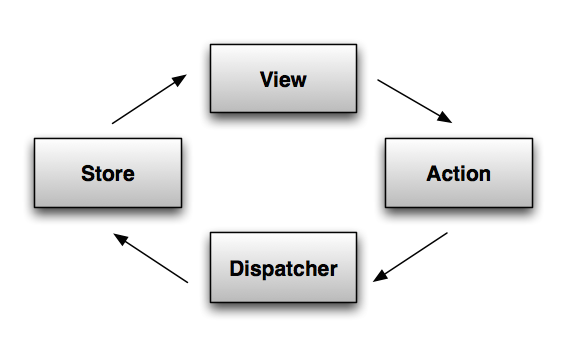
A typical Flux interaction looks as follows:
MVC is a very old pattern. And as a result, it is hardly possible to find two people who would agree on what it really means. I see MVC as a component pattern, with the view and the controller forming the component. Defined like this, MVC does not conflict with Flux and can be used in the view layer.
I won’t cover the pattern itself in great detail. So if you feel confused after reading the post, I highly recommend you to check outthis screencast series by Joe Maddalone, which is absolutely excellent. In the series Joe Maddalone builds a shopping cart application, a simplified version of which I am going to build in this post.
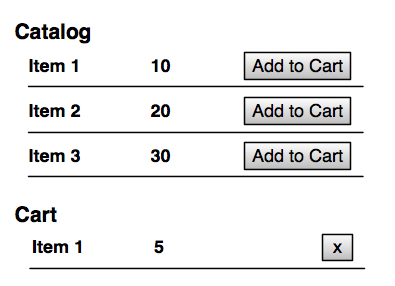
The application displays two tables: the catalog and the shopping cart, and supports two operations: addItem and removeItem.
Let’s start with the catalog table.
<table ng-controller="CatalogCtrl as catalog">
    <tr ng-repeat="item in catalog.catalogItems">
        <td>{{item.title}}</td>
        <td>{{item.cost}}</td>
        <td>
            <button ng-click="catalog.addToCart(item)">Add to Cart</button>
        </td>
    </tr>
</table>
Where CatalogCtrl is defined as follows:
var m = angular.module('cart', []);

class CatalogCtrl {
  constructor(catalogItems, cartActions) {
    this.cartActions = cartActions;
    this.catalogItems = catalogItems;
  }

  addToCart(catalogItem) {
    this.cartActions.addItem(catalogItem);
  }
}

m.controller("CatalogCtrl", CatalogCtrl);
To make it simple, let’s hardcode catalogItems.
m.value("catalogItems", [
  {id: 1, title: 'Item #1', cost: 1},
  {id: 2, title: 'Item #2', cost: 2},
  {id: 3, title: 'Item #3', cost: 3}
]);
The controller does not do much. It has no application logic: it just triggers the addItem action. It is worth noting that not everything should be handled as an action and go through the pipeline. Local view concerns (e.g., UI state) should be kept in the view layer.
The action layer is nothing but a collection of helper functions, which, at least in theory, should have a helper for every action your application can perform.
var ADD_ITEM = "ADD_ITEM";

m.factory("cartActions", function (dispatcher) {
  return {
    addItem(item) {
      dispatcher.emit({
        actionType: ADD_ITEM,
        item: item
      })
    }
  };
});
The dispatcher is a message-bus service that propagates events from views to stores. It has no application logic. A real project should probably use the Dispatcher library from Facebook, or implement it using RxJS. In this article I will use this simpleEventEmitter class, just to illustrate the interaction.
class EventEmitter {
  constructor() {
    this.listeners = [];
  }

  emit(event) {
    this.listeners.forEach((listener) => {
      listener(event);
    });
  }

  addListener(listener) {
    this.listeners.push(listener);
    return this.listeners.length - 1;
  }
}

m.service("dispatcher", EventEmitter);
Since all actions go through the dispatcher, it is a great place to add such things as logging.
A store contains application logic and state for a particular domain. It registers itself with the dispatcher to be notified about the events flowing through the system. The store then updates itself based on those events. And what is really important, there is no other way to update it. Views and other stores can read data from the store, but not update it directly. The store is observable, so it emits events that views can listen for.
This’s one way to implement the cart store.
class CartStore extends EventEmitter {
  constructor() {
    super();
    this.cartItems = [];
  }

  addItem(catalogItem) {
    var items = this.cartItems.filter((i) => i.catalogItem == catalogItem);
    if (items.length == 0) {
      this.cartItems.push({qty: 1, catalogItem: catalogItem});
    } else {
      items[0].qty += 1;
    }
  }

  removeItem(cartItem) {
    var index = this.cartItems.indexOf(cartItem);
    this.cartItems.splice(index, 1);
  }

  emitChange() {
    this.emit("change");
  }
}
Next, we need to register it.
m.factory("cartStore", function (dispatcher) {
  var cartStore = new CartStore();

  dispatcher.addListener(function (action) {
    switch(action.actionType){
      case ADD_ITEM:
        cartStore.addItem(action.item);
        cartStore.emitChange();
        break;

      case REMOVE_ITEM:
        cartStore.removeItem(action.item);
        cartStore.emitChange();
        break;
    }

  });
Since stores is where all of the application logic is contained, they can become very complicated very quickly. In this exampleCartStore is implemented using the transaction script pattern, which works fairly well for small applications, but breaks apart when dealing with complex domains. In addition, stores are responsible for both the domain and application logic. This, once again, works well for small applications, but not so much for larger one. So you may consider separating the two.
We are almost done. There is only one piece left to see the whole interaction working: we need to implement the cart table.
<h1>Cart</h1>
<table ng-controller="CartCtrl as cart">
    <tr ng-repeat="item in cart.items track by $id(item)">
        <td>{{item.catalogItem.title}}</td>
        <td>{{item.qty}}</td>
        <td>
            <button ng-click="cart.removeItem(item)">x</button>
        </td>
    </tr>
</table>


class CartCtrl {
  constructor(cartStore, cartActions) {
    this.cartStore = cartStore;;
    this.cartActions = cartActions;
    this.resetItems();

    cartStore.addListener(() => this.resetItems());
  }

  resetItems() {
    this.items = this.cartStore.cartItems();
  }

  removeItem(item) {
    //to be implemented
  }
}
m.controller("CartCtrl", CartCtrl);
The controller listens to the store, and when that changes, resets the list of cart items.
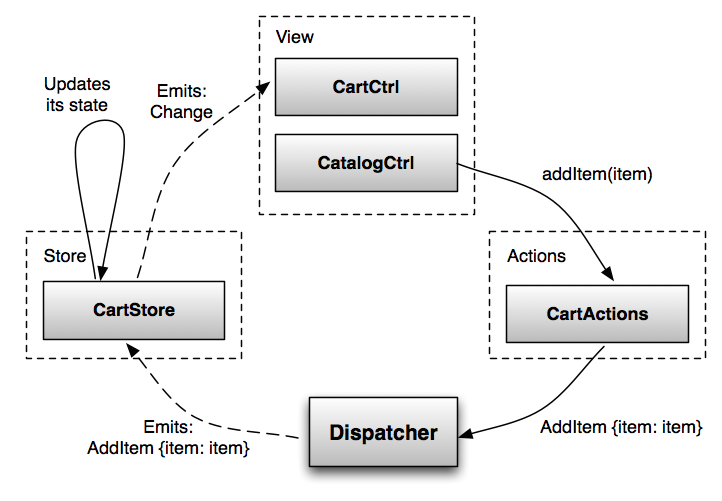
Flux is an architectural pattern based on unidirectional data flow. It can be used with any non-opinionated framework. In this blog post I have shown how it can be used with Angular.
此内容由惯性聚合(RSS阅读器)自动聚合整理,仅供阅读参考。 原文来自 — 版权归原作者所有。