


惯性聚合 高效追踪和阅读你感兴趣的博客、新闻、科技资讯
阅读原文 在惯性聚合中打开

推荐订阅源

博客园 - 【当耐特】
Help Net Security
Help Net Security
P
Proofpoint News Feed
J
Java Code Geeks
爱范儿
爱范儿
Last Week in AI
Last Week in AI
钛媒体:引领未来商业与生活新知
钛媒体:引领未来商业与生活新知
F
Full Disclosure
Google DeepMind News
H
Help Net Security
G
Google Developers Blog
Jina AI
Jina AI
Vercel News
Vercel News
cs.AI updates on arXiv.org
L
Lohrmann on Cybersecurity
S
Schneier on Security
Microsoft Azure Blog
IT之家
IT之家
Security Archives - TechRepublic
阮一峰的网络日志
阮一峰的网络日志
N
News and Events Feed by Topic
GbyAI
GbyAI
B
Blog
O
OpenAI News
博客园_首页
Cisco Talos Blog
Cisco Talos Blog
K
KPMG report finds enterprise disconnect between AI and its ROI | CIO
Hacker News: Ask HN
Hacker News: Ask HN
TaoSecurity Blog
TaoSecurity Blog
腾讯CDC
MongoDB | Blog
MongoDB | Blog
M
MIT News - Artificial intelligence
C
Cybersecurity and Infrastructure Security Agency CISA
Cyberwarzone
Cyberwarzone
Webroot Blog
Webroot Blog
Simon Willison's Weblog
Y
Y Combinator Blog
C
Cisco Blogs
A
Arctic Wolf
CTFtime.org: upcoming CTF events
T
The Exploit Database - CXSecurity.com
Security Latest
Security Latest
AI
AI
W
WeLiveSecurity
aimingoo的专栏
aimingoo的专栏
The Register - Security
Project Zero
Project Zero
H
Hackread – Cybersecurity News, Data Breaches, AI and More
N
Netflix TechBlog - Medium
Blog — PlanetScale
Blog — PlanetScale

博客园 - 阿武

Moto G 通话没声音 一个Java程序的生死旅程 精妙语录 【Windows Phone 7】【软件发布】深圳通助手 & 深圳长途汽车查询 & 深圳地铁通 [C++ Primer] Passing an array to a function by reference/pointers -- sample 【Ruby】删除旧文件 京东自动抢购机 64位的处理器支持多大的内存? 将.NET Entity Framework 的 Cache模块移植到JAVA平台 做快乐的程序员 Q 语言初学者系列:(3)Lists 初级 KDB+性能分析:内存篇 Q 语言初学者系列:(2)基本数据类型 Q 语言初学者系列:(1)开门篇 熟悉的感觉 盘点自己两年来走过的路 [JAVA]你见过这样的switch吗? - 阿武 - 博客园 网站上图片"另存为" 为什么是 bmp 格式 经实验, 网线两端都接在交换机上并不会烧毁交换机
Android 手机技巧
阿武 · 2014-03-06 · via 博客园 - 阿武

1. 使用其它手机做热点上网,最怕的就是有些应用会在连接 WIFI 时偷偷做一些事情,比如备份/同步数据等等。在这流量就是金钱的时代,不能白白让钱流走,这时你需要进入“设置 -> 浏览使用情况 ”,看到那三个点了吗?点下去再选择“移动热点”,找到你的移动热点的名称,把它勾选上,这样就不怕流量跑掉了。

注:当前使用的系统是4.4.2,尚不清楚这功能从什么版本开始支持的。
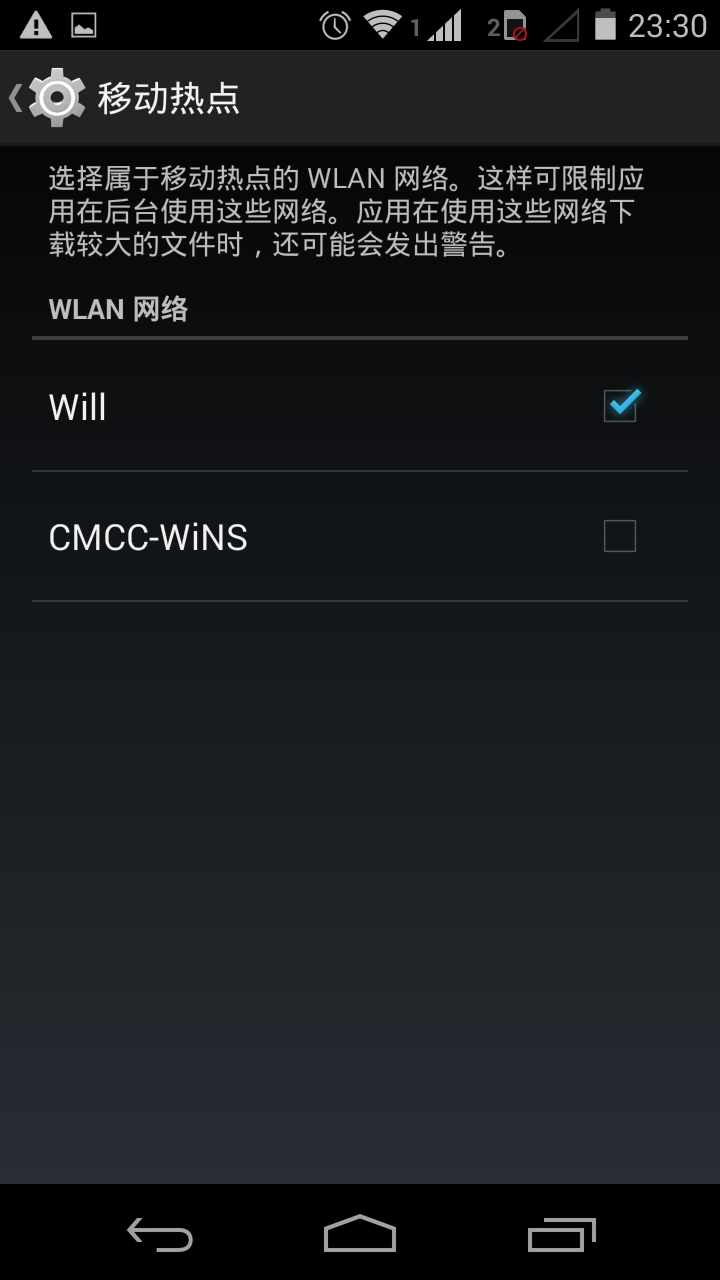
移动热点

2. 如何进入安全模式

第一步,长按关机按钮,弹出如下菜单:

第二步,再长按 “关机” 菜单,弹出如下提示,再按 “确定” 后自动重启即可。