







转自 TerryLee技术空间
UpdatePanel是Atlas中一个很重要的控件,功能强大且容易使用,可以使我们只做很小的改动就可以向已有的ASP.NET站点添加Ajax。采用Dflying的建议,我也是由UpdatePanel进入Atlas的世界。本文将通过可视化和代码两种方式来实现向已有的ASP.NET应用程序中添加UpdatePanel。
主要内容
1.UpdatePanel概述
2.使用可视化方式
3.使用代码方式
一.UpdatePanel概述
UpdatePanel是Atlas中一个很重要的控件,功能强大且容易使用,可以使我们只做很小的改动就可以向已有的ASP.NET站点添加Ajax。采用Dflying的建议,我也是由UpdatePanel进入Atlas的世界。本文将通过可视化和代码两种方式来实现向已有的ASP.NET应用程序中添加UpdatePanel。看一小段UpdatePanel的示例程序:
 <Atlas:UpdatePanel ID="UpdatePanel1" runat="server" Mode="Always"> <Triggers> <Atlas:ControlEventTrigger ControlID="DropDownList1" EventName="SelectedIndexChanged" /> </Triggers> <ContentTemplate> <asp:Label ID="Label1" runat="server" Width="164px" Font-Bold="True"></asp:Label> </ContentTemplate></Atlas:UpdatePanel>
我们需要注意的是:
1.UpdatePanel的更新方式有两种,即上面的Mode
|
更新方式 |
说明 |
|
Always |
每次AJAX PostBack或是普通PostBack的时候都会更新该Panel的内容 Mode="Always" |
|
Conditional |
只有满足如下某一条件时才更新该Panel的内容: 当Panel中的某个控件引发了PostBack时 当Panel所指定的某个Trigger被引发时 当Panel的Update()方法在Codebehind中被调用时 Mode=" Conditional" |
2.Triggers元素指定了发生动作的事件源,UpdatePanel提供两种引发异步PostBack的Trigger:
|
Triggers |
说明 |
|
ControlValueTrigger |
当某个控件的某个指定的属性变化时更新。 <Atlas:ControlValueTrigger ControlID="DropDownList1" PropertyName="SelectedValue" /> |
|
ControlEventTrigger |
当某个控件发出指定事件时更新。 <Atlas:ControlEventTrigger ControlID="DropDownList1" EventName="SelectedIndexChanged" /> |
3.ContentTemplate元素中指定了希望更新的部分,我们把需要动态更新的控件等都放在ContentTemplate中。下面我们将通过通过可视化和代码两种方式来看一下如何使用UpdatePanel。
二.使用可视化方式添加
1.新建Web Site项目,添加一个DropDownList和一个Label,并为DropDownList添加一些简单的Item:
<asp:DropDownList ID="DropDownList1" runat="server" Width="167px" AutoPostBack="True" OnSelectedIndexChanged="DropDownList1_SelectedIndexChanged"> <asp:ListItem>Nancy</asp:ListItem> <asp:ListItem>Andrew</asp:ListItem> <asp:ListItem>Janet</asp:ListItem> <asp:ListItem>Margaret</asp:ListItem></asp:DropDownList>
设置DropDownList的AutoPostBack属性为True,在SelectedIndexChanged事件中添加如下代码:
protected void DropDownList1_SelectedIndexChanged(object sender, EventArgs e) {
{ this.Label1.Text = "Selected : " + this.DropDownList1.SelectedValue;
 }
}
2.运行程序,这是一个标准的ASP.NET应用程序,Label将根据DropDownList的选择不同显示不同的文本,但是这个页面是完全刷新的,在选择的时候,浏览器的状态栏将会显示一个进度条,如下图所示:
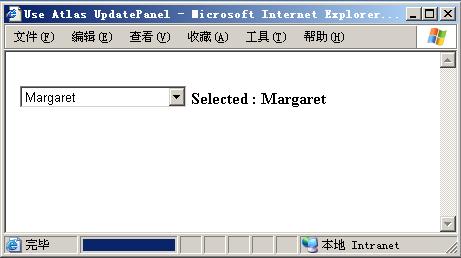
下面我们将通过可视化的方式为该应用程序添加上Atlas UpdatePanel。
3.托拽一个UpdatePanel控件到页面上,如何添加Atlas控件到工具箱请参考Add“Atlas”controls to the toolbox,这时将会自动添加Microsoft.Web.Atlas.dll到项目中。
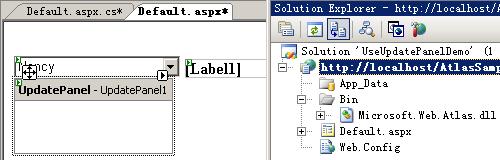
4.添加ScriptManager到页面。

5.设置EnablePartialRendering属性为True。
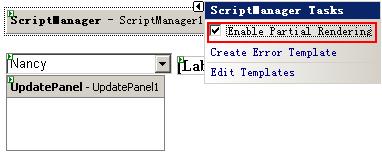
6.拖拽Label控件到UpdatePanel中,并设置UpdatePanel的属性和Triggers。
至此,我们就通过可视化的方式完成了对UpdatePanel的添加,运行程序就会看到效果了。
三.使用代码方式添加
接上面的第二步,我们看看添加具体的代码。添加完Microsoft.Web.Atlas.dll的引用后,在页面中先添加:
<%@ Register Assembly="Microsoft.Web.Atlas" Namespace="Microsoft.Web.UI" TagPrefix="Atlas" %>
添加ScriptManager控件,并设置EnablePartialRendering属性为true,这一点切记!关于ScriptManager的详细介绍可以参考Atlas学习手记(2):全面了解ScriptManager。
<Atlas:ScriptManager ID="ScriptManager1" runat="server" EnablePartialRendering="true"></Atlas:ScriptManager>
下面就该主角UpdatePanel登场了,在这里需要设置Triggers,Triggers指定了发生动作的事件源,也可以设置UpdatePanel的更新方式。
<Atlas:UpdatePanel ID="UpdatePanel1" runat="server"> <Triggers> <Atlas:ControlValueTrigger ControlID="DropDownList1" PropertyName="SelectedValue" /> </Triggers> <ContentTemplate> <asp:Label ID="Label1" runat="server" Width="164px" Font-Bold="True"></asp:Label> </ContentTemplate></Atlas:UpdatePanel>
这里我们设置的是ControlValueTrigger,如果要设置ControlEventTrigger,代码如下:
<Atlas:UpdatePanel ID="UpdatePanel1" runat="server"> <Triggers> <Atlas:ControlEventTrigger ControlID="DropDownList1" EventName="SelectedIndexChanged" /> </Triggers> <ContentTemplate> <asp:Label ID="Label1" runat="server" Width="164px" Font-Bold="True"></asp:Label> </ContentTemplate></Atlas:UpdatePanel>
到这儿所有的步骤都做完了,运行就可以体会到效果了。在这个过程中,我们并没有考虑任何的XMLHTTPRequest或者ActiveX对象,也没有编写任何的客户端脚本代码,这一切Atlas已经完全为我们做好了。
此内容由惯性聚合(RSS阅读器)自动聚合整理,仅供阅读参考。 原文来自 — 版权归原作者所有。