惯性聚合 高效追踪和阅读你感兴趣的博客、新闻、科技资讯
阅读原文 在惯性聚合中打开

推荐订阅源

S
Secure Thoughts
Security Latest
Security Latest
Simon Willison's Weblog
O
OpenAI News
GbyAI
GbyAI
L
LINUX DO - 最新话题
A
Arctic Wolf
T
Tor Project blog
G
GRAHAM CLULEY
I
InfoQ
博客园_首页
IT之家
IT之家
The Register - Security
Exploit-DB.com RSS Feed
P
Proofpoint News Feed
The GitHub Blog
The GitHub Blog
Blog — PlanetScale
Blog — PlanetScale
N
Netflix TechBlog - Medium
K
Kaspersky official blog
博客园 - 三生石上(FineUI控件)
S
SegmentFault 最新的问题
U
Unit 42
PCI Perspectives
PCI Perspectives
量子位
P
Palo Alto Networks Blog
S
Securelist
T
Troy Hunt's Blog
博客园 - 【当耐特】
Recorded Future
Recorded Future
K
KPMG report finds enterprise disconnect between AI and its ROI | CIO
S
Security Affairs
Engineering at Meta
Engineering at Meta
T
The Blog of Author Tim Ferriss
博客园 - 聂微东
罗磊的独立博客
N
News and Events Feed by Topic
人人都是产品经理
人人都是产品经理
B
Blog RSS Feed
NISL@THU
NISL@THU
C
Cisco Blogs
T
Threatpost
有赞技术团队
有赞技术团队
Forbes - Security
Forbes - Security
Hugging Face - Blog
Hugging Face - Blog
Last Week in AI
Last Week in AI
T
The Exploit Database - CXSecurity.com
Cloudbric
Cloudbric
Cyberwarzone
Cyberwarzone
Google DeepMind News
C
Cyber Attacks, Cyber Crime and Cyber Security

博客园 - 笨笨丁

C#调用java类、jar包方法(转) 解决VML遭遇IE8和XHTML DOCTYPE时不能运行的问题(转) Nice Validator(Form验证)及Juery zTree控件 ASP.NET程序中 抛出"Thread was being aborted. "异常(转) SQL语句Where中使用别名作为判断条件 50个令人惊奇的jQuery插件(对话框和表单篇)及免费的响应式bootstrap管理员后台界面主题 - Charisma PowerDesigner设计时表显示注释选项 showModalDialog 的重要提示 在网页中怎样给已发布的Flash添加链接的方法(zhuan) ASP.NET网站中获取当前虚拟目录的应用程序目录的方法(转) __doPostBack()没有定义解决方法(转) jQuery插件实战之fullcalendar(日历插件) - 使用fullcalendar开发一个功能完整的富客户端会议室预定系统(转) ajaxpro返回值类型总结-DataTable(转) Ibatis.net总是报:【ExecuteStoreCommand SqlParameterCollection 中已包含 SqlParameter】(转) jQuery校验validate详解(转) 一个.NET通用JSON解析/构建类的实现(c#)转 C# JSON字符串序列化与反序列化(转) AjaxPro新发现-错误处理 SVN专题:SVN Client API的.net 接口 SharpSvn介紹 Checkout操作实例,SVN权限(转)
IIS启用兼容模式设置(win2k3—Win7)
笨笨丁 · 2014-01-07 · via 博客园 - 笨笨丁

IE兼容0

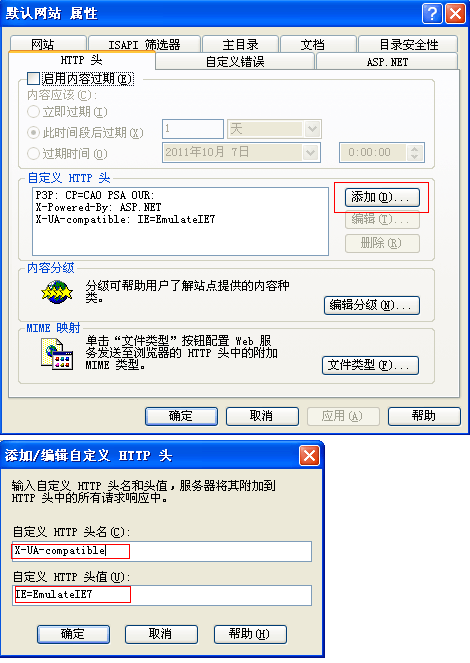
点击添加按钮(上图),弹出下面的对话框(下图)。在自定义HTTP头名处输入:

X-UA-compatible

在自定义HTTP头值处输入:

IE=EmulateIE7

(输入时注意不要留下空格)输入完,点击确定按钮

IE兼容

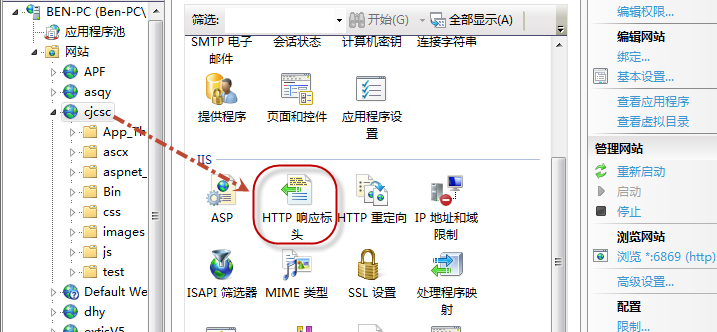
Win7 IIS兼容设置:

image

image