上篇博客从线程的基本概况开始着重讨论了线程,进程,程序之间的区别,然后讨论了线程操作的几个类,并通过实例来说明了线程的创建方法。本篇博客将会带大家更深入的了解线程,介绍线程的基本方法,并通过一个Demo使用委托来调用线程之外的对象。
前篇博客基础:【GDI+编程--番外篇(二)】--从事件看委托
【.NET线程--开篇】--线程从零开始
线程
多线程优缺点
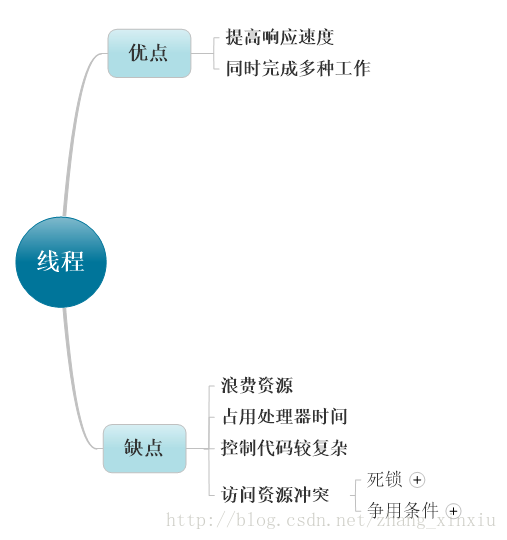
多线程的使用会帮助程序提高响应速度,因为可以同时执行多个任务这样对比一个个的来完成任务来说提高了响应的速度,较之添加多CPU来说多线程提高了强大的技术来执行多个任务。虽然多线程提高了响应速度,但同时牺牲了资源,由于多线程的执行它会占用多个资源,为了避免资源访问的冲突,往往会在每个线程中都会创建自己的资源,这样导致了资源的浪费。另外如果线程过多,则其中大多数线程都不会产生明显的进度,如果大多数当前线程处于一个进程中,则其他进程中的线程的调度频率就会很低。
线程基本方法
下表包括了在线程编程过程中常用的基本方法。
可用于控制单个线程的方法
| 方法 | 操作 |
|---|
| Start |
使线程开始运行。 |
| Sleep |
使线程暂停指定的一段时间。 |
| Suspend |
在线程到达安全点时,使其暂停。 |
| Abort |
在线程到达安全点时,使其停止。 |
| Resume |
重新启动挂起的线程 |
| Join |
使当前线程一直等到另一线程完成。 在与超时值一起使用时,如果该线程在分配的时间内完成,此方法将返回 True。 |
Note: 安全点是指代码中公共语言运行时可以安全地执行自动“垃圾回收”的位置。垃圾回收是指释放不再使用的变量并回收内存的过程。 调用线程的 Abort 或 Suspend 方法时,公共语言运行时将对代码进行分析,确定让线程停止运行的适当位置。
Demo1:线程,方法--委托
自己做的一个小Demo来实现多线程,当点击开始按钮后会在文本框中填写数字,与此同时加载进度条,读取进度,点击暂停后线程会停止。另外可以在文本框中输入暂停时间来指定线程暂停时间,在暂停后继续执行。
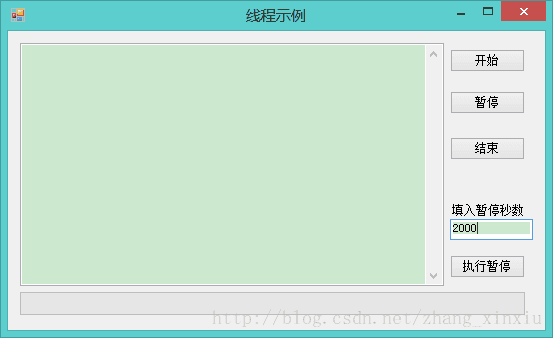
Demo下载地址:线程常用方法示例
在点击开始按钮后会同时创建两个线程,分别为showNumThread和pBarThread,用来向文本框中写入数字和加载进度条。这里需要说明的是,一般情况下线程内部是不允许调用线程外创建的对象的,创建的两个线程都调用了线程外部的对象,是怎么实现的呢?使用的是委托来异步执行程序来实现了调用线程外部的方法。
- private void btnStart_Click(object sender, EventArgs e)
- {
- pBarThread = new Thread(new ThreadStart(this.ExepBarShow));
- showNumThread = new Thread(new ThreadStart(this.ExeShowNum));
-
- this.StartThread(showNumThread);
- this.StartThread(pBarThread);
- }
-
- private void ExeShowNum()
- {
- try
- {
- MethodInvoker mInvoker = new MethodInvoker(this.ShowNumToText);
-
-
- while (true)
- {
- this.BeginInvoke((Delegate)mInvoker);
- Thread.Sleep(1000);
- }
- }
- catch { }
- }
-
- private void ShowNumToText()
- {
- i = i + 1;
- txtNum.Text = txtNum.Text + " " + (i + 1).ToString();
- }
-
- private void ExepBarShow()
- {
- try
- {
- MethodInvoker mInvoker = new MethodInvoker(this.pBarShow);
-
-
- while (true)
- {
- this.BeginInvoke((Delegate)mInvoker);
- Thread.Sleep(10);
- }
- }
- catch { }
- }
-
- private void pBarShow()
- {
- this.pgBar.PerformStep();
- }
-
- private void StartThread(Thread th) {
- th.Start();
- }
-
- private void EndThread(Thread th) {
- th.Interrupt();
- th.Abort();
- th = null;
- }
-
- private void btnStop_Click(object sender, EventArgs e)
- {
- try
- {
- this.TestThead();
- this.EndThread(this.pBarThread);
- this.EndThread(this.showNumThread);
- }
- catch (Exception ex)
- {
-
- MessageBox.Show(ex.Message , "提示", MessageBoxButtons.OK, MessageBoxIcon.Information);
- }
-
- }
-
- private void btnEnd_Click(object sender, EventArgs e)
- {
- try
- {
- this.TestThead();
- this.EndThread(this.pBarThread);
- this.EndThread(this.showNumThread);
- txtNum.Text = "";
- i = 0;
- this.pgBar.Value = 0;
- }
- catch (Exception ex)
- {
-
- MessageBox.Show(ex.Message, "提示", MessageBoxButtons.OK, MessageBoxIcon.Information);
- }
- }
-
- private void btnStopMinute_Click(object sender, EventArgs e)
- {
- try
- {
- int j = int.Parse(textBox1.Text);
- Thread.Sleep(j);
- }
- catch (Exception ex)
- {
- MessageBox.Show(ex.Message, "提示", MessageBoxButtons.OK, MessageBoxIcon.Information);
- }
- }
-
- private void TestThead() {
- if (pBarThread ==null)
- {
- throw new Exception ("未创建线程,请创建线程后操作!");
- }
-
- if (showNumThread == null)
- {
- throw new Exception ("未创建线程,请创建线程后操作!");
- }
- }
Demo2:Join方法使用实例
Join方法能在指定的线程中插入一个线程,当插入的线程执行完成后才会继续执行被插入的线程。.NET为我们重载了此方法,能够为方法传递参数来指定经过的时间,此时该方法的作用与Sleep相类似,执行经过多长时间后来执行被插入的线程。Join方法的灵活运行能够实现线程之间的执行顺序。
- using System;
- using System.Threading;
-
- namespace TestJoin
- {
-
-
-
- class Program
- {
- static void Main(string[] args)
- {
-
- Thread t1 = new Thread(() =>
- {
- Thread.Sleep(1000);
- Console.WriteLine("t1 is ending.");
- });
- t1.Start();
-
- t1.Join();
- Console.WriteLine("t1.Join() returned.");
-
-
-
- Thread t2 = new Thread(() =>
- {
- Thread.Sleep(1000);
- Console.WriteLine("t2 is ending.");
- });
- t2.Start();
-
- Console.WriteLine("t2.Join() returned.");
- Console.ReadLine();
- }
- }
- }
输出结果:
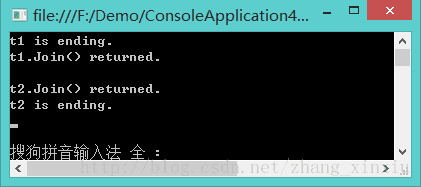
从输出结果上分析可以得出,Join方法将创建的线程插入到了主线程中当执行完后再继续执行主线程,对应到Demo2中是线程t1插入到了主线程中,这样会首先执行t1线程在控制台上打印“t1 is ending”打印完成后t1线程结束,然后继续执行主线程来打印其它的文字。所以我们完全可以说Join方法是将一个线程插入到主线程中,当执行完插入的线程后再继续执行被插入的线程。
结语
线程的优缺点决定了在开发过程中是否使用多线程,另外灵活运行单线程的方法来实现灵活的控制线程,两个Demo使用了线程的基本方法,能够更加深刻的了解它们的使用。下篇博客将会更加深入的讨论线程和线程之间的调用关系,以及如何实现线程间的数据传递及检索。







